Start Menu help

Bazerk83

New member
Member
Local time
4:47 AM
Messages
30
Hi guys I've just started tinkering with Windows 7 as there are things I don't much like about it, and other things I do.

What I DON'T like, is the fact I can't right-click on any folder or file while in the start menu and do things like create shortcuts, copy/paste, sort by name etc.

I don't understand why they took this age old Windows feature away. Or am I missing something?


Can ANYONE tell me how to restore these basic features as it's really annoying.


Many thanks.
 

My Computer

Computer Manufacturer/Model Number
Custom
OS
Windows 7 Professional
CPU
AMD Phenom II Ture Triple Core 720 2.80GHz
Motherboard
ASUS M4N82 Deluxe nForce 980a SLI
Memory
4GB DDR2
Graphics Card(s)
Gainward(GS) Nvidia GEforce GTX260 & BFG Nv. GEforce GTX 260
Sound Card
Creative Labs Fatal1ty Sound Blaster X-Fi Gamer Edition
Monitor(s) Displays
Standard Flatscreen 19" Del PnP Monitor
Hard Drives
Hitachi HDT721010sla360 1TB 7200rpm SATA
Samsung HD501LJ 500GB 7200rpm SATA
PSU
BFG 800W ES-800 PSU Quad 12V
Case
iCute Jet Turbine ATX PC Case
Cooling
Alpenföhn Nordwand CPU Cooler
Keyboard
Microsoft Wireless MultiMedia Keyboard 1.1
Mouse
Logitech MX620 Cordless Laser Mouse
Internet Speed
4Gb
ARRRRRRRRRRRRRRGH!!!! I can't find ANY solution online. This is really driving me nuts! Someone PLEASE help! I hate this inability to right-click anything or drag and drop. I can't even get into the start menu explorer to create folders or move anything.

This windows 7 start menu is horrible.

I've gone into properties and un-clicked and then re-selected the "enable dragging and dropping" feature. Did nothing.

PLEEEEEEEEEEEEASE someone help.
 

My Computer

Computer Manufacturer/Model Number
Custom
OS
Windows 7 Professional
CPU
AMD Phenom II Ture Triple Core 720 2.80GHz
Motherboard
ASUS M4N82 Deluxe nForce 980a SLI
Memory
4GB DDR2
Graphics Card(s)
Gainward(GS) Nvidia GEforce GTX260 & BFG Nv. GEforce GTX 260
Sound Card
Creative Labs Fatal1ty Sound Blaster X-Fi Gamer Edition
Monitor(s) Displays
Standard Flatscreen 19" Del PnP Monitor
Hard Drives
Hitachi HDT721010sla360 1TB 7200rpm SATA
Samsung HD501LJ 500GB 7200rpm SATA
PSU
BFG 800W ES-800 PSU Quad 12V
Case
iCute Jet Turbine ATX PC Case
Cooling
Alpenföhn Nordwand CPU Cooler
Keyboard
Microsoft Wireless MultiMedia Keyboard 1.1
Mouse
Logitech MX620 Cordless Laser Mouse
Internet Speed
4Gb
Start > Right-click "All Programs" > Open, or Open All Users.
Drag and drop, right-click, etc all work for me...
 

My Computer

Computer type
PC/Desktop
Computer Manufacturer/Model Number
Alienware Aurora ALX R4
OS
Windows 10 Pro (x64)
CPU
Intel Core i7-3930K (3.2GHz - 4.5GHz)
Motherboard
Alienware Aurora-R4 x79
Memory
4x Samsung 4GB PC3-12800 DDR3 (16GB 1600MHz)
Graphics Card(s)
Nvidia Geforce GTX 690
Sound Card
SteelSeries Siberia Elite
Monitor(s) Displays
Dell UltraSharp U3011
Screen Resolution
2560x1600
Hard Drives
Samsung 850 Pro 256 GB, Seagate 1TB Desktop Hybrid HDD, 2x Western Digital 4TB Green HDD
PSU
875W Some Dell PSU <.<
Case
Alienware Aurora ALX
Cooling
Custom Liquid Cooling (EK CPU & GPU blocks) dual EK 480RAD
Keyboard
Logitech G710+ Mechanical
Mouse
Logitech G700s
Internet Speed
Verizon Fios (50 mbps average)
Other Info
Server: Intel NUC D54250WYK: i5-4250U, 16GB, 256 GB mSATA, Windows Server 2012 R2
welcome to SevenForums, Bazerk83
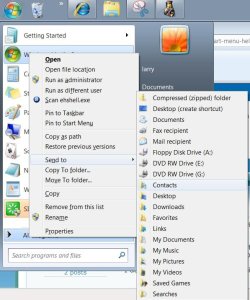
Have you tried shift key+right click? Works for me also.
right click start menu.JPG
 

My Computer

Computer Manufacturer/Model Number
Gateway GT5692
OS
Windows 7 Ulti. x64
CPU
AMD Phenom 8450 triple-core 2.10 ghz
Memory
4GB
Graphics Card(s)
ATI Radion HD 3200
Monitor(s) Displays
Gateway FPD1775W
Screen Resolution
1280x720
Hard Drives
465.6613 Gibibytes
This is a new operating system. All the things you mentioned can be done - but in slightly different ways. Keep studying Win7 and you'll find it. I bet the controls in your car do not resemble those of a Ford Model T either.
 

My Computer

Computer Manufacturer/Model Number
HP, Dell, Gateway, Toshiba - 4 laptops and 2 desktops
OS
Vista, Windows7, Mint Mate, Zorin, Windows 8
CPU
from 1.6GHz Duo to i7
Monitor(s) Displays
2x HP w2207
Hard Drives
5x HDD, 7x SSD, 12x Externals
Keyboard
with trackball - no mices
Mouse
Trackball mice
Internet Speed
DSL 6000

My Computer

Computer type
PC/Desktop
Computer Manufacturer/Model Number
Self built custom
OS
64-bit Windows 11 Pro for Workstations
CPU
Intel i7-8700K OC'd to 5 GHz
Motherboard
ASUS ROG Maximus XI Formula Z390
Memory
64 GB (4x16GB) G.SKILL TridentZ RGB DDR4 3600 MHz
Graphics Card(s)
ASUS ROG-STRIX-GTX1080TI-O11G-GAMING
Sound Card
Integrated
Monitor(s) Displays
2 x Samsung Odyssey G7 27"
Screen Resolution
2560x1440
Hard Drives
1TB Samsung 990 PRO M.2,
4TB Samsung 990 PRO PRO M.2,
TerraMaster F8 SSD Plus NAS
PSU
Seasonic Prime Titanium 850W
Case
Thermaltake Core P3
Cooling
Corsair Hydro H115i
Keyboard
Logitech wireless K800
Mouse
Logitech MX Master 4
Internet Speed
2 Gb/s Download and 100 Mb/s Upload
Antivirus
Malwarebyte Anti-Malware Premium
Browser
Google Chrome
Other Info
Logitech Z625 speaker system,
Logitech BRIO 4K Pro webcam,
HP Color LaserJet Pro MFP M477fdn,
APC SMART-UPS RT 1000 XL - SURT1000XLI,
Galaxy S23 Plus phone
Back
Top