
You are using an out of date browser. It may not display this or other websites correctly.
You should upgrade or use an alternative browser.
You should upgrade or use an alternative browser.
Start Menu issues recent programs list
- Thread starter 133794m3r
- Start date

- Local time
- 7:28 AM
- Messages
- 1,009
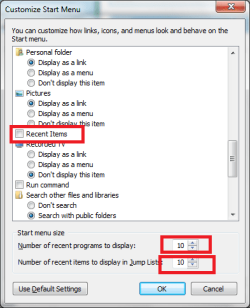
Doesn't any of these work for you?
http://www.sevenforums.com/tutorials/2013-recent-items-turn-off.html
or
http://www.sevenforums.com/tutorials/2275-recent-programs-turn-off.html
http://www.sevenforums.com/tutorials/2013-recent-items-turn-off.html
or
http://www.sevenforums.com/tutorials/2275-recent-programs-turn-off.html
Attachments
Last edited by a moderator:
My Computer
- Computer Manufacturer/Model Number
- ENIAC
- OS
- Windows 7 RC 7100 32bit/64bit
- CPU
- Intel Core2Duo E4500 2.20 GHz
- Motherboard
- ASUS P5LD2-X/1333
- Memory
- 2x1GB Kinsgston DDR2 800MHz
- Graphics Card(s)
- Nvidia 8500GT
- Sound Card
- Onboard High Definition Audio Device
- Monitor(s) Displays
- Sony Bravia 42"
- Case
- LINKW 2222
- Cooling
- Standard Intel
- Keyboard
- Some cheap one
- Mouse
- Microsoft Intellimouse something
- Internet Speed
- 24MBps ADSL
ok that's got my recent items working but still there's the other issue :/ i can't remove some items such as REmote desktop, sticky notes etc. And also it's not showing my default programs even though that's clearly checked.
My Computer
- OS
- 7 build 7077 x64

ok that's got my recent items working but still there's the other issue :/ i can't remove some items such as REmote desktop, sticky notes etc. And also it's not showing my default programs even though that's clearly checked.
Try this method.
- Removing a program icon from the Start menu doesn't remove it from the All Programs list or uninstall the program.
- Click the Start button.
- Right-click the program icon you want to remove from the Start menu, and then click Remove from this list.
Last edited:
My Computer
- Computer Manufacturer/Model Number
- Home Build
- OS
- Windows 7 RTM Ultimate - Activated (Technet)
- CPU
- Athlon 4800+
- Motherboard
- Gigabyte M56S-S3
- Memory
- 2 gig
- Graphics Card(s)
- ATI Radeon 2400+
- Sound Card
- On board
- Monitor(s) Displays
- Samsung 22" LCD
- Screen Resolution
- 1680 x 1050
- Hard Drives
- WD 250 gig Sata
- PSU
- 550 w
- Case
- Antec LS100
- Keyboard
- Logitech MX5000 BT
- Mouse
- Logitech MX 5000 BT
- Internet Speed
- ADSL 2+
what i'm saying is it won't remove from teh startmenu >.> on the very front of the items. It's windows Programs such as Remote Desktop, Sticky Notes, Calcutator etc. i click remove from li.st and it won't go away from my list. It's still there on teh front of my start menu.Try this method.
- Removing a program icon from the Start menu doesn't remove it from the All Programs list or uninstall the program.
- Click the Start button.
- Right-click the program icon you want to remove from the Start menu, and then click Remove from this list.
My Computer
- OS
- 7 build 7077 x64
what i'm saying is it won't remove from teh startmenu >.> on the very front of the items. It's windows Programs such as Remote Desktop, Sticky Notes, Calcutator etc. i click remove from li.st and it won't go away from my list. It's still there on teh front of my start menu.
What Build of Win 7 are you using....I just tried it on my 7077 x32 and I was able to remove Calculator and sticky notes....simply right click them and select remove from this list and they are gone.
My Computer
- Computer Manufacturer/Model Number
- Home Build
- OS
- Windows 7 RTM Ultimate - Activated (Technet)
- CPU
- Athlon 4800+
- Motherboard
- Gigabyte M56S-S3
- Memory
- 2 gig
- Graphics Card(s)
- ATI Radeon 2400+
- Sound Card
- On board
- Monitor(s) Displays
- Samsung 22" LCD
- Screen Resolution
- 1680 x 1050
- Hard Drives
- WD 250 gig Sata
- PSU
- 550 w
- Case
- Antec LS100
- Keyboard
- Logitech MX5000 BT
- Mouse
- Logitech MX 5000 BT
- Internet Speed
- ADSL 2+
yeah i did that. I'm on 7077 x64 :/ i can't seem to remove them for some unknown reason. And also i love how the mystery driver issue is still there even in 7 on my laptop @.@What Build of Win 7 are you using....I just tried it on my 7077 x32 and I was able to remove Calculator and sticky notes....simply right click them and select remove from this list and they are gone.
My Computer
- OS
- 7 build 7077 x64

I just got mine to disappear.
Right-click the Start orb --> uncheck Store recently opened programs in the Start menu --> click Apply --> click on Start orb and verify they are gone --> re-check Store recently opened programs in the Start menu --> click OK.
Now, if I can only get them all back again - I liked having most of those apps but I cannot remember what all of them were....
Would you mind posting a screen shot so I can add them back to the start menu?
Right-click the Start orb --> uncheck Store recently opened programs in the Start menu --> click Apply --> click on Start orb and verify they are gone --> re-check Store recently opened programs in the Start menu --> click OK.
Now, if I can only get them all back again - I liked having most of those apps but I cannot remember what all of them were....
Would you mind posting a screen shot so I can add them back to the start menu?
My Computers
System One System Two
-
- Computer type
- PC/Desktop
- Computer Manufacturer/Model Number
- The Beast Model A (homebrew)
- OS
- Windows 11 21H2 Current build
- CPU
- AMD Ryzen 9 3950X
- Motherboard
- MSI MEG X570 GODLIKE
- Memory
- 4 * 32 GB - Corsair Vengeance 3600 MHz
- Graphics Card(s)
- EVGA GeForce RTX 3080 Ti XC3 ULTRA GAMING (12G-P5-3955-KR)
- Sound Card
- Realtek® ALC1220 Codec
- Monitor(s) Displays
- 2x Eve Spectrum ES07D03 4K Gaming Monitor (Matte) | Eve Spec
- Screen Resolution
- 3x 3840 x 2160
- Hard Drives
- 3x Samsung 980 Pro NVMe PCIe 4 M.2 2 TB SSD (MZ-V8P2T0B/AM) } 3x Sabrent Rocket NVMe 4.0 1 TB SSD
- PSU
- PC Power & Cooling’s Silencer Series 1050 Watt, 80 Plus Plat
- Case
- Fractal Design Define 7 XL Dark ATX Full Tower Case
- Cooling
- SteelSeries Apex Pro Wired Gaming Keyboard
- Keyboard
- SteelSeries Apex Pro
- Mouse
- Logitech MX Master 3S | MX Master 3 for business
- Internet Speed
- AT&T LightSpeed Gigabit Duplex Ftth
- Antivirus
- Windows Defender + MB 3
- Browser
- Nightly (default) + Firefox (stable),Chrome, Edge
-
- Computer type
- PC/Desktop
- System Manufacturer/Model Number
- Dell Latitude E5470
- OS
- ChromeOS Flex Dev Channel (current)
- CPU
- Intel(R) Core(TM) i5-6300U CPU @ 2.40GHz, 2501 Mhz, 2 Core(s), 4 Logical Processor(s)
- Motherboard
- Dell
- Memory
- 16 GB
- Graphics Card(s)
- Intel(R) HD Graphics 520
- Sound Card
- Intel(R) HD Graphics 520 + RealTek Audio
- Monitor(s) Displays
- Dell laptop display 15"
- Screen Resolution
- 1920 * 1080
- Hard Drives
- Toshiba 128GB M.2 22300 drive
INTEL Cherryville 520 Series SSDSC2CW180A 180 GB SATA III SSD
- PSU
- Dell
- Case
- Dell
- Cooling
- Dell
- Keyboard
- Dell
- Mouse
- Logitech MX Master 3S (shared w. Sys 1) | Dell TouchPad
- Internet Speed
- AT&T LightSpeed Gigabit Duplex Ftth
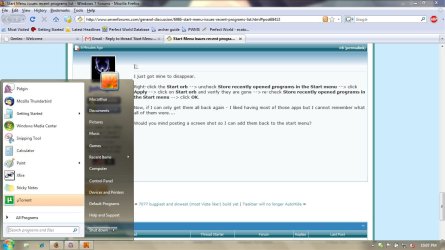
Thanks m8 - I got them back in there but not in the right order lol....
Plus, since my start menu is taller I think I had a couple more that are not showing in yours....
Plus, since my start menu is taller I think I had a couple more that are not showing in yours....
My Computers
System One System Two
-
- Computer type
- PC/Desktop
- Computer Manufacturer/Model Number
- The Beast Model A (homebrew)
- OS
- Windows 11 21H2 Current build
- CPU
- AMD Ryzen 9 3950X
- Motherboard
- MSI MEG X570 GODLIKE
- Memory
- 4 * 32 GB - Corsair Vengeance 3600 MHz
- Graphics Card(s)
- EVGA GeForce RTX 3080 Ti XC3 ULTRA GAMING (12G-P5-3955-KR)
- Sound Card
- Realtek® ALC1220 Codec
- Monitor(s) Displays
- 2x Eve Spectrum ES07D03 4K Gaming Monitor (Matte) | Eve Spec
- Screen Resolution
- 3x 3840 x 2160
- Hard Drives
- 3x Samsung 980 Pro NVMe PCIe 4 M.2 2 TB SSD (MZ-V8P2T0B/AM) } 3x Sabrent Rocket NVMe 4.0 1 TB SSD
- PSU
- PC Power & Cooling’s Silencer Series 1050 Watt, 80 Plus Plat
- Case
- Fractal Design Define 7 XL Dark ATX Full Tower Case
- Cooling
- SteelSeries Apex Pro Wired Gaming Keyboard
- Keyboard
- SteelSeries Apex Pro
- Mouse
- Logitech MX Master 3S | MX Master 3 for business
- Internet Speed
- AT&T LightSpeed Gigabit Duplex Ftth
- Antivirus
- Windows Defender + MB 3
- Browser
- Nightly (default) + Firefox (stable),Chrome, Edge
-
- Computer type
- PC/Desktop
- System Manufacturer/Model Number
- Dell Latitude E5470
- OS
- ChromeOS Flex Dev Channel (current)
- CPU
- Intel(R) Core(TM) i5-6300U CPU @ 2.40GHz, 2501 Mhz, 2 Core(s), 4 Logical Processor(s)
- Motherboard
- Dell
- Memory
- 16 GB
- Graphics Card(s)
- Intel(R) HD Graphics 520
- Sound Card
- Intel(R) HD Graphics 520 + RealTek Audio
- Monitor(s) Displays
- Dell laptop display 15"
- Screen Resolution
- 1920 * 1080
- Hard Drives
- Toshiba 128GB M.2 22300 drive
INTEL Cherryville 520 Series SSDSC2CW180A 180 GB SATA III SSD
- PSU
- Dell
- Case
- Dell
- Cooling
- Dell
- Keyboard
- Dell
- Mouse
- Logitech MX Master 3S (shared w. Sys 1) | Dell TouchPad
- Internet Speed
- AT&T LightSpeed Gigabit Duplex Ftth