
Solved Start menu lost applications' recent items, after Win-7 restore

RitaCatma

New member
Local time
3:59 AM
Messages
3
Howdy all,
I'm not an expert, don't know the language, sorry. I am a long-time user, though. I'd upgraded to Win-10 back in summer, hated it, and restored back to Win-7. But I lost my recent items list. Or rather, the pinned applications' recent items list, for example, for Excel, or Word, or any of them. I waited to see if they would repopulate as I used the programs, but they haven't done so. It would be nice to have that back, if possible.
Thank you for any advice -
Rita C
 

Attachments
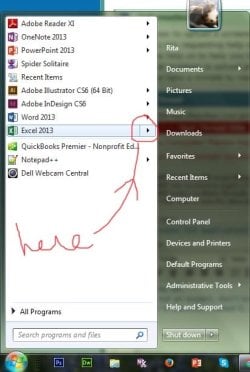
  • start-menu-arrow.jpg
    start-menu-arrow.jpg
    66.2 KB · Views: 16

My Computer

Computer type
Laptop
Computer Manufacturer/Model Number
Dell Inspiron 15, 3000 series
OS
Michigan (MI) Windows 7 Home Premium 64 bit
CPU
Core 13 ??
Browser
Chrome, Firefox
More -- I just tried the solutions offered in the similar threads, setting the recent items number to 0, and then back to 10. Some of them are now working, but still not Excel or Word. Weird. But I can live with that! Thanks, all, I'm marking this resolved.
Happy Monday, Rita C
 

My Computer

Computer type
Laptop
Computer Manufacturer/Model Number
Dell Inspiron 15, 3000 series
OS
Michigan (MI) Windows 7 Home Premium 64 bit
CPU
Core 13 ??
Browser
Chrome, Firefox
  1. Open Taskbar and Start Menu Properties by clicking the Start button clicking Control Panel, clicking Appearance and Personalization, and then clicking Taskbar and Start Menu.
  2. Click the Start Menu tab, and then click Customize.
  3. In the Customize Start Menu dialog box, click Use Default Settings, click OK, and then click OK again.
  4. if not you can just customize the menu to the preferences you want and see if that works ??
 

My Computer

Computer type
PC/Desktop
Computer Manufacturer/Model Number
Custom
OS
32bit embedded
Hi Kyle,
Thanks for the response - yes, I did all that. I reset it to default settings, personalized the start menu (actually I re-personalized the start menu!) and changed some display settings, to no avail as far as the MS programs. I think it's an MS problem at this point, since those are the only two that won't play well with others. All my Adobe program shortcuts do cooperate, for example, and my Notepad++, etc.
I appreciate your looking into it for me, though -- thanks again!
~ Rita
 

My Computer

Computer type
Laptop
Computer Manufacturer/Model Number
Dell Inspiron 15, 3000 series
OS
Michigan (MI) Windows 7 Home Premium 64 bit
CPU
Core 13 ??
Browser
Chrome, Firefox
Have you tried repairing the installation?
The first step in fixing these kind of problems is to Repair the installation.

Repair your installation by going to Control Panel > Add or Remove Programs (You can directly go there by typing appwiz.cpl in search box above Windows Start and hitting enter). When you select office, it will give you the option to repair.
 

My Computer

Computer type
PC/Desktop
Computer Manufacturer/Model Number
Custom
OS
32bit embedded
Have you tried repairing the installation?
The first step in fixing these kind of problems is to Repair the installation.

Repair your installation by going to Control Panel > Add or Remove Programs (You can directly go there by typing appwiz.cpl in search box above Windows Start and hitting enter). When you select office, it will give you the option to repair.

In my dotage of four score+ years I inadvertently removed the icon for "My Documents" from the LOWER LEFT half of the start menu pane in Win7Pro/Office SB 2010 which is a pain because now I find that the only way of opening "My Documents" is to shift everything on the screen to the right to get at the Desktop icon. Any way of getting it back? I've tried every which way I thought would work but no use. Incidentally, I have put Explorer on the taskbar which is part way where I want to be but not the whole way which was very convenient whilst had it. Quite difficult to be as stupid as me so be patient and I might go away soon. Thanks.
 

My Computer

OS
Win7 Home premium 32bit
Back
Top