Start Menu - My Videos

Fuzzi0n

New member
Local time
5:29 PM
Messages
54
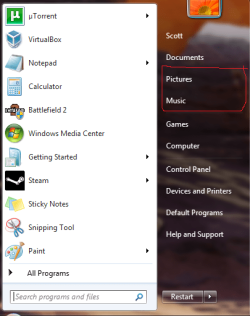
Anyone know how to add My Videos to the start menu.
 

My Computer

Computer Manufacturer/Model Number
Custom
OS
Windows 7 Ultimate / Ubuntu 10.04
CPU
E5300 @ 3.24Ghz
Motherboard
P5QPL-AM
Memory
Corsair 4GB DDR2 800Mhz
Graphics Card(s)
EVGA 9800GT
Monitor(s) Displays
2x 19"
Hard Drives
500GB W.D
60GB OCZ SSD
PSU
Corsair CX400
Internet Speed
8.2 / 0.5

My Computer

Computer type
PC/Desktop
Computer Manufacturer/Model Number
Homebuild
OS
Windows 7 Ultimate 64 bit SP1
CPU
DualCore Intel Pentium D 820, 2800 MHz (14 x 200)
Motherboard
Gigabyte EX58-UD3R
Memory
Kingston DDR3 (PC3-10700H) 6.0GB
Graphics Card(s)
AMD Radeon HD 6450
Sound Card
Realtek ALC882/D/M
Monitor(s) Displays
Samsung SyncMaster 2233SW
Screen Resolution
1920 x 1080
Hard Drives
Drive #1 - WDC WD2500JB-22REA0 (232 GB)
Drive #2 - WDC WD6400AAKS-65A7B0 (596 GB)
PSU
EVGA Supernova 750w G2 Gold
Cooling
5 x 80mm Generic Fans
Keyboard
Microsoft Comfort Curve 2000
Mouse
SteelSeries IKARI 62001-1 Laser or Microsoft Laser 6000
Internet Speed
1500/256
Antivirus
NOD32 v10.1.235.0
Browser
FireFox 59.0.2 X64bit
Other Info
Telstra Technicolor TG799vac Modem
LG HL-DT-ST DVDRAM GH20NS15 ATA Device
16X52X32X52 COMBO SCSI CDRom Device
Logitech Wave Keyboard
Microsoft 6000 Laser Mouse
Nah, in the S/s below, where pictures and music are located, is where i want it.
 

Attachments

  • start_menu.png
    start_menu.png
    37.6 KB · Views: 11

My Computer

Computer Manufacturer/Model Number
Custom
OS
Windows 7 Ultimate / Ubuntu 10.04
CPU
E5300 @ 3.24Ghz
Motherboard
P5QPL-AM
Memory
Corsair 4GB DDR2 800Mhz
Graphics Card(s)
EVGA 9800GT
Monitor(s) Displays
2x 19"
Hard Drives
500GB W.D
60GB OCZ SSD
PSU
Corsair CX400
Internet Speed
8.2 / 0.5
Last edited by a moderator:

My Computer

OS
Windows 7 x64
Motherboard
Intel DG965WH
Graphics Card(s)
GeForce 9500GS
Screen Resolution
1440x900
Case
Ultra
Keyboard
Logitech MX3200
Oh wow, I looked through that list before and didn't see it.
 

My Computer

Computer Manufacturer/Model Number
Custom
OS
Windows 7 Ultimate / Ubuntu 10.04
CPU
E5300 @ 3.24Ghz
Motherboard
P5QPL-AM
Memory
Corsair 4GB DDR2 800Mhz
Graphics Card(s)
EVGA 9800GT
Monitor(s) Displays
2x 19"
Hard Drives
500GB W.D
60GB OCZ SSD
PSU
Corsair CX400
Internet Speed
8.2 / 0.5
Nah, in the S/s below, where pictures and music are located, is where i want it.

http://www.sevenforums.com/tutorials/265-start-menu-customize.html

Click start menu -> Right click on the right side (where documents, videos, music etc) -> Click properties -> Click customize on the start menu tab -> Scroll down to the bottom where it says videos, check the option show as a link.

I hope that's what you wanted

How simple was that!

:o:o:o:o
 

My Computer

Computer type
PC/Desktop
Computer Manufacturer/Model Number
Homebuild
OS
Windows 7 Ultimate 64 bit SP1
CPU
DualCore Intel Pentium D 820, 2800 MHz (14 x 200)
Motherboard
Gigabyte EX58-UD3R
Memory
Kingston DDR3 (PC3-10700H) 6.0GB
Graphics Card(s)
AMD Radeon HD 6450
Sound Card
Realtek ALC882/D/M
Monitor(s) Displays
Samsung SyncMaster 2233SW
Screen Resolution
1920 x 1080
Hard Drives
Drive #1 - WDC WD2500JB-22REA0 (232 GB)
Drive #2 - WDC WD6400AAKS-65A7B0 (596 GB)
PSU
EVGA Supernova 750w G2 Gold
Cooling
5 x 80mm Generic Fans
Keyboard
Microsoft Comfort Curve 2000
Mouse
SteelSeries IKARI 62001-1 Laser or Microsoft Laser 6000
Internet Speed
1500/256
Antivirus
NOD32 v10.1.235.0
Browser
FireFox 59.0.2 X64bit
Other Info
Telstra Technicolor TG799vac Modem
LG HL-DT-ST DVDRAM GH20NS15 ATA Device
16X52X32X52 COMBO SCSI CDRom Device
Logitech Wave Keyboard
Microsoft 6000 Laser Mouse
Back
Top