
jaywelliott
New member
- Local time
- 2:45 AM
- Messages
- 2
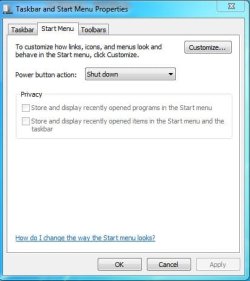
When I click my start menu, the recently used programs do not load. I've read numerous articles saying to go into the properties, click on the "start menu" tab and then under the privacy section, check off what I want.
That works all find and dandy if the privacy option is enabled, but mine is not for some reason.
Can anyone tell me how to enable the privacy options?
I've attached a picture of the screen so we can be certain we're talking about the same thing.
Thanks in advance for your help,
J
That works all find and dandy if the privacy option is enabled, but mine is not for some reason.
Can anyone tell me how to enable the privacy options?
I've attached a picture of the screen so we can be certain we're talking about the same thing.
Thanks in advance for your help,
J
Attachments
My Computer
- OS
- Windows 7 32 bit
