Start Menu Problem...

Lew

New member
Local time
7:28 PM
Messages
7
Location
Liverpool, United Kingdom
Hi,

I have been using Windows 7 for the past 5 months and im having an annoying problem with the Start Menu...

I like to keep me computer like it's brand new and not change any settings ect (it's just an OCD thing i have) and i want the Start Menu to remain like it was from day one. I have noticed with Windows 7 (unlike XP and Vista) when i use an application for the first time, it appears at the bottom like in XP and Vista, but what i find annoying in Windows 7 is when i use the same programme over time it starts to move up the Start Menu list to a point where it is eventually at the top.

I have been searching for weeks/months how to disable it and found nothing. The only thing i can do is right click and "Remove from this list" but the next time i use it, it will be at the top of the list... The only other way i can fix it is to Restore the computer to factory settings which i've been doing every 2 weeks.

Is there anything i can do to disable/fix the problem or do i have to just put up with it ???
 

My Computer

OS
Windows 7 Professional 32-bit
CPU
Intel Core i7 950
Motherboard
GIGABYTE GA-X58A-UD3R
Memory
6.00 GB
Graphics Card(s)
XFX Radeon HD 5750
Monitor(s) Displays
SAMSUNG SyncMaster SA350
Screen Resolution
1920x1080
Hard Drives
150GB SATA
Hi LEW, welcome to the forums :)

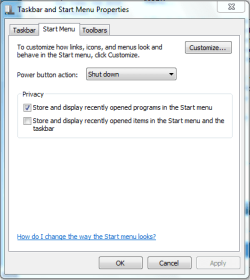
If you right-click the taskbar and select properties the first screen you're faced with will have 2 options;

1 'Store and display recently opened programs in start menu'
2 'Store and display recently items in the start menu and taskbar'

Capture.PNG

Option 1 is the 1 you're after. This should stop Windows from linking recently used apps to the Start Menu.

Hope it helps :)


OS
 

My Computer

Computer Manufacturer/Model Number
Compaq Desktop
OS
Windows 7 Ultimate x64
CPU
AMD Sempron Dual Core
Memory
3GB
Graphics Card(s)
NVIDIA GeForce 6150SE nForce 430
Screen Resolution
1024x768
Hard Drives
150GB Sata
you may have some luck by right clicking the start button and selecting properties,there are check boxes to disable displaying recently opened programmes

edit: doh! that sharks too fast ,posted whilst i was still two finger typing
 

My Computer

Computer Manufacturer/Model Number
Hewlett packard/p6512uk
OS
Microsoft Windows 7 Home Premium 64-bit 7600
CPU
IIx4 amd athelon 635 processor
Motherboard
FOXCONN 2AA9
Memory
2x2gb
Graphics Card(s)
ati radeon HD 5450
Sound Card
(1) Realtek High Definition Audio (2) AMD High Definition
Monitor(s) Displays
samsung lcd tv 32"
Screen Resolution
1360x 768
Hard Drives
(1) WDC WD10 01FAES-60Z2A0 SATA Disk Device (2) Maxtor OneTouch USB Device (3) ST310003 33AS USB Device (4) WD My Book 1111 USB Device
PSU
?
Cooling
air!
Keyboard
wireless hp
Mouse
wireless Hp,optical
Internet Speed
1.10mb/s
Antivirus
MSE
Browser
Firefox
you may have some luck by right clicking the start button and selecting properties,there are check boxes to disable displaying recently opened programmes

edit: doh! that sharks too fast ,posted whilst i was still two finger typing

Just finished work and only ever 2 finger type ;)
 

My Computer

Computer Manufacturer/Model Number
Compaq Desktop
OS
Windows 7 Ultimate x64
CPU
AMD Sempron Dual Core
Memory
3GB
Graphics Card(s)
NVIDIA GeForce 6150SE nForce 430
Screen Resolution
1024x768
Hard Drives
150GB Sata
If you right-click the taskbar and select properties the first screen you're faced with will have 2 options;

1 'Store and display recently opened programs in start menu'
2 'Store and display recently items in the start menu and taskbar'


Option 1 is the 1 you're after. This should stop Windows from linking recently used apps to the Start Menu.

Hope it helps
smile.gif

Nope,

The programms continue to move up the list :mad:

P.S I've unchecked both boxes under "Privacy" and now my Start Menu is blank !!! Anyone know how to get the programms back ??? Because re-checking both boxes doesn't do anything...
 
Last edited:

My Computer

OS
Windows 7 Professional 32-bit
CPU
Intel Core i7 950
Motherboard
GIGABYTE GA-X58A-UD3R
Memory
6.00 GB
Graphics Card(s)
XFX Radeon HD 5750
Monitor(s) Displays
SAMSUNG SyncMaster SA350
Screen Resolution
1920x1080
Hard Drives
150GB SATA
Are you refering to the recent used programs? If so the list should rebuild as you use programs.
 

My Computer

Computer type
PC/Desktop
Computer Manufacturer/Model Number
Custom Built
OS
Windows 10 Pro x64, Windows 8.1 Pro x64, Windows 7 Ultimate x64 SP1,
CPU
INTEL i9-7920X LGA 2066
Motherboard
Gigabyte X299-WU8 F3
Memory
64 GB (4 X 16 GB) G-Skill V Series DDR4 3200 Quad Channel
Graphics Card(s)
EVGA GTX 1060 SC 3 GB
Sound Card
Realtek Onboard ALC1220
Monitor(s) Displays
2 x Samsung S27E310
Screen Resolution
1920x1080
Hard Drives
Samsung 2 x 970 EVO Plus 500 GB NVMe
1 x 6TB WD 6003FZBX SATA
1 x 6TB WD 60EFRX SATA
12 x 3TB WD 30EFRX SATA
PSU
Seasonic X-1050
Case
Thermaltake Armor+
Cooling
Corsair H80i V2 Liquid AOI Cooler
Keyboard
Logitech G510s
Mouse
Logitech MX Master 2S
Internet Speed
200 Mb/s
Antivirus
ESET NOD32 13.1
Browser
EDGE (Dev, Canary, Beta), Chrome
Other Info
ASUS RT-AC68U router
Malwarebytes 4.0.4
See below:
 

Attachments

  • 2010-10-17_1921.png
    2010-10-17_1921.png
    18.1 KB · Views: 4

My Computer

Computer Manufacturer/Model Number
HP, Dell, Gateway, Toshiba - 4 laptops and 2 desktops
OS
Vista, Windows7, Mint Mate, Zorin, Windows 8
CPU
from 1.6GHz Duo to i7
Monitor(s) Displays
2x HP w2207
Hard Drives
5x HDD, 7x SSD, 12x Externals
Keyboard
with trackball - no mices
Mouse
Trackball mice
Internet Speed
DSL 6000
Nope,

The programms continue to move up the list :mad:

P.S I've unchecked both boxes under "Privacy" and now my Start Menu is blank !!! Anyone know how to get the programms back ??? Because re-checking both boxes doesn't do anything...
Windows 7 only gives you three options.

1. Let windows display and manage recently opened programs in your start menu.

2. Tell windows not to display recently opened programs in the start menu, leaving the start menu, as you say, blank.

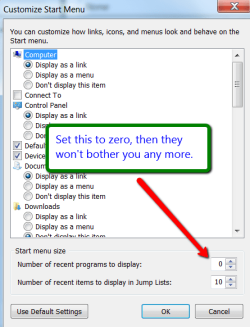
3. Tell windows how many recently opened programs to display in the start menu.

If you actually want programs to appear in the start menu, but you don't want windows messing with them, you're going to have to locate every program you want to display and "pin" it to the start menu. These programs will appear above the divider line in the menu. Below the divider line are all the recently opened programs that windows puts there. Windows will manage this area on a daily basis depending on which programs you are using most often. Keep in mind, all programs listed above the divider line in the start menu are permanent, pinned items. They will stay there, unchanged, until *you* change them. Windows will not mess with them.
Everything below the divider line belongs to Windows and windows will modify as it sees fit.
 

My Computer

Computer Manufacturer/Model Number
Custom Build
OS
Windows 7 Pro/32 Academic. Build 7600
CPU
Intel 2.3 Duo core
Motherboard
EliteGroup G31T-M
Memory
4 GB DDR
Graphics Card(s)
Nvidia GeForce 9500 GT
Sound Card
Built in
Monitor(s) Displays
Viewsonic 15" 4:3
Screen Resolution
1280 x 1024
Hard Drives
WD Caviar Black 750 GB
WD 250 GB External
PSU
Antec 450w
Keyboard
Standard windows
Mouse
Logitech USB
Internet Speed
Bellsouth DSL 6.0
If you actually want programs to appear in the start menu, but you don't want windows messing with them, you're going to have to locate every program you want to display and "pin" it to the start menu.
Option 1 is the 1 you're after. This should stop Windows from linking recently used apps to the Start Menu
THAT has sorted the problem with the Start Menu Recently Used Programms...

Orbital Shark & mborner A BIG THANK YOU TO YOU GUYS !!! :D:D:D

(And others contributed)...
 

My Computer

OS
Windows 7 Professional 32-bit
CPU
Intel Core i7 950
Motherboard
GIGABYTE GA-X58A-UD3R
Memory
6.00 GB
Graphics Card(s)
XFX Radeon HD 5750
Monitor(s) Displays
SAMSUNG SyncMaster SA350
Screen Resolution
1920x1080
Hard Drives
150GB SATA
Back
Top