
start menu problems

miq

New member
Local time
1:13 AM
Messages
22
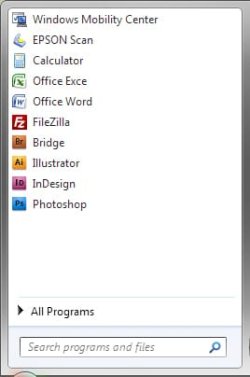
Where can I control start menu size, cause on my girl's win7 installation is just too big in relation with pinned programs. You can see from the pictures that mine is compact, the size of it is exactly that big as how many programs I have pinned, while on my girl's there's just too much empty space...?
Can anyone help me with this little problem?
 

Attachments
  • nina.jpg
    nina.jpg
    30.1 KB · Views: 9
  • miq.jpg
    miq.jpg
    34.9 KB · Views: 11

My Computer

OS
win 7
Click on Orb. Right click on blank spot in start menu. Click Properties. Scroll down and unselect "use large icons".
 

My Computer

Computer Manufacturer/Model Number
Dell / Studio xps
OS
Windows7 x64 7600 16385
CPU
Intel I7 920
Motherboard
Dell
Memory
6GB DDR3
Graphics Card(s)
ATI Radeon HD4350
Sound Card
Integrated 7.1 channel
Hard Drives
Hitachi HDT721064SLA360 (596 GB)
Keyboard
Logitech EX110
Mouse
Logitech LX8
large icons are unselected, you can see that from this images... pinned programs are small icons, but I just can't understand why on my win7 Start menu is the right size (in relation with pinned programs), while on my girls it's like fixed size and it just won't shrink...
 

My Computer

OS
win 7
OK, I see what your saying. Do as suggested above but Select "use large icons". That will get rid of the empty space.
 

My Computer

Computer Manufacturer/Model Number
Dell / Studio xps
OS
Windows7 x64 7600 16385
CPU
Intel I7 920
Motherboard
Dell
Memory
6GB DDR3
Graphics Card(s)
ATI Radeon HD4350
Sound Card
Integrated 7.1 channel
Hard Drives
Hitachi HDT721064SLA360 (596 GB)
Keyboard
Logitech EX110
Mouse
Logitech LX8
I know that trick, but that's not solving the problem... We want small icons, like on my start menu...
 

My Computer

OS
win 7
set it to large icons, restart, set it to small icons, restart. see if that helps
 

My Computer

Computer Manufacturer/Model Number
Dell Inspiron 1545
OS
Windows 7 build 7100 x86
CPU
Intel Core 2 Duo 2.1GHz
Motherboard
GM45 chipset
Memory
3GB
Graphics Card(s)
Intel(TM) Graphics Media Accelerator X4500HD
Sound Card
Realtek HD
Monitor(s) Displays
15.6" WLED 720p
Screen Resolution
1366x768
Hard Drives
320GB 5400rpm hard drive
right click on orb > properties > start menu > customize > number of recent programs to display

edit: this should have worked in vista, but it doesn't work for me in win7 7227. sorry. it's a bug.

edit2: that's because of the right column icons, there are too many and does not alow the left column to be smaller in height (jhomegroup, music, pictures etc). you must remove a few of them from properties > start menu > customize (uncheck HELP; HOMEGROUP; CONNECT TO; DEFAULT PROGRAMS etc or whatever program you don't need)
 

My Computer

OS
Windows 7 x86 build 7600
Back
Top