Start Menu Problems

Robert11

New member
Power User
Local time
5:08 PM
Messages
542
Hi,

Always something.

I transferred some files from an old XP PC to this new one with a Cruzier flash drive.
No problems, all went fine.

But when I look at my Start Menu, things are now different.

I am using what I think is called the Classic View.
Guess it's the old fashioned (like me) one.

The right hand sied pane looks as always.
Search box is there.
The All Programs lists them like it should when clicked.

But I have nothing, anymore above the All Programs.
Just a blank, grey area.

If I open some program, and then close it, it does not appear here (anymore) like it used to.

I clicked on it, and played around with Properties and then the Start Menu Tab, but nothing I have tried changes the situation.

Also tried the Customize, and the the Default Button, but no change.

Any idea what has changed, and how to get it back to acting normally, like it has in the past ? What (likely) happened ?

Thanks, and Happy Holidays,
Bob
 

My Computer

OS
Windows 7 64bit
Hi Bob,

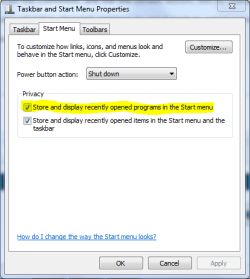
Right-click on the start orb, select Properties and the Start Menu tab. Check to ensure the highlighted option is checked (ticked). Click OK.

Capture.PNG
 

My Computer

Computer type
PC/Desktop
Computer Manufacturer/Model Number
Dwarf Dwf/11/2012 r09/2013
OS
Windows 8.1 Pro RTM x64
CPU
Intel Core-i5-3570K 4-core @ 3.4GHz (Ivy Bridge) (OC 4.4GHz)
Motherboard
ASRock Z77 Extreme4-M
Memory
4 x 4GB DDR3-1600 Corsair Vengeance CMZ8GX3M2A1600C9B (16GB)
Graphics Card(s)
MSI GeForce GTX770 Gaming OC 2GB
Sound Card
Realtek High Definition on board solution (ALC 898)
Monitor(s) Displays
ViewSonic VA1912w Widescreen (VGA)
Screen Resolution
1440x900
Hard Drives
OCZ Agility 3 SSD 120GB SATA III x2 (RAID 0)
Samsung HD501LJ 500GB SATA II x2
Hitachi HDS721010CLA332 1TB SATA II
Iomega 1.5TB Ext USB 2.0
WD 2.0TB Ext USB 3.0
PSU
XFX Pro Series 850W Semi-Modular
Case
Gigabyte IF233
Cooling
1 x 120mm Front Inlet 1 x 120mm Rear Exhaust
Keyboard
Microsoft Comfort Curve Keyboard 3000 (USB)
Mouse
Microsoft Comfort Mouse 3000 for Business (USB)
Internet Speed
NetGear DG834Gv3 ADSL Modem/Router (Ethernet) ~4.0 Mb/s (O2)
Antivirus
Avast! 8.0.1497
Browser
IE 11
Other Info
Optical Drive: HL-DT-ST BD-RE BH10LS30 SATA Bluray
Lexmark S305 Printer/Scanner/Copier (USB)
WEI Score: 8.1/8.1/8.5/8.5/8.25
Asus Eee PC 1011PX Netbook (Windows 7 x86 Starter)
Try a system restore. If the restore removes the files from xp you can add them back and see if it happens again. I played around with the very same setting you are talking about and had a reaction the same as you. A restore changed it back. Then I got it how I wanted by doing the same things again? Maybe worth a try,good luck to you.
 

My Computer

Computer Manufacturer/Model Number
Gateway GT5692
OS
Windows 7 Ulti. x64
CPU
AMD Phenom 8450 triple-core 2.10 ghz
Memory
4GB
Graphics Card(s)
ATI Radion HD 3200
Monitor(s) Displays
Gateway FPD1775W
Screen Resolution
1280x720
Hard Drives
465.6613 Gibibytes
Can you possibly post a screenshot? I can get a better understanding and provide assistance.
 

My Computer

Computer Manufacturer/Model Number
Custom Build
OS
W7 RTM Ultimate x64
CPU
Intel Q8400 @ 2.66GHZ
Motherboard
Gigabyte GA-EG45M-UD2H
Memory
4GB DDR2-800
Graphics Card(s)
Gainward GTS 450 GLH 1GB Edition
Sound Card
Integrated 8 Channel
Monitor(s) Displays
AOC 23.6 Inch Widescreen LCD
Screen Resolution
1920x1080
Hard Drives
Seagate 500GB Internal
Western Digital 1TB Internal

Hitachi 1TB External
PSU
Apevia Java Power 500W
Case
Cooler Master HAF 922 Black
Cooling
Stock Intel CPU Fan
Keyboard
HP SK-2960 Multimedia Keyboard
Mouse
Logitech M350 Wireless Gaming Mouse
Internet Speed
1.5MB
From OP: Latest

Hi,

Tried shutting down, and re-starting.

Looks like it is working now.
Can't imagine how simply transferring some stuff via the flash drive caused it, but it certainly did. Hard to understand.

Thanks for suggestions.
Great Forum.

Happy Holidays to all,
Bob
 

My Computer

OS
Windows 7 64bit
Glad you've fixed it, and happy holidays to you also sir.
 

My Computer

Computer Manufacturer/Model Number
Custom Build
OS
W7 RTM Ultimate x64
CPU
Intel Q8400 @ 2.66GHZ
Motherboard
Gigabyte GA-EG45M-UD2H
Memory
4GB DDR2-800
Graphics Card(s)
Gainward GTS 450 GLH 1GB Edition
Sound Card
Integrated 8 Channel
Monitor(s) Displays
AOC 23.6 Inch Widescreen LCD
Screen Resolution
1920x1080
Hard Drives
Seagate 500GB Internal
Western Digital 1TB Internal

Hitachi 1TB External
PSU
Apevia Java Power 500W
Case
Cooler Master HAF 922 Black
Cooling
Stock Intel CPU Fan
Keyboard
HP SK-2960 Multimedia Keyboard
Mouse
Logitech M350 Wireless Gaming Mouse
Internet Speed
1.5MB
Back
Top