
andre02
New member
Hi,
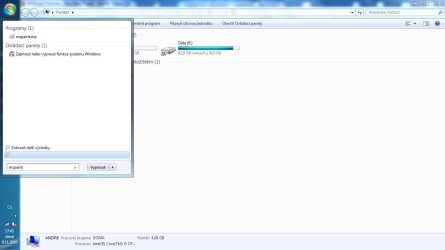
I've got a problem with search while using start menu. After typing something there is "See more results" link there, but I've got here one extra line under without any text --see pic.
When I click on it, start menu disappears, just like clicking outside.
Recently I've had to perform a repair install, but it's still there. It may be somehow set in registry, but I don't really know...
Do you have any idea how to get rid of it?
I've got a problem with search while using start menu. After typing something there is "See more results" link there, but I've got here one extra line under without any text --see pic.
When I click on it, start menu disappears, just like clicking outside.
Recently I've had to perform a repair install, but it's still there. It may be somehow set in registry, but I don't really know...
Do you have any idea how to get rid of it?
Attachments
My Computer
At a glance
Windows 7 Professional x64Intel Core i5 430M (2,26 GHz, 3 MB L3 cache)2 x 2 GB DDR3 (1066 MHz)ATI Mobility Radeon 5470 (512 MB) // Intel GM...
- Computer Manufacturer/Model Number
- Acer Aspire 4820TG TimeLineX (434G50MN)
- OS
- Windows 7 Professional x64
- CPU
- Intel Core i5 430M (2,26 GHz, 3 MB L3 cache)
- Memory
- 2 x 2 GB DDR3 (1066 MHz)
- Graphics Card(s)
- ATI Mobility Radeon 5470 (512 MB) // Intel GMA HD
- Monitor(s) Displays
- 14,0" LED
- Screen Resolution
- 1366 x 768 (16:9)
- Hard Drives
- WD Scorpio Blue 500 GB SATA (5400 rpm, 2,5")

