
Start Menu User Folder Buttons - Open to Users Instead of Libraries

How to Make Windows 7 Start Menu User Folder Buttons Open to Users Instead of Libraries Location

   Information
This will show you how to make the Windows 7 Start Menu My Documents, Pictures, Music, and Videos buttons open to the real C:\Users\(user-name) location instead of the default Libraries location for all users.

You must be logged in as an administrator to be able to do the steps in this tutorial.

   Note
Credit belongs to our member Foe for this.


EXAMPLE: Start Menu User Folder Buttons
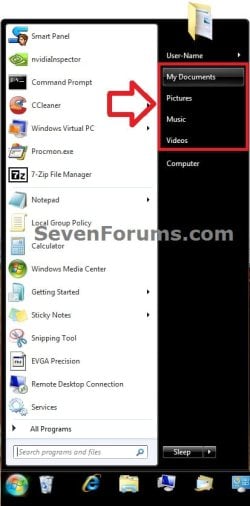
Start_Menu.jpg


OPTION ONE

Set Start Menu User Folder Buttons to Open to "Users" Location


1. Set Start Menu Documents Button to Open to Users Location
A) Click on the Download button below to download the file below.
Start_Menu_My_Documents_Open_to_Users.reg

Download


2. Set Start Menu Music Button to Open to Users Location
A) Click on the Download button below to download the file below.
Start_Menu_Music_Open_to_Users.reg

Download


3. Set Start Menu Pictures Button to Open to Users Location
A) Click on the Download button below to download the file below.
Start_Menu_Pictures_Open_to_Users.reg

Download


4. Set Start Menu Recorded TV Button to Open to Public Location
NOTE: Special thanks to Foe for this addition. :)
A) Click on the Download button below to download the file below.
Start_Menu_Recored_TV_Open_to_Public.bat

Download


5. Set Start Menu Videos Button to Open to Users Location
A) Click on the Download button below to download the file below.
Start_Menu_Videos_Open_to_Users.reg

Download


6. Save the .reg or. bat file to the desktop.

7. Double click on the downloaded .reg or .bat file.

8. Click on Run, Yes (UAC), Yes, and OK when prompted.

9. Log off and log on, or restart the computer to apply.

10. When done, you can delete the downloaded .reg file if you like.


OPTION TWO

Set Start Menu User Folder Buttons to Open to Default "Libraries" Location


1. Set Start Menu Documents Button back to Open to Default Libraries Location
A) Click on the Download button below to download the file below.
Default_Start_Menu_My_Documents_Open_to_Library.reg

Download


2. Set Start Menu Music Button back to Open to Default Libraries Location
A) Click on the Download button below to download the file below.
Default_Start_Menu_Music_Open_to_Library.reg

Download


3. Set Start Menu Pictures Button back to Open to Default Libraries Location
A) Click on the Download button below to download the file below.
Default_Start_Menu_Pictures_Open_to_Library.reg

Download


4. Set Start Menu Recorded TV Button back to Open to Default Public Libraries Location
NOTE: Special thanks to Foe for this addition. :)
A) Click on the Download button below to download the file below.
Start_Menu_Recored_TV_Open_to_Public_Library.reg

Download


5. Set Start Menu Videos Button back to Open to Default Libraries Location
A) Click on the Download button below to download the file below.
Default_Start_Menu_Videos_Open_to_Library.reg

Download


6. Save the .reg file to the desktop.

7. Double click on the downloaded .reg file.

8. Click on Run, Yes (UAC), Yes, and OK when prompted.

9. Log off and log on, or restart the computer to apply.

10. When done, you can delete the downloaded .reg file if you like.
That's it,
Shawn


Attachments

Last edited:
ah, right, this one:
152749d1304526157-start-menu-user-folder-buttons-open-users-instead-libraries-recorded-tv.jpg


I cant help but notice this library seems to behave like a manual created one. Recorded tv is not listed under libraries. Furthermore: i thought it was impossible to use environment variables (like %userprofile%) in REG_SZ's?
 

My Computer My Computer

At a glance

Windows 7 x64Intel dualcore P8400 @ 2.26 GHz4G DDR2 SDRAMATI Mobility Radeon HD 3400 Series
Computer Manufacturer/Model Number
Asus X70VR
OS
Windows 7 x64
CPU
Intel dualcore P8400 @ 2.26 GHz
Motherboard
64-0100-000001-00101111-072208-Cantiga$M70VX2
Memory
4G DDR2 SDRAM
Graphics Card(s)
ATI Mobility Radeon HD 3400 Series
Sound Card
Realtek ALC663 @ Intel 82801IB ICH9
Monitor(s) Displays
LG Philips LP171WP4-TLN1 (or television using HDMI Cable)
Screen Resolution
1440x900
Hard Drives
Hard Disk Name: Momentus 5400.5 320320
Interface: SATA-II
Formatted Capacity: 320 GB
Max. Internal Data Rate: 490.4 Mbit/s
Buffer Size: 8 MB
Ive just noticed the start menu rec tv library now acts like all the others if you right click\properties there no page with library-ms on it now just the same as the others.

Danny
 

My Computer My Computer

At a glance

Windows 7 Home Premium x64 SP1intel(R)core(TM)2 duo CPU T6600 @ 2.20GHz3 gb ddr3ati radeon hd4570/512mb
Computer Manufacturer/Model Number
acer aspire 5935g
OS
Windows 7 Home Premium x64 SP1
CPU
intel(R)core(TM)2 duo CPU T6600 @ 2.20GHz
Motherboard
intel gm45/gm47 revision 07
Memory
3 gb ddr3
Graphics Card(s)
ati radeon hd4570/512mb
Monitor(s) Displays
lop156wh2-tle1 15.3 flat
Screen Resolution
1366x768
Hard Drives
OCZ-Agility3 60gig ssd
320gig external hdd
500gig external hdd
Mouse
Optical
Internet Speed
30Mbps Down/30Mbps Up
ah, right, this one:

I cant help but notice this library seems to behave like a manual created one. Recorded tv is not listed under libraries. Furthermore: i thought it was impossible to use environment variables (like %userprofile%) in REG_SZ's?

Using Environment Variables in Registry Values
@brink
indeed, you need to use REG_EXPAND_SZ in order to use environment variables in a reg string.

@ danny
Yeah, it should now behave like default library in stead of a manual one.
 
Last edited:

My Computer My Computer

At a glance

Windows 7 x64Intel dualcore P8400 @ 2.26 GHz4G DDR2 SDRAMATI Mobility Radeon HD 3400 Series
Computer Manufacturer/Model Number
Asus X70VR
OS
Windows 7 x64
CPU
Intel dualcore P8400 @ 2.26 GHz
Motherboard
64-0100-000001-00101111-072208-Cantiga$M70VX2
Memory
4G DDR2 SDRAM
Graphics Card(s)
ATI Mobility Radeon HD 3400 Series
Sound Card
Realtek ALC663 @ Intel 82801IB ICH9
Monitor(s) Displays
LG Philips LP171WP4-TLN1 (or television using HDMI Cable)
Screen Resolution
1440x900
Hard Drives
Hard Disk Name: Momentus 5400.5 320320
Interface: SATA-II
Formatted Capacity: 320 GB
Max. Internal Data Rate: 490.4 Mbit/s
Buffer Size: 8 MB
I have honestly become lost in this thread, seems to be alot of back and forth. In the end I tried doing this myself, and its worked perfectly as far as I can tell. Here is what I did.

In HKEY_LOCAL_MACHINE\SOFTWARE\Microsoft\Windows\CurrentVersion\Explorer\FolderDescriptions\{1A6FDBA2-F42D-4358-A798-B74D745926C5}, the parent folder variable points to {48daf80b-e6cf-4f4e-b800-0e69d84ee384}, which is public libraries.

By checking similar entries for the other default libraries, you find that the folder variable for the user libraries directory is {1B3EA5DC-B587-4786-B4EF-BD1DC332AEAE}.

So I copied the RecordedTV.library-ms file from C:\Users\Public/Libraries to c:\Users\username\AppData\Roaming\Microsoft\Windows\Libraries, and then changed the parent folder variable as above, logged out and in again.

The result is that Recorded TV now acts just like all the other default libraries, clicking in start menu points to the correct location, and it displays correctly in navigation pane.

The library can now be renamed and used for another purpose, bringing the total of private libraries that can be accessed via start menu to 5. This is the max as far as I know, I have still not found any method to add custom libraries to start menu from scratch.

Using the Zorn Software tool, located at Zorn Software » Blog Archive » Win7 Library Tool - Simplicity is the Essence of Good Design, these libraries can now be linked with network locations as well.

Edit: One thing that is still wrong are the tooltips displayed when you hover over the library links in the start menu. They display the default messages. Anybody have any idea how these can be modified?
 
Last edited:

My Computer My Computer

At a glance

Windows 7 Ultimate x64
OS
Windows 7 Ultimate x64
Edit: One thing that is still wrong are the tooltips displayed when you hover over the library links in the start menu. They display the default messages. Anybody have any idea how these can be modified?

What's wrong with 'Watch TV programs recorded on your computer.'?
 
Last edited:

My Computer My Computer

At a glance

Windows 7 x64Intel dualcore P8400 @ 2.26 GHz4G DDR2 SDRAMATI Mobility Radeon HD 3400 Series
Computer Manufacturer/Model Number
Asus X70VR
OS
Windows 7 x64
CPU
Intel dualcore P8400 @ 2.26 GHz
Motherboard
64-0100-000001-00101111-072208-Cantiga$M70VX2
Memory
4G DDR2 SDRAM
Graphics Card(s)
ATI Mobility Radeon HD 3400 Series
Sound Card
Realtek ALC663 @ Intel 82801IB ICH9
Monitor(s) Displays
LG Philips LP171WP4-TLN1 (or television using HDMI Cable)
Screen Resolution
1440x900
Hard Drives
Hard Disk Name: Momentus 5400.5 320320
Interface: SATA-II
Formatted Capacity: 320 GB
Max. Internal Data Rate: 490.4 Mbit/s
Buffer Size: 8 MB
I have honestly become lost in this thread, seems to be alot of back and forth. In the end I tried doing this myself, and its worked perfectly as far as I can tell. Here is what I did.

In HKEY_LOCAL_MACHINE\SOFTWARE\Microsoft\Windows\CurrentVersion\Explorer\FolderDescriptions\{1A6FDBA2-F42D-4358-A798-B74D745926C5}, the parent folder variable points to {48daf80b-e6cf-4f4e-b800-0e69d84ee384}, which is public libraries.

By checking similar entries for the other default libraries, you find that the folder variable for the user libraries directory is {1B3EA5DC-B587-4786-B4EF-BD1DC332AEAE}.

So I copied the RecordedTV.library-ms file from C:\Users\Public/Libraries to c:\Users\username\AppData\Roaming\Microsoft\Windows\Libraries, and then changed the parent folder variable as above, logged out and in again.

The result is that Recorded TV now acts just like all the other default libraries, clicking in start menu points to the correct location, and it displays correctly in navigation pane.

The library can now be renamed and used for another purpose, bringing the total of private libraries that can be accessed via start menu to 5. This is the max as far as I know, I have still not found any method to add custom libraries to start menu from scratch.

Using the Zorn Software tool, located at Zorn Software » Blog Archive » Win7 Library Tool - Simplicity is the Essence of Good Design, these libraries can now be linked with network locations as well.

Edit: One thing that is still wrong are the tooltips displayed when you hover over the library links in the start menu. They display the default messages. Anybody have any idea how these can be modified?

Foe and Shawn had the right ideas from the start it was my system that wouldnt accept the changes.They were both just trying to understand why and solve the issue for me.Ive just tried both methods on a clean install on another pc and both worked the first time.

Danny
 

My Computer My Computer

At a glance

Windows 7 Home Premium x64 SP1intel(R)core(TM)2 duo CPU T6600 @ 2.20GHz3 gb ddr3ati radeon hd4570/512mb
Computer Manufacturer/Model Number
acer aspire 5935g
OS
Windows 7 Home Premium x64 SP1
CPU
intel(R)core(TM)2 duo CPU T6600 @ 2.20GHz
Motherboard
intel gm45/gm47 revision 07
Memory
3 gb ddr3
Graphics Card(s)
ati radeon hd4570/512mb
Monitor(s) Displays
lop156wh2-tle1 15.3 flat
Screen Resolution
1366x768
Hard Drives
OCZ-Agility3 60gig ssd
320gig external hdd
500gig external hdd
Mouse
Optical
Internet Speed
30Mbps Down/30Mbps Up
What's wrong with 'Watch TV programs recorded on your computer.'?

The folder is now called Game Installs.
 

My Computer My Computer

At a glance

Windows 7 Ultimate x64
OS
Windows 7 Ultimate x64
Not at my pc, it's not...

Are you sure you were not messing with the wrong key?
 

My Computer My Computer

At a glance

Windows 7 x64Intel dualcore P8400 @ 2.26 GHz4G DDR2 SDRAMATI Mobility Radeon HD 3400 Series
Computer Manufacturer/Model Number
Asus X70VR
OS
Windows 7 x64
CPU
Intel dualcore P8400 @ 2.26 GHz
Motherboard
64-0100-000001-00101111-072208-Cantiga$M70VX2
Memory
4G DDR2 SDRAM
Graphics Card(s)
ATI Mobility Radeon HD 3400 Series
Sound Card
Realtek ALC663 @ Intel 82801IB ICH9
Monitor(s) Displays
LG Philips LP171WP4-TLN1 (or television using HDMI Cable)
Screen Resolution
1440x900
Hard Drives
Hard Disk Name: Momentus 5400.5 320320
Interface: SATA-II
Formatted Capacity: 320 GB
Max. Internal Data Rate: 490.4 Mbit/s
Buffer Size: 8 MB
Not at my pc, it's not...

Are you sure you were not messing with the wrong key?

I meant i renamed and re-assigned it.
 

My Computer My Computer

At a glance

Windows 7 Ultimate x64
OS
Windows 7 Ultimate x64
Well using my own trick, it is now behaving like a personal library and the hover over is saying: 'watch tv programs recorded on your computer.'

I dont really understand what u did different though.
 

My Computer My Computer

At a glance

Windows 7 x64Intel dualcore P8400 @ 2.26 GHz4G DDR2 SDRAMATI Mobility Radeon HD 3400 Series
Computer Manufacturer/Model Number
Asus X70VR
OS
Windows 7 x64
CPU
Intel dualcore P8400 @ 2.26 GHz
Motherboard
64-0100-000001-00101111-072208-Cantiga$M70VX2
Memory
4G DDR2 SDRAM
Graphics Card(s)
ATI Mobility Radeon HD 3400 Series
Sound Card
Realtek ALC663 @ Intel 82801IB ICH9
Monitor(s) Displays
LG Philips LP171WP4-TLN1 (or television using HDMI Cable)
Screen Resolution
1440x900
Hard Drives
Hard Disk Name: Momentus 5400.5 320320
Interface: SATA-II
Formatted Capacity: 320 GB
Max. Internal Data Rate: 490.4 Mbit/s
Buffer Size: 8 MB
Reg file not running

Hi Brink -

Now that you have helped me remove auto arrange from windows explorer (different tutorial), I would like to reprogram my Pictures start menu button to open to the My Picture user folder. But having some trouble.

I download the Start_Menu_Pictures_Open_to_Users.reg file to desktop. Then rightclick and click Merge. First pop-up window has Run button to click. Next window has warning about trusting the source, and it has Yes (continue) button to click. But the next window titled "Registry Editor" says "Cannot import C:\Users\(username)\Desktop\ . . . .reg. Not all data was successfully written to the registry. Some keys are open by the system or other processes." ???

No window asks for administrator password, but it didn't ask during the autoarrange tutorial either.

What do you think? Would you recommend trying to run the (default) open-to-library program first?
 

My Computer My Computer

At a glance

windows 7 home premium 64bit
OS
windows 7 home premium 64bit
Hello Bat,

It sounds like you are merging the REG file while logged in as a standard user instead of an administrator account. Since this is applied to all users, it requires to be logged in as an administrator to be able to merge/import the REG file successfully.
 

My Computer My Computer

At a glance

64-bit Windows 11 Pro for WorkstationsIntel i7-8700K OC'd to 5 GHz64 GB (4x16GB) G.SKILL TridentZ RGB DDR4 3600...ASUS ROG-STRIX-GTX1080TI-O11G-GAMING
Computer type
PC/Desktop
Computer Manufacturer/Model Number
Self built custom
OS
64-bit Windows 11 Pro for Workstations
CPU
Intel i7-8700K OC'd to 5 GHz
Motherboard
ASUS ROG Maximus XI Formula Z390
Memory
64 GB (4x16GB) G.SKILL TridentZ RGB DDR4 3600 MHz
Graphics Card(s)
ASUS ROG-STRIX-GTX1080TI-O11G-GAMING
Sound Card
Integrated
Monitor(s) Displays
2 x Samsung Odyssey G7 27"
Screen Resolution
2560x1440
Hard Drives
1TB Samsung 990 PRO M.2,
4TB Samsung 990 PRO PRO M.2,
TerraMaster F8 SSD Plus NAS
PSU
Seasonic Prime Titanium 850W
Case
Thermaltake Core P3
Cooling
Corsair Hydro H115i
Keyboard
Logitech wireless K800
Mouse
Logitech MX Master 4
Internet Speed
2 Gb/s Download and 100 Mb/s Upload
Antivirus
Malwarebyte Anti-Malware Premium
Browser
Google Chrome
Other Info
Logitech Z625 speaker system,
Logitech BRIO 4K Pro webcam,
HP Color LaserJet Pro MFP M477fdn,
APC SMART-UPS RT 1000 XL - SURT1000XLI,
Galaxy S23 Plus phone
Alright, it was just that simple. Running it in the administrative account worked fine, and the change did apply to all users.

(In the case of the auto arrange tutorial, the changes to windows explorer didn't automatically apply to the other users after fixing the administrative account. It was actually necessary for me to run the procedure again, logged in as a user.)

This is great now -- maximum convenience.

Thank You Brink. Looking forward to checking out more topics on the Forum.
 

My Computer My Computer

At a glance

windows 7 home premium 64bit
OS
windows 7 home premium 64bit
You're most welcome Bat. :)
 

My Computer My Computer

At a glance

64-bit Windows 11 Pro for WorkstationsIntel i7-8700K OC'd to 5 GHz64 GB (4x16GB) G.SKILL TridentZ RGB DDR4 3600...ASUS ROG-STRIX-GTX1080TI-O11G-GAMING
Computer type
PC/Desktop
Computer Manufacturer/Model Number
Self built custom
OS
64-bit Windows 11 Pro for Workstations
CPU
Intel i7-8700K OC'd to 5 GHz
Motherboard
ASUS ROG Maximus XI Formula Z390
Memory
64 GB (4x16GB) G.SKILL TridentZ RGB DDR4 3600 MHz
Graphics Card(s)
ASUS ROG-STRIX-GTX1080TI-O11G-GAMING
Sound Card
Integrated
Monitor(s) Displays
2 x Samsung Odyssey G7 27"
Screen Resolution
2560x1440
Hard Drives
1TB Samsung 990 PRO M.2,
4TB Samsung 990 PRO PRO M.2,
TerraMaster F8 SSD Plus NAS
PSU
Seasonic Prime Titanium 850W
Case
Thermaltake Core P3
Cooling
Corsair Hydro H115i
Keyboard
Logitech wireless K800
Mouse
Logitech MX Master 4
Internet Speed
2 Gb/s Download and 100 Mb/s Upload
Antivirus
Malwarebyte Anti-Malware Premium
Browser
Google Chrome
Other Info
Logitech Z625 speaker system,
Logitech BRIO 4K Pro webcam,
HP Color LaserJet Pro MFP M477fdn,
APC SMART-UPS RT 1000 XL - SURT1000XLI,
Galaxy S23 Plus phone
I have a very hard question.
I searched in Regedit a Registry Key called:
HKEY_LOCAL_MACHINE\SOFTWARE\Wow6432Node
as suggested in:
http://www.sevenforums.com/tutorials/35627-libraries-folder-add-remove-navigation-pane.html
I assumed to follow this as my Windows version is 64-bit.

I searched the key on the original .REG for "Start_Menu_Videos_Open_to_Users.reg" and I found it was pointing to an seeming 32bit key of the registry, then I looked after that key in Wow6432Node and I FOUND IT, so I put the same value of the specific String ("ParsingName") of the .REG file IN the Wow6432Node String.

I mean I searched this:

HKEY_LOCAL_MACHINE\SOFTWARE\Microsoft\Windows\CurrentVersion\Explorer\
FolderDescriptions\{491E922F-5643-4af4-A7EB-4E7A138D8174}]
"ParsingName"="::{59031a47-3f72-44a7-89c5-5595fe6b30ee}\\{18989B1D-99B5-455B-841C-AB7C74E4DDFC}"

and copied in THIS key
HKEY_LOCAL_MACHINE\SOFTWARE\Wow6432Node\Microsoft\Windows\CurrentVersion
\explorer\FolderDescriptions\{491E922F-5643-4af4-A7EB-4E7A138D8174}]
"ParsingName"="::{59031a47-3f72-44a7-89c5-5595fe6b30ee}\\{18989B1D-99B5-455B-841C-AB7C74E4DDFC}"

BEING THE ONLY DIFFERENCE the Wow6432Node sub-key. THE BIG PROBLEM IS that now I look into Start Menu to find that now there's NO link nor menu in there, the "My Videos" option had disappeared! Why did it dissappeared? In first place, when I applied the .REG file without editing the Wow6432Node sub-key, this method didn't worked as promised.

Thanks in advance.
 
Last edited:

My Computer My Computer

At a glance

Windows 7 Home Premium x64AMD Hudson-24GB DDR3-1333 SDRAM DIMM2AMD Radeon(TM) HD 6480G
Computer Manufacturer/Model Number
Hewlett-Packard
OS
Windows 7 Home Premium x64
CPU
AMD Hudson-2
Motherboard
Hewlett-Packard HP Pavilion g6 Notebook PC
Memory
4GB DDR3-1333 SDRAM DIMM2
Graphics Card(s)
AMD Radeon(TM) HD 6480G
Sound Card
IDT 92HD81B1X
Monitor(s) Displays
One Display
Hard Drives
Hitachi HTS547550A9E384
Hello Lapc506, and welcome to Seven Forums.

The REG file in this tutorial works for both the 32-bit and 64-bit Windows 7 as is using only the location in the REG file. I would recommend to change the Wow6432Node entry back to the default entry below.

Code:
::{031E4825-7B94-4dc3-B131-E946B44C8DD5}\{491E922F-5643-4af4-A7EB-4E7A138D8174}


Did you restart the computer after merging the REG file to apply it?

Did you change the default location of the Videos folder?

You might also check in the Customize Start Menu settings to see if you still have Videos selected to display.
 

My Computer My Computer

At a glance

64-bit Windows 11 Pro for WorkstationsIntel i7-8700K OC'd to 5 GHz64 GB (4x16GB) G.SKILL TridentZ RGB DDR4 3600...ASUS ROG-STRIX-GTX1080TI-O11G-GAMING
Computer type
PC/Desktop
Computer Manufacturer/Model Number
Self built custom
OS
64-bit Windows 11 Pro for Workstations
CPU
Intel i7-8700K OC'd to 5 GHz
Motherboard
ASUS ROG Maximus XI Formula Z390
Memory
64 GB (4x16GB) G.SKILL TridentZ RGB DDR4 3600 MHz
Graphics Card(s)
ASUS ROG-STRIX-GTX1080TI-O11G-GAMING
Sound Card
Integrated
Monitor(s) Displays
2 x Samsung Odyssey G7 27"
Screen Resolution
2560x1440
Hard Drives
1TB Samsung 990 PRO M.2,
4TB Samsung 990 PRO PRO M.2,
TerraMaster F8 SSD Plus NAS
PSU
Seasonic Prime Titanium 850W
Case
Thermaltake Core P3
Cooling
Corsair Hydro H115i
Keyboard
Logitech wireless K800
Mouse
Logitech MX Master 4
Internet Speed
2 Gb/s Download and 100 Mb/s Upload
Antivirus
Malwarebyte Anti-Malware Premium
Browser
Google Chrome
Other Info
Logitech Z625 speaker system,
Logitech BRIO 4K Pro webcam,
HP Color LaserJet Pro MFP M477fdn,
APC SMART-UPS RT 1000 XL - SURT1000XLI,
Galaxy S23 Plus phone
Problems with the result!

Hi Brink..............gr8 tut have to say but......

Used the downloaded .reg docs to set the Start Menu User folder buttons to open to Users instead of Libraries.................all went well on the face of it, however, upon further investigation I have noticed a very strange and potentially worrying problem that will need resolving with your usual diligent investigation and help please.

After completion, clicking on any of the amended Start Menu buttons brings me to windows explorer and to the relevant User folder all as expected. The left hand pane folders appear all as they should in the 4 usual groups, as follows:

1) Favorites; Downloads; Recent Places; Desktop.

2) Libraries - Documents; Music; Pictures; Videos.

3) Computer – (I have partitioned my HD as follows) C: System; D: Restore; F: Data (Contacts; Desktop; Favorites; Links; My Documents; Searches); G: Multimedia (Downloads; My Music; My Pictures; My Videos; Saved Games)

4) Network

I can navigate and open folders as per normal in either left or right hand panes. “No problem there then”, I hear you say.

However, when I right-click the left hand pane and tick "Expand to current folder" and then re-launch from the amended Start Menu buttons, I see that all my User folders and sub-folders are now shown grouped together (under a main folder <My User Name>) in between the lists of Libraries and Computer.

Moreover, within the same left hand pane I can expand both F: and G: to reveal a second instance of my User folders all correctly placed in their respective hierarchies on their respective partitions.

What’s going on here? Surely this shouldn’t be happening? Looking at the Properties of each copy of each folder shows that neither is a shortcut, and frankly I cannot see any difference…………….one appears to be a clone of the other. However, each copy of the same folder would appear to be linked, because saving / moving / copying content to one copy of a folder means that the same also appears in its clone. I have not yet been able to establish whether or not these are actual clone / duplicate folders or just simply ‘mirrors’ of the same……………think what will happen to my disk storage if they are indeed clone / duplicate folders!!

Now worryingly, all this is not unique to one laptop, I have tested this on another two laptops each running OEM install of W7 Home Premium x64 bit………………same thing happens!!

Multiple copies of the same folders is not good practice……………..it sort of defeats the whole object of wanting to get rid of the double instances of the folders already existing within Libraries……………..I mean, that is why we are all looking at this thread in the first place isn’t it?

Has something been overlooked in the .reg script perhaps?
Am I the only one who has experienced this, or at least the only one who has noticed this?
Why is this happening Brink, and what can you suggest to help resolve it?

Thanks.

Amicus.
 

My Computer My Computer

At a glance

Windows 7 Home Premium 64 bit
OS
Windows 7 Home Premium 64 bit
Hello Amicus, and welcome to Seven Forums.

It's nothing to worry about. This is normal and is not caused by the tutorial. Whenever a user folder is opened directly at the C:\Users\(user-name) location and not navigated to it in Windows Explorer, it will show a separate (user-name) folder group in the navigation pane of Windows Explorer whenever you have the Expand to current folder option checked. :)

You can test this by opening Favorites on the Start Menu right dark side into Windows Explorer, and doing the same thing since it opens at the C:\Users\(user-name) location by default. It will do the same with it.

OR

You can also test this by navigating to say your C:\Users\(user-name)\Downloads folder, right click on the Downloads folder, click on Send To -> Desktop (Create shortcut). Next, open the shortcut on your desktop to have it open directly to that folder, and check the Expand to current folder option to see that it does it for this as well.
 

My Computer My Computer

At a glance

64-bit Windows 11 Pro for WorkstationsIntel i7-8700K OC'd to 5 GHz64 GB (4x16GB) G.SKILL TridentZ RGB DDR4 3600...ASUS ROG-STRIX-GTX1080TI-O11G-GAMING
Computer type
PC/Desktop
Computer Manufacturer/Model Number
Self built custom
OS
64-bit Windows 11 Pro for Workstations
CPU
Intel i7-8700K OC'd to 5 GHz
Motherboard
ASUS ROG Maximus XI Formula Z390
Memory
64 GB (4x16GB) G.SKILL TridentZ RGB DDR4 3600 MHz
Graphics Card(s)
ASUS ROG-STRIX-GTX1080TI-O11G-GAMING
Sound Card
Integrated
Monitor(s) Displays
2 x Samsung Odyssey G7 27"
Screen Resolution
2560x1440
Hard Drives
1TB Samsung 990 PRO M.2,
4TB Samsung 990 PRO PRO M.2,
TerraMaster F8 SSD Plus NAS
PSU
Seasonic Prime Titanium 850W
Case
Thermaltake Core P3
Cooling
Corsair Hydro H115i
Keyboard
Logitech wireless K800
Mouse
Logitech MX Master 4
Internet Speed
2 Gb/s Download and 100 Mb/s Upload
Antivirus
Malwarebyte Anti-Malware Premium
Browser
Google Chrome
Other Info
Logitech Z625 speaker system,
Logitech BRIO 4K Pro webcam,
HP Color LaserJet Pro MFP M477fdn,
APC SMART-UPS RT 1000 XL - SURT1000XLI,
Galaxy S23 Plus phone
Thanks for the very swift reply Brink..........much appreciated.

Phew! You're right of course........had myself worried there for an hour or so, and thought I'd done something crazy. All good, so I presume that there should be no issues with backups, imaging, etc., etc.?

When all's said and done though (and happy I am that every new file / prog., etc., will not be eating up my HDD), I still strangely feel it sort of defeats the whole object of wanting to get rid of the double instances of the folders already existing within Libraries.

Maybe I'm missing something rather obvious here; maybe I'm just too darn tidy and particular; or maybe my brain is just too single minded, but I do like things neat and tidy......one folder for one purpose, not two or three clones / duplicates all serving the same purpose............otherwise why not have Microsoft create a clone of each and every folder in every location throughout the whole darn OS so that nobody would have to remember or go searching for anything ever again............we could all just dump whatever we've created in the nearest clone / duplicate of the relevant folder.

Yes I know, I know, I've gone from the sublime to the ridiculous.......I'll stop ranting. Grrrr.

Thanks again Brink for clearing this up.:thumbsup:
Cheers,

A
 

My Computer My Computer

At a glance

Windows 7 Home Premium 64 bit
OS
Windows 7 Home Premium 64 bit
Amicus,

No worries. This will not cause any issues since it's a default built-in feature of Windows 7. :)

I guess it's just Microsoft's way to help make navigating in the "user folders" easier to do as it's own separate group in the navigation pane.
 

My Computer My Computer

At a glance

64-bit Windows 11 Pro for WorkstationsIntel i7-8700K OC'd to 5 GHz64 GB (4x16GB) G.SKILL TridentZ RGB DDR4 3600...ASUS ROG-STRIX-GTX1080TI-O11G-GAMING
Computer type
PC/Desktop
Computer Manufacturer/Model Number
Self built custom
OS
64-bit Windows 11 Pro for Workstations
CPU
Intel i7-8700K OC'd to 5 GHz
Motherboard
ASUS ROG Maximus XI Formula Z390
Memory
64 GB (4x16GB) G.SKILL TridentZ RGB DDR4 3600 MHz
Graphics Card(s)
ASUS ROG-STRIX-GTX1080TI-O11G-GAMING
Sound Card
Integrated
Monitor(s) Displays
2 x Samsung Odyssey G7 27"
Screen Resolution
2560x1440
Hard Drives
1TB Samsung 990 PRO M.2,
4TB Samsung 990 PRO PRO M.2,
TerraMaster F8 SSD Plus NAS
PSU
Seasonic Prime Titanium 850W
Case
Thermaltake Core P3
Cooling
Corsair Hydro H115i
Keyboard
Logitech wireless K800
Mouse
Logitech MX Master 4
Internet Speed
2 Gb/s Download and 100 Mb/s Upload
Antivirus
Malwarebyte Anti-Malware Premium
Browser
Google Chrome
Other Info
Logitech Z625 speaker system,
Logitech BRIO 4K Pro webcam,
HP Color LaserJet Pro MFP M477fdn,
APC SMART-UPS RT 1000 XL - SURT1000XLI,
Galaxy S23 Plus phone
Back
Top