
Start Menu User Folder Buttons - Open to Users Instead of Libraries

How to Make Windows 7 Start Menu User Folder Buttons Open to Users Instead of Libraries Location

   Information
This will show you how to make the Windows 7 Start Menu My Documents, Pictures, Music, and Videos buttons open to the real C:\Users\(user-name) location instead of the default Libraries location for all users.

You must be logged in as an administrator to be able to do the steps in this tutorial.

   Note
Credit belongs to our member Foe for this.


EXAMPLE: Start Menu User Folder Buttons
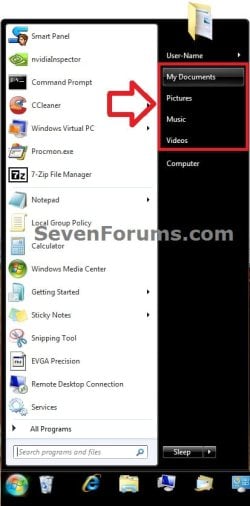
Start_Menu.jpg


OPTION ONE

Set Start Menu User Folder Buttons to Open to "Users" Location


1. Set Start Menu Documents Button to Open to Users Location
A) Click on the Download button below to download the file below.
Start_Menu_My_Documents_Open_to_Users.reg

Download


2. Set Start Menu Music Button to Open to Users Location
A) Click on the Download button below to download the file below.
Start_Menu_Music_Open_to_Users.reg

Download


3. Set Start Menu Pictures Button to Open to Users Location
A) Click on the Download button below to download the file below.
Start_Menu_Pictures_Open_to_Users.reg

Download


4. Set Start Menu Recorded TV Button to Open to Public Location
NOTE: Special thanks to Foe for this addition. :)
A) Click on the Download button below to download the file below.
Start_Menu_Recored_TV_Open_to_Public.bat

Download


5. Set Start Menu Videos Button to Open to Users Location
A) Click on the Download button below to download the file below.
Start_Menu_Videos_Open_to_Users.reg

Download


6. Save the .reg or. bat file to the desktop.

7. Double click on the downloaded .reg or .bat file.

8. Click on Run, Yes (UAC), Yes, and OK when prompted.

9. Log off and log on, or restart the computer to apply.

10. When done, you can delete the downloaded .reg file if you like.


OPTION TWO

Set Start Menu User Folder Buttons to Open to Default "Libraries" Location


1. Set Start Menu Documents Button back to Open to Default Libraries Location
A) Click on the Download button below to download the file below.
Default_Start_Menu_My_Documents_Open_to_Library.reg

Download


2. Set Start Menu Music Button back to Open to Default Libraries Location
A) Click on the Download button below to download the file below.
Default_Start_Menu_Music_Open_to_Library.reg

Download


3. Set Start Menu Pictures Button back to Open to Default Libraries Location
A) Click on the Download button below to download the file below.
Default_Start_Menu_Pictures_Open_to_Library.reg

Download


4. Set Start Menu Recorded TV Button back to Open to Default Public Libraries Location
NOTE: Special thanks to Foe for this addition. :)
A) Click on the Download button below to download the file below.
Start_Menu_Recored_TV_Open_to_Public_Library.reg

Download


5. Set Start Menu Videos Button back to Open to Default Libraries Location
A) Click on the Download button below to download the file below.
Default_Start_Menu_Videos_Open_to_Library.reg

Download


6. Save the .reg file to the desktop.

7. Double click on the downloaded .reg file.

8. Click on Run, Yes (UAC), Yes, and OK when prompted.

9. Log off and log on, or restart the computer to apply.

10. When done, you can delete the downloaded .reg file if you like.
That's it,
Shawn


Attachments

Last edited:
Hi Brink,

Yep, I guess so...........and thanks for the reassurance re; any potential issues.

Cheers,

A
 

My Computer My Computer

At a glance

Windows 7 Home Premium 64 bit
OS
Windows 7 Home Premium 64 bit
deleting this identity
 
Last edited:

My Computer My Computer

At a glance

Windows 7 64bit
OS
Windows 7 64bit
Hello Emcitement,

I'm happy to hear that they work great for you. :)

The user name folder (Personal Folder) from the Start Menu opens the C:\Users\(User-name) folder by default. There is no library location for this folder by default. Could you post a screenshot showing what opens to see if it may help ID what the issue may be?
 

My Computer My Computer

At a glance

64-bit Windows 11 Pro for WorkstationsIntel i7-8700K OC'd to 5 GHz64 GB (4x16GB) G.SKILL TridentZ RGB DDR4 3600...ASUS ROG-STRIX-GTX1080TI-O11G-GAMING
Computer type
PC/Desktop
Computer Manufacturer/Model Number
Self built custom
OS
64-bit Windows 11 Pro for Workstations
CPU
Intel i7-8700K OC'd to 5 GHz
Motherboard
ASUS ROG Maximus XI Formula Z390
Memory
64 GB (4x16GB) G.SKILL TridentZ RGB DDR4 3600 MHz
Graphics Card(s)
ASUS ROG-STRIX-GTX1080TI-O11G-GAMING
Sound Card
Integrated
Monitor(s) Displays
2 x Samsung Odyssey G7 27"
Screen Resolution
2560x1440
Hard Drives
1TB Samsung 990 PRO M.2,
4TB Samsung 990 PRO PRO M.2,
TerraMaster F8 SSD Plus NAS
PSU
Seasonic Prime Titanium 850W
Case
Thermaltake Core P3
Cooling
Corsair Hydro H115i
Keyboard
Logitech wireless K800
Mouse
Logitech MX Master 4
Internet Speed
2 Gb/s Download and 100 Mb/s Upload
Antivirus
Malwarebyte Anti-Malware Premium
Browser
Google Chrome
Other Info
Logitech Z625 speaker system,
Logitech BRIO 4K Pro webcam,
HP Color LaserJet Pro MFP M477fdn,
APC SMART-UPS RT 1000 XL - SURT1000XLI,
Galaxy S23 Plus phone
deleting this identity
 
Last edited:

My Computer My Computer

At a glance

Windows 7 64bit
OS
Windows 7 64bit
Emcitement,

Yeah, the way the Start Menu looks will vary from how you have it set in the Customize Start Menu settings area for what buttons you have turned on and if you have them display as links or menus.

While the user folder doesn't open directly to the actual C:\User\(user-name) location, it essentially still does since it opens to a junction point for that location. They are one in the same basically. This is not the same as a library location though. :)
 

My Computer My Computer

At a glance

64-bit Windows 11 Pro for WorkstationsIntel i7-8700K OC'd to 5 GHz64 GB (4x16GB) G.SKILL TridentZ RGB DDR4 3600...ASUS ROG-STRIX-GTX1080TI-O11G-GAMING
Computer type
PC/Desktop
Computer Manufacturer/Model Number
Self built custom
OS
64-bit Windows 11 Pro for Workstations
CPU
Intel i7-8700K OC'd to 5 GHz
Motherboard
ASUS ROG Maximus XI Formula Z390
Memory
64 GB (4x16GB) G.SKILL TridentZ RGB DDR4 3600 MHz
Graphics Card(s)
ASUS ROG-STRIX-GTX1080TI-O11G-GAMING
Sound Card
Integrated
Monitor(s) Displays
2 x Samsung Odyssey G7 27"
Screen Resolution
2560x1440
Hard Drives
1TB Samsung 990 PRO M.2,
4TB Samsung 990 PRO PRO M.2,
TerraMaster F8 SSD Plus NAS
PSU
Seasonic Prime Titanium 850W
Case
Thermaltake Core P3
Cooling
Corsair Hydro H115i
Keyboard
Logitech wireless K800
Mouse
Logitech MX Master 4
Internet Speed
2 Gb/s Download and 100 Mb/s Upload
Antivirus
Malwarebyte Anti-Malware Premium
Browser
Google Chrome
Other Info
Logitech Z625 speaker system,
Logitech BRIO 4K Pro webcam,
HP Color LaserJet Pro MFP M477fdn,
APC SMART-UPS RT 1000 XL - SURT1000XLI,
Galaxy S23 Plus phone
deleting this identity
 
Last edited:

My Computer My Computer

At a glance

Windows 7 64bit
OS
Windows 7 64bit
Library Problems

A great registry hack, so happy to be able to restore the right-hand side of the start menu to folder shortcuts. However, this may have had a strange effect on Windows Media Player 12 (WMP12, it now won't save playlists).

Anyway, would it be possible to take these registry hacks a step further? I'm a big user of both WMP12 and Windows Live Photo Gallery. However, both these programs now interface ONLY with the default pictures/music/video LIBRARIES.

For various (long explanation) reasons, I'm finding this really annoying, and wish that both programs could be made to interface with user folders (as Picasa still does, although this program has its own issues), and simply bypass all the library bloat.

Hope you can help
Regards
Emerald
 

My Computer My Computer

At a glance

Windows 7 Home Premium 64bit
OS
Windows 7 Home Premium 64bit
Hello Emerald, and welcome to Seven Forums.

I'm afraid that I do not know. This may be a better subject to post in the Music, Pictures & Video forum area to see if someone may know of a way for you to be able to do this. :(
 

My Computer My Computer

At a glance

64-bit Windows 11 Pro for WorkstationsIntel i7-8700K OC'd to 5 GHz64 GB (4x16GB) G.SKILL TridentZ RGB DDR4 3600...ASUS ROG-STRIX-GTX1080TI-O11G-GAMING
Computer type
PC/Desktop
Computer Manufacturer/Model Number
Self built custom
OS
64-bit Windows 11 Pro for Workstations
CPU
Intel i7-8700K OC'd to 5 GHz
Motherboard
ASUS ROG Maximus XI Formula Z390
Memory
64 GB (4x16GB) G.SKILL TridentZ RGB DDR4 3600 MHz
Graphics Card(s)
ASUS ROG-STRIX-GTX1080TI-O11G-GAMING
Sound Card
Integrated
Monitor(s) Displays
2 x Samsung Odyssey G7 27"
Screen Resolution
2560x1440
Hard Drives
1TB Samsung 990 PRO M.2,
4TB Samsung 990 PRO PRO M.2,
TerraMaster F8 SSD Plus NAS
PSU
Seasonic Prime Titanium 850W
Case
Thermaltake Core P3
Cooling
Corsair Hydro H115i
Keyboard
Logitech wireless K800
Mouse
Logitech MX Master 4
Internet Speed
2 Gb/s Download and 100 Mb/s Upload
Antivirus
Malwarebyte Anti-Malware Premium
Browser
Google Chrome
Other Info
Logitech Z625 speaker system,
Logitech BRIO 4K Pro webcam,
HP Color LaserJet Pro MFP M477fdn,
APC SMART-UPS RT 1000 XL - SURT1000XLI,
Galaxy S23 Plus phone
Heya

Thanks for the quick reply,
I'll have a look a this other forum

Emerald
 

My Computer My Computer

At a glance

Windows 7 Home Premium 64bit
OS
Windows 7 Home Premium 64bit

My Computer My Computer

At a glance

W7 Ultimate SP1, LM19.2 MATE, W10 Home 1703, ...AMD Phenom II x6 1100T, 3.3 GHz12GB DDR3 1333 G-Skill (4GB x 2), G-Skill (2G...NVIDIA GeForce GTX 660
Computer type
PC/Desktop
Computer Manufacturer/Model Number
n/a
OS
W7 Ultimate SP1, LM19.2 MATE, W10 Home 1703, W10 Pro 1703 VM, #All 64 bit
CPU
AMD Phenom II x6 1100T, 3.3 GHz
Motherboard
ASUS M4A88T-M/USB3 (AM3)
Memory
12GB DDR3 1333 G-Skill (4GB x 2), G-Skill (2GB x 2)
Graphics Card(s)
NVIDIA GeForce GTX 660
Sound Card
Realtek?
Monitor(s) Displays
Samsung S23B350
Screen Resolution
1920x1080
Hard Drives
WD Green 2TB (SATA), WD Green 3TB (SATA), WD Blue 4TB (SATA), WD Blue 6TB (SATA)
PSU
Cooler Master
Case
Antec GX300 Tower
Cooling
3x Antec TRICOOL 120mm Fans
Mouse
Wired Optical
Internet Speed
DSL
Antivirus
Avast
Browser
Pale Moon (64 bit)
Other Info
2018-12-27 Upgraded HDDs
2015-12-10 Upgraded case, graphics card, storage
2015-08-15 Upgraded motherboard & RAM
2015-07-15 Upgraded LM17.1 to LM17.2
Hello Peter,

Sorry, but no. The .reg files in this tutorial will only affect the buttons in the Start Menu. :(

I've never had the "Open" and "Save" type dialogs reliably open to the last location they were closed at.
 

My Computer My Computer

At a glance

64-bit Windows 11 Pro for WorkstationsIntel i7-8700K OC'd to 5 GHz64 GB (4x16GB) G.SKILL TridentZ RGB DDR4 3600...ASUS ROG-STRIX-GTX1080TI-O11G-GAMING
Computer type
PC/Desktop
Computer Manufacturer/Model Number
Self built custom
OS
64-bit Windows 11 Pro for Workstations
CPU
Intel i7-8700K OC'd to 5 GHz
Motherboard
ASUS ROG Maximus XI Formula Z390
Memory
64 GB (4x16GB) G.SKILL TridentZ RGB DDR4 3600 MHz
Graphics Card(s)
ASUS ROG-STRIX-GTX1080TI-O11G-GAMING
Sound Card
Integrated
Monitor(s) Displays
2 x Samsung Odyssey G7 27"
Screen Resolution
2560x1440
Hard Drives
1TB Samsung 990 PRO M.2,
4TB Samsung 990 PRO PRO M.2,
TerraMaster F8 SSD Plus NAS
PSU
Seasonic Prime Titanium 850W
Case
Thermaltake Core P3
Cooling
Corsair Hydro H115i
Keyboard
Logitech wireless K800
Mouse
Logitech MX Master 4
Internet Speed
2 Gb/s Download and 100 Mb/s Upload
Antivirus
Malwarebyte Anti-Malware Premium
Browser
Google Chrome
Other Info
Logitech Z625 speaker system,
Logitech BRIO 4K Pro webcam,
HP Color LaserJet Pro MFP M477fdn,
APC SMART-UPS RT 1000 XL - SURT1000XLI,
Galaxy S23 Plus phone
Thanks Brink

Sorry, but no. The .reg files in this tutorial will only affect the buttons in the Start Menu. :(

Thanks for that information Brink. :)

I've never had the "Open" and "Save" type dialogs reliably open to the last location they were closed at.

I meant that the "Open" and "Save" dialogue windows still open in the Libraries (usually "Documents") even though they have been removed from the Navigation pane.

I assume that the Windows Explorer hack (e.g. open in "Computer") doesn't change this either?
 

My Computer My Computer

At a glance

W7 Ultimate SP1, LM19.2 MATE, W10 Home 1703, ...AMD Phenom II x6 1100T, 3.3 GHz12GB DDR3 1333 G-Skill (4GB x 2), G-Skill (2G...NVIDIA GeForce GTX 660
Computer type
PC/Desktop
Computer Manufacturer/Model Number
n/a
OS
W7 Ultimate SP1, LM19.2 MATE, W10 Home 1703, W10 Pro 1703 VM, #All 64 bit
CPU
AMD Phenom II x6 1100T, 3.3 GHz
Motherboard
ASUS M4A88T-M/USB3 (AM3)
Memory
12GB DDR3 1333 G-Skill (4GB x 2), G-Skill (2GB x 2)
Graphics Card(s)
NVIDIA GeForce GTX 660
Sound Card
Realtek?
Monitor(s) Displays
Samsung S23B350
Screen Resolution
1920x1080
Hard Drives
WD Green 2TB (SATA), WD Green 3TB (SATA), WD Blue 4TB (SATA), WD Blue 6TB (SATA)
PSU
Cooler Master
Case
Antec GX300 Tower
Cooling
3x Antec TRICOOL 120mm Fans
Mouse
Wired Optical
Internet Speed
DSL
Antivirus
Avast
Browser
Pale Moon (64 bit)
Other Info
2018-12-27 Upgraded HDDs
2015-12-10 Upgraded case, graphics card, storage
2015-08-15 Upgraded motherboard & RAM
2015-07-15 Upgraded LM17.1 to LM17.2
Ah, ok. Step 9 in the tutorial below would only remove Libraries from the navigation pane in those dialogs. It wouldn't prevent it from opening or manually navigating to libraries though.

http://www.sevenforums.com/tutorials/35627-libraries-folder-add-remove-navigation-pane.html

Changing what explorer opens to would only affect that shortcut of explorer.

I suppose that you might see if using the tutorial below to set the places bar to have what you want instead may help for those type of dialogs.

http://www.sevenforums.com/tutorials/85487-common-file-dialog-box-customize-places-bar.html
 

My Computer My Computer

At a glance

64-bit Windows 11 Pro for WorkstationsIntel i7-8700K OC'd to 5 GHz64 GB (4x16GB) G.SKILL TridentZ RGB DDR4 3600...ASUS ROG-STRIX-GTX1080TI-O11G-GAMING
Computer type
PC/Desktop
Computer Manufacturer/Model Number
Self built custom
OS
64-bit Windows 11 Pro for Workstations
CPU
Intel i7-8700K OC'd to 5 GHz
Motherboard
ASUS ROG Maximus XI Formula Z390
Memory
64 GB (4x16GB) G.SKILL TridentZ RGB DDR4 3600 MHz
Graphics Card(s)
ASUS ROG-STRIX-GTX1080TI-O11G-GAMING
Sound Card
Integrated
Monitor(s) Displays
2 x Samsung Odyssey G7 27"
Screen Resolution
2560x1440
Hard Drives
1TB Samsung 990 PRO M.2,
4TB Samsung 990 PRO PRO M.2,
TerraMaster F8 SSD Plus NAS
PSU
Seasonic Prime Titanium 850W
Case
Thermaltake Core P3
Cooling
Corsair Hydro H115i
Keyboard
Logitech wireless K800
Mouse
Logitech MX Master 4
Internet Speed
2 Gb/s Download and 100 Mb/s Upload
Antivirus
Malwarebyte Anti-Malware Premium
Browser
Google Chrome
Other Info
Logitech Z625 speaker system,
Logitech BRIO 4K Pro webcam,
HP Color LaserJet Pro MFP M477fdn,
APC SMART-UPS RT 1000 XL - SURT1000XLI,
Galaxy S23 Plus phone
Thanks Brink

Thanks again Brink. :)

I'll try out that tutorial.
 

My Computer My Computer

At a glance

W7 Ultimate SP1, LM19.2 MATE, W10 Home 1703, ...AMD Phenom II x6 1100T, 3.3 GHz12GB DDR3 1333 G-Skill (4GB x 2), G-Skill (2G...NVIDIA GeForce GTX 660
Computer type
PC/Desktop
Computer Manufacturer/Model Number
n/a
OS
W7 Ultimate SP1, LM19.2 MATE, W10 Home 1703, W10 Pro 1703 VM, #All 64 bit
CPU
AMD Phenom II x6 1100T, 3.3 GHz
Motherboard
ASUS M4A88T-M/USB3 (AM3)
Memory
12GB DDR3 1333 G-Skill (4GB x 2), G-Skill (2GB x 2)
Graphics Card(s)
NVIDIA GeForce GTX 660
Sound Card
Realtek?
Monitor(s) Displays
Samsung S23B350
Screen Resolution
1920x1080
Hard Drives
WD Green 2TB (SATA), WD Green 3TB (SATA), WD Blue 4TB (SATA), WD Blue 6TB (SATA)
PSU
Cooler Master
Case
Antec GX300 Tower
Cooling
3x Antec TRICOOL 120mm Fans
Mouse
Wired Optical
Internet Speed
DSL
Antivirus
Avast
Browser
Pale Moon (64 bit)
Other Info
2018-12-27 Upgraded HDDs
2015-12-10 Upgraded case, graphics card, storage
2015-08-15 Upgraded motherboard & RAM
2015-07-15 Upgraded LM17.1 to LM17.2
You're welcome. Hopefully it help as a workaround.
 

My Computer My Computer

At a glance

64-bit Windows 11 Pro for WorkstationsIntel i7-8700K OC'd to 5 GHz64 GB (4x16GB) G.SKILL TridentZ RGB DDR4 3600...ASUS ROG-STRIX-GTX1080TI-O11G-GAMING
Computer type
PC/Desktop
Computer Manufacturer/Model Number
Self built custom
OS
64-bit Windows 11 Pro for Workstations
CPU
Intel i7-8700K OC'd to 5 GHz
Motherboard
ASUS ROG Maximus XI Formula Z390
Memory
64 GB (4x16GB) G.SKILL TridentZ RGB DDR4 3600 MHz
Graphics Card(s)
ASUS ROG-STRIX-GTX1080TI-O11G-GAMING
Sound Card
Integrated
Monitor(s) Displays
2 x Samsung Odyssey G7 27"
Screen Resolution
2560x1440
Hard Drives
1TB Samsung 990 PRO M.2,
4TB Samsung 990 PRO PRO M.2,
TerraMaster F8 SSD Plus NAS
PSU
Seasonic Prime Titanium 850W
Case
Thermaltake Core P3
Cooling
Corsair Hydro H115i
Keyboard
Logitech wireless K800
Mouse
Logitech MX Master 4
Internet Speed
2 Gb/s Download and 100 Mb/s Upload
Antivirus
Malwarebyte Anti-Malware Premium
Browser
Google Chrome
Other Info
Logitech Z625 speaker system,
Logitech BRIO 4K Pro webcam,
HP Color LaserJet Pro MFP M477fdn,
APC SMART-UPS RT 1000 XL - SURT1000XLI,
Galaxy S23 Plus phone
Thanks for that. I never investigated these buttons until today, and have had win7 since day 1.
Many people that I know including me, have great difficulty using the filing system, as it never puts things where they expect it to put them. You tell it to save a download to your downloads directory and it does not do so. Which is why my browser list of every download I have (and that's a lot), has never been cleared. Its the only way that I can find them.
 

My Computer My Computer

At a glance

7 64
OS
7 64
Thanks for that. I never investigated these buttons until today, and have had win7 since day 1.
Many people that I know including me, have great difficulty using the filing system, as it never puts things where they expect it to put them. You tell it to save a download to your downloads directory and it does not do so. Which is why my browser list of every download I have (and that's a lot), has never been cleared. Its the only way that I can find them.

Some browsers let you specify the folder you want "Downloads" to be saved in.

For example:

  • Firefox
  • Pale Moon
  • Maxthon 3 (it's hidden in an obscure location though)
  • Chrome
  • Opera 12 &16
 

My Computer My Computer

At a glance

W7 Ultimate SP1, LM19.2 MATE, W10 Home 1703, ...AMD Phenom II x6 1100T, 3.3 GHz12GB DDR3 1333 G-Skill (4GB x 2), G-Skill (2G...NVIDIA GeForce GTX 660
Computer type
PC/Desktop
Computer Manufacturer/Model Number
n/a
OS
W7 Ultimate SP1, LM19.2 MATE, W10 Home 1703, W10 Pro 1703 VM, #All 64 bit
CPU
AMD Phenom II x6 1100T, 3.3 GHz
Motherboard
ASUS M4A88T-M/USB3 (AM3)
Memory
12GB DDR3 1333 G-Skill (4GB x 2), G-Skill (2GB x 2)
Graphics Card(s)
NVIDIA GeForce GTX 660
Sound Card
Realtek?
Monitor(s) Displays
Samsung S23B350
Screen Resolution
1920x1080
Hard Drives
WD Green 2TB (SATA), WD Green 3TB (SATA), WD Blue 4TB (SATA), WD Blue 6TB (SATA)
PSU
Cooler Master
Case
Antec GX300 Tower
Cooling
3x Antec TRICOOL 120mm Fans
Mouse
Wired Optical
Internet Speed
DSL
Antivirus
Avast
Browser
Pale Moon (64 bit)
Other Info
2018-12-27 Upgraded HDDs
2015-12-10 Upgraded case, graphics card, storage
2015-08-15 Upgraded motherboard & RAM
2015-07-15 Upgraded LM17.1 to LM17.2
Registry Tweaks

Those registry files don't work. The default start menu registry tweaks work. But the user start menu registry files are corrupt. Or mixed up. Especially the music and the video buttons. When I applied them I lost my music button. And all of a sudden a "Documents and Settings" button showed up in the start menu. Please could you checked them out. I hate the Windows 7 library folders ideal.
 

My Computer My Computer

At a glance

Windows 7 Pro 64bit4.00 GBIntel Hd Graphics 4400
Computer type
Laptop
Computer Manufacturer/Model Number
Acer
OS
Windows 7 Pro 64bit
Memory
4.00 GB
Graphics Card(s)
Intel Hd Graphics 4400
Browser
Firefox
Those registry files don't work. The default start menu registry tweaks work. But the user start menu registry files are corrupt. Or mixed up. Especially the music and the video buttons. When I applied them I lost my music button. And all of a sudden a "Documents and Settings" button showed up in the start menu. Please could you checked them out. I hate the Windows 7 library folders ideal.

Hello Shadow33, and welcome to Seven Forums.

Did you by chance move or make changes to the location of your user folders before?

http://www.sevenforums.com/tutorials/18629-user-folders-change-default-location.html

If so, you should restore their default locations first.

http://www.sevenforums.com/tutorials/18583-user-folders-restore-default-location.html
 

My Computer My Computer

At a glance

64-bit Windows 11 Pro for WorkstationsIntel i7-8700K OC'd to 5 GHz64 GB (4x16GB) G.SKILL TridentZ RGB DDR4 3600...ASUS ROG-STRIX-GTX1080TI-O11G-GAMING
Computer type
PC/Desktop
Computer Manufacturer/Model Number
Self built custom
OS
64-bit Windows 11 Pro for Workstations
CPU
Intel i7-8700K OC'd to 5 GHz
Motherboard
ASUS ROG Maximus XI Formula Z390
Memory
64 GB (4x16GB) G.SKILL TridentZ RGB DDR4 3600 MHz
Graphics Card(s)
ASUS ROG-STRIX-GTX1080TI-O11G-GAMING
Sound Card
Integrated
Monitor(s) Displays
2 x Samsung Odyssey G7 27"
Screen Resolution
2560x1440
Hard Drives
1TB Samsung 990 PRO M.2,
4TB Samsung 990 PRO PRO M.2,
TerraMaster F8 SSD Plus NAS
PSU
Seasonic Prime Titanium 850W
Case
Thermaltake Core P3
Cooling
Corsair Hydro H115i
Keyboard
Logitech wireless K800
Mouse
Logitech MX Master 4
Internet Speed
2 Gb/s Download and 100 Mb/s Upload
Antivirus
Malwarebyte Anti-Malware Premium
Browser
Google Chrome
Other Info
Logitech Z625 speaker system,
Logitech BRIO 4K Pro webcam,
HP Color LaserJet Pro MFP M477fdn,
APC SMART-UPS RT 1000 XL - SURT1000XLI,
Galaxy S23 Plus phone
Hey Brink. I didn't change anything. I just want my start menu buttons [My Documents, Pictures, etc.] to click to my user name instead of Libraries. Two of them work. My Music disappears. And I don't know why Documents and Settings appears. And My Documents is there too.
 

My Computer My Computer

At a glance

Windows 7 Pro 64bit4.00 GBIntel Hd Graphics 4400
Computer type
Laptop
Computer Manufacturer/Model Number
Acer
OS
Windows 7 Pro 64bit
Memory
4.00 GB
Graphics Card(s)
Intel Hd Graphics 4400
Browser
Firefox
Back
Top