Start Menu Weirdness

HankAZ

New member
Local time
10:55 AM
Messages
38
I recently purchased a new computer with Win7 (64bit Home Premium) installed. I had previously upgraded my old XP machine to Win7.

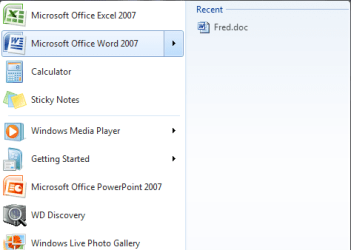
I have installed MS Office 7 and I have pinned both Word and Excel to the start menu. On my old machine, when I opened a document, that document would later appear on a sub-window of the start menu. The system would add a little arrow on the right end of the Microsoft Word entry, for example, and hovering over the arrow would display the recently opened items associated with MS Word. I cannot get that arrow and file list to appear in the start menu on the new computer. I have been through the customize process, but nothing I do fixes this issue.

Is there a "secret handshake" that I don't know? I realize this is a nit, but it is bugging me, big time!

Hank
 

My Computer

Computer Manufacturer/Model Number
HP DV6-2170US
OS
Win7
CPU
Intel Core i5-430M
Memory
4GB
Windows 7 is a bit different. If you open an excel document or a word document, it appears in the task bar at the bottom. You put your mouse over the icon and you can see the document.

If you do not have this feature type task bar, in search, and make sure it is properly set.
 
Last edited:

My Computer

Computer type
PC/Desktop
Computer Manufacturer/Model Number
Dell XPS 420
OS
Windows 10, Home Clean Install
CPU
Intel Core2 processsor Q8200(2.33Ghz 1333FSB) Quad Core Tech
Motherboard
Dell
Memory
6 gb
Graphics Card(s)
ATI Radeon 256MB HD3650
Sound Card
Intergrated 7.1 Channel Audio
Monitor(s) Displays
Dell SP2009W 20"
Hard Drives
640 GB Serial ATA Hard drive
Cooling
Fan
Keyboard
Dell USB Keyboard
Mouse
Dell Premium Optical USB
Internet Speed
DSL 2.85
You are missing my point/question. The upgraded Win7 machine gives me the document as shown in the photo. My new machine (also Win7) does not. But both are running Win7 Home Premium.

The issue is with the Start Menu. If I want to open that same document later, I go to the Start Menu, highlight MS Word, click on the little arrow and see the Recent Items listed to the right in the sub-window that the little arrow opens.
 

Attachments

  • ntitled.png
    ntitled.png
    10.9 KB · Views: 17

My Computer

Computer Manufacturer/Model Number
HP DV6-2170US
OS
Win7
CPU
Intel Core i5-430M
Memory
4GB
No worries on missing my original point. Perhaps I wasn't clear. :)

I have already tried PINning the programs to the start menu and the task bar. Neither has worked. I have PINned and unPINned them several times... I realize it's a nit, but it is truly annoying me.
 

My Computer

Computer Manufacturer/Model Number
HP DV6-2170US
OS
Win7
CPU
Intel Core i5-430M
Memory
4GB

My Computer

Computer type
PC/Desktop
Computer Manufacturer/Model Number
Dell XPS 420
OS
Windows 10, Home Clean Install
CPU
Intel Core2 processsor Q8200(2.33Ghz 1333FSB) Quad Core Tech
Motherboard
Dell
Memory
6 gb
Graphics Card(s)
ATI Radeon 256MB HD3650
Sound Card
Intergrated 7.1 Channel Audio
Monitor(s) Displays
Dell SP2009W 20"
Hard Drives
640 GB Serial ATA Hard drive
Cooling
Fan
Keyboard
Dell USB Keyboard
Mouse
Dell Premium Optical USB
Internet Speed
DSL 2.85
Do the following: Right click on the taskbar (or orb) > Properties > Start menu button > Customize > roll down to where it says "Open submenus when I pause on them with the mouse pointer" (it is under "O") > check the box in front of that > OK > Apply.
 

My Computer

Computer Manufacturer/Model Number
HP, Dell, Gateway, Toshiba - 4 laptops and 2 desktops
OS
Vista, Windows7, Mint Mate, Zorin, Windows 8
CPU
from 1.6GHz Duo to i7
Monitor(s) Displays
2x HP w2207
Hard Drives
5x HDD, 7x SSD, 12x Externals
Keyboard
with trackball - no mices
Mouse
Trackball mice
Internet Speed
DSL 6000
Do the following: Right click on the taskbar (or orb) > Properties > Start menu button > Customize > roll down to where it says "Open submenus when I pause on them with the mouse pointer" (it is under "O") > check the box in front of that > OK > Apply.

Sorry, no dice. I had already checked that... and tried unchecking, saving and then rechecking and saving. Still doesn't work.
 

My Computer

Computer Manufacturer/Model Number
HP DV6-2170US
OS
Win7
CPU
Intel Core i5-430M
Memory
4GB
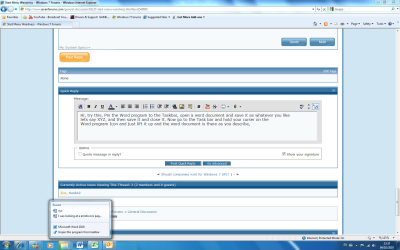
Hi, try this, Pin the Word program to the Taskbar, open a word document and save it as whatever you like
lets say XYZ, and then save it and close it. Now go to the Task bar and hold your curser on the
Word program Icon and just lift it up and the word document is there as you describe,
Have a look at the pic, I hope this is what you mean.


xyz.png
 

My Computer

Computer Manufacturer/Model Number
Self Build 64bit
OS
Vista Ult64, Win7600
CPU
Intel Core 2 Quad Q6600 @ 2400 MHz 64bit OS
Motherboard
Asus P5E3 Deluxe WiFi @p 64 bit OS
Memory
4096 MB DDR3-SDRAM
Graphics Card(s)
ATI Radeon HD 3870 Series x2 Crossfired
Sound Card
Realtek on board
Monitor(s) Displays
Samsung SyncMaster - 23 inches
Screen Resolution
1680x1050 pixels at 60 Hz in True Colors
Hard Drives
Hitachi (250 GB)/Samsung 750 GB. /Barracuda 160 GB.
My Book 1 TB external..
PSU
Cooler Master 1000w
Case
Cooler Master Cosmos 1000.
Cooling
Fans and fresh air,
Keyboard
Wireless
Mouse
Wireless
Internet Speed
Never fast enough
Other Info
I use a Magnum.
I just checked and it all works exactly how you want on my box. So the good news its possible! Jumplists are the thing you are trying to have function, but i didnt change anything for them to work, so maybe inadvertantly you have changed your jumplists from default actions?
 

My Computer

Computer Manufacturer/Model Number
HP dv6519tx
OS
Windows 7 Ultimate x64
CPU
1.80 GHz Intel Core 2 Duo processor T7100
Memory
3 gig ddr2
Graphics Card(s)
NVIDIA GeForce 8400M GS
Sound Card
Realtek High Definition Audio
Monitor(s) Displays
15.4” WXGA High Definition BrightView Widescreen
Screen Resolution
1280 x 800
Hard Drives
Hitachi 320 GB (5400 rpm)
PSU
90 W AC Power Adapter
Cooling
Kitchen plate under the lappy
Keyboard
101 key compatible
Mouse
Touch Pad with On/Off button and dedicated vertical Scroll
Internet Speed
Three Wireless internet prepaid using E160G USB dongle
Ok, I seem to be having problems communicating what the issue/problem is. Let's try it again, from the top. My previous WIN7 installation (different computer) had little arrow marks by some programs (Word, Excel, Notepad, Windows Media Player, to name a few) in the Start Menu. These marks indicated that the program had been used to open files (Word docs, etc). If I click on the little arrow mark, it opened a sub-window to the right of the start menu and it listed all of the files recently opened by that program. (See the picture attached to post #3.)

I have replaced that computer with a new one, and on this one, I cannot get the little arrow marks (or the associated "Recent" file list) to show up in the Start Menu. I have compared all of the settings associated with CUSTOMIZING the START MENU between the two machines and the checks and options are identical.
 

My Computer

Computer Manufacturer/Model Number
HP DV6-2170US
OS
Win7
CPU
Intel Core i5-430M
Memory
4GB
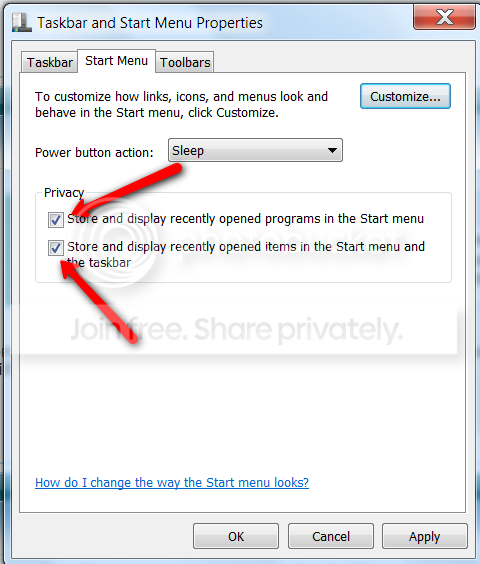
Check also whether these 2 boxes are checked.

2010-02-04_1908.png
 

My Computer

Computer Manufacturer/Model Number
HP, Dell, Gateway, Toshiba - 4 laptops and 2 desktops
OS
Vista, Windows7, Mint Mate, Zorin, Windows 8
CPU
from 1.6GHz Duo to i7
Monitor(s) Displays
2x HP w2207
Hard Drives
5x HDD, 7x SSD, 12x Externals
Keyboard
with trackball - no mices
Mouse
Trackball mice
Internet Speed
DSL 6000
Ok I understand what you are trying to achieve, did you try what I was saying and if you did,
did it work, I need to know that first.
 

My Computer

Computer Manufacturer/Model Number
Self Build 64bit
OS
Vista Ult64, Win7600
CPU
Intel Core 2 Quad Q6600 @ 2400 MHz 64bit OS
Motherboard
Asus P5E3 Deluxe WiFi @p 64 bit OS
Memory
4096 MB DDR3-SDRAM
Graphics Card(s)
ATI Radeon HD 3870 Series x2 Crossfired
Sound Card
Realtek on board
Monitor(s) Displays
Samsung SyncMaster - 23 inches
Screen Resolution
1680x1050 pixels at 60 Hz in True Colors
Hard Drives
Hitachi (250 GB)/Samsung 750 GB. /Barracuda 160 GB.
My Book 1 TB external..
PSU
Cooler Master 1000w
Case
Cooler Master Cosmos 1000.
Cooling
Fans and fresh air,
Keyboard
Wireless
Mouse
Wireless
Internet Speed
Never fast enough
Other Info
I use a Magnum.

My Computer

Computer Manufacturer/Model Number
HP DV6-2170US
OS
Win7
CPU
Intel Core i5-430M
Memory
4GB
Ok I understand what you are trying to achieve, did you try what I was saying and if you did,
did it work, I need to know that first.

Ok, I did what you suggested. It worked for MS Word, but it did not work for MS Excel.
 

My Computer

Computer Manufacturer/Model Number
HP DV6-2170US
OS
Win7
CPU
Intel Core i5-430M
Memory
4GB
hank: i would compare your start menu properties between the two computers. eventhough i do not think that this is your problem.

but, i would check if word is set to show in word recent files etc.. the start menu might be taking the list from there.
 

My Computer

Computer type
PC/Desktop
Computer Manufacturer/Model Number
surface pro 1
OS
windows 8.1 pro
CPU
Intel Core i5
Memory
4096 MB
Screen Resolution
1920 x 1080 x 59 hertz
hank: i would compare your start menu properties between the two computers. eventhough i do not think that this is your problem.

but, i would check if word is set to show in word recent files etc.. the start menu might be taking the list from there.

Thanks for the suggestion, but there was nothing there to be changed to enable it. Word is playing nice, Excel is not. Grrr.
 

My Computer

Computer Manufacturer/Model Number
HP DV6-2170US
OS
Win7
CPU
Intel Core i5-430M
Memory
4GB
Still looking for an answer to this one. It appears the issue of NO jumplist only applies to Excel. I have jumplists associated with the Start Menu entries for MS Word, MS Expression Web 3, MS IE 8, VLC Media player and a few others... but still nothing for Excel.

One "sort of" workaround was to install Hedgehog's JumpList Launcher app. It's OK, but not as "clean" as having the Excel jumplist in the Win7 Start Menu.
 

My Computer

Computer Manufacturer/Model Number
HP DV6-2170US
OS
Win7
CPU
Intel Core i5-430M
Memory
4GB
When you select the program at the Start All Programs, Don't start it, right click on it and Select
Pin to Start Menu. When it is pinned to the Start Menu you will then have the arrow that you
are talking about to link you to the last open pages, as per your photo on the first page.
 

My Computer

Computer Manufacturer/Model Number
Self Build 64bit
OS
Vista Ult64, Win7600
CPU
Intel Core 2 Quad Q6600 @ 2400 MHz 64bit OS
Motherboard
Asus P5E3 Deluxe WiFi @p 64 bit OS
Memory
4096 MB DDR3-SDRAM
Graphics Card(s)
ATI Radeon HD 3870 Series x2 Crossfired
Sound Card
Realtek on board
Monitor(s) Displays
Samsung SyncMaster - 23 inches
Screen Resolution
1680x1050 pixels at 60 Hz in True Colors
Hard Drives
Hitachi (250 GB)/Samsung 750 GB. /Barracuda 160 GB.
My Book 1 TB external..
PSU
Cooler Master 1000w
Case
Cooler Master Cosmos 1000.
Cooling
Fans and fresh air,
Keyboard
Wireless
Mouse
Wireless
Internet Speed
Never fast enough
Other Info
I use a Magnum.
Yep. That works for every app that I have tried it on...except MS Excel. It it pinned to the Start Menu, but NO jumplist for Excel.
 

My Computer

Computer Manufacturer/Model Number
HP DV6-2170US
OS
Win7
CPU
Intel Core i5-430M
Memory
4GB
Back
Top