
You are using an out of date browser. It may not display this or other websites correctly.
You should upgrade or use an alternative browser.
You should upgrade or use an alternative browser.
Start Menu
- Thread starter vmaucoin2
- Start date
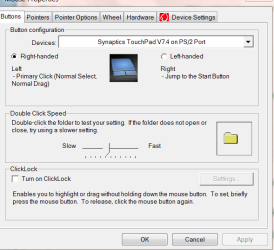
Check the mouse settings to see what the right button is set to do.
My Computer
- Computer Manufacturer/Model Number
- Built be Me
- OS
- Windows 7 Pro x64
- CPU
- i5 760
- Motherboard
- Asus P7P55D-E Pro
- Memory
- 16GB
- Graphics Card(s)
- Nvidia GTS450
- Sound Card
- On board
- Monitor(s) Displays
- Dell 2007WFP Dell 1800FP
- Screen Resolution
- 1680x1050 1280x1024
- Hard Drives
- Seagate 250GB & 750GB
WD 1TB
- PSU
- Antec 750
- Case
- In Win
- Cooling
- Cooler Master Hyper 212+
- Keyboard
- IBM
- Mouse
- MS
- Local time
- 7:10 PM
- Messages
- 2,039
Check your mouse settings in the control panel;

If that does not solve the problem, download and run this;
Malwarebytes
to see if malware is affecting your system.
Regards....Mike Connor

If that does not solve the problem, download and run this;
Malwarebytes
to see if malware is affecting your system.
Regards....Mike Connor
My Computer
- OS
- Several, including Windows 7 x64 Ultimate
- Local time
- 7:10 PM
- Messages
- 2,039
You have your right "mouse", ( actually the Synaptics touch equivalent), button, set to open the start menu. You need to change that back to the default setting. In "Device Settings".
Regards....Mike Connor
Regards....Mike Connor
My Computer
- OS
- Several, including Windows 7 x64 Ultimate

- Local time
- 7:10 PM
- Messages
- 2,039