Start minimized

marios1441

New member
Local time
12:20 PM
Messages
88
I'm looking for a way or program for Windows XP and Windows 7 that will autostart a program on windows startup and run it minimized. I tried making a shortcut to the Startup folder and program starts in open window again. Specifically i tried Skype and i need the way or program for Skype because the autostart feature goes away once a while.
 

My Computer

Computer type
PC/Desktop
OS
Windows 7 Ultimate 64-bit
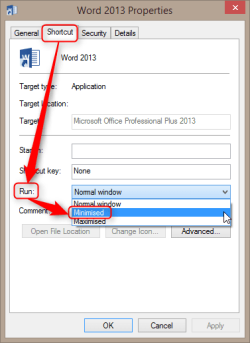
To start a program minimized, open its shortcut properties and select Run: Minimized:

2014-06-28_14h42_19.png

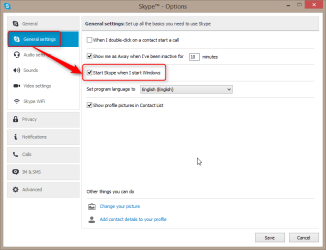
In case of Skype you don't need to manually put it in Startup folder. Simply set it to run when Windows is started and it will automatically run minimized:

2014-06-28_14h41_10.png

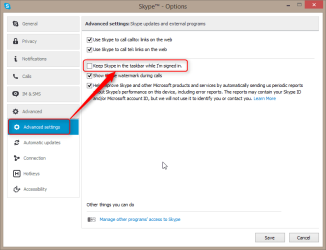
You might also want to prevent Skype showing in Taskbar when its running minimized in notification area:

2014-06-28_14h45_31.png

Kari
 

My Computer

Computer type
Laptop
Computer Manufacturer/Model Number
HP ENVY 17-1150eg
OS
Windows 10 Pro x64 EN-GB
CPU
1.6 GHz Intel Core i7-720QM Processor
Memory
6 GB
Graphics Card(s)
ATI Mobility Radeon HD 5850 Graphics
Sound Card
Beats sound system with integrated subwoofer
Monitor(s) Displays
17" laptop display, 22" LED and 32" Full HD TV through HDMI
Screen Resolution
1600*900 (1), 1920*1080 (2&3)
Hard Drives
Internal: 2 x 500 GB SATA Hard Disk Drive 7200 rpm
External: 2TB for backups, 3TB USB3 network drive for media
Cooling
As Envy runs a bit warm, I have it on a Cooler Master pad
Keyboard
Logitech diNovo Media Desktop Laser (bluetooth)
Mouse
Logitech Performance Mouse MX
Internet Speed
50/10 Mbps VDSL
Antivirus
Windows Defender 4.3.9431.0
Browser
Maxthon 3.5.2., IE11
To start a program minimized, open its shortcut properties and select Run: Minimized:


In case of Skype you don't need to manually put it in Startup folder. Simply set it to run when Windows is started and it will automatically run minimized:


You might also want to prevent Skype showing in Taskbar when its running minimized in notification area:


Kari
I have a problem with a friends pc that he brings me continually his pc for ticking the 'Automatically start with Windows' selection on Skype because it unticks by itself so i want to run Skype on Windows startup manually. He has a Windows XP OS because his machine is very old and slow to run anything newer.
 

My Computer

Computer type
PC/Desktop
OS
Windows 7 Ultimate 64-bit
To start a program minimized, open its shortcut properties and select Run: Minimized:


In case of Skype you don't need to manually put it in Startup folder. Simply set it to run when Windows is started and it will automatically run minimized:


You might also want to prevent Skype showing in Taskbar when its running minimized in notification area:


Kari
I also modified its shortcut like you said and still Skype dos not run minimized and runs at open window.
 

My Computer

Computer type
PC/Desktop
OS
Windows 7 Ultimate 64-bit
I would try this:
  • Delete the Skype shortcut from Startup folder
  • Uninstall skype
  • Reboot
  • Reinstall Skype, set it to run when Windows starts from Skype settings, do not manually add anything to Startup
 

My Computer

Computer type
Laptop
Computer Manufacturer/Model Number
HP ENVY 17-1150eg
OS
Windows 10 Pro x64 EN-GB
CPU
1.6 GHz Intel Core i7-720QM Processor
Memory
6 GB
Graphics Card(s)
ATI Mobility Radeon HD 5850 Graphics
Sound Card
Beats sound system with integrated subwoofer
Monitor(s) Displays
17" laptop display, 22" LED and 32" Full HD TV through HDMI
Screen Resolution
1600*900 (1), 1920*1080 (2&3)
Hard Drives
Internal: 2 x 500 GB SATA Hard Disk Drive 7200 rpm
External: 2TB for backups, 3TB USB3 network drive for media
Cooling
As Envy runs a bit warm, I have it on a Cooler Master pad
Keyboard
Logitech diNovo Media Desktop Laser (bluetooth)
Mouse
Logitech Performance Mouse MX
Internet Speed
50/10 Mbps VDSL
Antivirus
Windows Defender 4.3.9431.0
Browser
Maxthon 3.5.2., IE11
I would try this:
  • Delete the Skype shortcut from Startup folder
  • Uninstall skype
  • Reboot
  • Reinstall Skype, set it to run when Windows starts from Skype settings, do not manually add anything to Startup
I already did. I also tried this by re-installing two times and installing again the Windows XP Professional 32-bit.
 

My Computer

Computer type
PC/Desktop
OS
Windows 7 Ultimate 64-bit
Maybe it's XP????
You could try a scheduled task that launches Skype (minimized shortcut) that is triggered at login.
 

My Computer

Computer type
Laptop
Computer Manufacturer/Model Number
HP Pavilion dv6-6c10us
OS
x64 (6.3.9600) Win8.1 Pro & soon dual boot x64 (6.1.7601) Win7_SP1 HomePrem
CPU
AMD A6-3420M APU with Radeon(tm) HD Graphics
Motherboard
Hewlett-Packard 1805
Memory
6.00 GB
Graphics Card(s)
AMD Radeon(TM) HD 6520G
Sound Card
(1) AMD High Definition Audio Device (2) IDT High Definiti
Monitor(s) Displays
HP W2072a 20" LCD (1600 x 900) @ 60 Hz
Screen Resolution
1366 x 768 x 32 bits (4294967296 colors) @ 60 Hz
Hard Drives
ST640LM0 00 HM641JI SATA Disk Device
Keyboard
Logitech k520 wireless KB
Mouse
Logitech m320 wireless mouse (bundled with KB)
Internet Speed
15/5 | 54 MB Wireless 'n'
Antivirus
Realtime: Defender or Avast | On-demand: Malwarebytes, ESET
Browser
IE 11 on Win8, IE 10 on win 7
Other Info
Media: [Gimp, Audacity, VLC] || Comm: [WEmail 2012, Skype] || Productivity: [OpenOffice,| Textpad] || Utils: [Sysinternals, cCleaner, Speccy, Defraggler]
Maybe it's XP????
You could try a scheduled task that launches Skype (minimized shortcut) that is triggered at login.

Do you know of an app?
 

My Computer

Computer type
PC/Desktop
OS
Windows 7 Ultimate 64-bit
An app??

I suggested using Task Scheduler, a native Windows utility, to manage a shortcut that runs minimized and is triggered at the user login.

Task Scheduler How-To

Kari previously described the shortcut.
 

My Computer

Computer type
Laptop
Computer Manufacturer/Model Number
HP Pavilion dv6-6c10us
OS
x64 (6.3.9600) Win8.1 Pro & soon dual boot x64 (6.1.7601) Win7_SP1 HomePrem
CPU
AMD A6-3420M APU with Radeon(tm) HD Graphics
Motherboard
Hewlett-Packard 1805
Memory
6.00 GB
Graphics Card(s)
AMD Radeon(TM) HD 6520G
Sound Card
(1) AMD High Definition Audio Device (2) IDT High Definiti
Monitor(s) Displays
HP W2072a 20" LCD (1600 x 900) @ 60 Hz
Screen Resolution
1366 x 768 x 32 bits (4294967296 colors) @ 60 Hz
Hard Drives
ST640LM0 00 HM641JI SATA Disk Device
Keyboard
Logitech k520 wireless KB
Mouse
Logitech m320 wireless mouse (bundled with KB)
Internet Speed
15/5 | 54 MB Wireless 'n'
Antivirus
Realtime: Defender or Avast | On-demand: Malwarebytes, ESET
Browser
IE 11 on Win8, IE 10 on win 7
Other Info
Media: [Gimp, Audacity, VLC] || Comm: [WEmail 2012, Skype] || Productivity: [OpenOffice,| Textpad] || Utils: [Sysinternals, cCleaner, Speccy, Defraggler]
An app??

I suggested using Task Scheduler, a native Windows utility, to manage a shortcut that runs minimized and is triggered at the user login.

Task Scheduler How-To

Kari previously described the shortcut.
Do you know where to download this app?
 

My Computer

Computer type
PC/Desktop
OS
Windows 7 Ultimate 64-bit
Do you know where to download this app?

It's NOT a separate program, it's a built-in thing in Windows, just follow the tutorial.
But anyway, the start minimized/maximized/normal option is a merely a sugerence passed from Windows to a starting program, but it's up to each one to honor it or not. It seems that Skype is buggy enough to ignore it. Just as a test, I tried with a shortcut to the calculator, and neither worked.
 

My Computer

Computer type
Laptop
Computer Manufacturer/Model Number
Toshiba Sattelite A665-S6092
OS
Windows 7 Ultimate x64
CPU
Intel Core i7-740QM
Memory
8 GB DDR3
Graphics Card(s)
NVIDIA GeForce 330GT
Screen Resolution
1366x768
Hard Drives
Samsung 840 SSD 500GB
1TB USB3 external HD
Cooling
Coolermaster Notepal U3 notebook cooling pad
Internet Speed
3mbps ASDL
Antivirus
ClamWin 0.98.7
Browser
Opera 12.17 x86 (main), Firefox 38 (sec), IE11 (last resort)
An app??

I suggested using Task Scheduler, a native Windows utility, to manage a shortcut that runs minimized and is triggered at the user login.

Task Scheduler How-To

Kari previously described the shortcut.
Do you know where to download this app?

Did you even read Slartybart's post you quoted?

Task Scheduler is a native, built-in Windows app.
 

My Computer

Computer type
Laptop
Computer Manufacturer/Model Number
HP ENVY 17-1150eg
OS
Windows 10 Pro x64 EN-GB
CPU
1.6 GHz Intel Core i7-720QM Processor
Memory
6 GB
Graphics Card(s)
ATI Mobility Radeon HD 5850 Graphics
Sound Card
Beats sound system with integrated subwoofer
Monitor(s) Displays
17" laptop display, 22" LED and 32" Full HD TV through HDMI
Screen Resolution
1600*900 (1), 1920*1080 (2&3)
Hard Drives
Internal: 2 x 500 GB SATA Hard Disk Drive 7200 rpm
External: 2TB for backups, 3TB USB3 network drive for media
Cooling
As Envy runs a bit warm, I have it on a Cooler Master pad
Keyboard
Logitech diNovo Media Desktop Laser (bluetooth)
Mouse
Logitech Performance Mouse MX
Internet Speed
50/10 Mbps VDSL
Antivirus
Windows Defender 4.3.9431.0
Browser
Maxthon 3.5.2., IE11
I'm looking for a way or program for Windows XP and Windows 7 that will autostart a program on windows startup and run it minimized. I tried making a shortcut to the Startup folder and program starts in open window again. Specifically i tried Skype and i need the way or program for Skype because the autostart feature goes away once a while.
The task scheduler/shortcut "solution" isn't very elegant.

Perhaps we should try to determine why the Skype autostart "goes away", fix that, and let Skype manage itself through preferences.

Marios, could you post the same Skype screenshots that Kari posted in post# 2.

Please also follow this tutorial to provide the current operating environment of your machine.
http://www.sevenforums.com/tutorials/311593-speccy-publish-snapshot-your-system-specs.html

You can do both of these on your friend's machine too - just be clear which machine the information pertains to when you post it. It can be as simple as putting XP Speccy, XP Skype or Win7 Speccy, Win7 Skype in the post titles (go advanced to show the title input field)

Thanks
 

My Computer

Computer type
Laptop
Computer Manufacturer/Model Number
HP Pavilion dv6-6c10us
OS
x64 (6.3.9600) Win8.1 Pro & soon dual boot x64 (6.1.7601) Win7_SP1 HomePrem
CPU
AMD A6-3420M APU with Radeon(tm) HD Graphics
Motherboard
Hewlett-Packard 1805
Memory
6.00 GB
Graphics Card(s)
AMD Radeon(TM) HD 6520G
Sound Card
(1) AMD High Definition Audio Device (2) IDT High Definiti
Monitor(s) Displays
HP W2072a 20" LCD (1600 x 900) @ 60 Hz
Screen Resolution
1366 x 768 x 32 bits (4294967296 colors) @ 60 Hz
Hard Drives
ST640LM0 00 HM641JI SATA Disk Device
Keyboard
Logitech k520 wireless KB
Mouse
Logitech m320 wireless mouse (bundled with KB)
Internet Speed
15/5 | 54 MB Wireless 'n'
Antivirus
Realtime: Defender or Avast | On-demand: Malwarebytes, ESET
Browser
IE 11 on Win8, IE 10 on win 7
Other Info
Media: [Gimp, Audacity, VLC] || Comm: [WEmail 2012, Skype] || Productivity: [OpenOffice,| Textpad] || Utils: [Sysinternals, cCleaner, Speccy, Defraggler]
Back
Top