Start Orb malfunctioning at startup.

Henadin

New member
Local time
7:38 PM
Messages
11
Each time I log onto my laptop the windows start orb begins as one I set it as a week ago and since restored back to the original. Then, after waiting a bit of time, the taskbar and start orb disappear. I'm assuming that it's resetting itself. Then the normal start orb returns. I'd prefer for the start orb to be customizable but I now understand the dangers of that so I will have to deal with the default. I've used windows 7 start orb changer several times and these problems are just occuring now. How can return to when everything was working properly. Unfortunately, I never created a backup of my system nor these files. All help is appreciated.

Thanks!
 

My Computer My Computer

Computer type
Laptop
Computer Manufacturer/Model Number
Samsung
OS
Windoes 7 Home Premium
Memory
4.00 Gigabytes
Graphics Card(s)
Intel Integrated Graphics
Hard Drives
500 gigabyte
Antivirus
avast
Browser
Opera
Try and do a system restore if you have not already done so. Click start, programs, accessories, system tools, system restore. Try and restore to a point and time before all the problems started. Hope this may help.

PS; you should ALWAYS make sure to backup anything important you know you cant lose due to the fact that hardware such as hard drives, and motherboards can suddenly die at any point and time for any reason.
 

My Computer My Computer

Computer type
PC/Desktop
Computer Manufacturer/Model Number
custom built
OS
Windows 7 ultimate 64-bit
CPU
Intel I7 2600K 3.4ghz
Motherboard
Asus Evo P8P67
Memory
Corsair 16gb ddr3 1600mhz
Graphics Card(s)
Nvidia Geforce gt 430
Sound Card
Sound Blaster Titanium x-fi pci express
Monitor(s) Displays
Dell E198WFP
Hard Drives
1 western digital 2TB drive.
PSU
Antec 1200 watt
Case
Inwin Dragon Rider
Cooling
6 case supplied cooling fans
Keyboard
logitech mk700
Mouse
logitech m705
Internet Speed
25-50mbps download; 10mbps upload(i think)
Antivirus
avg free 2014
Browser
mozilla firefox
Other Info
Also have a pretty bad speaker setup which is a klipsch promedia 5.1 surround speaker setup with huge subwoofer and lg blu ray player/writer. Also a hp officejet pro 8600 plus wireless all in one and a logitech s7500 webcam.
Before System Restore, I would recommend to run Windows System File Checker (SFC) with error correcting option (switch) SCANNOW. See this tutorial for instructions: http://www.sevenforums.com/tutorials/1538-sfc-scannow-command-system-file-checker.html

Please remember that quite often SFC cannot correct all errors it finds in one run. If so, it tells you it found and corrected some errors but could not correct all of them. In this case, just run SFC again as many times as needed for it to report it did not find any errors.

Personally I also reboot after every SFC /SCANNOW run before starting the next one, although not all geeks see this important.

Kari
 

My Computer My Computer

Computer type
Laptop
Computer Manufacturer/Model Number
HP ENVY 17-1150eg
OS
Windows 10 Pro x64 EN-GB
CPU
1.6 GHz Intel Core i7-720QM Processor
Memory
6 GB
Graphics Card(s)
ATI Mobility Radeon HD 5850 Graphics
Sound Card
Beats sound system with integrated subwoofer
Monitor(s) Displays
17" laptop display, 22" LED and 32" Full HD TV through HDMI
Screen Resolution
1600*900 (1), 1920*1080 (2&3)
Hard Drives
Internal: 2 x 500 GB SATA Hard Disk Drive 7200 rpm
External: 2TB for backups, 3TB USB3 network drive for media
Cooling
As Envy runs a bit warm, I have it on a Cooler Master pad
Keyboard
Logitech diNovo Media Desktop Laser (bluetooth)
Mouse
Logitech Performance Mouse MX
Internet Speed
50/10 Mbps VDSL
Antivirus
Windows Defender 4.3.9431.0
Browser
Maxthon 3.5.2., IE11
I like Kari alway restart after sfc /scannow and a problem was found.
I can't prove it but I think some things are repaired on a restart.
Then the next sfc /scannow get a fresh start to look for more problems.
Plus it cost nothing to restart and run another scan.
 

My Computer My Computer

Computer type
PC/Desktop
Computer Manufacturer/Model Number
Home made Desktop
OS
Windows 10 Pro. 64/ version 1709 Windows 7 Pro/64
CPU
Intel i7-6800K @ 4.3
Motherboard
ASUS X-99 Deluxe II
Memory
Corsair Platinum 16 gig @2400
Graphics Card(s)
EVGA GTX 1070 OC
Monitor(s) Displays
Asus 27" LED LCD/VE278Q
Screen Resolution
1920-1080 or 1280-720 HDMI
Hard Drives
INTEL SSD 730-240 Gb Sata 3.0/
PSU
EVGA Platium 1200W
Case
Phanteks Luxe Tempered Glass 8 fans/ one radiator
Cooling
XSPC/ Water Cooled CPU
Keyboard
Das 4 Professional
Mouse
Logitech M705/MX Anywhere 2-S
Internet Speed
100 mbits
Antivirus
Microsoft Security Essentials/ Malwarebytes Premium 3.0/ SAS
Browser
I.E. 11 default/Firefox/ ISP Time Warner Cable/Spectrum
Other Info
LG BluRay Burner/
Sound system-KLipsch-THX/
Icy Dock ssd Hot Swap bays.
Unfortunately there is no restore point to go back to. Unless I'mjust using th program improperly. I do appreciate the advice to set up a restore point though. I'm going to be sure to dot that to avoid these situations. Thanks

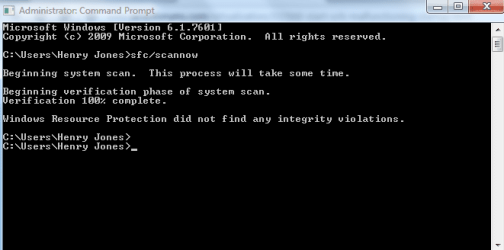
I'm running sfc/scannow
I'll let you know how it goes.

Thanks
 

My Computer My Computer

Computer type
Laptop
Computer Manufacturer/Model Number
Samsung
OS
Windoes 7 Home Premium
Memory
4.00 Gigabytes
Graphics Card(s)
Intel Integrated Graphics
Hard Drives
500 gigabyte
Antivirus
avast
Browser
Opera
I ran the sfc/scannow and this is what it showed. I attached a picture.
 

Attachments

  • Untitled.png
    Untitled.png
    9.3 KB · Views: 12

My Computer My Computer

Computer type
Laptop
Computer Manufacturer/Model Number
Samsung
OS
Windoes 7 Home Premium
Memory
4.00 Gigabytes
Graphics Card(s)
Intel Integrated Graphics
Hard Drives
500 gigabyte
Antivirus
avast
Browser
Opera
Back
Top