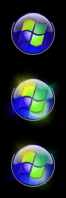
start orb replacement not displaying correctly

decibelle

New member
Local time
1:03 AM
Messages
72

Attachments

  • right orb.png
    right orb.png
    4.4 KB · Views: 28
  • light orb.png
    light orb.png
    3.3 KB · Views: 28

My Computer

Computer type
PC/Desktop
OS
XP Home, Windows 7 Professional 64-bit

My Computer

Computer type
Laptop
Computer Manufacturer/Model Number
Sager NP9170
OS
Win 7 Pro x64 / Win 10 Pro
CPU
Intel(R) Core(TM) i7-3630QM CPU @ 2.40GHz
Motherboard
CLEVO P170EM
Memory
12 GB
Graphics Card(s)
(1) Intel(R) HD Graphics 4000 (2) NVIDIA GeForce GTX 675M
Sound Card
(1) Realtek High Definition Audio (2) Intel(R) Display Aud
Monitor(s) Displays
17.3
Screen Resolution
1920x1080
Hard Drives
(1) Samsung 860 EVO 500GB(OS) (1) Samsung 860 EVO 500GB(Data)
Keyboard
Backlite
Antivirus
MSE, Malwarebytes Pro
Browser
Firefox
Other Info
DESKTOP: Custom-built.
OS: Win 10 Pro x64.
CASE: Rosewill R5.
CPU: Intel I5 4670K CPU @ 3.40GHz.
CPU COOLER: Cool Master Hyper 212 EVO.
MOTHERBOARD: Asus Z87-A.
MEMORY: Kingston HyperX 2x4 GB.
GPU: Nvidia Geforce 650 TI.
PSU: Corsair TX750.
DRIVES: (1) Samsung 840 120 GB SSD (2) Western Digital blue 500 GB 7200 RPM.
I did it manually, with ResHacker. I guess I'll try it with that app, but it seems that it's not a matter of how I did it, but how it gets displayed afterward. But I'll get back to you after I try the other way.
 

My Computer

Computer type
PC/Desktop
OS
XP Home, Windows 7 Professional 64-bit
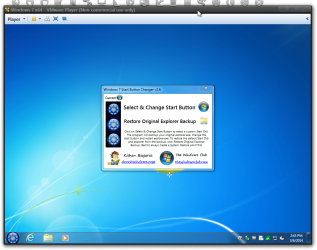
I used the app, and it's working now, but I'm only getting the first state of the button, no hover, no pressed. I'm using of 125% DPI setting, if that offers any clues. What could be wrong?
 

My Computer

Computer type
PC/Desktop
OS
XP Home, Windows 7 Professional 64-bit
It's most likely the DPI setting doing it.

Jerry

Edit: Just tested and it is the DPI.
 

My Computer

Computer type
Laptop
Computer Manufacturer/Model Number
Sager NP9170
OS
Win 7 Pro x64 / Win 10 Pro
CPU
Intel(R) Core(TM) i7-3630QM CPU @ 2.40GHz
Motherboard
CLEVO P170EM
Memory
12 GB
Graphics Card(s)
(1) Intel(R) HD Graphics 4000 (2) NVIDIA GeForce GTX 675M
Sound Card
(1) Realtek High Definition Audio (2) Intel(R) Display Aud
Monitor(s) Displays
17.3
Screen Resolution
1920x1080
Hard Drives
(1) Samsung 860 EVO 500GB(OS) (1) Samsung 860 EVO 500GB(Data)
Keyboard
Backlite
Antivirus
MSE, Malwarebytes Pro
Browser
Firefox
Other Info
DESKTOP: Custom-built.
OS: Win 10 Pro x64.
CASE: Rosewill R5.
CPU: Intel I5 4670K CPU @ 3.40GHz.
CPU COOLER: Cool Master Hyper 212 EVO.
MOTHERBOARD: Asus Z87-A.
MEMORY: Kingston HyperX 2x4 GB.
GPU: Nvidia Geforce 650 TI.
PSU: Corsair TX750.
DRIVES: (1) Samsung 840 120 GB SSD (2) Western Digital blue 500 GB 7200 RPM.
You're right. Can it be fixed?
 

My Computer

Computer type
PC/Desktop
OS
XP Home, Windows 7 Professional 64-bit
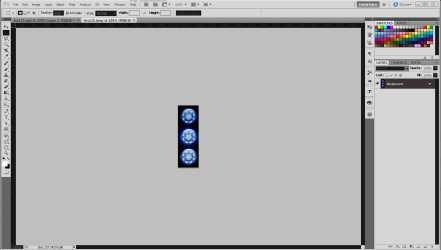
I think so, you need to edit the explorer.exe again and change 6807.bmp it's for 125% DPI

I edited the size of the start orb so it should work, it's in the zip folder at the bottom of this post.

Jerry
 

Attachments

My Computer

Computer type
Laptop
Computer Manufacturer/Model Number
Sager NP9170
OS
Win 7 Pro x64 / Win 10 Pro
CPU
Intel(R) Core(TM) i7-3630QM CPU @ 2.40GHz
Motherboard
CLEVO P170EM
Memory
12 GB
Graphics Card(s)
(1) Intel(R) HD Graphics 4000 (2) NVIDIA GeForce GTX 675M
Sound Card
(1) Realtek High Definition Audio (2) Intel(R) Display Aud
Monitor(s) Displays
17.3
Screen Resolution
1920x1080
Hard Drives
(1) Samsung 860 EVO 500GB(OS) (1) Samsung 860 EVO 500GB(Data)
Keyboard
Backlite
Antivirus
MSE, Malwarebytes Pro
Browser
Firefox
Other Info
DESKTOP: Custom-built.
OS: Win 10 Pro x64.
CASE: Rosewill R5.
CPU: Intel I5 4670K CPU @ 3.40GHz.
CPU COOLER: Cool Master Hyper 212 EVO.
MOTHERBOARD: Asus Z87-A.
MEMORY: Kingston HyperX 2x4 GB.
GPU: Nvidia Geforce 650 TI.
PSU: Corsair TX750.
DRIVES: (1) Samsung 840 120 GB SSD (2) Western Digital blue 500 GB 7200 RPM.
Thanks for resizing for me. That's an improvement -- I get all three states -- but now it's too big. I think I can resize it, if you tell me what to try.
 

Attachments

  • too big.png
    too big.png
    2.8 KB · Views: 20

My Computer

Computer type
PC/Desktop
OS
XP Home, Windows 7 Professional 64-bit
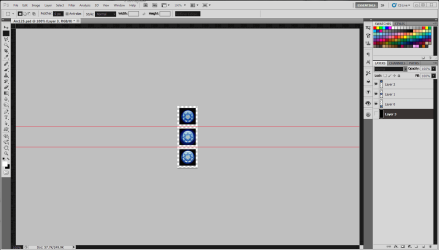
You need to open the .bmp in a image editor and split it into 3 layers and resize each image in each layer then make a black background on the bottom and save as a .bmp.
The one in the screenshot is in the zip.

Jerry
1.PNG
Capture.PNG
3.PNG
 

Attachments

My Computer

Computer type
Laptop
Computer Manufacturer/Model Number
Sager NP9170
OS
Win 7 Pro x64 / Win 10 Pro
CPU
Intel(R) Core(TM) i7-3630QM CPU @ 2.40GHz
Motherboard
CLEVO P170EM
Memory
12 GB
Graphics Card(s)
(1) Intel(R) HD Graphics 4000 (2) NVIDIA GeForce GTX 675M
Sound Card
(1) Realtek High Definition Audio (2) Intel(R) Display Aud
Monitor(s) Displays
17.3
Screen Resolution
1920x1080
Hard Drives
(1) Samsung 860 EVO 500GB(OS) (1) Samsung 860 EVO 500GB(Data)
Keyboard
Backlite
Antivirus
MSE, Malwarebytes Pro
Browser
Firefox
Other Info
DESKTOP: Custom-built.
OS: Win 10 Pro x64.
CASE: Rosewill R5.
CPU: Intel I5 4670K CPU @ 3.40GHz.
CPU COOLER: Cool Master Hyper 212 EVO.
MOTHERBOARD: Asus Z87-A.
MEMORY: Kingston HyperX 2x4 GB.
GPU: Nvidia Geforce 650 TI.
PSU: Corsair TX750.
DRIVES: (1) Samsung 840 120 GB SSD (2) Western Digital blue 500 GB 7200 RPM.
All right, that explains a lot, because I resized it the first time as one image and it didn't work. Could you please specify exactly how much to resize? Am I correct in that the width is supposed to be 66 pixels for 125% DPI? So, just resize each image retaining proportions to 66 pixels in width?
 

My Computer

Computer type
PC/Desktop
OS
XP Home, Windows 7 Professional 64-bit
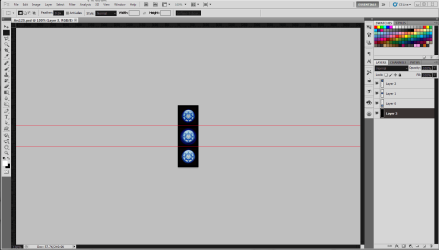
The size should be the 81 pixels by 243 pixels, so each state is 81 x 81 pixels.

After you have split it into three 81 x 81 pixel layers you'll need to select one layer and resize the image with in that layer with most image editors it will be under Layers in the menu bar and then maybe something like Modify and then resize or size and then you will reduce it by a certain percentage which will be trial and error, and then do the other two layers exactly the same. When done you should still have a 81 pixel by 243 pixel image but each section should be smaller.

Jerry
 

My Computer

Computer type
Laptop
Computer Manufacturer/Model Number
Sager NP9170
OS
Win 7 Pro x64 / Win 10 Pro
CPU
Intel(R) Core(TM) i7-3630QM CPU @ 2.40GHz
Motherboard
CLEVO P170EM
Memory
12 GB
Graphics Card(s)
(1) Intel(R) HD Graphics 4000 (2) NVIDIA GeForce GTX 675M
Sound Card
(1) Realtek High Definition Audio (2) Intel(R) Display Aud
Monitor(s) Displays
17.3
Screen Resolution
1920x1080
Hard Drives
(1) Samsung 860 EVO 500GB(OS) (1) Samsung 860 EVO 500GB(Data)
Keyboard
Backlite
Antivirus
MSE, Malwarebytes Pro
Browser
Firefox
Other Info
DESKTOP: Custom-built.
OS: Win 10 Pro x64.
CASE: Rosewill R5.
CPU: Intel I5 4670K CPU @ 3.40GHz.
CPU COOLER: Cool Master Hyper 212 EVO.
MOTHERBOARD: Asus Z87-A.
MEMORY: Kingston HyperX 2x4 GB.
GPU: Nvidia Geforce 650 TI.
PSU: Corsair TX750.
DRIVES: (1) Samsung 840 120 GB SSD (2) Western Digital blue 500 GB 7200 RPM.
The 81x81 seems too big, I thought. It overflows the task bar.

Also, in the original explorer.exe, the midsize graphic is 66 x 198.
 

Attachments

  • overflow.png
    overflow.png
    4.2 KB · Views: 12
  • too big.png
    too big.png
    2.5 KB · Views: 12

My Computer

Computer type
PC/Desktop
OS
XP Home, Windows 7 Professional 64-bit
I was going by image #6807 which is 81 x 243 pixels.

Jerry
 

My Computer

Computer type
Laptop
Computer Manufacturer/Model Number
Sager NP9170
OS
Win 7 Pro x64 / Win 10 Pro
CPU
Intel(R) Core(TM) i7-3630QM CPU @ 2.40GHz
Motherboard
CLEVO P170EM
Memory
12 GB
Graphics Card(s)
(1) Intel(R) HD Graphics 4000 (2) NVIDIA GeForce GTX 675M
Sound Card
(1) Realtek High Definition Audio (2) Intel(R) Display Aud
Monitor(s) Displays
17.3
Screen Resolution
1920x1080
Hard Drives
(1) Samsung 860 EVO 500GB(OS) (1) Samsung 860 EVO 500GB(Data)
Keyboard
Backlite
Antivirus
MSE, Malwarebytes Pro
Browser
Firefox
Other Info
DESKTOP: Custom-built.
OS: Win 10 Pro x64.
CASE: Rosewill R5.
CPU: Intel I5 4670K CPU @ 3.40GHz.
CPU COOLER: Cool Master Hyper 212 EVO.
MOTHERBOARD: Asus Z87-A.
MEMORY: Kingston HyperX 2x4 GB.
GPU: Nvidia Geforce 650 TI.
PSU: Corsair TX750.
DRIVES: (1) Samsung 840 120 GB SSD (2) Western Digital blue 500 GB 7200 RPM.
What works for me is 6802, which is 66 x 198. It works in explorer.exe, obviously, and if I export it on to my desktop or wherever, and use it with that start button app, it works that way too.

So why, when I took that very file, 6802, and just shifted the colors, not touching the size at all, did it not work? Is there some very limited palette of colors that work and everything outside that screws things up? Here's what it looks like when I change the colors. The bmp file is shown here as a png.
 

Attachments

  • too light.png
    too light.png
    1.5 KB · Views: 11
  • too light hover.png
    too light hover.png
    2.3 KB · Views: 11
  • orig start orb color shift.png
    orig start orb color shift.png
    5.4 KB · Views: 11

My Computer

Computer type
PC/Desktop
OS
XP Home, Windows 7 Professional 64-bit
What works for me is 6802, which is 66 x 198. It works in explorer.exe, obviously, and if I export it on to my desktop or wherever, and use it with that start button app, it works that way too.
Did you go to 100% on DPI if so that's way.


So why, when I took that very file, 6802, and just shifted the colors, not touching the size at all, did it not work? Is there some very limited palette of colors that work and everything outside that screws things up? Here's what it looks like when I change the colors. The bmp file is shown here as a png.
I am not sure.

Jerry
 

My Computer

Computer type
Laptop
Computer Manufacturer/Model Number
Sager NP9170
OS
Win 7 Pro x64 / Win 10 Pro
CPU
Intel(R) Core(TM) i7-3630QM CPU @ 2.40GHz
Motherboard
CLEVO P170EM
Memory
12 GB
Graphics Card(s)
(1) Intel(R) HD Graphics 4000 (2) NVIDIA GeForce GTX 675M
Sound Card
(1) Realtek High Definition Audio (2) Intel(R) Display Aud
Monitor(s) Displays
17.3
Screen Resolution
1920x1080
Hard Drives
(1) Samsung 860 EVO 500GB(OS) (1) Samsung 860 EVO 500GB(Data)
Keyboard
Backlite
Antivirus
MSE, Malwarebytes Pro
Browser
Firefox
Other Info
DESKTOP: Custom-built.
OS: Win 10 Pro x64.
CASE: Rosewill R5.
CPU: Intel I5 4670K CPU @ 3.40GHz.
CPU COOLER: Cool Master Hyper 212 EVO.
MOTHERBOARD: Asus Z87-A.
MEMORY: Kingston HyperX 2x4 GB.
GPU: Nvidia Geforce 650 TI.
PSU: Corsair TX750.
DRIVES: (1) Samsung 840 120 GB SSD (2) Western Digital blue 500 GB 7200 RPM.
>Did you go to 100% on DPI if so that's why.<

No, what I mean is it works for 125%.
 

My Computer

Computer type
PC/Desktop
OS
XP Home, Windows 7 Professional 64-bit
I've experimented with a bunch of variations in sizing and color, and I can't seem to change the color of an existing for without running into that same weird color washout problem, no matter what the DPI setting. It's completely baffling.
 

My Computer

Computer type
PC/Desktop
OS
XP Home, Windows 7 Professional 64-bit
Back
Top