Start Orb

mj452312

New member
Local time
6:44 AM
Messages
7
Anyone able to change the start orb by modifying explorer.exe in any x64 build later than 7100?

I've swapped bitmaps and reshacker is showing the right modified orb images for explorer.exe, it's just not working on the actual taskbar....any ideas???:sarc:
 

My Computer

Computer Manufacturer/Model Number
Dell Studio XPS
OS
Windows 7229 x64
CPU
Intel P9500
Memory
4GB
Graphics Card(s)
Nvidia 9500m
Hard Drives
128GB SSD
There is another explorer.exe in SysWOW64 and it also contains the start orb images so you may have more luck if you change those as well.
 

My Computer

Computer Manufacturer/Model Number
Home Brew
OS
Windows 7 Ultimate Vista Ultimate x64
CPU
Core 2 Duo E8500 3.16Ghz @ 3.8Ghz
Motherboard
eVGA 750i FTW
Memory
2x2Gigs Patriot PC2-6400 LL
Graphics Card(s)
Inno3D GeForce GTX260 216 SP
Monitor(s) Displays
ASUS VW222U 22" 2ms Response time
Screen Resolution
1680x1050
Hard Drives
SATA 150GB
SATA II 250GB
USB IDE 750GB Ext.
PSU
HYTEC 600W & Thermaltake 650W Toughpower Power Exp
Case
Thermaltake Armor LCS (Liquid Cooling System)
Cooling
Liquid Cooling System
Keyboard
Logitech G15 Gaming Keyboard
Mouse
Logitech G9 Gaming Mouse
There is another explorer.exe in SysWOW64 and it also contains the start orb images so you may have more luck if you change those as well.

Yes, I have done this for both explorer.exe's - still not working.
 

My Computer

Computer Manufacturer/Model Number
Dell Studio XPS
OS
Windows 7229 x64
CPU
Intel P9500
Memory
4GB
Graphics Card(s)
Nvidia 9500m
Hard Drives
128GB SSD
Did you replace all of the various sizes or just one in particular?
 

My Computer

Computer Manufacturer/Model Number
Home Brew
OS
Windows 7 Ultimate Vista Ultimate x64
CPU
Core 2 Duo E8500 3.16Ghz @ 3.8Ghz
Motherboard
eVGA 750i FTW
Memory
2x2Gigs Patriot PC2-6400 LL
Graphics Card(s)
Inno3D GeForce GTX260 216 SP
Monitor(s) Displays
ASUS VW222U 22" 2ms Response time
Screen Resolution
1680x1050
Hard Drives
SATA 150GB
SATA II 250GB
USB IDE 750GB Ext.
PSU
HYTEC 600W & Thermaltake 650W Toughpower Power Exp
Case
Thermaltake Armor LCS (Liquid Cooling System)
Cooling
Liquid Cooling System
Keyboard
Logitech G15 Gaming Keyboard
Mouse
Logitech G9 Gaming Mouse
6805 and 6801. I use 1280x800 resolution. Thanks for helping.
 

My Computer

Computer Manufacturer/Model Number
Dell Studio XPS
OS
Windows 7229 x64
CPU
Intel P9500
Memory
4GB
Graphics Card(s)
Nvidia 9500m
Hard Drives
128GB SSD
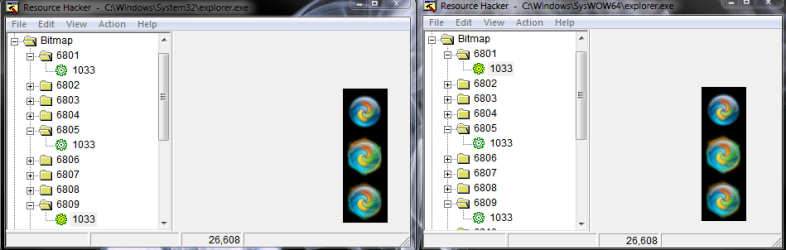
Also tried 6809...heres a cap of explorer.exe in reshacker showing the modified images. I can't see why this isn't working :mad:.
 

Attachments

  • Capture.PNG
    Capture.PNG
    24.5 KB · Views: 349

My Computer

Computer Manufacturer/Model Number
Dell Studio XPS
OS
Windows 7229 x64
CPU
Intel P9500
Memory
4GB
Graphics Card(s)
Nvidia 9500m
Hard Drives
128GB SSD
Isn't explorer for the 32bit supposed to be in just 'c:\windows' not 'c:\windows\system32' ?

I dont have one in my system32 folder here...
 

My Computer

Computer Manufacturer/Model Number
Self Built
OS
XP Pro SP3 x86/Vista SP2 x64/Win7 x64 Triple-boot
CPU
AMD64 X2 AM2 5000+
Motherboard
Asus MSN-X Plus
Memory
Corsair TWX 2Gb (2x1Gb) DDR2 800Mhz
Graphics Card(s)
PCI-X 2.0 Inno3D (NVidia) 9500GT 1Gb DDR2
Sound Card
Onboard Realtec ALC662-GR
Monitor(s) Displays
Relisys 17' CRT (model unknown)
Screen Resolution
1024x768
Hard Drives
750Gb Samsung 7200-3Gb/s 32Mb Cache SATA
PSU
500W
Cooling
Standard AMD CPU Fan, One side, front and rear case fan.
Keyboard
Microsoft Multimedia Keyboard
Mouse
Samsung Optical
Internet Speed
10M
RESOURCE HACKER!
that actually works on 7? cool.
it might not save it, if you dont open R:H with admin rights. also, are you doing the 'replacement' in safe mode?
 

My Computer

Computer Manufacturer/Model Number
eMachines W3502
OS
Windows 7 Ultimate x32
CPU
Intel Celeron D 3.2 Ghz 533 fsb (LGA 775)
Motherboard
Intel D101GGC
Memory
1 GB (2x512MB) PC-3200 DDR @ 200Mhz
Graphics Card(s)
Nvidia GeForce 9400GT- 1GB
Sound Card
Sound Blaster X-Fi Xtreame Gamer
Monitor(s) Displays
19" LCD HDtv
Screen Resolution
1360x768 @ 60Htz
Hard Drives
SeaGate Barracuda 750GB
SeaGate Barracuda 100GB
Toshiba CD/DVDW/ TS-H552D [DVD+R, DL]
PSU
stock (idk)
Case
The busted remains of the stock case
Cooling
Dust cooled, waitwut?
Keyboard
Stock. Missing a few keys.
Mouse
Logitech LX8 5-btn mouse (wireless)
Internet Speed
TWC 10Mb
Other Info
Keeps going, and going, and going.......
Hmm...when I tried to replace c:\windows\explorer.exe with a modified version, the modified version drew an error of "class not registered" so I had to switch back. :huh:
 

My Computer

Computer Manufacturer/Model Number
Dell Studio XPS
OS
Windows 7229 x64
CPU
Intel P9500
Memory
4GB
Graphics Card(s)
Nvidia 9500m
Hard Drives
128GB SSD
Hmm...when I tried to replace c:\windows\explorer.exe with a modified version, the modified version drew an error of "class not registered" so I had to switch back. :huh:

Hmmm... I'm struggling to even save it elsewhere nevermind overwriting it. I've done all the take ownership stuff (inc. booting into safe mode and even into XP/Vista and doing it from there!). :cry:

If you look at the first icon resource using Restorator it says it's an invalid resource. I've thrown it at about 5 or 6 different editors, even tried editing it in my Visual Studio res editor! I think this invalid icon has something to do with it.

ResHacker won't even open it here for me. its left-hand window is just an empty white space like nothing is being loaded. :mad:

It could be this build of Win7 we're both using is what I'm thinking now (build 7229 x64) because I know it's possible, I've seen altered one's about for Win7.
 

My Computer

Computer Manufacturer/Model Number
Self Built
OS
XP Pro SP3 x86/Vista SP2 x64/Win7 x64 Triple-boot
CPU
AMD64 X2 AM2 5000+
Motherboard
Asus MSN-X Plus
Memory
Corsair TWX 2Gb (2x1Gb) DDR2 800Mhz
Graphics Card(s)
PCI-X 2.0 Inno3D (NVidia) 9500GT 1Gb DDR2
Sound Card
Onboard Realtec ALC662-GR
Monitor(s) Displays
Relisys 17' CRT (model unknown)
Screen Resolution
1024x768
Hard Drives
750Gb Samsung 7200-3Gb/s 32Mb Cache SATA
PSU
500W
Cooling
Standard AMD CPU Fan, One side, front and rear case fan.
Keyboard
Microsoft Multimedia Keyboard
Mouse
Samsung Optical
Internet Speed
10M
Have you tried reshacker with 'run as admin' in safe mode?

I had a similar blank issue with user32.dll.mui when running reshacker normally. It worked fine in safemode :huh:
 

My Computer

Computer type
PC/Desktop
Computer Manufacturer/Model Number
Systems by SmartEyeball
OS
8 Pro x64
CPU
i7 3770K 4.6GHz
Motherboard
ASUS P8Z77 WS
Memory
16GB G.Skill Trident X 2666mhz
Graphics Card(s)
x2 EVGA 780 Ti Superclocked SLI
Sound Card
SB X-FI Surround 5.1 PRO USB / ATH-AD900 Headphones
Monitor(s) Displays
x3 Dell U2410 / 58" Samsung
Screen Resolution
5760*1200/ 1920*1200
Hard Drives
2x Intel 520 240GB (RAID 0) * 2x WD Caviar Blacks 2TB (RAID 0) * 2TB WD Caviar Black * Sony Optirac DVD
PSU
Silverstone Strider Evolution 1200W
Case
Thermaltake Level 10 GT Snow Edition
Cooling
Noctua NH-D14
Keyboard
Topre Realforce // Ducky Shine MX Black // Filco Ninja TKL
Mouse
Thermaltake Theron (Highly Recommended) + Razer Imperator
Antivirus
MSE
Browser
IE, FF, WaterFox
Other Info
GT Extreme V2 Sim Racing Cockpit + 40" LCD and K/B Mouse stand ▼
Fanatec CSR Elite Wheel + Clubsport V1 Pedals + CSR shifter/7G-H ▼Saitek X52 Pro ▼ TrackIR 5 Pro
Buttkicker v2 Seat Rumbler with Dedicated 5.1 and Sub Woofer attached to frame ▼
=
Bloody Big Grin
Yeah I tried every trick in the book mate, I was only trying to see if I could figure out mj452312's problem. I dont really want to change it that badly for myself.

I'm certain it's that icon I mentioned in my above post that must have a weird format compared to usual icons. The icon does show up in VS, I just cant save from a resource editor. (which it won't be able to if it thinks something is corrupted.)
 

My Computer

Computer Manufacturer/Model Number
Self Built
OS
XP Pro SP3 x86/Vista SP2 x64/Win7 x64 Triple-boot
CPU
AMD64 X2 AM2 5000+
Motherboard
Asus MSN-X Plus
Memory
Corsair TWX 2Gb (2x1Gb) DDR2 800Mhz
Graphics Card(s)
PCI-X 2.0 Inno3D (NVidia) 9500GT 1Gb DDR2
Sound Card
Onboard Realtec ALC662-GR
Monitor(s) Displays
Relisys 17' CRT (model unknown)
Screen Resolution
1024x768
Hard Drives
750Gb Samsung 7200-3Gb/s 32Mb Cache SATA
PSU
500W
Cooling
Standard AMD CPU Fan, One side, front and rear case fan.
Keyboard
Microsoft Multimedia Keyboard
Mouse
Samsung Optical
Internet Speed
10M
  • Like
Reactions: OEM
Back
Top