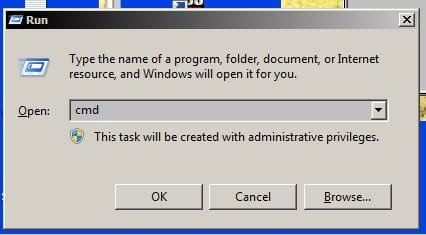
Start-Run combo always empty

wromack

New member
Local time
10:21 PM
Messages
1
Hello. I hope this is the right place to post my question.
I've Win7 Pro (64) and I see that che combo box Start-Run is always empty. The commands I write work, of course, but it doesn't save the history of commands (very useful): each command I write works but nothing remains in the box, not only after a restart but during the same session, too.
Thanks in advance for your help (and sorry for my Italian English).
 

My Computer

OS
Win7
Mine is doing the same as administrator but when i added another user on that one worked fine.
 

My Computer

Computer Manufacturer/Model Number
Acer Extensa / E series
OS
windows 7 home premium
CPU
AMD Sempron (tm) 3800 +2.20 GHz
Memory
4.50 GB
Monitor(s) Displays
View sonic VA 1926w
Screen Resolution
1440X900
Hard Drives
Hitatchi HDS721616PLA380
IOMEGA EXTERNAL HARD DRIVE HDD 13.0GB
Cooling
ACPI FAN
Keyboard
HID Compliant keyboard (trust)
Mouse
HID Compliant mouse (trust)
Internet Speed
3.50 mbs
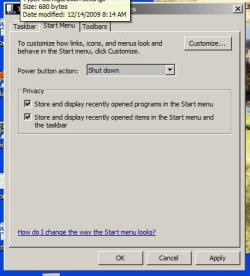
Right-click the Start button and choose properties.
Make sure "Store and display recently opened programs in the Start menu" is checked. This value also controls whether the run dialog keeps track of the history as well.
 

My Computer

OS
7
I first saw this problem in the Beta stages of W7. Sometimes it only saved my command history if i clicked on OK as opposed to hitting Enter and vice-versa. Very strange! :confused: This of course was ironed out (at least for me!). See if it does the same for you if MrJukes' suggestion doesn't work.
 

My Computer

Computer Manufacturer/Model Number
HP Touchsmart IQ771.uk
OS
Windows 7 Ultimate x64
CPU
AMD Turion(tm) 64 X2 Mobile Technology TL-56
Motherboard
ASUS Pheonix
Memory
3GB Nanya PC2-6400 DDR2-SDRAM SO-DIM (400MHz)
Graphics Card(s)
NVIDIA GeForce Go 7600 256MB GDDR3 SDRAM
Sound Card
High Definition Intergrated NVIDIA MCP51
Monitor(s) Displays
46" Sony Bravia HDTV
Screen Resolution
1600x1200
Hard Drives
1.5TB Samsug
320GB Seagate ST3320820AS - SATA 3Gb/s 8MB
500GB Maxtor Basics STM305003EHD301-RK
Internet Speed
↓6.32 Mb/s ↑0.35 Mb/s ↔26ms
Other Info
BIOS - American Megatrends Inc. 5.07
Ethernet Port - NVIDIA nForce 10/100/1000 Mbps
DVD Drive - TSSTcorp DVDR/RW TS-T632L
Right-click the Start button and choose properties.
Make sure "Store and display recently opened programs in the Start menu" is checked. This value also controls whether the run dialog keeps track of the history as well.

Thanks!

Because I use the Classic Shell, I had to click on the taskbar and select the Start Menu tab. After checking the boxes, my history is back! Hooooray!

StartMenuSettings.JPG
FixedRunHistory.JPG

$teve
 

My Computer

Computer Manufacturer/Model Number
Dell T3400
OS
Windows 7 Pro x64 (dual-booting XPSP3 and Win7)
CPU
Intel Core-2 Quad
Memory
4GB 800 Mhz PC2 unbuffered ECC
Graphics Card(s)
NVIDIA Quadro FX 570
Sound Card
Creative SB X-Fi model SB0770
Monitor(s) Displays
Dell 19" FP
Screen Resolution
1680x1050
Hard Drives
SATA disk0 250GB disk1 500GB
Internet Speed
TW RR
Other Info
Just a baby compared to my work box!
Back
Top