
Solved Start up failing after removal of second hard drive

H3KT1C

New member
Local time
10:58 AM
Messages
22
Location
Australia
Hello,

I recently decided to remove one of my hard drives for use in another PC.

Ever since removal I have not been able to boot back into Windows, I just get a black screen with a flashing _ in the left hand top corner.

I have tried Startup Repair and also manually rebuilding the MBR.

The partition status when I have a look at it with Acronis Disk Director is also marked as Active, System and Boot.

I did notice at the bottom of the startup repair diagnosis and repair log that I have attached to this post that is says "Boot status indicates that the OS booted successfully."

It would be a great if someone could help me with this problem, it's really starting to drive me nuts now.

Ben.
 

Attachments

My Computer My Computer

At a glance

Windows 7 Ultimate x64Intel Core i7 2600K 3.40GHz, 8MB Cache, LGA1155Corsair 8GB DDR3 Dual Ch (2x XMS3 4GB) PC-106...Gigabyte ATI Radeon 5770 1GB
Computer Manufacturer/Model Number
Custom / Self Built
OS
Windows 7 Ultimate x64
CPU
Intel Core i7 2600K 3.40GHz, 8MB Cache, LGA1155
Motherboard
Asus P8P67 v3 Intel Mainboard (B3 Stepping)
Memory
Corsair 8GB DDR3 Dual Ch (2x XMS3 4GB) PC-10600 (1333MHz)
Graphics Card(s)
Gigabyte ATI Radeon 5770 1GB
Sound Card
Realtek® ALC 892 8-Channel High Definition Audio
Monitor(s) Displays
Vivo 42" Full HD LCD TV
Screen Resolution
1920 x 1080
Hard Drives
2x Samsung EcoGreen F4 2TB HD204UI
PSU
Cooler Master Extreme Power Plus 650W
Case
Cooler Master HAF X 942
Cooling
Rasa 750 RX360 WaterCooling
Keyboard
Logitech K340
Mouse
Logitech Anywhere Mouse M905
Internet Speed
ADSL2+
Other Info
LG BH10LS30 Blu-Ray Writer
Scythe Kaze Server 5.25" Fan Controller
As you removed your first HD Drive.

   Information
Boot up using the Startup Repair CD or Windows 7 DVD. (not the OEM manufacturer's Recovery Disk) If you have a Netbook, you will need a CD/DVD drive.
NOTE: Make sure no USB drives are plugged in.
Do not use a USB Pendrive for Startup Repair.
startup repair disc-create

Do a Strartup Repair:
http://www.sevenforums.com/tutorials/681-startup-repair.html?ltr=S
Note: You may need to do startup repair 3 to 4 times.
http://www.sevenforums.com/tutorials/105541-startup-repair-run-3-separate-times.html
 

My Computer My Computer

At a glance

ME/XP/Vista/Win7
OS
ME/XP/Vista/Win7
As you removed your first HD Drive.

   Information
Boot up using the Startup Repair CD or Windows 7 DVD. (not the OEM manufacturer's Recovery Disk) If you have a Netbook, you will need a CD/DVD drive.
NOTE: Make sure no USB drives are plugged in.
Do not use a USB Pendrive for Startup Repair.
startup repair disc-create

Do a Strartup Repair:
http://www.sevenforums.com/tutorials/681-startup-repair.html?ltr=S
Note: You may need to do startup repair 3 to 4 times.
http://www.sevenforums.com/tutorials/105541-startup-repair-run-3-separate-times.html

Okay I have tried Startup repair 14 times and still no progress, startup repair doesn't state that anything is wrong.
 

My Computer My Computer

At a glance

Windows 7 Ultimate x64Intel Core i7 2600K 3.40GHz, 8MB Cache, LGA1155Corsair 8GB DDR3 Dual Ch (2x XMS3 4GB) PC-106...Gigabyte ATI Radeon 5770 1GB
Computer Manufacturer/Model Number
Custom / Self Built
OS
Windows 7 Ultimate x64
CPU
Intel Core i7 2600K 3.40GHz, 8MB Cache, LGA1155
Motherboard
Asus P8P67 v3 Intel Mainboard (B3 Stepping)
Memory
Corsair 8GB DDR3 Dual Ch (2x XMS3 4GB) PC-10600 (1333MHz)
Graphics Card(s)
Gigabyte ATI Radeon 5770 1GB
Sound Card
Realtek® ALC 892 8-Channel High Definition Audio
Monitor(s) Displays
Vivo 42" Full HD LCD TV
Screen Resolution
1920 x 1080
Hard Drives
2x Samsung EcoGreen F4 2TB HD204UI
PSU
Cooler Master Extreme Power Plus 650W
Case
Cooler Master HAF X 942
Cooling
Rasa 750 RX360 WaterCooling
Keyboard
Logitech K340
Mouse
Logitech Anywhere Mouse M905
Internet Speed
ADSL2+
Other Info
LG BH10LS30 Blu-Ray Writer
Scythe Kaze Server 5.25" Fan Controller
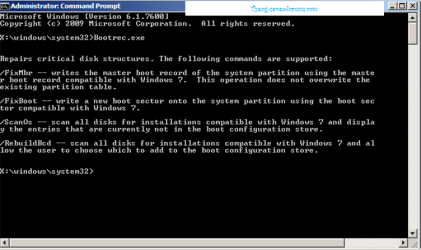
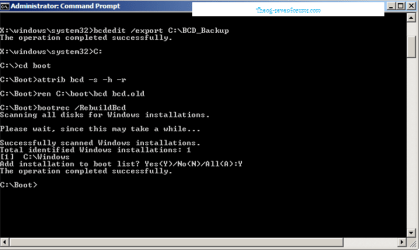
Okay I done that, once I type bootrec /RebuildBcd it displays

Scanning all disks for Windows installations.

Please wait, since this may take a while...

Successfully scanned Windows installations.
Total identified Windows installations: 0
The operation completed successfully.
 

My Computer My Computer

At a glance

Windows 7 Ultimate x64Intel Core i7 2600K 3.40GHz, 8MB Cache, LGA1155Corsair 8GB DDR3 Dual Ch (2x XMS3 4GB) PC-106...Gigabyte ATI Radeon 5770 1GB
Computer Manufacturer/Model Number
Custom / Self Built
OS
Windows 7 Ultimate x64
CPU
Intel Core i7 2600K 3.40GHz, 8MB Cache, LGA1155
Motherboard
Asus P8P67 v3 Intel Mainboard (B3 Stepping)
Memory
Corsair 8GB DDR3 Dual Ch (2x XMS3 4GB) PC-10600 (1333MHz)
Graphics Card(s)
Gigabyte ATI Radeon 5770 1GB
Sound Card
Realtek® ALC 892 8-Channel High Definition Audio
Monitor(s) Displays
Vivo 42" Full HD LCD TV
Screen Resolution
1920 x 1080
Hard Drives
2x Samsung EcoGreen F4 2TB HD204UI
PSU
Cooler Master Extreme Power Plus 650W
Case
Cooler Master HAF X 942
Cooling
Rasa 750 RX360 WaterCooling
Keyboard
Logitech K340
Mouse
Logitech Anywhere Mouse M905
Internet Speed
ADSL2+
Other Info
LG BH10LS30 Blu-Ray Writer
Scythe Kaze Server 5.25" Fan Controller
May be a video issue. Can you boot into safe mode? Hit F8 repeatedly at boot, then choose safe mode.
 

My Computer My Computer

At a glance

Windows 7 x64 pro/ Windows 7 x86 Pro/ XP SP3 x86
Computer Manufacturer/Model Number
Too many to describe...
OS
Windows 7 x64 pro/ Windows 7 x86 Pro/ XP SP3 x86
May be a video issue. Can you boot into safe mode? Hit F8 repeatedly at boot, then choose safe mode.

This is one thing about my motherboard that I find annoying, when I hit F8 repeatedly during boot it takes me to the motherboards boot menu to select which drive I'd like to boot from.
 

My Computer My Computer

At a glance

Windows 7 Ultimate x64Intel Core i7 2600K 3.40GHz, 8MB Cache, LGA1155Corsair 8GB DDR3 Dual Ch (2x XMS3 4GB) PC-106...Gigabyte ATI Radeon 5770 1GB
Computer Manufacturer/Model Number
Custom / Self Built
OS
Windows 7 Ultimate x64
CPU
Intel Core i7 2600K 3.40GHz, 8MB Cache, LGA1155
Motherboard
Asus P8P67 v3 Intel Mainboard (B3 Stepping)
Memory
Corsair 8GB DDR3 Dual Ch (2x XMS3 4GB) PC-10600 (1333MHz)
Graphics Card(s)
Gigabyte ATI Radeon 5770 1GB
Sound Card
Realtek® ALC 892 8-Channel High Definition Audio
Monitor(s) Displays
Vivo 42" Full HD LCD TV
Screen Resolution
1920 x 1080
Hard Drives
2x Samsung EcoGreen F4 2TB HD204UI
PSU
Cooler Master Extreme Power Plus 650W
Case
Cooler Master HAF X 942
Cooling
Rasa 750 RX360 WaterCooling
Keyboard
Logitech K340
Mouse
Logitech Anywhere Mouse M905
Internet Speed
ADSL2+
Other Info
LG BH10LS30 Blu-Ray Writer
Scythe Kaze Server 5.25" Fan Controller
Some how I have managed to resolve this issue, using Acronis Disk Director what I did was deleted the volume then recovered the volume with Acronis Recovery Expert, rebooted and to my surprise it booted up windows no problem at all. The only thing I need to do now is edit the boot menu with EasyBCD 2.1 so I don't have wait 30 seconds or manually select the OS to boot up.

Thank you very much for your help though guys :)
 

My Computer My Computer

At a glance

Windows 7 Ultimate x64Intel Core i7 2600K 3.40GHz, 8MB Cache, LGA1155Corsair 8GB DDR3 Dual Ch (2x XMS3 4GB) PC-106...Gigabyte ATI Radeon 5770 1GB
Computer Manufacturer/Model Number
Custom / Self Built
OS
Windows 7 Ultimate x64
CPU
Intel Core i7 2600K 3.40GHz, 8MB Cache, LGA1155
Motherboard
Asus P8P67 v3 Intel Mainboard (B3 Stepping)
Memory
Corsair 8GB DDR3 Dual Ch (2x XMS3 4GB) PC-10600 (1333MHz)
Graphics Card(s)
Gigabyte ATI Radeon 5770 1GB
Sound Card
Realtek® ALC 892 8-Channel High Definition Audio
Monitor(s) Displays
Vivo 42" Full HD LCD TV
Screen Resolution
1920 x 1080
Hard Drives
2x Samsung EcoGreen F4 2TB HD204UI
PSU
Cooler Master Extreme Power Plus 650W
Case
Cooler Master HAF X 942
Cooling
Rasa 750 RX360 WaterCooling
Keyboard
Logitech K340
Mouse
Logitech Anywhere Mouse M905
Internet Speed
ADSL2+
Other Info
LG BH10LS30 Blu-Ray Writer
Scythe Kaze Server 5.25" Fan Controller

My Computer My Computer

At a glance

Vista, Windows7, Mint Mate, Zorin, Windows 8from 1.6GHz Duo to i7
Computer Manufacturer/Model Number
HP, Dell, Gateway, Toshiba - 4 laptops and 2 desktops
OS
Vista, Windows7, Mint Mate, Zorin, Windows 8
CPU
from 1.6GHz Duo to i7
Monitor(s) Displays
2x HP w2207
Hard Drives
5x HDD, 7x SSD, 12x Externals
Keyboard
with trackball - no mices
Mouse
Trackball mice
Internet Speed
DSL 6000
I suspect that your active partition with the bootmgr was on that drive. If you want to run a startup repair on your C drive, you must first make it active. You can use the bootable CD of PW for that (last entry on the webpage): Free Download Magic Partition Manager Software - Partition Wizard Online

Hmm, I guess I was 1 minute too late.

Ah yes I think the bootmgr was on the drive that I removed.
I made sure the partition was marked as active with Acronis Disk Director bootable usb.
At first I did make the partition active using the DISKPART command.

;) Yes just a minute or two late.

It's very odd that removing the volume then restoring it solved the problem, just glad that's solved it, I really was not looking forward to do a clean install or even a restore from a backup as it was over 24hrs old. Now I know if even removing a HDD I should always do a full backup just in case.
 

My Computer My Computer

At a glance

Windows 7 Ultimate x64Intel Core i7 2600K 3.40GHz, 8MB Cache, LGA1155Corsair 8GB DDR3 Dual Ch (2x XMS3 4GB) PC-106...Gigabyte ATI Radeon 5770 1GB
Computer Manufacturer/Model Number
Custom / Self Built
OS
Windows 7 Ultimate x64
CPU
Intel Core i7 2600K 3.40GHz, 8MB Cache, LGA1155
Motherboard
Asus P8P67 v3 Intel Mainboard (B3 Stepping)
Memory
Corsair 8GB DDR3 Dual Ch (2x XMS3 4GB) PC-10600 (1333MHz)
Graphics Card(s)
Gigabyte ATI Radeon 5770 1GB
Sound Card
Realtek® ALC 892 8-Channel High Definition Audio
Monitor(s) Displays
Vivo 42" Full HD LCD TV
Screen Resolution
1920 x 1080
Hard Drives
2x Samsung EcoGreen F4 2TB HD204UI
PSU
Cooler Master Extreme Power Plus 650W
Case
Cooler Master HAF X 942
Cooling
Rasa 750 RX360 WaterCooling
Keyboard
Logitech K340
Mouse
Logitech Anywhere Mouse M905
Internet Speed
ADSL2+
Other Info
LG BH10LS30 Blu-Ray Writer
Scythe Kaze Server 5.25" Fan Controller
After an installation one should always check where the active partition is. The Win7 installer has the habit of grabbing the first partition on the first frive it can find and place the bootmgr there. That is how mine ended up on a random HDD data partition when I installed on the SSD. Not a big deal though.
 

My Computer My Computer

At a glance

Vista, Windows7, Mint Mate, Zorin, Windows 8from 1.6GHz Duo to i7
Computer Manufacturer/Model Number
HP, Dell, Gateway, Toshiba - 4 laptops and 2 desktops
OS
Vista, Windows7, Mint Mate, Zorin, Windows 8
CPU
from 1.6GHz Duo to i7
Monitor(s) Displays
2x HP w2207
Hard Drives
5x HDD, 7x SSD, 12x Externals
Keyboard
with trackball - no mices
Mouse
Trackball mice
Internet Speed
DSL 6000
After an installation one should always check where the active partition is. The Win7 installer has the habit of grabbing the first partition on the first frive it can find and place the bootmgr there. That is how mine ended up on a random HDD data partition when I installed on the SSD. Not a big deal though.

From this I have learnt that one should only install Windows with one HDD to start of with then connect up any extras afterwards so then you don't run into this problem.
 

My Computer My Computer

At a glance

Windows 7 Ultimate x64Intel Core i7 2600K 3.40GHz, 8MB Cache, LGA1155Corsair 8GB DDR3 Dual Ch (2x XMS3 4GB) PC-106...Gigabyte ATI Radeon 5770 1GB
Computer Manufacturer/Model Number
Custom / Self Built
OS
Windows 7 Ultimate x64
CPU
Intel Core i7 2600K 3.40GHz, 8MB Cache, LGA1155
Motherboard
Asus P8P67 v3 Intel Mainboard (B3 Stepping)
Memory
Corsair 8GB DDR3 Dual Ch (2x XMS3 4GB) PC-10600 (1333MHz)
Graphics Card(s)
Gigabyte ATI Radeon 5770 1GB
Sound Card
Realtek® ALC 892 8-Channel High Definition Audio
Monitor(s) Displays
Vivo 42" Full HD LCD TV
Screen Resolution
1920 x 1080
Hard Drives
2x Samsung EcoGreen F4 2TB HD204UI
PSU
Cooler Master Extreme Power Plus 650W
Case
Cooler Master HAF X 942
Cooling
Rasa 750 RX360 WaterCooling
Keyboard
Logitech K340
Mouse
Logitech Anywhere Mouse M905
Internet Speed
ADSL2+
Other Info
LG BH10LS30 Blu-Ray Writer
Scythe Kaze Server 5.25" Fan Controller
That is why, you should always make the OS HD, disk0 & first HD boot in BIOS.
 

My Computer My Computer

At a glance

ME/XP/Vista/Win7
OS
ME/XP/Vista/Win7
That is why, you should always make the OS HD, disk0 & first HD boot in BIOS.

Hmm, I'm just viewing the Windows Disk Management now and my OS HD is disk1, it is plugged into the first sata port though. I have got it set as my first boot drive in BIOS.
 
Last edited:

My Computer My Computer

At a glance

Windows 7 Ultimate x64Intel Core i7 2600K 3.40GHz, 8MB Cache, LGA1155Corsair 8GB DDR3 Dual Ch (2x XMS3 4GB) PC-106...Gigabyte ATI Radeon 5770 1GB
Computer Manufacturer/Model Number
Custom / Self Built
OS
Windows 7 Ultimate x64
CPU
Intel Core i7 2600K 3.40GHz, 8MB Cache, LGA1155
Motherboard
Asus P8P67 v3 Intel Mainboard (B3 Stepping)
Memory
Corsair 8GB DDR3 Dual Ch (2x XMS3 4GB) PC-10600 (1333MHz)
Graphics Card(s)
Gigabyte ATI Radeon 5770 1GB
Sound Card
Realtek® ALC 892 8-Channel High Definition Audio
Monitor(s) Displays
Vivo 42" Full HD LCD TV
Screen Resolution
1920 x 1080
Hard Drives
2x Samsung EcoGreen F4 2TB HD204UI
PSU
Cooler Master Extreme Power Plus 650W
Case
Cooler Master HAF X 942
Cooling
Rasa 750 RX360 WaterCooling
Keyboard
Logitech K340
Mouse
Logitech Anywhere Mouse M905
Internet Speed
ADSL2+
Other Info
LG BH10LS30 Blu-Ray Writer
Scythe Kaze Server 5.25" Fan Controller
Yeah, Disk0 and disconnect of the other HDDs are obvious measures. But what do you do if you cannot unplug the HDD cables because they are quasi frozen and access to the mobo is so tight that you cannot get to it. On my HP box I did it the right way, but this Dell box is a disaster..
 

My Computer My Computer

At a glance

Vista, Windows7, Mint Mate, Zorin, Windows 8from 1.6GHz Duo to i7
Computer Manufacturer/Model Number
HP, Dell, Gateway, Toshiba - 4 laptops and 2 desktops
OS
Vista, Windows7, Mint Mate, Zorin, Windows 8
CPU
from 1.6GHz Duo to i7
Monitor(s) Displays
2x HP w2207
Hard Drives
5x HDD, 7x SSD, 12x Externals
Keyboard
with trackball - no mices
Mouse
Trackball mice
Internet Speed
DSL 6000
Back
Top