hi,
i have an acer extensa 5635Z.
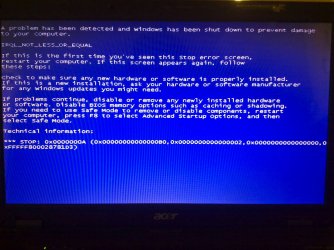
i am having start up issues where a blue screen comes up for a split second and then computer gives me to option to try and repair or start window normally. when i try and repair the problem it cannot find any issues with it. most times i can just chose to start windows normally and windows starts up, but then the computer and internet seem to be slower than normal. when i tried to restart it last the blue screen attached came up and i had to power off the computer and restart again, i am using the computer now.
I have done a system restore and fully cleaned out the computer and then re installed windows with the recovery discs but this problem has not gone away.
Could anyone tell me what the issue is or how much it may cost to fix this issue?? not a very expensive laptop so not worth spending much money on it.
thanks
rick
i have an acer extensa 5635Z.
i am having start up issues where a blue screen comes up for a split second and then computer gives me to option to try and repair or start window normally. when i try and repair the problem it cannot find any issues with it. most times i can just chose to start windows normally and windows starts up, but then the computer and internet seem to be slower than normal. when i tried to restart it last the blue screen attached came up and i had to power off the computer and restart again, i am using the computer now.
I have done a system restore and fully cleaned out the computer and then re installed windows with the recovery discs but this problem has not gone away.
Could anyone tell me what the issue is or how much it may cost to fix this issue?? not a very expensive laptop so not worth spending much money on it.
thanks
rick
My Computer
- OS
- Win7