Start-Up Programs Question

Robert11

New member
Power User
Local time
6:22 PM
Messages
542
Hello,

Regarding the Start-Up menu, the list of programs and items that start when the PC is turned on:

a. If there are two Users, is the list different depending upon which User logs on ?

b. IF there is a separate list for each user, and then the two Users just
do "Switch Users" during the day, do these start up items then change, or once going, they continue irrespective of the User ?

e.g., each user would be operating on "his side" of the PC as expected, but the start up programs for the other user would (also) be active. True ?

Thanks,
Bob
 

My Computer

OS
Windows 7 64bit
Hi Bob,

Yes and no.

There are in fact 2 locations for the Startup.

http://www.sevenforums.com/tutorials/1401-startup-programs-change.html

All Users: C:\Users\All Users\Microsoft\Windows\Start Menu\Programs\Startup

These are programs that run for every user, and they will start up for each user the first time they log on.

User: C:\Users\<UserName>\AppData\Roaming\Microsoft\Windows\Start Menu\Programs\Startup

These are programs that are unique to each user, and they will start up the first time the user logs on.

When switching from one user to another, the programs remain running but are suspended so that when the previous user logs back in they can resume from where they left off.
 
Last edited by a moderator:

My Computer

Computer type
PC/Desktop
Computer Manufacturer/Model Number
Dwarf Dwf/11/2012 r09/2013
OS
Windows 8.1 Pro RTM x64
CPU
Intel Core-i5-3570K 4-core @ 3.4GHz (Ivy Bridge) (OC 4.4GHz)
Motherboard
ASRock Z77 Extreme4-M
Memory
4 x 4GB DDR3-1600 Corsair Vengeance CMZ8GX3M2A1600C9B (16GB)
Graphics Card(s)
MSI GeForce GTX770 Gaming OC 2GB
Sound Card
Realtek High Definition on board solution (ALC 898)
Monitor(s) Displays
ViewSonic VA1912w Widescreen (VGA)
Screen Resolution
1440x900
Hard Drives
OCZ Agility 3 SSD 120GB SATA III x2 (RAID 0)
Samsung HD501LJ 500GB SATA II x2
Hitachi HDS721010CLA332 1TB SATA II
Iomega 1.5TB Ext USB 2.0
WD 2.0TB Ext USB 3.0
PSU
XFX Pro Series 850W Semi-Modular
Case
Gigabyte IF233
Cooling
1 x 120mm Front Inlet 1 x 120mm Rear Exhaust
Keyboard
Microsoft Comfort Curve Keyboard 3000 (USB)
Mouse
Microsoft Comfort Mouse 3000 for Business (USB)
Internet Speed
NetGear DG834Gv3 ADSL Modem/Router (Ethernet) ~4.0 Mb/s (O2)
Antivirus
Avast! 8.0.1497
Browser
IE 11
Other Info
Optical Drive: HL-DT-ST BD-RE BH10LS30 SATA Bluray
Lexmark S305 Printer/Scanner/Copier (USB)
WEI Score: 8.1/8.1/8.5/8.5/8.25
Asus Eee PC 1011PX Netbook (Windows 7 x86 Starter)
Programs can also be started from the registry. A good way to see startup settings is to use StartupCPL.
 

My Computer

Computer Manufacturer/Model Number
DIY
OS
W7x64 Pro, SuSe 12.1/** W7 x64 Pro, XP MCE
CPU
Phenom II 1090T w/Noctua NH-D14 /**4400+ X2 w/CM Hyper TX 3
Motherboard
ASRock 890FX Deluxe 4/**A8N-SLI
Memory
2 x 2GB Patriot PGS34g1600LLKA/**4x1GB Corsair VS
Graphics Card(s)
EVGA GTX460 SC/**EVGA 8800GTS
Sound Card
Asus Xonar D2X/**Xonar D1
Monitor(s) Displays
Acer X233H, Dell E152FPc /**LG M237-WD
Screen Resolution
1920x1080 & 1024x768/**1980x1080
Hard Drives
WDC 2TB, 1.5TB, 1TB, 500GB,Seagate 500GB , Maxtor 80GB /**500GB Seagate & WDC 1TB Black
PSU
CM RS600 w/ APC BX1000G/**Antec 500 TP w/ APC BX1000
Case
HAF922/**Antec 1040IIB
Cooling
3x200mm, 1x140 and 1x120mm/**5x80mm fans
Keyboard
Logitech Media USB/**Saitek Eclipse
Mouse
Cordless Trackman Wheel/**Ditto
Internet Speed
3.3Mbps
Other Info
SB 560 5.1 w/ Sennheiser RS140/**Creative T20 speakers, Dvico FusionHDTV7 Gold RT, Cisco E3000, HP 5510V AIO, Linksys E3000, Belkin F5U237 hub and **F5D8055 adapter
(** = 2nd rig)
Programs can also be started from the registry. A good way to see startup settings is to use StartupCPL.

I often open System Configuration (click Start button, type "msconfig") to modify start up programs.
 

My Computer

Computer Manufacturer/Model Number
Lenovo
OS
Windows 7 Professonal
CPU
Intel Pentium Dual Core 2*1.86 GHz
Memory
2GB
Graphics Card(s)
256 MB (Shared)
Yes, but there are more startup items than are listed in msconfig.
 

My Computer

Computer Manufacturer/Model Number
DIY
OS
W7x64 Pro, SuSe 12.1/** W7 x64 Pro, XP MCE
CPU
Phenom II 1090T w/Noctua NH-D14 /**4400+ X2 w/CM Hyper TX 3
Motherboard
ASRock 890FX Deluxe 4/**A8N-SLI
Memory
2 x 2GB Patriot PGS34g1600LLKA/**4x1GB Corsair VS
Graphics Card(s)
EVGA GTX460 SC/**EVGA 8800GTS
Sound Card
Asus Xonar D2X/**Xonar D1
Monitor(s) Displays
Acer X233H, Dell E152FPc /**LG M237-WD
Screen Resolution
1920x1080 & 1024x768/**1980x1080
Hard Drives
WDC 2TB, 1.5TB, 1TB, 500GB,Seagate 500GB , Maxtor 80GB /**500GB Seagate & WDC 1TB Black
PSU
CM RS600 w/ APC BX1000G/**Antec 500 TP w/ APC BX1000
Case
HAF922/**Antec 1040IIB
Cooling
3x200mm, 1x140 and 1x120mm/**5x80mm fans
Keyboard
Logitech Media USB/**Saitek Eclipse
Mouse
Cordless Trackman Wheel/**Ditto
Internet Speed
3.3Mbps
Other Info
SB 560 5.1 w/ Sennheiser RS140/**Creative T20 speakers, Dvico FusionHDTV7 Gold RT, Cisco E3000, HP 5510V AIO, Linksys E3000, Belkin F5U237 hub and **F5D8055 adapter
(** = 2nd rig)
From OP

Hi all,

Just a quick thanks for the info.

Sure is a lot to learn, but we are trying.

Appreciate All the help,
Bob
 

My Computer

OS
Windows 7 64bit
Startup Programs Folder: All Users ? (Dwarf, et al)

Hello,

Trying to find, and adjust somewhat, my Startup Programs Folders.

For the two users on the PC, no problems.
As mentioned by Dwarf, they are under C:\Users\Username\App...

But for the ALL Users Folder, not sure:

For this "common startups" Folder, if I try to find All Users under:
C:\Users\All Users...

Under Users\, I have no "All Users" apparently.

What's there is:
Bob (one of the two users)
Steve (the other user)
Public
Default

Where, please is "All Users" ?
Is it termed "Public" in W7, or...?

Sure I'm just looking in the wrong place.

Thanks,
Bob
 

My Computer

OS
Windows 7 64bit
C:\ProgramData\Microsoft\Windows\Start Menu

This what your after?
 

My Computer

Computer Manufacturer/Model Number
Custom Build
OS
W7 RTM Ultimate x64
CPU
Intel Q8400 @ 2.66GHZ
Motherboard
Gigabyte GA-EG45M-UD2H
Memory
4GB DDR2-800
Graphics Card(s)
Gainward GTS 450 GLH 1GB Edition
Sound Card
Integrated 8 Channel
Monitor(s) Displays
AOC 23.6 Inch Widescreen LCD
Screen Resolution
1920x1080
Hard Drives
Seagate 500GB Internal
Western Digital 1TB Internal

Hitachi 1TB External
PSU
Apevia Java Power 500W
Case
Cooler Master HAF 922 Black
Cooling
Stock Intel CPU Fan
Keyboard
HP SK-2960 Multimedia Keyboard
Mouse
Logitech M350 Wireless Gaming Mouse
Internet Speed
1.5MB
From OP: Re "ALL Users" Startup Folder ?

Hi,

Sort of.

I can find the start-ups for the individual users, Bob and Steve, but what I can't locate is the list for the startups that start for both users automatically, irrespective of which user logs in.

I was told that they are in a flolder called ALL USERS, but can't locate it.

Thanks,
Bob
 

My Computer

OS
Windows 7 64bit
Here you go, Bob.
Capture.PNG
Can you attach a snip showing the same section from your machine?
 

My Computer

Computer type
PC/Desktop
Computer Manufacturer/Model Number
Dwarf Dwf/11/2012 r09/2013
OS
Windows 8.1 Pro RTM x64
CPU
Intel Core-i5-3570K 4-core @ 3.4GHz (Ivy Bridge) (OC 4.4GHz)
Motherboard
ASRock Z77 Extreme4-M
Memory
4 x 4GB DDR3-1600 Corsair Vengeance CMZ8GX3M2A1600C9B (16GB)
Graphics Card(s)
MSI GeForce GTX770 Gaming OC 2GB
Sound Card
Realtek High Definition on board solution (ALC 898)
Monitor(s) Displays
ViewSonic VA1912w Widescreen (VGA)
Screen Resolution
1440x900
Hard Drives
OCZ Agility 3 SSD 120GB SATA III x2 (RAID 0)
Samsung HD501LJ 500GB SATA II x2
Hitachi HDS721010CLA332 1TB SATA II
Iomega 1.5TB Ext USB 2.0
WD 2.0TB Ext USB 3.0
PSU
XFX Pro Series 850W Semi-Modular
Case
Gigabyte IF233
Cooling
1 x 120mm Front Inlet 1 x 120mm Rear Exhaust
Keyboard
Microsoft Comfort Curve Keyboard 3000 (USB)
Mouse
Microsoft Comfort Mouse 3000 for Business (USB)
Internet Speed
NetGear DG834Gv3 ADSL Modem/Router (Ethernet) ~4.0 Mb/s (O2)
Antivirus
Avast! 8.0.1497
Browser
IE 11
Other Info
Optical Drive: HL-DT-ST BD-RE BH10LS30 SATA Bluray
Lexmark S305 Printer/Scanner/Copier (USB)
WEI Score: 8.1/8.1/8.5/8.5/8.25
Asus Eee PC 1011PX Netbook (Windows 7 x86 Starter)
From OP For Dwarf et al Re ALL USER Folder: Where ?

Hi,

So much a novice with this, I'm not sure how to make a "snip" and post it like you suggested.

Anyway, please see my previous post re all of this.

Two users on this PC.
I can find under their User name, their startup individual folder.

But, no matter where I look, I cannot find the All User Folder.
I also tried in the Search Box for ALL, All Users, etc. but nothing comes up.

If I go to C:/Users, the only folders that show up are:

Bob
Default
public
Steve

Bob and Steve, of course being me and my son.

So, where can All Users be ?
Could it be a hidden folder ?
Does one have to create it, somehow, by themselves ?

Is it possible just not to have one as there might be just no common start up programs, although this seems, to me, a bit unlikely.

So, where might it be ?

Thanks for help.

Regards,
Bob
 

My Computer

OS
Windows 7 64bit
Hi,

So much a novice with this, I'm not sure how to make a "snip" and post it like you suggested.

Anyway, please see my previous post re all of this.

Two users on this PC.
I can find under their User name, their startup individual folder.

But, no matter where I look, I cannot find the All User Folder.
I also tried in the Search Box for ALL, All Users, etc. but nothing comes up.

If I go to C:/Users, the only folders that show up are:

Bob
Default
public
Steve

Bob and Steve, of course being me and my son.

So, where can All Users be ?
Could it be a hidden folder ?
Does one have to create it, somehow, by themselves ?

Is it possible just not to have one as there might be just no common start up programs, although this seems, to me, a bit unlikely.

So, where might it be ?

Thanks for help.

Regards,
Bob
Don't know if this helps but I don't have "all users" either. And this might help with how to post a "snip" or screenshot, http://www.sevenforums.com/tutorials/9733-how-post-screenshot-seven-forums.html . Hope that helps. D.
 

Attachments

  • Capture.PNG
    Capture.PNG
    33.1 KB · Views: 10

My Computer

Computer type
PC/Desktop
Computer Manufacturer/Model Number
Self Built
OS
Win 10 Pro x64
CPU
Intel I5-2500K @3.3GHz
Motherboard
Asrock P67 Extreme4
Memory
16GB G.Skill Ripjaws X (4x4GB)
Graphics Card(s)
EVGA GeForce 750 Ti SC 2GB
Sound Card
ASUS Xonar DG 5.1 Channels 24-bit 96KHz PCI Interface Sound
Monitor(s) Displays
auria eq2367
Screen Resolution
1920 x 1080
Hard Drives
250GB Samsung 850 EVO SSD
1TB WD Blue
1TB Hitachi
PSU
SeaSonic X 650W 80 Plus Gold
Case
Corsair Obsidian 750D
Cooling
Corsair H60, Three 140mm case fans
Keyboard
Logitech Wireless Keyboard K520
Mouse
Logitech Wireless Mouse M310
Internet Speed
Wave Broadband ~ 100 dn 5 up
Antivirus
Windows Defender, Malwarebytes Premium
Browser
Edge, IE11, Chrome
Other Info
Laptop specs: HP g7-1365dx /
CPU: AMD A6-3420M APU with Radeon(tm) HD Graphics /
RAM: Crucial 8Gb (2x4Gb) /
SSD: Crucial M4-CT128M4SSD2 ATA Device/ FW 000F /
GFX: AMD Radeon HD 6520G /
OS: Windows 10 Pro x64
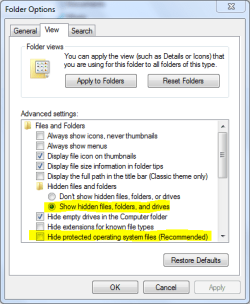
To see the All Users folder You need to go into folder options and tick the option to see hidden files and folders and uncheck hide protected operating system files, make sure to click " Apply".
 

My Computer

Computer Manufacturer/Model Number
DELL/Alienware Area-51
OS
Windows 7 Ultimate x64
CPU
Intel I7 980x @ 3.47 GHz
Motherboard
X58
Memory
6 GB (3 x 2GB) 1333 MHz
Graphics Card(s)
2 EVGA GTX 480's in SLI
Sound Card
Creative X-Fi Titanium
Monitor(s) Displays
DELL Ultra Sharp 2709W
Screen Resolution
1920 x 1200
Hard Drives
OS = 750 GB Seagate
Data = 750 GB Seagate
Music = 1 TB WD Black
PSU
1.2 KW
Case
DELL Alienware Area-51
Cooling
Liquid for CPU
Keyboard
Alienware TactX
Mouse
Alienware TactX
Internet Speed
Cable 5-9 MB
You can also look at the HKCU and HKLM hives in the registry, somewhere under software, microsoft, current version. Current User and Local Machine respectively. They can have more entries.
 

My Computer

Computer Manufacturer/Model Number
Sony Vaio Z46GDU
OS
Windows 7 Ultimate x86-64
CPU
[email protected] 1066MHz FSB
Motherboard
Sony branded
Memory
6GB DDR3 1066MHz
Graphics Card(s)
9300M GS 256MB Dedicated (Speed) + Intel4500MHD (Stamina)
Sound Card
Realtek HD Audio
Monitor(s) Displays
13.1' WXGA
Screen Resolution
1600x900
Hard Drives
320GB 7200RPM w/ 16MB cache
Internet Speed
1MB/s

My Computer

Computer type
PC/Desktop
Computer Manufacturer/Model Number
Dwarf Dwf/11/2012 r09/2013
OS
Windows 8.1 Pro RTM x64
CPU
Intel Core-i5-3570K 4-core @ 3.4GHz (Ivy Bridge) (OC 4.4GHz)
Motherboard
ASRock Z77 Extreme4-M
Memory
4 x 4GB DDR3-1600 Corsair Vengeance CMZ8GX3M2A1600C9B (16GB)
Graphics Card(s)
MSI GeForce GTX770 Gaming OC 2GB
Sound Card
Realtek High Definition on board solution (ALC 898)
Monitor(s) Displays
ViewSonic VA1912w Widescreen (VGA)
Screen Resolution
1440x900
Hard Drives
OCZ Agility 3 SSD 120GB SATA III x2 (RAID 0)
Samsung HD501LJ 500GB SATA II x2
Hitachi HDS721010CLA332 1TB SATA II
Iomega 1.5TB Ext USB 2.0
WD 2.0TB Ext USB 3.0
PSU
XFX Pro Series 850W Semi-Modular
Case
Gigabyte IF233
Cooling
1 x 120mm Front Inlet 1 x 120mm Rear Exhaust
Keyboard
Microsoft Comfort Curve Keyboard 3000 (USB)
Mouse
Microsoft Comfort Mouse 3000 for Business (USB)
Internet Speed
NetGear DG834Gv3 ADSL Modem/Router (Ethernet) ~4.0 Mb/s (O2)
Antivirus
Avast! 8.0.1497
Browser
IE 11
Other Info
Optical Drive: HL-DT-ST BD-RE BH10LS30 SATA Bluray
Lexmark S305 Printer/Scanner/Copier (USB)
WEI Score: 8.1/8.1/8.5/8.5/8.25
Asus Eee PC 1011PX Netbook (Windows 7 x86 Starter)
Hi,

So much a novice with this, I'm not sure how to make a "snip" and post it like you suggested.

Anyway, please see my previous post re all of this.

Two users on this PC.
I can find under their User name, their startup individual folder.

But, no matter where I look, I cannot find the All User Folder.
I also tried in the Search Box for ALL, All Users, etc. but nothing comes up.

If I go to C:/Users, the only folders that show up are:

Bob
Default
public
Steve

Bob and Steve, of course being me and my son.

So, where can All Users be ?
Could it be a hidden folder ?
Does one have to create it, somehow, by themselves ?

Is it possible just not to have one as there might be just no common start up programs, although this seems, to me, a bit unlikely.

So, where might it be ?

Thanks for help.

Regards,
Bob
Don't know if this helps but I don't have "all users" either. And this might help with how to post a "snip" or screenshot, http://www.sevenforums.com/tutorials/9733-how-post-screenshot-seven-forums.html . Hope that helps. D.

I stand corrected, Thank you pat247 and Dwarf. Following their instructions I find I do have "all users", so thanks for the how to. D.:o
 

Attachments

  • Capture 2.PNG
    Capture 2.PNG
    48.7 KB · Views: 4

My Computer

Computer type
PC/Desktop
Computer Manufacturer/Model Number
Self Built
OS
Win 10 Pro x64
CPU
Intel I5-2500K @3.3GHz
Motherboard
Asrock P67 Extreme4
Memory
16GB G.Skill Ripjaws X (4x4GB)
Graphics Card(s)
EVGA GeForce 750 Ti SC 2GB
Sound Card
ASUS Xonar DG 5.1 Channels 24-bit 96KHz PCI Interface Sound
Monitor(s) Displays
auria eq2367
Screen Resolution
1920 x 1080
Hard Drives
250GB Samsung 850 EVO SSD
1TB WD Blue
1TB Hitachi
PSU
SeaSonic X 650W 80 Plus Gold
Case
Corsair Obsidian 750D
Cooling
Corsair H60, Three 140mm case fans
Keyboard
Logitech Wireless Keyboard K520
Mouse
Logitech Wireless Mouse M310
Internet Speed
Wave Broadband ~ 100 dn 5 up
Antivirus
Windows Defender, Malwarebytes Premium
Browser
Edge, IE11, Chrome
Other Info
Laptop specs: HP g7-1365dx /
CPU: AMD A6-3420M APU with Radeon(tm) HD Graphics /
RAM: Crucial 8Gb (2x4Gb) /
SSD: Crucial M4-CT128M4SSD2 ATA Device/ FW 000F /
GFX: AMD Radeon HD 6520G /
OS: Windows 10 Pro x64
Back
Top