Start Up Screen in HP dv6

R Fernandez

New member
Member
Local time
3:35 AM
Messages
25
HP Dv6
How can I bypass or remove the start screen in W7 (start screen with the E-mail Web and Music/Videos) and go straight to Windows?
 

My Computer My Computer

OS
Windows 7
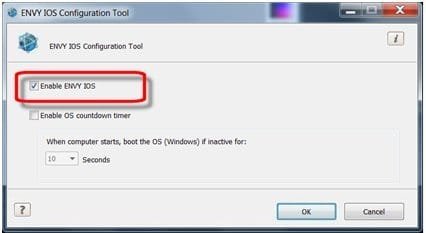
Welcome to Seven Forums R Fernandez. That is the HP Instant On Software (IOS) Environment. Here is how to disable it:

Turn on the power and allow the computer to boot into Windows 7

Click Start , All Programs , and then click IOS .

Right-click the IOS Configuration Tool .

Select Run as administrator .

c01997977.jpg

Deselect the Enable IOS check box.

When you have completed your selections, click OK to accept the choices and close the window. Restart the computer to apply the new Instant On setting.

A Guy
 

My Computer My Computer

Computer type
PC/Desktop
OS
Windows 10 Home x64
CPU
INTEL Core i5-750 Quad-Core 3.37GHz
Motherboard
ASUS P7P55D
Memory
HyperX Fury Black Series 8GB (2 x 4GB) 1866Mhz
Graphics Card(s)
EVGA GeForce GTX 750 Superclocked 1GB 128-Bit GDDR5
Monitor(s) Displays
LG 32MA68HY 32" IPS
Screen Resolution
1920 x 1080
Hard Drives
Samsung 840 Evo 120GB, SEAGATE 500GB Barracuda® 7200.12, SATA 3 Gb/s, 7200 RPM, 16MB cache
PSU
ANTEC TruePower New TP-550, 80 PLUS, 550W
Case
ANTEC Three Hundred Illusion
Cooling
COOLER MASTER Hyper 212 Plus, 4 x 120mm 1 x 140mm Noctua's
Internet Speed
85 + Mbps
Antivirus
Avast
Browser
Vivaldi
Thanks for your quick reply.

Did as you said but I cannot find the IOS tool.

Any other suggestions or another way to locate this tool?

Thanks
 

My Computer My Computer

OS
Windows 7
Thanks for your quick reply.

Did as you said but I cannot find the IOS tool.

Any other suggestions or another way to locate this tool?

Thanks

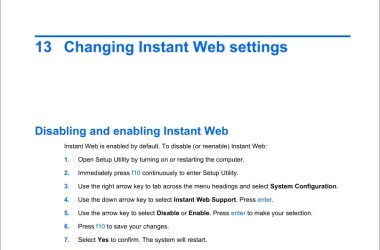
HP calls it "Quickweb".
 

My Computer My Computer

Computer Manufacturer/Model Number
Too many to describe...
OS
Windows 7 x64 pro/ Windows 7 x86 Pro/ XP SP3 x86
Thanks Bill :)

R Fernandez, try this:

Web.jpg

A Guy

We posted same time. Glad you got it sorted.
 
Last edited:

My Computer My Computer

Computer type
PC/Desktop
OS
Windows 10 Home x64
CPU
INTEL Core i5-750 Quad-Core 3.37GHz
Motherboard
ASUS P7P55D
Memory
HyperX Fury Black Series 8GB (2 x 4GB) 1866Mhz
Graphics Card(s)
EVGA GeForce GTX 750 Superclocked 1GB 128-Bit GDDR5
Monitor(s) Displays
LG 32MA68HY 32" IPS
Screen Resolution
1920 x 1080
Hard Drives
Samsung 840 Evo 120GB, SEAGATE 500GB Barracuda® 7200.12, SATA 3 Gb/s, 7200 RPM, 16MB cache
PSU
ANTEC TruePower New TP-550, 80 PLUS, 550W
Case
ANTEC Three Hundred Illusion
Cooling
COOLER MASTER Hyper 212 Plus, 4 x 120mm 1 x 140mm Noctua's
Internet Speed
85 + Mbps
Antivirus
Avast
Browser
Vivaldi
Back
Top