
You are using an out of date browser. It may not display this or other websites correctly.
You should upgrade or use an alternative browser.
You should upgrade or use an alternative browser.
Start Up Sound
- Thread starter Reg
- Start date
Just because there is a check next to windows startup sound doesnt mean there is a sound associated with it.
Repeat the procedure from step 3 to step 5 to customize all or any sound event. Only thing you need to remember is that Windows supports only .wav files.

- Right-click on Desktop and select Personalize.
- Click on the link named “Sounds” at the bottom of the window.
- Next, select a sound event from the list and then hit Browse button. Note that you need to have your customized new sound file in .wav format.
- Select your desired .wav sound track and click Open and then click Apply.
- Once you change the sound, just hit the Play button to test the customized sound.
Repeat the procedure from step 3 to step 5 to customize all or any sound event. Only thing you need to remember is that Windows supports only .wav files.
My Computer
- Computer type
- PC/Desktop
- Computer Manufacturer/Model Number
- Custom
- OS
- Windows 7 64bit
- CPU
- Intel I7 4770k @4.5
- Motherboard
- Asus z87-pro
- Memory
- 16GB corsair Vengence
- Graphics Card(s)
- EVGA GTX 980 TI SC acx2.0
- Sound Card
- XFI fatality gamer
- Monitor(s) Displays
- Samsung
- Screen Resolution
- 1920 x 1080
- Hard Drives
- OCZ ssd Baracuda 1tb x2
- PSU
- Corsair 1200 watt
- Case
- NZXT Noctis 450
- Cooling
- Kraken X61
- Keyboard
- Logitech G510
- Mouse
- Razer naga
- Internet Speed
- 100 down 25 up
- Other Info
- Nzxt Hue +
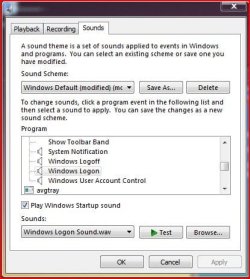
Thank you Urbwolf. I have just recently installed Windows 7 64 bit Ultimate. I just wanted the original Start up Sound. There does not appear to be a Start up Sound listed in the Programs Events List.
Regards....Reg
Regards....Reg
Last edited:
My Computer
- OS
- Windows 7 Ultimate

Windows logon is what you are looking for, I think.Thank you Skilled. I have just recently installed Windows 7 64 bit Ultimate. I just wanted the original Start up Sound. There does not appear to be a Start up Sound listed in the Programs Events List.
Regards....Reg
Attachments
My Computer
- Computer Manufacturer/Model Number
- Acer Aspire 5750
- OS
- Windows 7 Home Premium 64bit
- CPU
- Intel Core i3-2310M
- Motherboard
- Acer OEM
- Memory
- 8GB
- Graphics Card(s)
- Intel HD3000
- Screen Resolution
- 1366x768
- Hard Drives
- 320GB Toshiba
Hello Brummy
Thank you for your reply. I am sure it is not Log On. It is listed as Windows Start Up in the
C Directory/Windows /Media. In there that wave file sound is just a soft click. It should be music lasting a second or two.
Regards Reg
Thank you for your reply. I am sure it is not Log On. It is listed as Windows Start Up in the
C Directory/Windows /Media. In there that wave file sound is just a soft click. It should be music lasting a second or two.
Regards Reg
Last edited:
My Computer
- OS
- Windows 7 Ultimate
I have just gone into my lap with Vista Premium OS. Startup sound on the Laptop is fine. I thought to copy the Startup Wave file on the Laptop and replace the one on my Desktop, in C Directory/Windows/Media. Unfortanetly that wave file did not have any music*, just a soft click, exactly the same as the one on my Desktop. So where does Windows keep the startup wave file with music*? And what are the wave files titled Startup
*I say music but I am sure you know what I mean.
Reg
*I say music but I am sure you know what I mean.
Reg
Last edited:
My Computer
- OS
- Windows 7 Ultimate
Windows 7 doesn't have a start up sound just the logon sound. I played my startup sound and its just a click also the sound i hear when my computer starts up is the same as the windows log on sound.
My Computer
- Computer type
- PC/Desktop
- Computer Manufacturer/Model Number
- Custom
- OS
- Windows 7 64bit
- CPU
- Intel I7 4770k @4.5
- Motherboard
- Asus z87-pro
- Memory
- 16GB corsair Vengence
- Graphics Card(s)
- EVGA GTX 980 TI SC acx2.0
- Sound Card
- XFI fatality gamer
- Monitor(s) Displays
- Samsung
- Screen Resolution
- 1920 x 1080
- Hard Drives
- OCZ ssd Baracuda 1tb x2
- PSU
- Corsair 1200 watt
- Case
- NZXT Noctis 450
- Cooling
- Kraken X61
- Keyboard
- Logitech G510
- Mouse
- Razer naga
- Internet Speed
- 100 down 25 up
- Other Info
- Nzxt Hue +
Thank you for your reply Urbwolf.I don't have to log in when I boot up on Windows 7 and I get no sound when Windows opens, Just like I don't have to long in with Vista but I get sound when Windows opens. I have deliberately not activated the password facility. Both of them give me the Log in Sound when I come out of sleep mode and have to log in.
Why does Windows make such a big deal of Windows Startup Sound by not putting Windows Startup wave file in the Control Panel/Sounds but giving you a little box to tick for "on" or untick for "off" To hear the wave Sound from Windows Startup you to go to C/Windows/Media and its just a little click. To hear anything you have to put the volume up. When is this sound activated by Windows?
Reg
Why does Windows make such a big deal of Windows Startup Sound by not putting Windows Startup wave file in the Control Panel/Sounds but giving you a little box to tick for "on" or untick for "off" To hear the wave Sound from Windows Startup you to go to C/Windows/Media and its just a little click. To hear anything you have to put the volume up. When is this sound activated by Windows?
Reg
Last edited:
My Computer
- OS
- Windows 7 Ultimate
It's a bug...
Win 7 Home Premium.
Found out this: when you select a picture as screen background, then you will have the startup sound.
But, when you select a fixed color for the background, then there is no sound... Now even more strange in this case: press the desktop button (at the far right) and you'll have the sound!
As i I like a fixed background, I had to create a color JPG, which I use as a background image.
I would like to report this to MS, but I've not found how. It's really a mistery how to report bugs to them.
Hope this helps you guys.
Win 7 Home Premium.
Found out this: when you select a picture as screen background, then you will have the startup sound.
But, when you select a fixed color for the background, then there is no sound... Now even more strange in this case: press the desktop button (at the far right) and you'll have the sound!
As i I like a fixed background, I had to create a color JPG, which I use as a background image.
I would like to report this to MS, but I've not found how. It's really a mistery how to report bugs to them.
Hope this helps you guys.
My Computer
- OS
- win 7
...And more
Well, I found out this:
Apparently the sound comes when the desktop displays, I found out these configurations:
1/ only one account (auto-login) and fixed color background
-sound comes when you press (firsttime) the desktop button
2/ with picture background, sound comes up
3/ multiple accounts (you have to click one)
-sound comes when the desktop displays
Thence, I suppose that the sound is generated at the same time the desktop (re)paints...
Well, I found out this:
Apparently the sound comes when the desktop displays, I found out these configurations:
1/ only one account (auto-login) and fixed color background
-sound comes when you press (firsttime) the desktop button
2/ with picture background, sound comes up
3/ multiple accounts (you have to click one)
-sound comes when the desktop displays
Thence, I suppose that the sound is generated at the same time the desktop (re)paints...
My Computer
- OS
- win 7
Dirk.....
"only one account (auto-login) and fixed colour background
-sound comes when you press (first time) the desktop button"
That does not happen at this end. Microsoft have obviously got a problem with startup sound. I don't think any of this was their intention. The sample you quote above is an example...how ridiculous.
Through Print Screen on Key Board and Paint I saved an Icon in jpeg. Went to Pictures ...I don't know what I did exactly and up came the start up sound. When I got to my desk top I found a large picture of the Icon on top of the background colour. The whole thing is bizarre.
Reg
"only one account (auto-login) and fixed colour background
-sound comes when you press (first time) the desktop button"
That does not happen at this end. Microsoft have obviously got a problem with startup sound. I don't think any of this was their intention. The sample you quote above is an example...how ridiculous.
Through Print Screen on Key Board and Paint I saved an Icon in jpeg. Went to Pictures ...I don't know what I did exactly and up came the start up sound. When I got to my desk top I found a large picture of the Icon on top of the background colour. The whole thing is bizarre.
Reg
My Computer
- OS
- Windows 7 Ultimate
Dirk....Just my opinion about this, if in fact it was Microsofts intention, which I doubt.
1. Ridiculous
2. Why insists that one has a picture to get the Startup Sound...again ridiculous
3. That is fine
The Startup Sound should come on as the Desktop opens. Its purpose, I would have thought, is to notify the person that has initiated the boot up, who may be doing something else while it is booting up, that the Desktop is now available. It is a useful feature. Can't say the same for the many other sounds.
Reg
1. Ridiculous
2. Why insists that one has a picture to get the Startup Sound...again ridiculous
3. That is fine
The Startup Sound should come on as the Desktop opens. Its purpose, I would have thought, is to notify the person that has initiated the boot up, who may be doing something else while it is booting up, that the Desktop is now available. It is a useful feature. Can't say the same for the many other sounds.
Reg
My Computer
- OS
- Windows 7 Ultimate
Still waiting for a plausible answer to this problem of no sound when boot up has finished and the desktop has opened. Am I the only person with this problem. Since my original message I have noticed the Windows Startup Wave File has disappeared from Control Panel/Sound/Sound but it is still in C:/Windows/Media
Reg
Reg
My Computer
- OS
- Windows 7 Ultimate
Dirk,
You are an absolute genius. I've been struggling with this no start up sound for days.
It also happens that I've switched to a solid background color last week. Would never have though of that.
I also notice that with a jpeg in my background instead of a solid color, my boot up time falls almost 50% as measured by the Win7 events viewer. (that was what was really bothering me, not the lack of start up sound) It went from ap. 55000ms to 110000ms and then back to 55000ms when I called back my jpeg background. Strange MS business this one.
Thanks again,
G.
You are an absolute genius. I've been struggling with this no start up sound for days.
It also happens that I've switched to a solid background color last week. Would never have though of that.
I also notice that with a jpeg in my background instead of a solid color, my boot up time falls almost 50% as measured by the Win7 events viewer. (that was what was really bothering me, not the lack of start up sound) It went from ap. 55000ms to 110000ms and then back to 55000ms when I called back my jpeg background. Strange MS business this one.
Thanks again,
G.
My Computer
- Computer Manufacturer/Model Number
- Dell Inspiron 6400
- OS
- Windows 7 Ultimate x68