
Start Up

RonBin79

New member
Member
VIP
Local time
8:14 AM
Messages
311
Location
West Sussex
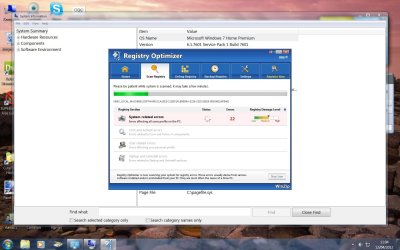
Stupidly I downloaded "WinZip Registry Optimizer" a WinZip programme designed by a Corel Company which is supposed to be Microsoft Gold Certified with a CNET Editors ratiing of four stars and now I can get rid of it!! I have looked through my list of programmes but cannot find it. Obviously they have hidden it away under another name. Every time I open my computer up it comes, does a scan and tells me I have hundres of registry errors and the only way to clear them is to purchase the programme, which I will not do as I have a suspicion it's a con. I have attached a screen shot showing details of the programme.

Two questions, (A) can anyone with the knowledge please tell me where it might be hiding and how to get rid of it and (B) If I can't get rid of it, where do I find my "Start Up" screen/menu in the control panel so I can switch it off and stop it opening every time I switch on, if it is showing there please?

RonBin79
 

Attachments
  • Reg Optimiser.jpg
    Reg Optimiser.jpg
    155.1 KB · Views: 38

My Computer

Computer Manufacturer/Model Number
Dell XP8300
OS
Windows Seven Premium
CPU
Intel Core i5-2300
Motherboard
Unknown
Memory
8GB
Graphics Card(s)
1GB ATI Raedon HD 5450
Sound Card
Integrated 7.1 with THX TrueStudio
Monitor(s) Displays
Dell 17"
Hard Drives
1 Terrabyte Serial ATA
Case
Dell (Metal)
Cooling
None
Keyboard
Dell
Mouse
Dell Laser
Internet Speed
2.8Gb
I'd do a System Restore to a date prior to installing the offending program.

It most likely lives somewhere in C:\Program files or C:\Program files (x86), but who knows what the name of the directory within those directories might be. And just deleting that directory would leave behind remnants.

Yeah, it is a con of a sort. Those types of programs will typically find dozens or hundreds of "errors" on a brand new immaculate Windows installation--and ask you to pay for their removal. And then find even more after you have paid and removed the so-called errors.

General recommendation is to not use a registry cleaner at all. If you are so obsessive that you cannot help yourself, use CCleaner, but say yes when it asks you if you want to backup the existing registry.
 

My Computer

Computer type
PC/Desktop
Computer Manufacturer/Model Number
Ignatz Special; 4 speed manual gearbox; factory air conditioning; one of one
OS
Windows 7 Home Premium SP1, 64-bit
CPU
Intel Skylake i5-6600K, not overclocked
Motherboard
AsRock Z170M Extreme 4, micro ATX
Memory
8 GB HyperX DDR4-2666 (2 x 4 GB)
Graphics Card(s)
none; graphics are integrated on CPU
Sound Card
onboard: Realtek ALC1150; external: USB Behringer UF0-202
Monitor(s) Displays
Dell S2340M 23 inch IPS
Screen Resolution
1600 x 900
Hard Drives
System: Crucial MX100 series SSD, 128 GB;
Data: Samsung Spinpoint 103SJ, 1 TB;
Backup: WD Caviar Green WD30EZRX-00D8PB0, 3 TB
PSU
Rosewill SilentNight 500 watt fanless, semi-modular
Case
Antec Solo II
Cooling
Noctua NH-U12S; Noctua F12 intake, Noctua S12A exhaust
Keyboard
Microsoft 200 6JH-00001 USB
Mouse
Dell or Microsoft optical wired; USB
Antivirus
Microsoft Security Essentials and Malwarebytes Premium
Browser
Pale Moon
Other Info
All fans PWM; speeds at idle: CPU circa 500 rpm; intake circa 600 rpm; exhaust circa 600 rpm; CPU temps 27 idle and 47 C load in a warm room (27 C/81 F) when running Intel Extreme Tuning Utility stress test.
WinZip Reg optimizer

Thanks for the info I have learned my lesson! Can you tell me please where I can find on the Control Panel (Windows 7 Premioum) the screen which allows you to turn off programmes which open on start up??

RonBin79
 

My Computer

Computer Manufacturer/Model Number
Dell XP8300
OS
Windows Seven Premium
CPU
Intel Core i5-2300
Motherboard
Unknown
Memory
8GB
Graphics Card(s)
1GB ATI Raedon HD 5450
Sound Card
Integrated 7.1 with THX TrueStudio
Monitor(s) Displays
Dell 17"
Hard Drives
1 Terrabyte Serial ATA
Case
Dell (Metal)
Cooling
None
Keyboard
Dell
Mouse
Dell Laser
Internet Speed
2.8Gb
Type msconfig into the start box and then look at the "startup" tab. That's where most of them are.

Windows will start with all of the shown items unchecked. You should leave your anti-virus checked. You can revisit the page and re-check certain entries if some of your desired functionality disappears when unchecked. I've got about 5 things checked on that tab.

Did you use System Restore and did it get rid of the program in question?
 

My Computer

Computer type
PC/Desktop
Computer Manufacturer/Model Number
Ignatz Special; 4 speed manual gearbox; factory air conditioning; one of one
OS
Windows 7 Home Premium SP1, 64-bit
CPU
Intel Skylake i5-6600K, not overclocked
Motherboard
AsRock Z170M Extreme 4, micro ATX
Memory
8 GB HyperX DDR4-2666 (2 x 4 GB)
Graphics Card(s)
none; graphics are integrated on CPU
Sound Card
onboard: Realtek ALC1150; external: USB Behringer UF0-202
Monitor(s) Displays
Dell S2340M 23 inch IPS
Screen Resolution
1600 x 900
Hard Drives
System: Crucial MX100 series SSD, 128 GB;
Data: Samsung Spinpoint 103SJ, 1 TB;
Backup: WD Caviar Green WD30EZRX-00D8PB0, 3 TB
PSU
Rosewill SilentNight 500 watt fanless, semi-modular
Case
Antec Solo II
Cooling
Noctua NH-U12S; Noctua F12 intake, Noctua S12A exhaust
Keyboard
Microsoft 200 6JH-00001 USB
Mouse
Dell or Microsoft optical wired; USB
Antivirus
Microsoft Security Essentials and Malwarebytes Premium
Browser
Pale Moon
Other Info
All fans PWM; speeds at idle: CPU circa 500 rpm; intake circa 600 rpm; exhaust circa 600 rpm; CPU temps 27 idle and 47 C load in a warm room (27 C/81 F) when running Intel Extreme Tuning Utility stress test.
Did you look for the Program in Control Panel>Programs and Features which is where you uninstall it?

If not, look under Start>All Programs to find it, see if it has an Uninstaller listing there to click.

But Ignat's idea to System Restore before you installed it would be preferable to get rid of both the crapware and any changes it made. So try that first to see if you have a Restore point before it was installed.

If problems persist work through these Troubleshooting Steps for Windows 7 - Windows 7 Forums
 
Last edited:
Type msconfig into the start box and then look at the "startup" tab. That's where most of them are.

Windows will start with all of the shown items unchecked. You should leave your anti-virus checked. You can revisit the page and re-check certain entries if some of your desired functionality disappears when unchecked. I've got about 5 things checked on that tab.

Did you use System Restore and did it get rid of the program in question?


go o run --> msconfig (wizard will open in that -->services --> enable checkbox to hide all microsoft services -->find all req services re running --> goto startup tab -->check for the item in case if u find unwanted item uncheck by this way u can predict the unwanted startup item.
 

My Computer

OS
Karnataka
Click Start, type services.msc in the Search box. Press ENTER. Right click and stop each service which is not necessary for you.
 

My Computer

OS
Windows 7 Ultimate x64
Back
Top