Solved Starting PC Alternative

MourningStar

(_x_)
Power User
VIP
Local time
9:59 AM
Messages
1,308
The pc and several peripheral's power cables are connected to a powerstrip with an on/off switch. Everynight I use the Start > Shutdown method to power off the pc. I then switch off the powerstrip. Every morning I switch on the powerstrip and then use the pc's power button to start the pc.

If possible, how do I configure the pc to start when I switch on the powerstrip?

-thx
 

My Computer

Computer type
PC/Desktop
Computer Manufacturer/Model Number
HP (HP-P6212F)
OS
Microsoft Windows 7 Home Premium 64-bit 7601 Multiprocessor Free Service Pack 1
CPU
Pentium(R) Dual-Core CPU E5300 @ 2.60GHz
Motherboard
PEGATRON CORPORATION Benicia
Memory
6.00 GB
Graphics Card(s)
Intel(R) G33/G31 Express Chipset Family
Sound Card
Realtek High Definition Audio
Monitor(s) Displays
24'' HP WS LCD
Screen Resolution
1920 x 1080 x 32 bits (4294967296 colors) @ 60 Hz
Hard Drives
(1) ATA Hitachi HDT72106 SCSI Disk Device (2) Generic- Compact Flash USB Device (3) Generic- MS/MS-Pro USB Device (4) Generic- SD/MMC USB Device (5) Generic- SM/xD-Picture USB Device (6) Verbatim STORE N GO USB Device
Keyboard
Logitech G510s
Mouse
Logitech Trackball M570
Antivirus
Microsoft Security Essentials / Malwarebytes
Browser
IE / Firefox / Chrome
The Paper Clip Test (aka Jump a PSU) can be used to test a power connection, without using the Case's ON button, It follows that if you leave the wire in place, and switch via the power strip, then you may well achieve what you request.

Trouble is, you will have induction loads powering on same time as solid state components, and that might not be safe - might overload the PSU. The paperclip idea is also not safe if you think about it; with a short circuit dangling over side of Power Connector.

So the experiment is fun, but a permanent solution might be dangerous.
 

My Computer

Computer type
PC/Desktop
OS
Windows 7 x64, Vista x64, 8.1 smartphone
CPU
Intel E8400 65W 64-bit
Motherboard
Gigabyte EP45-UD3LR
Memory
DDR2 2 x 2GB, 1GB x 2
Graphics Card(s)
XFX Radeon HD5750
Sound Card
AMD High Definition Audio; Realtek High Definition Audio
Monitor(s) Displays
iiyama prolite X2377HDS
Screen Resolution
1920 x 1080
Hard Drives
500GB 7200 rpm Seagate ST3500413AS 16MB, 500GB 5400 rpm Toshiba MQ02ABF050H 32MB, 200GB 7200 rpm Seagate ST3200820AS 8MB, 2TB 7200 rpm Western Digital WD20EZRX 64MB
PSU
Enermax Liberty Modular
Case
Antec P193 Midi Tower
Keyboard
Mionix ZIBAL 60
Mouse
Razer USB 2.0 Diamondback Mouse or Huion Graphics Tablet
Browser
Internet Explorer, Lunascape, Firefox, Opera, Avast Safezone
...So the experiment is fun, but a permanent solution might be dangerous.
Thank you - However, I do not request an experiment, fun, or dangerous advice.
 

My Computer

Computer type
PC/Desktop
Computer Manufacturer/Model Number
HP (HP-P6212F)
OS
Microsoft Windows 7 Home Premium 64-bit 7601 Multiprocessor Free Service Pack 1
CPU
Pentium(R) Dual-Core CPU E5300 @ 2.60GHz
Motherboard
PEGATRON CORPORATION Benicia
Memory
6.00 GB
Graphics Card(s)
Intel(R) G33/G31 Express Chipset Family
Sound Card
Realtek High Definition Audio
Monitor(s) Displays
24'' HP WS LCD
Screen Resolution
1920 x 1080 x 32 bits (4294967296 colors) @ 60 Hz
Hard Drives
(1) ATA Hitachi HDT72106 SCSI Disk Device (2) Generic- Compact Flash USB Device (3) Generic- MS/MS-Pro USB Device (4) Generic- SD/MMC USB Device (5) Generic- SM/xD-Picture USB Device (6) Verbatim STORE N GO USB Device
Keyboard
Logitech G510s
Mouse
Logitech Trackball M570
Antivirus
Microsoft Security Essentials / Malwarebytes
Browser
IE / Firefox / Chrome
You really don't have to power off the power strip. Why are you doing that?
 

My Computer

Computer type
PC/Desktop
OS
Windows 7 Ultimate x64
You don't have to shut your computer down at night either why are you doing this
 

My Computer

Computer type
PC/Desktop
Computer Manufacturer/Model Number
Custom Build
OS
Windows 10 pro 64bit
CPU
i5 ivy bridge
Memory
2x4gb ddr3
Graphics Card(s)
Nivida GeForce
Hard Drives
WD Blue 500gb
Antivirus
Windows defender
Browser
Google chrome
The pc and several peripheral's power cables are connected to a powerstrip with an on/off switch. Everynight I use the Start > Shutdown method to power off the pc. I then switch off the powerstrip. Every morning I switch on the powerstrip and then use the pc's power button to start the pc.
If possible, how do I configure the pc to start when I switch on the powerstrip?
-thx


That's usually pretty easy in the BIOS, on most computers, either Desktop or Laptop.

Every BIOS that I can remember seeing, has a Power Management setting where you can tell it what to do in case of a power failure. I always set mine to "Always ON". Then when you turn on the line power, the computer will come on by itself. That also saves a lot of wear and tear on the Power ON Switch on your computer.

I give you 100 attaboys for turning off your PC when you're done using it. I've been doing that for about 50 years now. (and I'm a professional computer tech)
The home computer is built out of Hobby Grade parts, that were never designed for 24x7 service, and should be turned OFF when not in use, like any other home appliance.

Likewise, your monitor (on a desktop PC) will come on by itself, if it was on when you turned off the Power Strip.

* If Microsoft built a car, you'd have to press the starter to turn the car off!

You don't really have to use that old antiquated Power OFF method to just power Down your PC.

All you need is a Shutdown shortcut on your desktop, or in your Quickstart Tool Bar (at the bottom of your desktop screen)
Here's the one I use for Windows 7. (The syntax is slightly different for different OS's.)

%windir%\System32\shutdown.exe /s /t 1


If you just copy and paste that line into a desktop shortcut, you'll get the three spaces that are required in that command line.


I use that shortcut in my toolbar for a One-Click shutdown. It's fast, efficient and easy on the nerves. ;)

My Win-7 Desktop PC shuts down in just 5 seconds, using that shortcut. :D

For years, I've been giving that to all my customers, and they LOVE IT!


Good Luck,
TechnoMage :cool:
 

My Computer

Computer type
PC/Desktop
Computer Manufacturer/Model Number
Various
OS
Win 7 Pro, SP1, x86, Win-11/Pro/64
CPU
AMD
Motherboard
Various
Memory
8GB Crucial
Graphics Card(s)
Various
Sound Card
OnBoard
Monitor(s) Displays
Acer 21.5"
Hard Drives
Crucial SSD, 500 GB
PSU
OEM
Case
SFF Slim Line Case
Cooling
OEM
Keyboard
eMachines
Mouse
Logitech Wireless
Internet Speed
varies
Antivirus
Windows Defender/Super Anti-Spyware
Browser
Firefox
You don't have to shut your computer down at night either why are you doing this


You don't want to leave your computer on all the time. Not only does it cost money to run, but you're putting wear and tear on your computer. Especially the PSU.
 

My Computer

Computer type
PC/Desktop
OS
Windows 7 Ultimate x64
I HAVE to leave my computer on or else it wont boot due to a ram issue and i don't have money to replace anything
 

My Computer

Computer type
PC/Desktop
Computer Manufacturer/Model Number
Custom Build
OS
Windows 10 pro 64bit
CPU
i5 ivy bridge
Memory
2x4gb ddr3
Graphics Card(s)
Nivida GeForce
Hard Drives
WD Blue 500gb
Antivirus
Windows defender
Browser
Google chrome
Technomage, in another thread you said i could pm you but when i try to do that it says i do not have permission can you send ME a PM
 

My Computer

Computer type
PC/Desktop
Computer Manufacturer/Model Number
Custom Build
OS
Windows 10 pro 64bit
CPU
i5 ivy bridge
Memory
2x4gb ddr3
Graphics Card(s)
Nivida GeForce
Hard Drives
WD Blue 500gb
Antivirus
Windows defender
Browser
Google chrome
I HAVE to leave my computer on or else it wont boot due to a ram issue and i don't have money to replace anything


Well, that Sucks! What is the RAM issue? Bad ram?
How many sticks? Have you run Memtest 86+ on your ram? (one stick at a time?)


I've saved MANY ram sticks that tested bad, by just washing them, at the kitchen sink, with soap and water. Yes, they are waterproof, but not DIRT proof. Dirt between the little legs on the ram chips will short them out, effectively killing the ram. Washing away the dirt can restore the ram to good operating condition. I once did a whole thread on "Wash that ram!".


The only ram I've actually had to just throw away was "Kingston" ram. It really sucks!


Good Luck!
TM :cool:
 

My Computer

Computer type
PC/Desktop
Computer Manufacturer/Model Number
Various
OS
Win 7 Pro, SP1, x86, Win-11/Pro/64
CPU
AMD
Motherboard
Various
Memory
8GB Crucial
Graphics Card(s)
Various
Sound Card
OnBoard
Monitor(s) Displays
Acer 21.5"
Hard Drives
Crucial SSD, 500 GB
PSU
OEM
Case
SFF Slim Line Case
Cooling
OEM
Keyboard
eMachines
Mouse
Logitech Wireless
Internet Speed
varies
Antivirus
Windows Defender/Super Anti-Spyware
Browser
Firefox
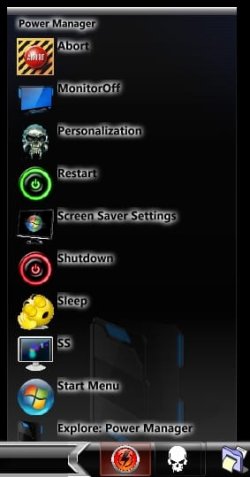
Thank you TechnoMage2016 - I use a similar shutdown shortcut in a system/power management menu (with a timer & abort option in case I change my mind, refer to image).

I want to explore your BIOS advice. Can you provide a 'for dummies' tutorial/guide to walk me thru this? -thx
 

Attachments

  • 2020-04-17_095428.jpg
    2020-04-17_095428.jpg
    64.2 KB · Views: 9

My Computer

Computer type
PC/Desktop
Computer Manufacturer/Model Number
HP (HP-P6212F)
OS
Microsoft Windows 7 Home Premium 64-bit 7601 Multiprocessor Free Service Pack 1
CPU
Pentium(R) Dual-Core CPU E5300 @ 2.60GHz
Motherboard
PEGATRON CORPORATION Benicia
Memory
6.00 GB
Graphics Card(s)
Intel(R) G33/G31 Express Chipset Family
Sound Card
Realtek High Definition Audio
Monitor(s) Displays
24'' HP WS LCD
Screen Resolution
1920 x 1080 x 32 bits (4294967296 colors) @ 60 Hz
Hard Drives
(1) ATA Hitachi HDT72106 SCSI Disk Device (2) Generic- Compact Flash USB Device (3) Generic- MS/MS-Pro USB Device (4) Generic- SD/MMC USB Device (5) Generic- SM/xD-Picture USB Device (6) Verbatim STORE N GO USB Device
Keyboard
Logitech G510s
Mouse
Logitech Trackball M570
Antivirus
Microsoft Security Essentials / Malwarebytes
Browser
IE / Firefox / Chrome
Technomage, in another thread you said i could pm you but when i try to do that it says i do not have permission can you send ME a PM

Read above
 

My Computer

Computer type
PC/Desktop
Computer Manufacturer/Model Number
Custom Build
OS
Windows 10 pro 64bit
CPU
i5 ivy bridge
Memory
2x4gb ddr3
Graphics Card(s)
Nivida GeForce
Hard Drives
WD Blue 500gb
Antivirus
Windows defender
Browser
Google chrome

My Computer

Computer type
PC/Desktop
Computer Manufacturer/Model Number
HP (HP-P6212F)
OS
Microsoft Windows 7 Home Premium 64-bit 7601 Multiprocessor Free Service Pack 1
CPU
Pentium(R) Dual-Core CPU E5300 @ 2.60GHz
Motherboard
PEGATRON CORPORATION Benicia
Memory
6.00 GB
Graphics Card(s)
Intel(R) G33/G31 Express Chipset Family
Sound Card
Realtek High Definition Audio
Monitor(s) Displays
24'' HP WS LCD
Screen Resolution
1920 x 1080 x 32 bits (4294967296 colors) @ 60 Hz
Hard Drives
(1) ATA Hitachi HDT72106 SCSI Disk Device (2) Generic- Compact Flash USB Device (3) Generic- MS/MS-Pro USB Device (4) Generic- SD/MMC USB Device (5) Generic- SM/xD-Picture USB Device (6) Verbatim STORE N GO USB Device
Keyboard
Logitech G510s
Mouse
Logitech Trackball M570
Antivirus
Microsoft Security Essentials / Malwarebytes
Browser
IE / Firefox / Chrome

My Computer

Computer type
PC/Desktop
Computer Manufacturer/Model Number
Various
OS
Win 7 Pro, SP1, x86, Win-11/Pro/64
CPU
AMD
Motherboard
Various
Memory
8GB Crucial
Graphics Card(s)
Various
Sound Card
OnBoard
Monitor(s) Displays
Acer 21.5"
Hard Drives
Crucial SSD, 500 GB
PSU
OEM
Case
SFF Slim Line Case
Cooling
OEM
Keyboard
eMachines
Mouse
Logitech Wireless
Internet Speed
varies
Antivirus
Windows Defender/Super Anti-Spyware
Browser
Firefox
Back
Top