Starts up without explorer.exe

ykarim

New member
Local time
4:42 PM
Messages
5
Upon start, after I log-in, all I get is a black screen. On the lower right, I do see the Windows 7 build number 7022. The my documents folder opens up. There is nothing else. The only way that I have figured out to load anything is to go to the Windows Task Manager and start a new task: explorer.exe. Then everything loads fine, no error messages.

I have just installed this copy of Windows 7, I am dual-booting with Windows XP SP3 x86 Professional.

Is anyone else experiening this same problem. Any help would be greatly appreciated.

I will post a screenshot soon.
 

My Computer

Computer type
PC/Desktop
OS
Windows 7 Professional x64
CPU
Intel(R) Core(TM) i5-3570K CPU @ 3.40GHz
Motherboard
Asus Sabertoth Z77
Memory
16GB
Graphics Card(s)
Nvidia GTX 670
Monitor(s) Displays
Dell U2412M
Screen Resolution
1900 x 1200
Hard Drives
Crucial M4 128 GB
PSU
Corsair X750
Case
Corsair 550D
Keyboard
Logitech DiNovo Bluetooth
Mouse
Logitech G500
Antivirus
Microsoft Security Essentials
Browser
Chrome

My Computer

Computer Manufacturer/Model Number
Home Brew
OS
Windows 7 Ultimate Vista Ultimate x64
CPU
Core 2 Duo E8500 3.16Ghz @ 3.8Ghz
Motherboard
eVGA 750i FTW
Memory
2x2Gigs Patriot PC2-6400 LL
Graphics Card(s)
Inno3D GeForce GTX260 216 SP
Monitor(s) Displays
ASUS VW222U 22" 2ms Response time
Screen Resolution
1680x1050
Hard Drives
SATA 150GB
SATA II 250GB
USB IDE 750GB Ext.
PSU
HYTEC 600W & Thermaltake 650W Toughpower Power Exp
Case
Thermaltake Armor LCS (Liquid Cooling System)
Cooling
Liquid Cooling System
Keyboard
Logitech G15 Gaming Keyboard
Mouse
Logitech G9 Gaming Mouse
Thanks for the quick reply. I will try your suggestion and get back to you.
 

My Computer

Computer type
PC/Desktop
OS
Windows 7 Professional x64
CPU
Intel(R) Core(TM) i5-3570K CPU @ 3.40GHz
Motherboard
Asus Sabertoth Z77
Memory
16GB
Graphics Card(s)
Nvidia GTX 670
Monitor(s) Displays
Dell U2412M
Screen Resolution
1900 x 1200
Hard Drives
Crucial M4 128 GB
PSU
Corsair X750
Case
Corsair 550D
Keyboard
Logitech DiNovo Bluetooth
Mouse
Logitech G500
Antivirus
Microsoft Security Essentials
Browser
Chrome
I ran the scan like you suggested.

Windows Resource Protection did not find any integrity violations.
 

My Computer

Computer type
PC/Desktop
OS
Windows 7 Professional x64
CPU
Intel(R) Core(TM) i5-3570K CPU @ 3.40GHz
Motherboard
Asus Sabertoth Z77
Memory
16GB
Graphics Card(s)
Nvidia GTX 670
Monitor(s) Displays
Dell U2412M
Screen Resolution
1900 x 1200
Hard Drives
Crucial M4 128 GB
PSU
Corsair X750
Case
Corsair 550D
Keyboard
Logitech DiNovo Bluetooth
Mouse
Logitech G500
Antivirus
Microsoft Security Essentials
Browser
Chrome
Hi ykarim and Welcome to the forums!

Do you know how to get into the registry?
If so, go to this key:

HKEY_LOCAL_MACHINE\SOFTWARE\Microsoft\WindowsNT\CurrentVersion\Winlogon

and make sure there is a value in there called - shell=explorer.exe

If it's not there and you do not know how to add a new key vakue or need help, post back please.
 

My Computer

Computer Manufacturer/Model Number
Personal Build
OS
Vista Ult 64bit - Windows 7 Ult 7264 64bit
CPU
Intel Core 2 Duo E6750
Motherboard
Asus Commando
Memory
4 G's Crucial Ballistix Tracer
Graphics Card(s)
BFG Nvidia 8800 GTS 340
Sound Card
Creative Sound Blaster X-FI Platinum FATAL1TY
Monitor(s) Displays
2-22" HP W2207 LCD
Screen Resolution
1920 x 1080
Hard Drives
3 x 500G WD Caviar SATA II
PSU
Enermax Noise Taker II 600W
Case
NZXT Lexa Classic (dual doored & windowed)
Cooling
Zalman 9700 CPU cooler - 4 x 120mm, 1 x 90mm fans
Keyboard
Logitech MX 5500
Mouse
Logitech MX Revolution
Internet Speed
Blazing...
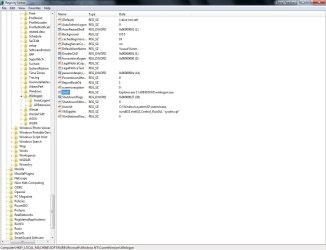
This is what I see in the registry:
 

Attachments

  • prt scr.jpg
    prt scr.jpg
    95.3 KB · Views: 886

My Computer

Computer type
PC/Desktop
OS
Windows 7 Professional x64
CPU
Intel(R) Core(TM) i5-3570K CPU @ 3.40GHz
Motherboard
Asus Sabertoth Z77
Memory
16GB
Graphics Card(s)
Nvidia GTX 670
Monitor(s) Displays
Dell U2412M
Screen Resolution
1900 x 1200
Hard Drives
Crucial M4 128 GB
PSU
Corsair X750
Case
Corsair 550D
Keyboard
Logitech DiNovo Bluetooth
Mouse
Logitech G500
Antivirus
Microsoft Security Essentials
Browser
Chrome
This is what I see in the registry:

The "Shell" entry is all wrong.

Double-click on "Shell", then edit the text so that it's value is only "explorer.exe" (WITHOUT THE QUOTES).

Reboot, and post back with the results.
 

My Computer

Computer type
PC/Desktop
Computer Manufacturer/Model Number
Virtual Machine
OS
Windows 7 Professional 32-bit SP1
CPU
AMD A4/A6
Motherboard
Intel Corporation 440BX Desktop Reference Platform
Memory
3.00GB EDO
Graphics Card(s)
VMware SVGA 3D
Sound Card
High Definition Audio Device
Monitor(s) Displays
Generic Non-PnP Monitor on VMware SVGA 3D
Screen Resolution
1440x900
Hard Drives
1 x 60GB VMware Virtual SATA Hard Drive ATA Device
Antivirus
Kaspersky Total Security
I created a new user account, and the same thing hapened, expect that there was no my documents folder open on startup.

I corrected the registry with explorer.exe. The issue is now resolved. I have no idea why it would have changed in the first place. There had to have been something, but cannot pinpoint the source. Just happy it is resolved. Thanks for your help.
 

My Computer

Computer type
PC/Desktop
OS
Windows 7 Professional x64
CPU
Intel(R) Core(TM) i5-3570K CPU @ 3.40GHz
Motherboard
Asus Sabertoth Z77
Memory
16GB
Graphics Card(s)
Nvidia GTX 670
Monitor(s) Displays
Dell U2412M
Screen Resolution
1900 x 1200
Hard Drives
Crucial M4 128 GB
PSU
Corsair X750
Case
Corsair 550D
Keyboard
Logitech DiNovo Bluetooth
Mouse
Logitech G500
Antivirus
Microsoft Security Essentials
Browser
Chrome
I created a new user account, and the same thing hapened, expect that there was no my documents folder open on startup.

I corrected the registry with explorer.exe. The issue is now resolved. I have no idea why it would have changed in the first place. There had to have been something, but cannot pinpoint the source. Just happy it is resolved. Thanks for your help.

When you look and the original value of the "Shell" key in the registry, it was set to "explorer.exe c:\windows\winlogon.exe", which should have been your first clue.

First, WINLOGON.EXE has it's own entry in the registry. And second, WINLOGON.EXE is in the C:\Windows\System32" folder. The fact that something modified your registry to have explorer attempt to run a fake WINLOGON.EXE at startup is indicative of some sort of virus or other malware infection.

I'd check to see that WINLOGON does exist in "C:\Windows\System32", and then delete the rouge "C:\Windows\WinLogon.exe" which most defintely does not belong there. It is common practice for malware writers to use legitimate Windows system filenames to try and hide the true intent of the programs from unsuspecting users that believe them to be genuine system files, thus preventing them from deleting them.

Your safest bet in this case would be (if possible) to slave your hard disk to a known malware-free computer, with up-to-date virus protection, and then to perform a thorough scan of the drive to root out any suspect software. When you reconnect you drive to your hardware, install and update better anti-virus software, because whatever you have has not done it's job by allowing something through.

Keeping UAC set to it's maximum level (one setting above the Windows 7 default) is also a good idea. That way, if anything tries to perform an action (like modify the registry), you will be prompted for authorization to allow it to continue or not. That way, you can stop rogue software that your anti-virus software may have missed.
 

My Computer

Computer type
PC/Desktop
Computer Manufacturer/Model Number
Virtual Machine
OS
Windows 7 Professional 32-bit SP1
CPU
AMD A4/A6
Motherboard
Intel Corporation 440BX Desktop Reference Platform
Memory
3.00GB EDO
Graphics Card(s)
VMware SVGA 3D
Sound Card
High Definition Audio Device
Monitor(s) Displays
Generic Non-PnP Monitor on VMware SVGA 3D
Screen Resolution
1440x900
Hard Drives
1 x 60GB VMware Virtual SATA Hard Drive ATA Device
Antivirus
Kaspersky Total Security
Nice catch Peter!

I knew someone knowledgable would come in and help if we found the registry entry was incorrect, but allot of times that file placement would slip past some. That's an important lesson that HJT has taught over the years, always know the proper directory placement of system files, and know the Bad guys use this tactic often.

I think we deserve a little "Rep" here...don't you? ;)
 

My Computer

Computer Manufacturer/Model Number
Personal Build
OS
Vista Ult 64bit - Windows 7 Ult 7264 64bit
CPU
Intel Core 2 Duo E6750
Motherboard
Asus Commando
Memory
4 G's Crucial Ballistix Tracer
Graphics Card(s)
BFG Nvidia 8800 GTS 340
Sound Card
Creative Sound Blaster X-FI Platinum FATAL1TY
Monitor(s) Displays
2-22" HP W2207 LCD
Screen Resolution
1920 x 1080
Hard Drives
3 x 500G WD Caviar SATA II
PSU
Enermax Noise Taker II 600W
Case
NZXT Lexa Classic (dual doored & windowed)
Cooling
Zalman 9700 CPU cooler - 4 x 120mm, 1 x 90mm fans
Keyboard
Logitech MX 5500
Mouse
Logitech MX Revolution
Internet Speed
Blazing...
Back
Top