
I am having some major problems with my windows 7 desktop. Here is my build:
NZXT Technologies Source 210 Computer Case (Black)
WD Blue 1 TB Desktop Hard Drive: 3.5 Inch, 7200 RPM, SATA 6 Gb/s, 64 MB Cache – WD10EZEX
Crucial Ballistix Sport Very Low Profile 8GB Single DDR3-1600 1.35V UDIMM 240-Pin Memory Module BLS8G3D1609ES2LX0
MSI Socket FM2/AMD A75/DDR3/SATA3&USB3.0/A&GbE/MicroATX Motherboard FM2-A75MA-E35
AMD Quad Core A10-Series APU for Desktops A10-6800K with Radeon HD 8670D (AD680KWOHLBOX)
Coolmax 600W 140mm Blue LED Fan Power Supply VL-600B (Black)
My first problem is mainly being able to start my computer at all. About 2/3 the time I turn on my computer, one of two things will happen: either the startup screen will freeze and the text and windows logo will become disfigured with red lines surrounding them (I will attempt to post pictures for clarity), or the screen will go black.
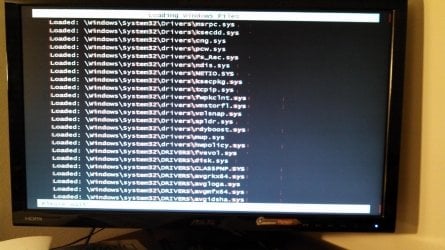
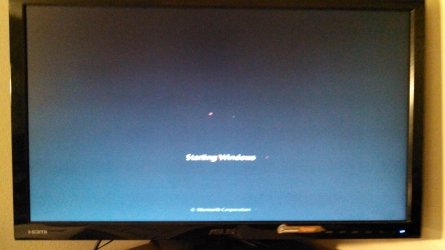
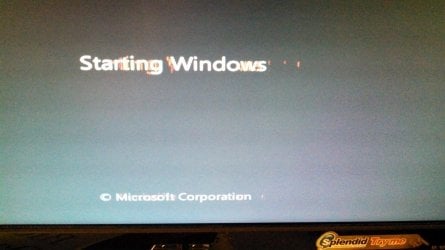
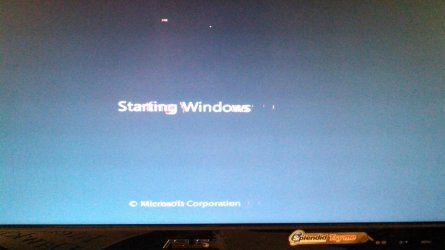
In each of these cases, the computer does not start up, and I have to reboot it. After a few times I am able to get the computer started. This event occurs regardless of how I'm booting windows (normal, safe mode, startup repair, ect.) This, I believe, has always been a problem of mine I have never really attempted to fix, other than trying a system restore, which did nothing. Just today, another problem occurred. After I went through the first problem and I was able to boot my computer, after I tried to log on, I received an error message reading: “User Profile Service service failed the logon. User profile cannot be loaded.” I looked up this specific problem and said that the best thing to do is a system restore. Well I restarted my computer multiple times, as I had to bypass my first problem to even launch startup repair. After doing that, I did a system restore, and that gave me errors, saying that my system could NOT be restored. After bypassing the first problem again to start the computer normally, and try logging on again, I received the same error. At this point, I would really wish to just reinstall windows entirely and rid myself of these problems the relatively simple way. However, I do not believe there is a way to retrieve my product key from this specific install, and I don't believe I have any more to use. Therefore, if I can fix each of these problems, I would rather do that and not have to spend the money on a new product key. If anyone has any answers, they will be appreciated.
NZXT Technologies Source 210 Computer Case (Black)
WD Blue 1 TB Desktop Hard Drive: 3.5 Inch, 7200 RPM, SATA 6 Gb/s, 64 MB Cache – WD10EZEX
Crucial Ballistix Sport Very Low Profile 8GB Single DDR3-1600 1.35V UDIMM 240-Pin Memory Module BLS8G3D1609ES2LX0
MSI Socket FM2/AMD A75/DDR3/SATA3&USB3.0/A&GbE/MicroATX Motherboard FM2-A75MA-E35
AMD Quad Core A10-Series APU for Desktops A10-6800K with Radeon HD 8670D (AD680KWOHLBOX)
Coolmax 600W 140mm Blue LED Fan Power Supply VL-600B (Black)
My first problem is mainly being able to start my computer at all. About 2/3 the time I turn on my computer, one of two things will happen: either the startup screen will freeze and the text and windows logo will become disfigured with red lines surrounding them (I will attempt to post pictures for clarity), or the screen will go black.
In each of these cases, the computer does not start up, and I have to reboot it. After a few times I am able to get the computer started. This event occurs regardless of how I'm booting windows (normal, safe mode, startup repair, ect.) This, I believe, has always been a problem of mine I have never really attempted to fix, other than trying a system restore, which did nothing. Just today, another problem occurred. After I went through the first problem and I was able to boot my computer, after I tried to log on, I received an error message reading: “User Profile Service service failed the logon. User profile cannot be loaded.” I looked up this specific problem and said that the best thing to do is a system restore. Well I restarted my computer multiple times, as I had to bypass my first problem to even launch startup repair. After doing that, I did a system restore, and that gave me errors, saying that my system could NOT be restored. After bypassing the first problem again to start the computer normally, and try logging on again, I received the same error. At this point, I would really wish to just reinstall windows entirely and rid myself of these problems the relatively simple way. However, I do not believe there is a way to retrieve my product key from this specific install, and I don't believe I have any more to use. Therefore, if I can fix each of these problems, I would rather do that and not have to spend the money on a new product key. If anyone has any answers, they will be appreciated.
My Computer
- Computer Manufacturer/Model Number
- Lenovo Thinkpad Edge
- OS
- Windows 7, Windows Vista
