Solved Startup drivers/services/programs not always loaded

TheoStudioC

New member
Local time
10:32 PM
Messages
6
I'm using win7 pro. Three screens for video editing and a professional audiocard for 16 channel optical audio input/output. It's a standalone machine without internet. Everything has the latest updates and drivers installed. There should be 12 sytemtray icons visible after startup. Each time windows starts I have a different amount of systemtray icons with a different order. I just continue restart (do nothing just goto menu start and choose retart) until all icons are visible. Sometimes it takes about 15 restarts. It's not sure that the programs that have no icon vivible are also not loaded, sometimes they are sometimes not. While restarting I somtimes get the message "error reading TrayIcon1" or "MMDriver not working" or both. It also happens that all over sudden without any reason my screen order is changed after a restart. All the desktop icons are moved to an other screen.
Reinstalling windows, hard- and software (tried twice) didn't help. I also tried an other harddrive without result. I think there's a timing problem on loading drivers and programs during startup.
The startup folder is empty, everyting is loaded by ini, init or the registry.
Is there an option to let windows load the second driver after finnishing the firrst?
The machine is working perfect when everyting is loaded, so no complaints about that.
It only take a verry long time to start, I can live with it but it's very annoying.

Suggestions are welcome.
 

My Computer

Computer type
PC/Desktop
Computer Manufacturer/Model Number
custom build
OS
windows 7 pro x64
CPU
Intel Core2 Quad Q6600 2.4 GHz
Motherboard
FoxConn MCP73
Memory
4 Gb DRAM
Graphics Card(s)
NVIDIA GeForce 7050 NVIDIA nForce 610i / AMD Radeon HD 5450
Sound Card
E-MU E-DSP Audio Processor [8 channel optical audio In/Out]
Monitor(s) Displays
2x LG IPS & 1x LG E2242
Screen Resolution
1920 x 1080
Hard Drives
WCD WD20EZRX 1,8TB sata / Samsung HD250HJ pata
ST950032 5AS 500 GB sata / WD 10EAVS 1TB USB
Case
High Tower
Keyboard
Logitech wireless
Mouse
Logitech wireless
Internet Speed
100Mb
Antivirus
None
Browser
IE FireFox Opera Chrome Safari
Welcome to the forum

- If you don't have or use internet, change win update to manual on services and on Control Panel\All Control Panel Items\Windows Update\Change settings and set it to Never check.
- run msconfig and on startup tab, disable all.
Reboot
If it boots normally, find witch start up is messing your boot.
 

My Computers

System One System Two

  • Computer type
    PC/Desktop
    Computer Manufacturer/Model Number
    custom build
    OS
    Windows 7 HP 64
    CPU
    i5 6600K - 800MHz to 4200MHz
    Motherboard
    GA-Z170-HD3P
    Memory
    4+4G GSkill DDR4 3000
    Graphics Card(s)
    IG - Intel 530
    Monitor(s) Displays
    Samsung 226BW
    Screen Resolution
    1680x1050
    Hard Drives
    (1) -1 SM951 – 128GB M.2 AHCI PCIe SSD drive for Windows 7 and Lubuntu
    (2) -1 WD SATA 3 - 1T for Data
    (3) -1 WD SATA 3 - 1T for backup
    PSU
    Thermaltake 450W TR2 gold
    Keyboard
    Old and good Chicony mechanical keyboard
    Mouse
    Logitech mX performance - 9 buttons (had to disable some)
    Internet Speed
    500Mb/s
    Browser
    Firefox 64
    Other Info
    TinyWall firewall
  • Computer type
    Laptop
    System Manufacturer/Model Number
    Asus Q550LF
    OS
    Windows 7 Pro
    CPU
    i7-4500U 800MHz to 3.0GHz
    Motherboard
    Asus Q550LF
    Memory
    (4+4)G DDR3 1600
    Graphics Card(s)
    IG intel 4400 + NVIDIA GeForce GT 745M
    Sound Card
    Realtek
    Monitor(s) Displays
    LG Display LP156WF4-SPH1
    Screen Resolution
    1920 x 1080
    Hard Drives
    BX500 120G SSD for Windows and programs +
    1T HDD for data
    Internet Speed
    500 Mb/s
    Browser
    Firefox
    Other Info
    TinyWall firewall
Hi, Win 7 normally should not be installed UEFI.
BIOS settings.
CSM/Boot Device Control/Legacy Oprom Only.
Secure Boot/OS Type/Other OS.
Fast Boot/Off or Post Report leave around 6 seconds (what ever it is called in your BIOS.
In Windows run msconfig as administrator/General tab and select "Normal Start up"...re-boot.
Your system specs show you are running one Nvidia and one AMD graphics card! I am not sure but I don't see that as a great idea.
 

My Computer

Computer type
PC/Desktop
Computer Manufacturer/Model Number
Owner Builder
OS
Windows 7 Ultimate x64 SP1 OEM
CPU
Intel i7 3930K
Motherboard
Asus X79 Deluxe
Memory
Kingston Genesis KHX2133C11D3K4/32G
Graphics Card(s)
Asus RTX 2070 Ti Turbo fan series
Sound Card
Creative Sound Blaster ZXR
Monitor(s) Displays
Samsung U32J39 UHD
Screen Resolution
3840 x 2160
Hard Drives
Samsung 860 Pro 256 GB
OCZ Vertex 4 512GB
Western Digital Black 4TB
PSU
Corsair AX850
Case
Gigabyte
Cooling
Push - Pull 120 mm Noctua PWM, Scythe Big Shuriken 2 Rev. B
Keyboard
Logitech K800 Backlit
Mouse
Logitech MX2 Master
Internet Speed
NBN 25 Mbps
Antivirus
Kaspersky Internet Security
Browser
Mozilla FireFox
Other Info
TP-Link Archer VR600v
Sennheiser TR220 WiFi Head Phones.
And a really stupid comment.
Dont shutdown
Use hibernate or sleep options.

Roy
 

My Computer

Computer type
PC/Desktop
Computer Manufacturer/Model Number
medionl/Aspire 6930G/acer x55a
OS
W7 home premium 32bit/W7HP 64bit/w10 tp insider ring
CPU
E5300 dual core
Motherboard
medion MS7366
Memory
3gb
Graphics Card(s)
Nvidia Geforce 7100 Nforce 630i
Monitor(s) Displays
avixc
Internet Speed
n (isp resticted to 72)
Antivirus
mse/pands
Browser
palemoon
Other Info
Belkin Fd7050 n USB using Railink RT2870 drivers, more upto date
Tried several options. Doesn't realy matter which of the 12 programs I disable on startup. The startup sequence, that's making the problem, is NEVER the same !! I have to disable a minimum af 4 programs (can be any 4 out of the 12) to get a stable startup. I think loading drivers/programs interfere with eachother. Is there an option to start loading after finnishing an other?
And this is about another (a standalone machine) as i'm using now to write these posts.
 

My Computer

Computer type
PC/Desktop
Computer Manufacturer/Model Number
custom build
OS
windows 7 pro x64
CPU
Intel Core2 Quad Q6600 2.4 GHz
Motherboard
FoxConn MCP73
Memory
4 Gb DRAM
Graphics Card(s)
NVIDIA GeForce 7050 NVIDIA nForce 610i / AMD Radeon HD 5450
Sound Card
E-MU E-DSP Audio Processor [8 channel optical audio In/Out]
Monitor(s) Displays
2x LG IPS & 1x LG E2242
Screen Resolution
1920 x 1080
Hard Drives
WCD WD20EZRX 1,8TB sata / Samsung HD250HJ pata
ST950032 5AS 500 GB sata / WD 10EAVS 1TB USB
Case
High Tower
Keyboard
Logitech wireless
Mouse
Logitech wireless
Internet Speed
100Mb
Antivirus
None
Browser
IE FireFox Opera Chrome Safari
I'm not really understanding why one would have 12 programs start at boot.
Starting 12 programs at boot with only 4 gig of ram is asking a bit much.

I agree with MeOnMine.
Two completely different Video card will also cause problems.

Maybe if some of the programs were set to Delay Start things would be better.
The best way I know of to test if some programs are causing problems would be using this Tutorial by Brink.

Troubleshoot Application Conflicts by Performing a Clean Startup

Jack
 

My Computer

Computer type
PC/Desktop
Computer Manufacturer/Model Number
Home made Desktop
OS
Windows 10 Pro. 64/ version 1709 Windows 7 Pro/64
CPU
Intel i7-6800K @ 4.3
Motherboard
ASUS X-99 Deluxe II
Memory
Corsair Platinum 16 gig @2400
Graphics Card(s)
EVGA GTX 1070 OC
Monitor(s) Displays
Asus 27" LED LCD/VE278Q
Screen Resolution
1920-1080 or 1280-720 HDMI
Hard Drives
INTEL SSD 730-240 Gb Sata 3.0/
PSU
EVGA Platium 1200W
Case
Phanteks Luxe Tempered Glass 8 fans/ one radiator
Cooling
XSPC/ Water Cooled CPU
Keyboard
Das 4 Professional
Mouse
Logitech M705/MX Anywhere 2-S
Internet Speed
100 mbits
Antivirus
Microsoft Security Essentials/ Malwarebytes Premium 3.0/ SAS
Browser
I.E. 11 default/Firefox/ ISP Time Warner Cable/Spectrum
Other Info
LG BluRay Burner/
Sound system-KLipsch-THX/
Icy Dock ssd Hot Swap bays.
Windows 7 itself has over a 100 programs/processes running, so why can't I have extra 12?
Read the first post! They are used for 3 video screens, 3 video cards, 2 video capture cards, 2x 8 channel optical light pipe and a 48 channel analog mixing console automation. And again ... it's not the machine i'm using to write these posts. When everything is loaded and running (after several restarts) it's all working perfect! No complaints. Only the startup sequence is never the same. Windows 7 is not consequent in handling the startup procedure. Is there anyone with an educated suggestion?
 

My Computer

Computer type
PC/Desktop
Computer Manufacturer/Model Number
custom build
OS
windows 7 pro x64
CPU
Intel Core2 Quad Q6600 2.4 GHz
Motherboard
FoxConn MCP73
Memory
4 Gb DRAM
Graphics Card(s)
NVIDIA GeForce 7050 NVIDIA nForce 610i / AMD Radeon HD 5450
Sound Card
E-MU E-DSP Audio Processor [8 channel optical audio In/Out]
Monitor(s) Displays
2x LG IPS & 1x LG E2242
Screen Resolution
1920 x 1080
Hard Drives
WCD WD20EZRX 1,8TB sata / Samsung HD250HJ pata
ST950032 5AS 500 GB sata / WD 10EAVS 1TB USB
Case
High Tower
Keyboard
Logitech wireless
Mouse
Logitech wireless
Internet Speed
100Mb
Antivirus
None
Browser
IE FireFox Opera Chrome Safari
Start up processes and start up programs are two completely different things.

Have a nice day.

Jack
 

My Computer

Computer type
PC/Desktop
Computer Manufacturer/Model Number
Home made Desktop
OS
Windows 10 Pro. 64/ version 1709 Windows 7 Pro/64
CPU
Intel i7-6800K @ 4.3
Motherboard
ASUS X-99 Deluxe II
Memory
Corsair Platinum 16 gig @2400
Graphics Card(s)
EVGA GTX 1070 OC
Monitor(s) Displays
Asus 27" LED LCD/VE278Q
Screen Resolution
1920-1080 or 1280-720 HDMI
Hard Drives
INTEL SSD 730-240 Gb Sata 3.0/
PSU
EVGA Platium 1200W
Case
Phanteks Luxe Tempered Glass 8 fans/ one radiator
Cooling
XSPC/ Water Cooled CPU
Keyboard
Das 4 Professional
Mouse
Logitech M705/MX Anywhere 2-S
Internet Speed
100 mbits
Antivirus
Microsoft Security Essentials/ Malwarebytes Premium 3.0/ SAS
Browser
I.E. 11 default/Firefox/ ISP Time Warner Cable/Spectrum
Other Info
LG BluRay Burner/
Sound system-KLipsch-THX/
Icy Dock ssd Hot Swap bays.
Your root issue might be programs, or might be hardware drivers. I'd start by assuming its drivers cuz you have so many devices. You might have incompatible drivers, or bad drivers, or even a bad bios. Here's the steps I would take to get things cleaned up and starting fresh ....

First completely uninstall either the amd or nvidia card, and drivers. Running these two brands simultaneously is not the cleanest way to start off troubleshooting, so best to eliminate one of them. I suggest just one monitor for now as well.

Then update your motherboard bios. If its not properly handing off its environment to windows, you are hosed before you start. A bios update will allow you to be confident that your bios is not the issue. A bad bios can manifest itself in intermittent windows driver errors, so lets check that off the list with a fresh update.

Then boot straight into bios and disable any integrated peripherals you do not use, such as onboard graphics, onboard LAN, onboard audio. This reduces the driver environment burden for windows.

Then re-install your motherboard drivers from your motherboard's website.

Then reboot and see if things run cleanly. If so, add back in the video card you took out.

You have a great deal of hardware devices running on a 4GB machine. Yes windows is supposed to be able to handle it, but its worth pointing out because it makes your environment unique. Your motherboard voltage regulators are stressed, your power supply is stressed. If you lose a couple bits every startup it can manifest itself in driver errors. If you take your car to the mechanic becuse it makes funny noise when you put 14 kids in the back seat, the first thing he'll ask is does it make the noise when there are no kids in the car. That's the troubleshooting principle I'm advising for you here.

Check your hard disk for errors.

Keep checking in device manager to make sure your drivers are loading correctly. Actually you might check that first.
 

My Computer

Computer type
PC/Desktop
Computer Manufacturer/Model Number
diy
OS
Win7 pro x64
CPU
stock i7 7700k
Motherboard
Gigabyte Z270N-WIFI mini-ITX
Memory
Corsair Vengeance LPX 16GB (2x8GB) DDR4 @ 3200MHz
Graphics Card(s)
integrated Intel HD 630
Sound Card
onboard Realtek ALC1220
Monitor(s) Displays
two vertically mounted samsung 55" 4k un55mu8000
Screen Resolution
1920x1280
Hard Drives
256GB Samsung EVO 960 M.2 pci-e NVMe SSD
PSU
SilverStone Nightjar ST45NF 450Watt Fanless
Case
No case. Motherboard is mounted directly onto power supply
Cooling
Evercool low profile 815EP with Panaflow 12L fan at 7v
Keyboard
Ortek MCK-86 mini
Mouse
Belkin 5-button USB
Internet Speed
spectrum 400mbps
That's why I tried to slow down the boot process.
Fast boot is sometimes too fast.
 

My Computer

Computer type
PC/Desktop
Computer Manufacturer/Model Number
Owner Builder
OS
Windows 7 Ultimate x64 SP1 OEM
CPU
Intel i7 3930K
Motherboard
Asus X79 Deluxe
Memory
Kingston Genesis KHX2133C11D3K4/32G
Graphics Card(s)
Asus RTX 2070 Ti Turbo fan series
Sound Card
Creative Sound Blaster ZXR
Monitor(s) Displays
Samsung U32J39 UHD
Screen Resolution
3840 x 2160
Hard Drives
Samsung 860 Pro 256 GB
OCZ Vertex 4 512GB
Western Digital Black 4TB
PSU
Corsair AX850
Case
Gigabyte
Cooling
Push - Pull 120 mm Noctua PWM, Scythe Big Shuriken 2 Rev. B
Keyboard
Logitech K800 Backlit
Mouse
Logitech MX2 Master
Internet Speed
NBN 25 Mbps
Antivirus
Kaspersky Internet Security
Browser
Mozilla FireFox
Other Info
TP-Link Archer VR600v
Sennheiser TR220 WiFi Head Phones.
Yes I know. It's all done before I wrote the first post. Oke I don't think it has anything to do with it but here it is.
The machine has an Intel core i7 5960 processor, 32 GB internal memorie, 500 GB SSD HD, Matrox P690 LP PCIE x1, Matrox P690 Plus LP PCIE x16, 7TB Raid Array HD for realtime 4K video editing, MADI HDSPe AIO audiocard with MADI HDSPe FX OPTO-X expansion and a software USB interface to communicate with a Allen & Heath 48 channel mixing console with fader automation. When something is defect, bad or incompatible it should never run well or run well for a long time. It does run well when everting is loaded even for days. I said before I can live with it. It's only so annoying.
 

My Computer

Computer type
PC/Desktop
Computer Manufacturer/Model Number
custom build
OS
windows 7 pro x64
CPU
Intel Core2 Quad Q6600 2.4 GHz
Motherboard
FoxConn MCP73
Memory
4 Gb DRAM
Graphics Card(s)
NVIDIA GeForce 7050 NVIDIA nForce 610i / AMD Radeon HD 5450
Sound Card
E-MU E-DSP Audio Processor [8 channel optical audio In/Out]
Monitor(s) Displays
2x LG IPS & 1x LG E2242
Screen Resolution
1920 x 1080
Hard Drives
WCD WD20EZRX 1,8TB sata / Samsung HD250HJ pata
ST950032 5AS 500 GB sata / WD 10EAVS 1TB USB
Case
High Tower
Keyboard
Logitech wireless
Mouse
Logitech wireless
Internet Speed
100Mb
Antivirus
None
Browser
IE FireFox Opera Chrome Safari
The reason your icons don't always appear in the same order is that they appear only once they are "ready" and they are ready at a different moment each boot because your hard drive changes (e.g. pagefile.sys gets changed) with each boot. I would try disabling your paging file, and/or moving it to a different drive.

How to Disable or Move the Windows Page File

If your boot drive is pretty fragmented that can also cause slight changes to the order at which programs/drivers are accessed and loaded. Try defraggler.

Defraggler - Builds

If that does not work for you, check into Startup Delayer and Winpatrol, both of which give you better startup control

Startup Delayer - Freeware download and reviews from SnapFiles

WinPatrol (Free Edition) - Freeware download and reviews from SnapFiles
 
Last edited:

My Computer

Computer type
PC/Desktop
Computer Manufacturer/Model Number
diy
OS
Win7 pro x64
CPU
stock i7 7700k
Motherboard
Gigabyte Z270N-WIFI mini-ITX
Memory
Corsair Vengeance LPX 16GB (2x8GB) DDR4 @ 3200MHz
Graphics Card(s)
integrated Intel HD 630
Sound Card
onboard Realtek ALC1220
Monitor(s) Displays
two vertically mounted samsung 55" 4k un55mu8000
Screen Resolution
1920x1280
Hard Drives
256GB Samsung EVO 960 M.2 pci-e NVMe SSD
PSU
SilverStone Nightjar ST45NF 450Watt Fanless
Case
No case. Motherboard is mounted directly onto power supply
Cooling
Evercool low profile 815EP with Panaflow 12L fan at 7v
Keyboard
Ortek MCK-86 mini
Mouse
Belkin 5-button USB
Internet Speed
spectrum 400mbps
Okay. Installed a 80GB HD (was lying in a drawbar, somewhere) only used for the pagefile. No difference.
Switched of the pagefile also no difference.
MeOnMine is talking about slowing down the boot process. I can't find any option for that.
 

My Computer

Computer type
PC/Desktop
Computer Manufacturer/Model Number
custom build
OS
windows 7 pro x64
CPU
Intel Core2 Quad Q6600 2.4 GHz
Motherboard
FoxConn MCP73
Memory
4 Gb DRAM
Graphics Card(s)
NVIDIA GeForce 7050 NVIDIA nForce 610i / AMD Radeon HD 5450
Sound Card
E-MU E-DSP Audio Processor [8 channel optical audio In/Out]
Monitor(s) Displays
2x LG IPS & 1x LG E2242
Screen Resolution
1920 x 1080
Hard Drives
WCD WD20EZRX 1,8TB sata / Samsung HD250HJ pata
ST950032 5AS 500 GB sata / WD 10EAVS 1TB USB
Case
High Tower
Keyboard
Logitech wireless
Mouse
Logitech wireless
Internet Speed
100Mb
Antivirus
None
Browser
IE FireFox Opera Chrome Safari
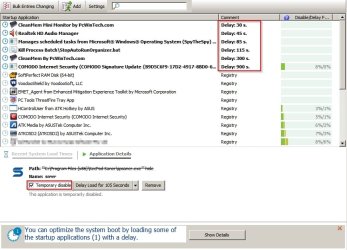
You can possibly delay loading of some third party software startup entries that you have added.

Delay.jpg

RE: System tray icons.

Reset them using this tutorial which also clears out old items.

Notification Area Icons - Reset

You would need to select order of icons to be displayed after running the script and rebooting.

Order depends upon whether you choose to "always display all icons" after making your choices.

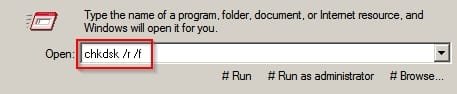
Would also suggest running a full disk check when you have finished using your computer. A reboot is needed,

Run this command:

Run-Command.jpg

You will find a lot of discussion in this forum on services management. Personally I disable services that I don't need. Some other services are set to manual start instead of automatic.

Anyway take a look at:

Start> Run then type msconfig and press enter.

On the services tab hide all microsoft services and see what's left. Work out if you can safely disable any or set to delayed start or if not required to be running on boot set to manual start.
 
Last edited:

My Computer

Computer type
Laptop
Computer Manufacturer/Model Number
ASUS
OS
Microsoft Windows 7 Home Premium 64-bit 7601 Multiprocessor Free Service Pack 1
CPU
AMD C-60 APU with Radeon(tm) HD Graphics
Motherboard
ASUSTeK COMPUTER INC. X501U
Memory
4.00 GB
Graphics Card(s)
AMD Radeon HD 6290 Graphics
Sound Card
(1) AMD High Definition Audio Device (2) Realtek High Defi
Screen Resolution
1366 x 768 x 32 bits (4294967296 colors) @ 60 Hz
Hard Drives
Hitachi HTS545050A7E380 SATA Disk Device
Antivirus
Comodo CIS & FW, SecureAplus App Whitelisting, Threatfire
Browser
Cyberfox 64bit, Opera 64bit, Airfox
Other Info
Spy-The-Spy, HitmanPro.Alert, Norton Connect Safe, MJRegWatcher, BitDefender TrafficLight, Voodoo Shield, Zemana AntiMalware
I figured it out. It has to do with the order of installing the hardware.
Start with a basic machine, no additional hardware installed.
Install windows 7.
Switch off.
Put in first piece off hardware.
Start up.
Install the software of the new hardware.
Switch off.
Install second piece of hardware.
Start up.
Install software of the new hardware.
Switch off.
Repeat until all hard- and software is installed.

Order of insallation:
1) Matrox P690 Plus
2) Matrox P690 LP
3) MADI HDSPe AIO
4) MADI HDSPe FX Opto
5) Install Fader Automation software
6) Set Up RaidArray

When I change someting in the installation order things go wrong right away or after a while.
If so I have to strip the machine and start all over again.
But ..... when it's running its running.
 

My Computer

Computer type
PC/Desktop
Computer Manufacturer/Model Number
custom build
OS
windows 7 pro x64
CPU
Intel Core2 Quad Q6600 2.4 GHz
Motherboard
FoxConn MCP73
Memory
4 Gb DRAM
Graphics Card(s)
NVIDIA GeForce 7050 NVIDIA nForce 610i / AMD Radeon HD 5450
Sound Card
E-MU E-DSP Audio Processor [8 channel optical audio In/Out]
Monitor(s) Displays
2x LG IPS & 1x LG E2242
Screen Resolution
1920 x 1080
Hard Drives
WCD WD20EZRX 1,8TB sata / Samsung HD250HJ pata
ST950032 5AS 500 GB sata / WD 10EAVS 1TB USB
Case
High Tower
Keyboard
Logitech wireless
Mouse
Logitech wireless
Internet Speed
100Mb
Antivirus
None
Browser
IE FireFox Opera Chrome Safari
Back
Top