Startup fade-in/out misalignment

Trinitrotoluene

New member
Power User
Local time
5:13 PM
Messages
61
First of all, this is nothing major. Just something that looks out of the ordinary and I've been trying to find out for a while why it does this (MUST.... UNDERSTAND.... EVERYTHING..... :mad:)


At the welcome screen, you get this fade-in and fade-out deal, right? On my system, when it fades, it makes the picture shift to the left really quick in a vibrating type of way. I've tried to capture it on my phone, but the FPS isn't high enough to capture it, It's a .3gp file, vlc plays it. I don't have any software to convert it, sorry:

MEGAUPLOAD - The leading online storage and file delivery service


To be honest, the video shows pretty much nothing. But to get my idea, look close at about 11 seconds to the right of my monitor. You can see the picture shift real quick to the left. When it blurs out, it all looks normal because of the the lower FPS of my phone camera, it didn't capture anything. But trust me when I say it is really obviously vibrating and shifting to the left.
I remember it didn't always do this, but I can't seem to nail it down :huh: Perhaps something related to graphics drivers initialization that hasn't completed yet?

So... Who gets to win eternal fame?!
 

My Computer

Computer Manufacturer/Model Number
Myself
OS
Windows 7 Ultimate 64 bit Retail
CPU
Intel Core i7 930
Motherboard
Gigabyte X58A UD3R 2.0
Memory
KHX1600C8D3K3/6GX
Graphics Card(s)
AMD Radeon 5870
Sound Card
Creative X-Fi Titanium
Monitor(s) Displays
Samsung PX2370
Screen Resolution
1920x1080
Hard Drives
2x Samsung HD103SJ Raid0 (windows, apps, games)
2x Samsung HD204UI Raid1
1x WD3200KS
PSU
Corsair HX850W
Case
CM690 II Advanced
Cooling
Case 2x front, 2x top, 1x bottom, 1x back CPU Mugen 2 rev.B
Keyboard
Logitech Illuminated
Mouse
Logitech G5
Other Info
Bipedal carbon based high-latency and small cache-sized biological operator behind the keyboard. What would you expect?!
very hard to tell from that video as your moving too but I believe that looks like your samsung monitor auto adjusting ?
 

My Computer

Computer Manufacturer/Model Number
built my own
OS
win7 ultimate / virtual box
CPU
Intel Core i7 3770K,1155, Ivy Bridge
Motherboard
MSI Z77A-G43
Memory
GSkill Ripjaws Z Series 1600 CL 9.0 16GB
Graphics Card(s)
KFA2 GeForce GTX 670 EX OC 2048MB GDDR5 PCI-E gfx card
Sound Card
onboard Nvidia HDMI audio
Monitor(s) Displays
ASUS VK222H 22" widescreen LCD monitor
Screen Resolution
1680x1050
Hard Drives
Kingston 128gb SSD
OCZ Vertex 90gb SSD
500GB WDCaviar 16mb 5000KS
320GB WDCaviar 16mb 3200AAKS sata 2
1TB Samsung 16mb HD103SJ sata 2
PSU
Corsair HX 750W ATX2.2 Modular
Cooling
Antec 25 Kuhler H2O 620
Keyboard
logitech
Mouse
logitech MX518
Internet Speed
7mb adsl
Sounds plausible! But the weird thing is, it didn't always do this. Also, why would it go on an auto-adjust mayhem when the fade out/in kicks in (not visible in video unfortunately). Do you think that would also be auto-adjustments so fast and so frequent in those few seconds?
 

My Computer

Computer Manufacturer/Model Number
Myself
OS
Windows 7 Ultimate 64 bit Retail
CPU
Intel Core i7 930
Motherboard
Gigabyte X58A UD3R 2.0
Memory
KHX1600C8D3K3/6GX
Graphics Card(s)
AMD Radeon 5870
Sound Card
Creative X-Fi Titanium
Monitor(s) Displays
Samsung PX2370
Screen Resolution
1920x1080
Hard Drives
2x Samsung HD103SJ Raid0 (windows, apps, games)
2x Samsung HD204UI Raid1
1x WD3200KS
PSU
Corsair HX850W
Case
CM690 II Advanced
Cooling
Case 2x front, 2x top, 1x bottom, 1x back CPU Mugen 2 rev.B
Keyboard
Logitech Illuminated
Mouse
Logitech G5
Other Info
Bipedal carbon based high-latency and small cache-sized biological operator behind the keyboard. What would you expect?!
So... Who gets to win eternal fame?!
I believe ickymay...mite.......:p

Imho.....
When you finished building your machine, and started it up for the first time it was as pristine as the new fallen snow that is occurring outside my house right now.

But, as you added more programs; the processes, services, and start-ups increased causing the monitor to work harder as it was preparing the desktop.
In turn this increased the effect your seeing.

I calmed mine down by making sure I had the latest drivers for my Video, and Monitor.

According to your SystemSpecs.
For the Video Card:
AMD Support Search

For the Monitor:
Support for PX2370 LED Series 70 SAMSUNG

You might also try turning off Auto-Adjust to see if the effect is greater or less.

From Samsung:
Special Features Magic Lux, Magic ECO, Magic Return, Magic Angle, MagicBright3, Off timer, Image Size Colour Effect, Customised key, MagicWizard & MagicTune with AssetManagement, Windows 7 Certification, Safe Mode (DownScaling in UXGA)
The most comfortable viewing experience for you - PX2370 - LCD Monitor - Monitor | SAMSUNG

Personally I'd be leery of those "Magic" features.

It would take some work on your part, but you might be able to adjust some of the "jumpiness" out.
I don't think you'll get all of it, but hopefully you can get it to calm down.


EDIT:
Also, why would it go on an auto-adjust mayhem when the fade out/in kicks in (not visible in video unfortunately). Do you think that would also be auto-adjustments so fast and so frequent in those few seconds?
Of course! After all, the screen is going from True Color to Black, then back to True Color.
 

My Computer

Computer type
PC/Desktop
Computer Manufacturer/Model Number
Gateway DX4831-01e (Mid-Tower Desktop)
OS
Originally Win 7 Hm Prem x64 Ver 6.1.7600 Build 7601-SP1 | Upgraded to Windows 10 December 14, 2019
CPU
Intel i3 530 2.93GHz, 2933MHz 2 Cores 4 Logical Processors
Motherboard
Gateway H57M01 133 megahertz
Memory
6GB of 1,333MHz DDR3 SDRAM
Graphics Card(s)
32MB Intel Graphics Media Accelerator HD IGChip
Sound Card
Realtek High Definition Audio
Monitor(s) Displays
Gateway HX2000 20inch TFT active matrix TN
Screen Resolution
1600 x 900 x 59 hertz
Hard Drives
WDC WD10EADS-00M2B0 [HDD] (1000.20 GB) -- drive 0,
HL-DT-ST DVDRAM GH41N [CD-ROM dr]
Four card readers, and Four USB 2.0
PSU
300watts.
Case
Mid-Tower Desktop
Cooling
Stock from Gateway
Keyboard
Natural Ergonomic Keyboard 4000, see Other Info
Mouse
Orig. Gateway wore out now using Insignia USB wired optical
Internet Speed
Vz FIOS 10ms png 57.64Mbps down 65.53Mbps up Speedtest.org
Antivirus
Zamana Anti-logger with Anti-malware, MSE, Windows Firewall,
Browser
IE11.0.9600.19399-Upd ver11.0.135, Firefox 68.0.1 x64
Other Info
System Specs by Belarc.

BIOS: American Megatrends Inc. P01-A0 11/17/2009

Replaced the MS 'Natural' Standard PS/2 Enhanced 101-102 Keyboard with a new Natural Ergonomic Keyboard 4000 on August 1st 2014.

Canon Pixma MG3222 Printer.

Updated to IE11 on 12102015 | Fios Quantum Router g1100

Additional AV: SpywareBlaster, manual Mbam, SAS
Nice! So I have Catalyst 10.12 already, wasn't sure if I had the Samsung driver, but I just reinstalled it: no difference. And it seems auto-adjust is unavailable on digital source? I don't use any of those magic features, don't like them either.

the processes, services, and start-ups increased causing the monitor to work harder as it was preparing the desktop.
Not sure if I get that. The monitor just gets the picture from the graphics card and the rest of the system. How do all those extra processes and services add to the effect I'm seeing?

Not sure if this was clear or obvious so far: this vibrating and misalignment only happens during startup/shutdown with the fades. But forget about it if that was clear enough already.


Both your eternal fame share is 50-50 right now :party:
 

My Computer

Computer Manufacturer/Model Number
Myself
OS
Windows 7 Ultimate 64 bit Retail
CPU
Intel Core i7 930
Motherboard
Gigabyte X58A UD3R 2.0
Memory
KHX1600C8D3K3/6GX
Graphics Card(s)
AMD Radeon 5870
Sound Card
Creative X-Fi Titanium
Monitor(s) Displays
Samsung PX2370
Screen Resolution
1920x1080
Hard Drives
2x Samsung HD103SJ Raid0 (windows, apps, games)
2x Samsung HD204UI Raid1
1x WD3200KS
PSU
Corsair HX850W
Case
CM690 II Advanced
Cooling
Case 2x front, 2x top, 1x bottom, 1x back CPU Mugen 2 rev.B
Keyboard
Logitech Illuminated
Mouse
Logitech G5
Other Info
Bipedal carbon based high-latency and small cache-sized biological operator behind the keyboard. What would you expect?!
Not sure if I get that. The monitor just gets the picture from the graphics card and the rest of the system. How do all those extra processes and services add to the effect I'm seeing?
Their usage is decreasing the total amount of memory, and CPU cycles available to the Video card and Monitor.
 

My Computer

Computer type
PC/Desktop
Computer Manufacturer/Model Number
Gateway DX4831-01e (Mid-Tower Desktop)
OS
Originally Win 7 Hm Prem x64 Ver 6.1.7600 Build 7601-SP1 | Upgraded to Windows 10 December 14, 2019
CPU
Intel i3 530 2.93GHz, 2933MHz 2 Cores 4 Logical Processors
Motherboard
Gateway H57M01 133 megahertz
Memory
6GB of 1,333MHz DDR3 SDRAM
Graphics Card(s)
32MB Intel Graphics Media Accelerator HD IGChip
Sound Card
Realtek High Definition Audio
Monitor(s) Displays
Gateway HX2000 20inch TFT active matrix TN
Screen Resolution
1600 x 900 x 59 hertz
Hard Drives
WDC WD10EADS-00M2B0 [HDD] (1000.20 GB) -- drive 0,
HL-DT-ST DVDRAM GH41N [CD-ROM dr]
Four card readers, and Four USB 2.0
PSU
300watts.
Case
Mid-Tower Desktop
Cooling
Stock from Gateway
Keyboard
Natural Ergonomic Keyboard 4000, see Other Info
Mouse
Orig. Gateway wore out now using Insignia USB wired optical
Internet Speed
Vz FIOS 10ms png 57.64Mbps down 65.53Mbps up Speedtest.org
Antivirus
Zamana Anti-logger with Anti-malware, MSE, Windows Firewall,
Browser
IE11.0.9600.19399-Upd ver11.0.135, Firefox 68.0.1 x64
Other Info
System Specs by Belarc.

BIOS: American Megatrends Inc. P01-A0 11/17/2009

Replaced the MS 'Natural' Standard PS/2 Enhanced 101-102 Keyboard with a new Natural Ergonomic Keyboard 4000 on August 1st 2014.

Canon Pixma MG3222 Printer.

Updated to IE11 on 12102015 | Fios Quantum Router g1100

Additional AV: SpywareBlaster, manual Mbam, SAS
Yes, fair enough. But how come the monitor does not show any of this stuff while the system is performing way more intense tasks?

edit: it also does this shifting to the left, just once, when I'm in a game and I activate xfire in-game menu. And then when I exit the in-game xfire menu and enter it again, it doesn't do this. Is this in-line with your theory?
 
Last edited:

My Computer

Computer Manufacturer/Model Number
Myself
OS
Windows 7 Ultimate 64 bit Retail
CPU
Intel Core i7 930
Motherboard
Gigabyte X58A UD3R 2.0
Memory
KHX1600C8D3K3/6GX
Graphics Card(s)
AMD Radeon 5870
Sound Card
Creative X-Fi Titanium
Monitor(s) Displays
Samsung PX2370
Screen Resolution
1920x1080
Hard Drives
2x Samsung HD103SJ Raid0 (windows, apps, games)
2x Samsung HD204UI Raid1
1x WD3200KS
PSU
Corsair HX850W
Case
CM690 II Advanced
Cooling
Case 2x front, 2x top, 1x bottom, 1x back CPU Mugen 2 rev.B
Keyboard
Logitech Illuminated
Mouse
Logitech G5
Other Info
Bipedal carbon based high-latency and small cache-sized biological operator behind the keyboard. What would you expect?!
Yes, fair enough. But how come the monitor does not show any of this stuff while the system is performing way more intense tasks?
Because the screen is not going from True Color to Black, then back to True Color.
Such as booting from one OS to another. During Tasking there is always a True Color signal being generated.

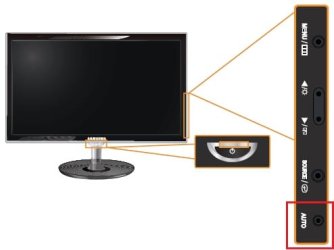
Reading the Samsung PX2370 manual Support for PX2370 SAMSUNG I've found that auto-adjust is only available if the Monitor uses the DVI to D-Sub cable (Analog).

If you are using any other type cable you need to go into the Video Card properties to set-up auto-adjust.

See 3-4 Product Operating Buttons (AUTO) here, a 7.12mb pdf:
http://downloadcenter.samsung.com/content/UM/201002/20100208161857906/BN59-00992A-01Eng.pdf

~~~ ~~~ ~~~ ~~~

Strange.....:shock: Your edit did not show in your reply post, only when I went to reply to your above "quote"

edit: it also does this shifting to the left, just once, when I'm in a game and I activate xfire in-game menu. And then when I exit the in-game xfire menu and enter it again, it doesn't do this. Is this in-line with your theory?
No. This is something different.
Try adjusting the overscan/underscan settings in the Catalyst control panel, in display settings. It may also be a 'zoom' or 'wide adjustment' issue.
 

My Computer

Computer type
PC/Desktop
Computer Manufacturer/Model Number
Gateway DX4831-01e (Mid-Tower Desktop)
OS
Originally Win 7 Hm Prem x64 Ver 6.1.7600 Build 7601-SP1 | Upgraded to Windows 10 December 14, 2019
CPU
Intel i3 530 2.93GHz, 2933MHz 2 Cores 4 Logical Processors
Motherboard
Gateway H57M01 133 megahertz
Memory
6GB of 1,333MHz DDR3 SDRAM
Graphics Card(s)
32MB Intel Graphics Media Accelerator HD IGChip
Sound Card
Realtek High Definition Audio
Monitor(s) Displays
Gateway HX2000 20inch TFT active matrix TN
Screen Resolution
1600 x 900 x 59 hertz
Hard Drives
WDC WD10EADS-00M2B0 [HDD] (1000.20 GB) -- drive 0,
HL-DT-ST DVDRAM GH41N [CD-ROM dr]
Four card readers, and Four USB 2.0
PSU
300watts.
Case
Mid-Tower Desktop
Cooling
Stock from Gateway
Keyboard
Natural Ergonomic Keyboard 4000, see Other Info
Mouse
Orig. Gateway wore out now using Insignia USB wired optical
Internet Speed
Vz FIOS 10ms png 57.64Mbps down 65.53Mbps up Speedtest.org
Antivirus
Zamana Anti-logger with Anti-malware, MSE, Windows Firewall,
Browser
IE11.0.9600.19399-Upd ver11.0.135, Firefox 68.0.1 x64
Other Info
System Specs by Belarc.

BIOS: American Megatrends Inc. P01-A0 11/17/2009

Replaced the MS 'Natural' Standard PS/2 Enhanced 101-102 Keyboard with a new Natural Ergonomic Keyboard 4000 on August 1st 2014.

Canon Pixma MG3222 Printer.

Updated to IE11 on 12102015 | Fios Quantum Router g1100

Additional AV: SpywareBlaster, manual Mbam, SAS
Underscan/overscan isn't fixing that specific "issue". And I can't find 'zoom' or 'wide adjustments'. Funny, I just installed Catalyst 10.12 with the new CCC2 (was solely using the display drivers first). And I noticed that, when closing CCC, my monitor also adjusts itself real quick by shifting the picture to the left and back again (same as with xfire in-game menu).

Where can I find the auto-adjust setting in my video card options? I've looked around in CCC but I couldn't find anything.
 

My Computer

Computer Manufacturer/Model Number
Myself
OS
Windows 7 Ultimate 64 bit Retail
CPU
Intel Core i7 930
Motherboard
Gigabyte X58A UD3R 2.0
Memory
KHX1600C8D3K3/6GX
Graphics Card(s)
AMD Radeon 5870
Sound Card
Creative X-Fi Titanium
Monitor(s) Displays
Samsung PX2370
Screen Resolution
1920x1080
Hard Drives
2x Samsung HD103SJ Raid0 (windows, apps, games)
2x Samsung HD204UI Raid1
1x WD3200KS
PSU
Corsair HX850W
Case
CM690 II Advanced
Cooling
Case 2x front, 2x top, 1x bottom, 1x back CPU Mugen 2 rev.B
Keyboard
Logitech Illuminated
Mouse
Logitech G5
Other Info
Bipedal carbon based high-latency and small cache-sized biological operator behind the keyboard. What would you expect?!
Underscan/overscan isn't fixing that specific "issue". And I can't find 'zoom' or 'wide adjustments'. Funny, I just installed Catalyst 10.12 with the new CCC2 (was solely using the display drivers first). And I noticed that, when closing CCC, my monitor also adjusts itself real quick by shifting the picture to the left and back again (same as with xfire in-game menu).
I found this:
Known issues under the Windows 7 operating systemThe following section provides a summary of open issues that may be experienced under the Windows 7 operating system in the latest version of AMD Catalyst™.

These include:Video settings might not be retained after enabling / disabling Crossfire.
Here:AMD Catalyst

Does xfire equate to Crossfire?

Where can I find the auto-adjust setting in my video card options? I've looked around in CCC but I couldn't find anything.


Third comment down has the poster asking where is auto-tune? in 10.12 .

A little further down there's mention that it wasn't there in 10.10 either :(
You may have to rely on the auto-tune that comes with the PX2370, and those "Magic" settings.

I only have one more question.....

Did you un-install the previous video driver before installing the 10.12 driver?
That seems to be the accepted procedure.

And another suggestion....
Try turning the auto-adjust on the monitor off, and then wait till it completes its cycle before turning it back on, then wait until it cycles before turning it back off. Do this at least three times.
 

My Computer

Computer type
PC/Desktop
Computer Manufacturer/Model Number
Gateway DX4831-01e (Mid-Tower Desktop)
OS
Originally Win 7 Hm Prem x64 Ver 6.1.7600 Build 7601-SP1 | Upgraded to Windows 10 December 14, 2019
CPU
Intel i3 530 2.93GHz, 2933MHz 2 Cores 4 Logical Processors
Motherboard
Gateway H57M01 133 megahertz
Memory
6GB of 1,333MHz DDR3 SDRAM
Graphics Card(s)
32MB Intel Graphics Media Accelerator HD IGChip
Sound Card
Realtek High Definition Audio
Monitor(s) Displays
Gateway HX2000 20inch TFT active matrix TN
Screen Resolution
1600 x 900 x 59 hertz
Hard Drives
WDC WD10EADS-00M2B0 [HDD] (1000.20 GB) -- drive 0,
HL-DT-ST DVDRAM GH41N [CD-ROM dr]
Four card readers, and Four USB 2.0
PSU
300watts.
Case
Mid-Tower Desktop
Cooling
Stock from Gateway
Keyboard
Natural Ergonomic Keyboard 4000, see Other Info
Mouse
Orig. Gateway wore out now using Insignia USB wired optical
Internet Speed
Vz FIOS 10ms png 57.64Mbps down 65.53Mbps up Speedtest.org
Antivirus
Zamana Anti-logger with Anti-malware, MSE, Windows Firewall,
Browser
IE11.0.9600.19399-Upd ver11.0.135, Firefox 68.0.1 x64
Other Info
System Specs by Belarc.

BIOS: American Megatrends Inc. P01-A0 11/17/2009

Replaced the MS 'Natural' Standard PS/2 Enhanced 101-102 Keyboard with a new Natural Ergonomic Keyboard 4000 on August 1st 2014.

Canon Pixma MG3222 Printer.

Updated to IE11 on 12102015 | Fios Quantum Router g1100

Additional AV: SpywareBlaster, manual Mbam, SAS
Since I'm running it via DVI, auto-adjustment on my monitor isn't available or necessary since DVI is simply the true picture, I think the manual said. The only other "auto-" I have is auto-source, but that's something different.

I have uninstalled the previous driver, via the software panel, then did a driversweeper, rebooted, driversweeper just to check (all gone) and installed the new one.

Xfire, I'm sorry if that mixed things up a little with Crossfire!

The auto-adjust on the monitor? Can't find it anywhere, or anything that looks like it. But maybe I'm kind of getting blind by all these auto-this and auto-that's.


Holy sssss...yncmaster, didn't know something complicated causes such a stupid little effect eh!
 

My Computer

Computer Manufacturer/Model Number
Myself
OS
Windows 7 Ultimate 64 bit Retail
CPU
Intel Core i7 930
Motherboard
Gigabyte X58A UD3R 2.0
Memory
KHX1600C8D3K3/6GX
Graphics Card(s)
AMD Radeon 5870
Sound Card
Creative X-Fi Titanium
Monitor(s) Displays
Samsung PX2370
Screen Resolution
1920x1080
Hard Drives
2x Samsung HD103SJ Raid0 (windows, apps, games)
2x Samsung HD204UI Raid1
1x WD3200KS
PSU
Corsair HX850W
Case
CM690 II Advanced
Cooling
Case 2x front, 2x top, 1x bottom, 1x back CPU Mugen 2 rev.B
Keyboard
Logitech Illuminated
Mouse
Logitech G5
Other Info
Bipedal carbon based high-latency and small cache-sized biological operator behind the keyboard. What would you expect?!
The auto-adjust on the monitor? Can't find it anywhere, or anything that looks like it. But maybe I'm kind of getting blind by all these auto-this and auto-that's.
Sometimes it helps if one steps away from a problem, then while you're doing something else the solution will come to you.

"Life is what happens while you are busy making other plans".
John Lennon (10-08-1940 ~ 12-08-1980)

If you go back to 3-4 in the manual it will show you where the buttons are, and their functions.

I marked the this an that :p with a red box.
 

Attachments

  • Sam_Sung.jpg
    Sam_Sung.jpg
    13.6 KB · Views: 6

My Computer

Computer type
PC/Desktop
Computer Manufacturer/Model Number
Gateway DX4831-01e (Mid-Tower Desktop)
OS
Originally Win 7 Hm Prem x64 Ver 6.1.7600 Build 7601-SP1 | Upgraded to Windows 10 December 14, 2019
CPU
Intel i3 530 2.93GHz, 2933MHz 2 Cores 4 Logical Processors
Motherboard
Gateway H57M01 133 megahertz
Memory
6GB of 1,333MHz DDR3 SDRAM
Graphics Card(s)
32MB Intel Graphics Media Accelerator HD IGChip
Sound Card
Realtek High Definition Audio
Monitor(s) Displays
Gateway HX2000 20inch TFT active matrix TN
Screen Resolution
1600 x 900 x 59 hertz
Hard Drives
WDC WD10EADS-00M2B0 [HDD] (1000.20 GB) -- drive 0,
HL-DT-ST DVDRAM GH41N [CD-ROM dr]
Four card readers, and Four USB 2.0
PSU
300watts.
Case
Mid-Tower Desktop
Cooling
Stock from Gateway
Keyboard
Natural Ergonomic Keyboard 4000, see Other Info
Mouse
Orig. Gateway wore out now using Insignia USB wired optical
Internet Speed
Vz FIOS 10ms png 57.64Mbps down 65.53Mbps up Speedtest.org
Antivirus
Zamana Anti-logger with Anti-malware, MSE, Windows Firewall,
Browser
IE11.0.9600.19399-Upd ver11.0.135, Firefox 68.0.1 x64
Other Info
System Specs by Belarc.

BIOS: American Megatrends Inc. P01-A0 11/17/2009

Replaced the MS 'Natural' Standard PS/2 Enhanced 101-102 Keyboard with a new Natural Ergonomic Keyboard 4000 on August 1st 2014.

Canon Pixma MG3222 Printer.

Updated to IE11 on 12102015 | Fios Quantum Router g1100

Additional AV: SpywareBlaster, manual Mbam, SAS
Ah, ok! But auto adjustment is not available via DVI, so that button is not going to be of any use for us to fix this issue. That is, if I understood everything correctly this time.
 

My Computer

Computer Manufacturer/Model Number
Myself
OS
Windows 7 Ultimate 64 bit Retail
CPU
Intel Core i7 930
Motherboard
Gigabyte X58A UD3R 2.0
Memory
KHX1600C8D3K3/6GX
Graphics Card(s)
AMD Radeon 5870
Sound Card
Creative X-Fi Titanium
Monitor(s) Displays
Samsung PX2370
Screen Resolution
1920x1080
Hard Drives
2x Samsung HD103SJ Raid0 (windows, apps, games)
2x Samsung HD204UI Raid1
1x WD3200KS
PSU
Corsair HX850W
Case
CM690 II Advanced
Cooling
Case 2x front, 2x top, 1x bottom, 1x back CPU Mugen 2 rev.B
Keyboard
Logitech Illuminated
Mouse
Logitech G5
Other Info
Bipedal carbon based high-latency and small cache-sized biological operator behind the keyboard. What would you expect?!
Yesterday I booted up medal of honor allied assault again. I had it in windowed mode, and upon changing the gamma of the game (in-game slider) my screen picture shifted to the left and back, real quick, at each increment of raising/lowering the gamma.

Isn't this something related to the videocard driver, that messed up recently? It's just so weird to me. Not that I don't believe you.
 

My Computer

Computer Manufacturer/Model Number
Myself
OS
Windows 7 Ultimate 64 bit Retail
CPU
Intel Core i7 930
Motherboard
Gigabyte X58A UD3R 2.0
Memory
KHX1600C8D3K3/6GX
Graphics Card(s)
AMD Radeon 5870
Sound Card
Creative X-Fi Titanium
Monitor(s) Displays
Samsung PX2370
Screen Resolution
1920x1080
Hard Drives
2x Samsung HD103SJ Raid0 (windows, apps, games)
2x Samsung HD204UI Raid1
1x WD3200KS
PSU
Corsair HX850W
Case
CM690 II Advanced
Cooling
Case 2x front, 2x top, 1x bottom, 1x back CPU Mugen 2 rev.B
Keyboard
Logitech Illuminated
Mouse
Logitech G5
Other Info
Bipedal carbon based high-latency and small cache-sized biological operator behind the keyboard. What would you expect?!
If you were using the in-game control I would think it would be a function of the game control itself. Although, it would not be outside the realm of possibility that the card could not handle the requirements that the game control was trying to place on it.


If you are concerned about the card, furmark stress tester should tell you if it is good or not:
FurMark: VGA Stress Test, Graphics Card and GPU Stability Test, Burn-in Test, OpenGL Benchmark and GPU Temperature | oZone3D.Net Its marked for vista x32, but should run okay on 7x64.

See attachment to turn off aero-glass when you run furmark.
You may want to read this about furmark and Radeon 5870 cards:
ATI Cypress (Radeon HD 5870) Cards Have Hardware Protection Against Power Virus Like FurMark and OCCT - 3D Tech News, Pixel Hacking, Data Visualization and 3D Programming - Geeks3D.com


If that's a little over the top:
ATITool - Overclocking utility for ATI and NVIDIA cards

HOME PAGE OF MISHA CHERKES Video Memory stress test


http://www.geeks3d.com/20090925/ati...on-against-power-virus-like-furmark-and-occt/
 

My Computer

Computer type
PC/Desktop
Computer Manufacturer/Model Number
Gateway DX4831-01e (Mid-Tower Desktop)
OS
Originally Win 7 Hm Prem x64 Ver 6.1.7600 Build 7601-SP1 | Upgraded to Windows 10 December 14, 2019
CPU
Intel i3 530 2.93GHz, 2933MHz 2 Cores 4 Logical Processors
Motherboard
Gateway H57M01 133 megahertz
Memory
6GB of 1,333MHz DDR3 SDRAM
Graphics Card(s)
32MB Intel Graphics Media Accelerator HD IGChip
Sound Card
Realtek High Definition Audio
Monitor(s) Displays
Gateway HX2000 20inch TFT active matrix TN
Screen Resolution
1600 x 900 x 59 hertz
Hard Drives
WDC WD10EADS-00M2B0 [HDD] (1000.20 GB) -- drive 0,
HL-DT-ST DVDRAM GH41N [CD-ROM dr]
Four card readers, and Four USB 2.0
PSU
300watts.
Case
Mid-Tower Desktop
Cooling
Stock from Gateway
Keyboard
Natural Ergonomic Keyboard 4000, see Other Info
Mouse
Orig. Gateway wore out now using Insignia USB wired optical
Internet Speed
Vz FIOS 10ms png 57.64Mbps down 65.53Mbps up Speedtest.org
Antivirus
Zamana Anti-logger with Anti-malware, MSE, Windows Firewall,
Browser
IE11.0.9600.19399-Upd ver11.0.135, Firefox 68.0.1 x64
Other Info
System Specs by Belarc.

BIOS: American Megatrends Inc. P01-A0 11/17/2009

Replaced the MS 'Natural' Standard PS/2 Enhanced 101-102 Keyboard with a new Natural Ergonomic Keyboard 4000 on August 1st 2014.

Canon Pixma MG3222 Printer.

Updated to IE11 on 12102015 | Fios Quantum Router g1100

Additional AV: SpywareBlaster, manual Mbam, SAS
So I turned aero off, ran Furmark for exactly 3 hours. No artifacts, 87 degrees celsius max. on the GPU. So the card sure looks to be in good shape and fortunately there were also no problems with overcurrent protection when running Furmark on this 5870.
 

My Computer

Computer Manufacturer/Model Number
Myself
OS
Windows 7 Ultimate 64 bit Retail
CPU
Intel Core i7 930
Motherboard
Gigabyte X58A UD3R 2.0
Memory
KHX1600C8D3K3/6GX
Graphics Card(s)
AMD Radeon 5870
Sound Card
Creative X-Fi Titanium
Monitor(s) Displays
Samsung PX2370
Screen Resolution
1920x1080
Hard Drives
2x Samsung HD103SJ Raid0 (windows, apps, games)
2x Samsung HD204UI Raid1
1x WD3200KS
PSU
Corsair HX850W
Case
CM690 II Advanced
Cooling
Case 2x front, 2x top, 1x bottom, 1x back CPU Mugen 2 rev.B
Keyboard
Logitech Illuminated
Mouse
Logitech G5
Other Info
Bipedal carbon based high-latency and small cache-sized biological operator behind the keyboard. What would you expect?!

My Computer

Computer type
PC/Desktop
Computer Manufacturer/Model Number
Gateway DX4831-01e (Mid-Tower Desktop)
OS
Originally Win 7 Hm Prem x64 Ver 6.1.7600 Build 7601-SP1 | Upgraded to Windows 10 December 14, 2019
CPU
Intel i3 530 2.93GHz, 2933MHz 2 Cores 4 Logical Processors
Motherboard
Gateway H57M01 133 megahertz
Memory
6GB of 1,333MHz DDR3 SDRAM
Graphics Card(s)
32MB Intel Graphics Media Accelerator HD IGChip
Sound Card
Realtek High Definition Audio
Monitor(s) Displays
Gateway HX2000 20inch TFT active matrix TN
Screen Resolution
1600 x 900 x 59 hertz
Hard Drives
WDC WD10EADS-00M2B0 [HDD] (1000.20 GB) -- drive 0,
HL-DT-ST DVDRAM GH41N [CD-ROM dr]
Four card readers, and Four USB 2.0
PSU
300watts.
Case
Mid-Tower Desktop
Cooling
Stock from Gateway
Keyboard
Natural Ergonomic Keyboard 4000, see Other Info
Mouse
Orig. Gateway wore out now using Insignia USB wired optical
Internet Speed
Vz FIOS 10ms png 57.64Mbps down 65.53Mbps up Speedtest.org
Antivirus
Zamana Anti-logger with Anti-malware, MSE, Windows Firewall,
Browser
IE11.0.9600.19399-Upd ver11.0.135, Firefox 68.0.1 x64
Other Info
System Specs by Belarc.

BIOS: American Megatrends Inc. P01-A0 11/17/2009

Replaced the MS 'Natural' Standard PS/2 Enhanced 101-102 Keyboard with a new Natural Ergonomic Keyboard 4000 on August 1st 2014.

Canon Pixma MG3222 Printer.

Updated to IE11 on 12102015 | Fios Quantum Router g1100

Additional AV: SpywareBlaster, manual Mbam, SAS
Ah, well it's no real problem anyway. If I happen to run into a solution, I'll post back here!

The MoH:AA multitexturing is unrelated, as I meet the requirements and all the text from the link is actually the startup console generating an error.

My memory is OK, though I haven't ran memtest yet on this new kit. All the BSOD's are gone.


But thank you anyway, still learned a great deal from all this!!
 

My Computer

Computer Manufacturer/Model Number
Myself
OS
Windows 7 Ultimate 64 bit Retail
CPU
Intel Core i7 930
Motherboard
Gigabyte X58A UD3R 2.0
Memory
KHX1600C8D3K3/6GX
Graphics Card(s)
AMD Radeon 5870
Sound Card
Creative X-Fi Titanium
Monitor(s) Displays
Samsung PX2370
Screen Resolution
1920x1080
Hard Drives
2x Samsung HD103SJ Raid0 (windows, apps, games)
2x Samsung HD204UI Raid1
1x WD3200KS
PSU
Corsair HX850W
Case
CM690 II Advanced
Cooling
Case 2x front, 2x top, 1x bottom, 1x back CPU Mugen 2 rev.B
Keyboard
Logitech Illuminated
Mouse
Logitech G5
Other Info
Bipedal carbon based high-latency and small cache-sized biological operator behind the keyboard. What would you expect?!
Your welcome, I'm just sorry that we couldn't come to a solid resolution to this.

As with you, I'll be chewing on this one for a while, and if I find anything out I'll post back.
 

My Computer

Computer type
PC/Desktop
Computer Manufacturer/Model Number
Gateway DX4831-01e (Mid-Tower Desktop)
OS
Originally Win 7 Hm Prem x64 Ver 6.1.7600 Build 7601-SP1 | Upgraded to Windows 10 December 14, 2019
CPU
Intel i3 530 2.93GHz, 2933MHz 2 Cores 4 Logical Processors
Motherboard
Gateway H57M01 133 megahertz
Memory
6GB of 1,333MHz DDR3 SDRAM
Graphics Card(s)
32MB Intel Graphics Media Accelerator HD IGChip
Sound Card
Realtek High Definition Audio
Monitor(s) Displays
Gateway HX2000 20inch TFT active matrix TN
Screen Resolution
1600 x 900 x 59 hertz
Hard Drives
WDC WD10EADS-00M2B0 [HDD] (1000.20 GB) -- drive 0,
HL-DT-ST DVDRAM GH41N [CD-ROM dr]
Four card readers, and Four USB 2.0
PSU
300watts.
Case
Mid-Tower Desktop
Cooling
Stock from Gateway
Keyboard
Natural Ergonomic Keyboard 4000, see Other Info
Mouse
Orig. Gateway wore out now using Insignia USB wired optical
Internet Speed
Vz FIOS 10ms png 57.64Mbps down 65.53Mbps up Speedtest.org
Antivirus
Zamana Anti-logger with Anti-malware, MSE, Windows Firewall,
Browser
IE11.0.9600.19399-Upd ver11.0.135, Firefox 68.0.1 x64
Other Info
System Specs by Belarc.

BIOS: American Megatrends Inc. P01-A0 11/17/2009

Replaced the MS 'Natural' Standard PS/2 Enhanced 101-102 Keyboard with a new Natural Ergonomic Keyboard 4000 on August 1st 2014.

Canon Pixma MG3222 Printer.

Updated to IE11 on 12102015 | Fios Quantum Router g1100

Additional AV: SpywareBlaster, manual Mbam, SAS
I just decided to uninstall 10.12 totally and install 10.8, solely the drivers. Used driversweeper as well.

After installing the older 10.8 drivers and at first boot, I kept an eye on the blur effects during startup and they were no longer maligning. Not sure what caused it, but obviously it is driver related. It was the only option left anyway!

Additionally, when I bring up the xfire in-game menu, the picture also no longer vibrates real quick like it used to. Also I used to have mouse lag when I hovered over the top right close and minimize buttons of full screened windows, also gone now. I think this was related to lag in Heroes of Newerth when scrolling the view by mousing to the top right corner. As I had that too.

Hope that's useful to anyone googlin' out there!
 

My Computer

Computer Manufacturer/Model Number
Myself
OS
Windows 7 Ultimate 64 bit Retail
CPU
Intel Core i7 930
Motherboard
Gigabyte X58A UD3R 2.0
Memory
KHX1600C8D3K3/6GX
Graphics Card(s)
AMD Radeon 5870
Sound Card
Creative X-Fi Titanium
Monitor(s) Displays
Samsung PX2370
Screen Resolution
1920x1080
Hard Drives
2x Samsung HD103SJ Raid0 (windows, apps, games)
2x Samsung HD204UI Raid1
1x WD3200KS
PSU
Corsair HX850W
Case
CM690 II Advanced
Cooling
Case 2x front, 2x top, 1x bottom, 1x back CPU Mugen 2 rev.B
Keyboard
Logitech Illuminated
Mouse
Logitech G5
Other Info
Bipedal carbon based high-latency and small cache-sized biological operator behind the keyboard. What would you expect?!
Back
Top