Startup Items Missing

Cheemag

New member
Member
VIP
Local time
12:15 AM
Messages
247
Location
Englandshire, Scotland
Good Afternoon,

Windows 7 Pro 64-bit, up-to-date.

Help ! Items keep disappearing from my startup list. I put them back in, but they
disappear at random intervals. I mean actually disappear, not just fail to start,

I've checked C:\ProgramData\Microsoft\Windows\Start Menu\Programs\Startup.

This has nothing in it at all, and C:\Users\Owner\AppData\Roaming\Microsoft\Windows\Start Menu\Programs\Startup has only the non-registry items which I put in there (put back in there).

Could I make the items read-only so that they don't get deleted by whatever is doing this.

Kaspersky 2017 says the machine is clean, as does MWB and ADW Cleaner.
 

My Computer My Computer

At a glance

Windows 7 Professional 64-bitIntel Core 2 Duo4 GBNvidia GE Force 9500GT
Computer Manufacturer/Model Number
Gigabyte
OS
Windows 7 Professional 64-bit
CPU
Intel Core 2 Duo
Motherboard
EP41T-UD3L
Memory
4 GB
Graphics Card(s)
Nvidia GE Force 9500GT
Sound Card
On-board
Monitor(s) Displays
Acer V203H
Hard Drives
Two Samsung HD103SJ 1TB
PSU
?
Case
?
Cooling
Fan
You have two startup folders:
- C:\ProgramData\Microsoft\Windows\Start Menu\Programs\Startup is for all users.
- C:\Users\Owner\AppData\Roaming\Microsoft\Windows\Start Menu\Programs\Startup is for the current user only.
Any shortcut on this folders should be run at start up.

Can you explain what kind of files keep disappearing from your startup folder?
What you mean by "has only the non-registry items which I put in there"?
 

My Computers My Computers

  • At a glance

    Windows 7 HP 64i5 6600K - 800MHz to 4200MHz4+4G GSkill DDR4 3000IG - Intel 530
    Computer type
    PC/Desktop
    Computer Manufacturer/Model Number
    custom build
    OS
    Windows 7 HP 64
    CPU
    i5 6600K - 800MHz to 4200MHz
    Motherboard
    GA-Z170-HD3P
    Memory
    4+4G GSkill DDR4 3000
    Graphics Card(s)
    IG - Intel 530
    Monitor(s) Displays
    Samsung 226BW
    Screen Resolution
    1680x1050
    Hard Drives
    (1) -1 SM951 – 128GB M.2 AHCI PCIe SSD drive for Windows 7 and Lubuntu
    (2) -1 WD SATA 3 - 1T for Data
    (3) -1 WD SATA 3 - 1T for backup
    PSU
    Thermaltake 450W TR2 gold
    Keyboard
    Old and good Chicony mechanical keyboard
    Mouse
    Logitech mX performance - 9 buttons (had to disable some)
    Internet Speed
    500Mb/s
    Browser
    Firefox 64
    Other Info
    TinyWall firewall
  • At a glance

    Windows 7 Proi7-4500U 800MHz to 3.0GHz(4+4)G DDR3 1600IG intel 4400 + NVIDIA GeForce GT 745M
    Computer type
    Laptop
    System Manufacturer/Model Number
    Asus Q550LF
    OS
    Windows 7 Pro
    CPU
    i7-4500U 800MHz to 3.0GHz
    Motherboard
    Asus Q550LF
    Memory
    (4+4)G DDR3 1600
    Graphics Card(s)
    IG intel 4400 + NVIDIA GeForce GT 745M
    Sound Card
    Realtek
    Monitor(s) Displays
    LG Display LP156WF4-SPH1
    Screen Resolution
    1920 x 1080
    Hard Drives
    BX500 120G SSD for Windows and programs +
    1T HDD for data
    Internet Speed
    500 Mb/s
    Browser
    Firefox
    Other Info
    TinyWall firewall
You have two startup folders:
- C:\ProgramData\Microsoft\Windows\Start Menu\Programs\Startup is for all users.
- C:\Users\Owner\AppData\Roaming\Microsoft\Windows\Start Menu\Programs\Startup is for the current user only.

Yes. ..Start Menu\Programs\Startup is empty.

The one in AppData\Roaming has 3 entries:

11/07/2016 16:59 1,348 AutoHotkey - Shortcut.lnk
21/05/2017 14:03 998 MagicDisc.lnk
11/07/2016 15:32 983 MiniMinder.lnk


Any shortcut on this folders should be run at start up.
Not always in my case ...

Can you explain what kind of files keep disappearing from your startup folder?
AutoHotkey yesterday and Magic Disc the day before. I stress they are not just
failing to start, they disapear from the Roaming folder.

What you mean by "has only the non-registry items which I put in there"?
Some startup items are run by/from the Registry and don't appear in these startup folders.
 

My Computer My Computer

At a glance

Windows 7 Professional 64-bitIntel Core 2 Duo4 GBNvidia GE Force 9500GT
Computer Manufacturer/Model Number
Gigabyte
OS
Windows 7 Professional 64-bit
CPU
Intel Core 2 Duo
Motherboard
EP41T-UD3L
Memory
4 GB
Graphics Card(s)
Nvidia GE Force 9500GT
Sound Card
On-board
Monitor(s) Displays
Acer V203H
Hard Drives
Two Samsung HD103SJ 1TB
PSU
?
Case
?
Cooling
Fan
Can you disable magic disk and see if your startups appear?

I don't like the sound of this:
MagicDisc has automatically Detecting engine, so user try to open any CD/DVD image files with MagicDisc.

Source: http://www.magiciso.com/tutorials/miso-magicdisc-overview.htm

And: Windows Explorer Embed.

MagicISO embed Windows Explorer and use the double window unification user contact interface. Use the quick button and the mouse Drag & Drops files between Windows Explorer and MagicISO so that you can handle the CD/DVD image file easy but powerful enough.

Source: http://www.magiciso.com/index.htm
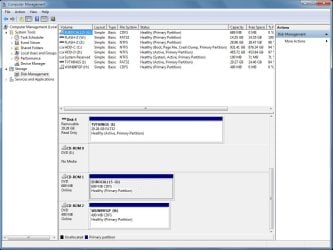
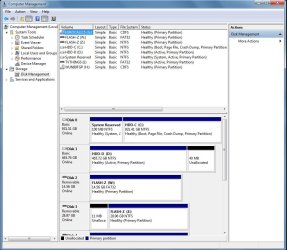
It would also help if you can show snips of Disk Management before and after you disable magic disk.

Disk Management - Post a Screen Capture Image
 

My Computer My Computer

At a glance

Originally Win 7 Hm Prem x64 Ver 6.1.7600 Bui...Intel i3 530 2.93GHz, 2933MHz 2 Cores 4 Logic...6GB of 1,333MHz DDR3 SDRAM32MB Intel Graphics Media Accelerator HD IGChip
Computer type
PC/Desktop
Computer Manufacturer/Model Number
Gateway DX4831-01e (Mid-Tower Desktop)
OS
Originally Win 7 Hm Prem x64 Ver 6.1.7600 Build 7601-SP1 | Upgraded to Windows 10 December 14, 2019
CPU
Intel i3 530 2.93GHz, 2933MHz 2 Cores 4 Logical Processors
Motherboard
Gateway H57M01 133 megahertz
Memory
6GB of 1,333MHz DDR3 SDRAM
Graphics Card(s)
32MB Intel Graphics Media Accelerator HD IGChip
Sound Card
Realtek High Definition Audio
Monitor(s) Displays
Gateway HX2000 20inch TFT active matrix TN
Screen Resolution
1600 x 900 x 59 hertz
Hard Drives
WDC WD10EADS-00M2B0 [HDD] (1000.20 GB) -- drive 0,
HL-DT-ST DVDRAM GH41N [CD-ROM dr]
Four card readers, and Four USB 2.0
PSU
300watts.
Case
Mid-Tower Desktop
Cooling
Stock from Gateway
Keyboard
Natural Ergonomic Keyboard 4000, see Other Info
Mouse
Orig. Gateway wore out now using Insignia USB wired optical
Internet Speed
Vz FIOS 10ms png 57.64Mbps down 65.53Mbps up Speedtest.org
Antivirus
Zamana Anti-logger with Anti-malware, MSE, Windows Firewall,
Browser
IE11.0.9600.19399-Upd ver11.0.135, Firefox 68.0.1 x64
Other Info
System Specs by Belarc.

BIOS: American Megatrends Inc. P01-A0 11/17/2009

Replaced the MS 'Natural' Standard PS/2 Enhanced 101-102 Keyboard with a new Natural Ergonomic Keyboard 4000 on August 1st 2014.

Canon Pixma MG3222 Printer.

Updated to IE11 on 12102015 | Fios Quantum Router g1100

Additional AV: SpywareBlaster, manual Mbam, SAS
Can you disable magic disk and see if your startups appear?

They do, yes. I've deleted the startup entry for Magic Discs but the pseudo-discs are still there and useable.

I don't like the sound of this: It would also help if you can show snips of Disk Management before and after you disable magic disk.
If there are doubts about Magic Disc I can delete it, make new ISOs and use another application.

Screenshots Before.jpg and After.jpg attached. The Magic Disc entries are drives G: and H:
 

Attachments

  • Before.jpg
    Before.jpg
    105.4 KB · Views: 2
  • After.jpg
    After.jpg
    97.2 KB · Views: 1

My Computer My Computer

At a glance

Windows 7 Professional 64-bitIntel Core 2 Duo4 GBNvidia GE Force 9500GT
Computer Manufacturer/Model Number
Gigabyte
OS
Windows 7 Professional 64-bit
CPU
Intel Core 2 Duo
Motherboard
EP41T-UD3L
Memory
4 GB
Graphics Card(s)
Nvidia GE Force 9500GT
Sound Card
On-board
Monitor(s) Displays
Acer V203H
Hard Drives
Two Samsung HD103SJ 1TB
PSU
?
Case
?
Cooling
Fan
If there are doubts about Magic Disc I can delete it, make new ISOs and use another application.
Try your suggestion for awhile and see if your concerns settle down. It looks like magic disk is either not right for your system or it isn't configured right.
 

My Computer My Computer

At a glance

Originally Win 7 Hm Prem x64 Ver 6.1.7600 Bui...Intel i3 530 2.93GHz, 2933MHz 2 Cores 4 Logic...6GB of 1,333MHz DDR3 SDRAM32MB Intel Graphics Media Accelerator HD IGChip
Computer type
PC/Desktop
Computer Manufacturer/Model Number
Gateway DX4831-01e (Mid-Tower Desktop)
OS
Originally Win 7 Hm Prem x64 Ver 6.1.7600 Build 7601-SP1 | Upgraded to Windows 10 December 14, 2019
CPU
Intel i3 530 2.93GHz, 2933MHz 2 Cores 4 Logical Processors
Motherboard
Gateway H57M01 133 megahertz
Memory
6GB of 1,333MHz DDR3 SDRAM
Graphics Card(s)
32MB Intel Graphics Media Accelerator HD IGChip
Sound Card
Realtek High Definition Audio
Monitor(s) Displays
Gateway HX2000 20inch TFT active matrix TN
Screen Resolution
1600 x 900 x 59 hertz
Hard Drives
WDC WD10EADS-00M2B0 [HDD] (1000.20 GB) -- drive 0,
HL-DT-ST DVDRAM GH41N [CD-ROM dr]
Four card readers, and Four USB 2.0
PSU
300watts.
Case
Mid-Tower Desktop
Cooling
Stock from Gateway
Keyboard
Natural Ergonomic Keyboard 4000, see Other Info
Mouse
Orig. Gateway wore out now using Insignia USB wired optical
Internet Speed
Vz FIOS 10ms png 57.64Mbps down 65.53Mbps up Speedtest.org
Antivirus
Zamana Anti-logger with Anti-malware, MSE, Windows Firewall,
Browser
IE11.0.9600.19399-Upd ver11.0.135, Firefox 68.0.1 x64
Other Info
System Specs by Belarc.

BIOS: American Megatrends Inc. P01-A0 11/17/2009

Replaced the MS 'Natural' Standard PS/2 Enhanced 101-102 Keyboard with a new Natural Ergonomic Keyboard 4000 on August 1st 2014.

Canon Pixma MG3222 Printer.

Updated to IE11 on 12102015 | Fios Quantum Router g1100

Additional AV: SpywareBlaster, manual Mbam, SAS
Thing is MagicDisc isn't malware. MagicIso is. I have the former.

It isn't just Magic Disc, Autohotkey has disappeared in the past and today NordVPN didn't initialise. The latter though, is called up by Task Manager, so that too is less than satisfactory.

The Magic Disc executable isn't now running although its two pseudo-CDs are still perfectly useable.
 

My Computer My Computer

At a glance

Windows 7 Professional 64-bitIntel Core 2 Duo4 GBNvidia GE Force 9500GT
Computer Manufacturer/Model Number
Gigabyte
OS
Windows 7 Professional 64-bit
CPU
Intel Core 2 Duo
Motherboard
EP41T-UD3L
Memory
4 GB
Graphics Card(s)
Nvidia GE Force 9500GT
Sound Card
On-board
Monitor(s) Displays
Acer V203H
Hard Drives
Two Samsung HD103SJ 1TB
PSU
?
Case
?
Cooling
Fan
Back
Top