
Solved Startup problem

harish89391

Banned
Local time
8:59 PM
Messages
6
Location
Chennai
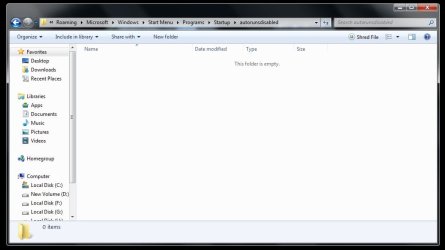
When ever i start my windows,automatically a folder Opens,it is irritating me help.
screenshot proof below:
help.jpg
OuYt7fP
 

My Computer My Computer

Computer type
PC/Desktop
Computer Manufacturer/Model Number
INTEL
OS
Windows 7 Ultimate SP1 32bit
CPU
Intex Nova N
Graphics Card(s)
Intel Corporation
Sound Card
Realtek Audio Manager
Monitor(s) Displays
Samsung
Screen Resolution
1600*900
Hard Drives
Toshiba 300gb
Keyboard
Frontech
Mouse
Logitech
Internet Speed
40 kb/sec
Browser
Firefox Developer Edition
i Reuploaded...Please check It.thanks
 

My Computer My Computer

Computer type
PC/Desktop
Computer Manufacturer/Model Number
INTEL
OS
Windows 7 Ultimate SP1 32bit
CPU
Intex Nova N
Graphics Card(s)
Intel Corporation
Sound Card
Realtek Audio Manager
Monitor(s) Displays
Samsung
Screen Resolution
1600*900
Hard Drives
Toshiba 300gb
Keyboard
Frontech
Mouse
Logitech
Internet Speed
40 kb/sec
Browser
Firefox Developer Edition
did you use autoruns before?
 

My Computer My Computer

Computer type
PC/Desktop
Computer Manufacturer/Model Number
dell xps 9000
OS
win 10
Yes
 

My Computer My Computer

Computer type
PC/Desktop
Computer Manufacturer/Model Number
INTEL
OS
Windows 7 Ultimate SP1 32bit
CPU
Intex Nova N
Graphics Card(s)
Intel Corporation
Sound Card
Realtek Audio Manager
Monitor(s) Displays
Samsung
Screen Resolution
1600*900
Hard Drives
Toshiba 300gb
Keyboard
Frontech
Mouse
Logitech
Internet Speed
40 kb/sec
Browser
Firefox Developer Edition
Sounds like you might of check something in their that's causing it to open.
 

My Computer My Computer

Computer type
PC/Desktop
Computer Manufacturer/Model Number
dell xps 9000
OS
win 10
Go to the location in the Explorer address bar and delete the unneeded shortcut. Note that you'll need to unhide Hidden Appdata files first, then click the left back arrow before the word Roaming to see the full address which is located under your User name. Hidden Files and Folders - Show or Hide - Windows 7 Forums
341990d1417489681t-startup-problem-help.jpg


While you're at it establish a Clean Boot to get rid of other less obvious freeloaders, from the Troubleshooting steps under the wave below.
 
Last edited:

My Computer My Computer

Computer type
PC/Desktop
Computer Manufacturer/Model Number
INTEL
OS
Windows 7 Ultimate SP1 32bit
CPU
Intex Nova N
Graphics Card(s)
Intel Corporation
Sound Card
Realtek Audio Manager
Monitor(s) Displays
Samsung
Screen Resolution
1600*900
Hard Drives
Toshiba 300gb
Keyboard
Frontech
Mouse
Logitech
Internet Speed
40 kb/sec
Browser
Firefox Developer Edition
Good glad it was as easy as deleting folder
 

My Computer My Computer

Computer type
PC/Desktop
Computer Manufacturer/Model Number
dell xps 9000
OS
win 10
Back
Top