
Solved Startup Repair 3 times failed to fix problem

exeviss

New member
Local time
6:38 PM
Messages
33
I tried following the directions I found on a thread on this site for writing a new system partition by running startup repair 3 times with other hard drives disconnected but it didn't work. When I try to boot the drive it gives me the option to use grub recovery mode which is odd because i thought I deleted linux. I discovered that my old hdd from my previous installation of windows 7 had the system partition on it, which is a problem because I want to wipe that drive and install ubuntu on it.
The next thing I want to try is running bootrec from the command prompt on the repair disk but I'm unsure of which commands to run. bootrec /fixmbr and bootrec /fixboot are the ones I've seen in my searches. I just don't want to accidentally screw something up. Thanks for your help.
Screenshot in the link.
 

Attachments
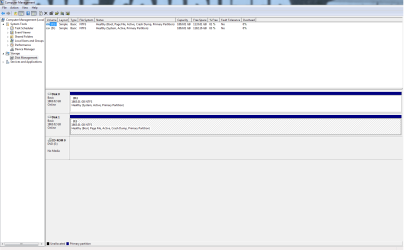
  • partitions.png
    partitions.png
    30.5 KB · Views: 6

My Computer My Computer

At a glance

Windows 7 Professional 64 bit
Computer type
PC/Desktop
OS
Windows 7 Professional 64 bit
Disconnect all other drives, make sure windows is on the 1st sata port on the motherboard, try again. Post back your results.

Having Linux code on the C drive is probably causing the problem.
 

My Computer My Computer

At a glance

Windows 10 Pro x64Intel Core i7 6700KGSkill TridentZ RGB 16GB 3600 16-16-16-36EVGA GTX 980 Ti SC x2
Computer type
PC/Desktop
Computer Manufacturer/Model Number
Skylake Special #666
OS
Windows 10 Pro x64
CPU
Intel Core i7 6700K
Motherboard
Asus Sabertooth Z170 Mark 1
Memory
GSkill TridentZ RGB 16GB 3600 16-16-16-36
Graphics Card(s)
EVGA GTX 980 Ti SC x2
Sound Card
Realtek High Definition
Monitor(s) Displays
AOC G2460PG
Screen Resolution
1920 x 1080 144Hz
Hard Drives
Samsung 860 Pro 256GB, Seagate Barracuda 4TB x2
PSU
EVGA 1000 P2, EVGA White Custom Braided Cables
Case
Corsair Vengeance C70 Gunmetal Black
Cooling
Corsair H100i v2, Corsair ML120 x2, Thermal Grizzly Kryonaut
Keyboard
Logitech G910 Orion Spectrum
Mouse
Logitech G700s
Internet Speed
Verizon Fios Quantum Gateway 75/75
Antivirus
Windows Defender, Malwarebytes Free 3.8.3
Browser
Chrome
Other Info
Corsair SP120 x4, LG Blu-ray Drive, Durabrand HT-395 100 Watt Dolby Digital Amp, Corsair H2100 Wireless 7.1 Headset
If what you're saying is that you unplugged DISK0 shown in screenshot, set C drive as first to boot and then ran Startup Repair - Run 3 Separate Times but it would not start when set first to boot....

Then try moving Bootmgr - Move to C:\ with EasyBCD - Windows 7 Forums.

After System flag shows up on C in Disk Mgmt, power down to unplug the other drive, swap its cable to C drive so that it is now DISK0, see if it will start.

If so you can plug back in the other HD to wipe it and install Ubuntu. The best way is here to Dual boot Ubuntu-Win7
 
This issue has been fixed, EasyBCD worked like a charm. I meant to thank you earlier but I've been busy since I got the ubuntu up and running. I needed it for work. I really appreciate the help.
 

My Computer My Computer

At a glance

Windows 7 Professional 64 bit
Computer type
PC/Desktop
OS
Windows 7 Professional 64 bit
Back
Top