Solved Startup Strange

windows 7 dvd. The repair option was on the disk opions
 

My Computer

Computer type
PC/Desktop
Computer Manufacturer/Model Number
Custom Build
OS
Windows 7 64bit
CPU
intel I7 960 Quad Core 3.2
Motherboard
Gigabyte x58a-ud5
Memory
10 Gig
Graphics Card(s)
nvidia gforce 750TI
Monitor(s) Displays
Asus LCD
Hard Drives
Seagate 1TB Sata 3 HDD
PSU
850W
Case
Storm Enforcer
Cooling
200mm fans front/top Thermtake lownoise CPU fan and Heatsink
Antivirus
Norton
Let it run until the screen appears asking for a Language, then press Shift+F10.
 

My Computer

Computer type
PC/Desktop
Computer Manufacturer/Model Number
Home Built Desktop By DataTech
OS
Windows 7 Ultimate X64 SP1
CPU
Intel i5-2550K, Differing ~4.4-4.8GHz No built in GPU
Motherboard
ASUS P8Z68-V PRO/GEN3
Memory
16GB G.Skill Sniper 1866MHz @ 2133MHz 2x8GB
Graphics Card(s)
ASUS GTX650TIB-DC2OC-2GD5, (650TI Boost)
Sound Card
Onboard Realtek 5-1
Monitor(s) Displays
Samsung P2570HD
Screen Resolution
1920x1080
Hard Drives
Samsung 840 Pro 256GB SSD for OS, 500GB Seagate Constellation (Enterprise drive) for Data
PSU
Corsair HX650W
Case
Inwin Dragon Rider
Cooling
Hyper 212 EVO w/two Noctua fans, push-pull, @1300 RPM
Keyboard
E-Z Eyes, bright yellow keys with large characters
Mouse
steelseries SENSEI Laser Pro Gaming
Internet Speed
48-51Mbs Mbs down, 11 Mbs up Xfinity Cable
Antivirus
Norton Internet Security 2013
Browser
IE 10, Opera, Pale Moon if needed
Other Info
4 case fans, LG BluRay-RE, ASUS DVD-RW, Mr. Fusion power supply, 1.21 gigawatts.
Good news. It was the keyboard that was dodgy (dead f10 key). Changed keyboards, f10 worked, went into windows setup,did f10+shift, That worked, went through the process, ended up with a message saying Clean successful.

I'm just reinstalling now. Worked out how to run the Format on it also. Ill get back to you after install is completed.

Thanks
 

My Computer

Computer type
PC/Desktop
Computer Manufacturer/Model Number
Custom Build
OS
Windows 7 64bit
CPU
intel I7 960 Quad Core 3.2
Motherboard
Gigabyte x58a-ud5
Memory
10 Gig
Graphics Card(s)
nvidia gforce 750TI
Monitor(s) Displays
Asus LCD
Hard Drives
Seagate 1TB Sata 3 HDD
PSU
850W
Case
Storm Enforcer
Cooling
200mm fans front/top Thermtake lownoise CPU fan and Heatsink
Antivirus
Norton
yes files all backed up
 

My Computer

Computer type
PC/Desktop
Computer Manufacturer/Model Number
Custom Build
OS
Windows 7 64bit
CPU
intel I7 960 Quad Core 3.2
Motherboard
Gigabyte x58a-ud5
Memory
10 Gig
Graphics Card(s)
nvidia gforce 750TI
Monitor(s) Displays
Asus LCD
Hard Drives
Seagate 1TB Sata 3 HDD
PSU
850W
Case
Storm Enforcer
Cooling
200mm fans front/top Thermtake lownoise CPU fan and Heatsink
Antivirus
Norton
The good news is the computer is running well. Once up and running it is flying. The bad news is it still has the peculiar start up sequence.

Can you tell me if this needs to be fixed and whether it will take much work to do it..

At the moment I am feeling a little burnt out on it.

Thanks
 

My Computer

Computer type
PC/Desktop
Computer Manufacturer/Model Number
Custom Build
OS
Windows 7 64bit
CPU
intel I7 960 Quad Core 3.2
Motherboard
Gigabyte x58a-ud5
Memory
10 Gig
Graphics Card(s)
nvidia gforce 750TI
Monitor(s) Displays
Asus LCD
Hard Drives
Seagate 1TB Sata 3 HDD
PSU
850W
Case
Storm Enforcer
Cooling
200mm fans front/top Thermtake lownoise CPU fan and Heatsink
Antivirus
Norton
I don't blame you. But if you wiped the HD and stuck with the steps to get a perfect install - especially regarding how drivers are handled in Win7 - then you've pretty much eliminated software as the cause and can now focus on hardware.

I would start with cables and connections. You may need to move to our Hardware section to get specialized help. They are quite good.
 
Thanks alot
 

My Computer

Computer type
PC/Desktop
Computer Manufacturer/Model Number
Custom Build
OS
Windows 7 64bit
CPU
intel I7 960 Quad Core 3.2
Motherboard
Gigabyte x58a-ud5
Memory
10 Gig
Graphics Card(s)
nvidia gforce 750TI
Monitor(s) Displays
Asus LCD
Hard Drives
Seagate 1TB Sata 3 HDD
PSU
850W
Case
Storm Enforcer
Cooling
200mm fans front/top Thermtake lownoise CPU fan and Heatsink
Antivirus
Norton
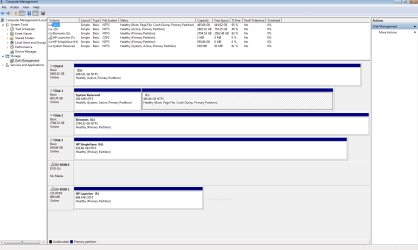
Just to be sure, please post back a screenshot of your maximized Disk Management drive map and listings:

1. Type Disk Management in Start :orb: Search box.
2. Open Disk Mgmt. window and maximize it.
3. Type Snipping Tool in Start Search box.
4. Open Snipping Tool, choose Rectangular Snip, click New, draw a box around full drive map and all listings.
5, Save Snip, attach using paper clip in Reply Box.

Tell us what is on each partition.
 
Hi

Remember this is not my computer but pretty much as you see. Disk 0. which is a second hard disk is where he keeps his data.

Disk 1. C Drive and System Reserved. C drive is very basic at the moment. Windows plus a tiny bit of software.
 

Attachments

  • Capture disk drives.PNG
    Capture disk drives.PNG
    15.4 KB · Views: 11

My Computer

Computer type
PC/Desktop
Computer Manufacturer/Model Number
Custom Build
OS
Windows 7 64bit
CPU
intel I7 960 Quad Core 3.2
Motherboard
Gigabyte x58a-ud5
Memory
10 Gig
Graphics Card(s)
nvidia gforce 750TI
Monitor(s) Displays
Asus LCD
Hard Drives
Seagate 1TB Sata 3 HDD
PSU
850W
Case
Storm Enforcer
Cooling
200mm fans front/top Thermtake lownoise CPU fan and Heatsink
Antivirus
Norton
Ive discovered something. He has two external drives connected to his computer. He usually leaves them turned on.

All this time I have been doing this exercise they have been switched on. I only turned them off later today and forgot to turn them on for that drive map thing.

Anyway I just did a restart whilst they were turned off and the start up was perfect.

What does that mean?
 

My Computer

Computer type
PC/Desktop
Computer Manufacturer/Model Number
Custom Build
OS
Windows 7 64bit
CPU
intel I7 960 Quad Core 3.2
Motherboard
Gigabyte x58a-ud5
Memory
10 Gig
Graphics Card(s)
nvidia gforce 750TI
Monitor(s) Displays
Asus LCD
Hard Drives
Seagate 1TB Sata 3 HDD
PSU
850W
Case
Storm Enforcer
Cooling
200mm fans front/top Thermtake lownoise CPU fan and Heatsink
Antivirus
Norton
Why is the D data drive marked Active? Only an OS drive should be marked Active. Partition - Mark as Inactive - Windows 7 Forums. It would also be safer to have the OS disk in DISK0 slot, so that during repairs it won't derail the System boot files to the data HD as it can when it's in first slot.

Check also that neither of the external HD's are marked Active. If not then isolate which external HD is causing the Startup problem, move it's data off to wipe with Diskpart Clean Command. This will normally solve the problem where another HD interferes with boot.
 
As you can see. The smaller of the 2 hard drives is 465 gig. The larger of the 2 is 1.8 tbs. Now the 1.8tb drive is the one he would have put in as a 2nd hard drive.

I cant see how I could have installed onto the wrong drive because I have installed twice onto this PC and 2ndly because I made sure when I did the clean on the 2nd install that I selected the C drive. Both times I selected the c drive. I also switched off the two externals when I did the clean.

The externals are the Elements and the HP.

The 1.8tb drive does in fact have system files in it though, nothing else. I don't know whether he moved them there or what.

I'm confused.

I cant ask him any of this because he is away at the moment.

Do you think he may have crossed wires when he installed the 1.8 drive.

What do you think?
 

Attachments

  • Capture.PNG
    Capture.PNG
    34.5 KB · Views: 4
Last edited:

My Computer

Computer type
PC/Desktop
Computer Manufacturer/Model Number
Custom Build
OS
Windows 7 64bit
CPU
intel I7 960 Quad Core 3.2
Motherboard
Gigabyte x58a-ud5
Memory
10 Gig
Graphics Card(s)
nvidia gforce 750TI
Monitor(s) Displays
Asus LCD
Hard Drives
Seagate 1TB Sata 3 HDD
PSU
850W
Case
Storm Enforcer
Cooling
200mm fans front/top Thermtake lownoise CPU fan and Heatsink
Antivirus
Norton
I guess you want me to repeat it: The D data drive is marked Active and needs to be marked Inactive since only an OS drive should be marked Active. I would also move it to Disk1 slot by swapping cables if possible.

The C drive looks correct.

I told you how what to do for the external HD which is interfering.
 
Last edited:
Sorry missed that one. I will transfer the data out (even though it looks useless) and do the clean command on the drive

Not possible at this time to swap cables, I know what your saying best practice and all but I don't want to commit to that whilst hes not there. Ill get back to you with results later.

Thanks
 

My Computer

Computer type
PC/Desktop
Computer Manufacturer/Model Number
Custom Build
OS
Windows 7 64bit
CPU
intel I7 960 Quad Core 3.2
Motherboard
Gigabyte x58a-ud5
Memory
10 Gig
Graphics Card(s)
nvidia gforce 750TI
Monitor(s) Displays
Asus LCD
Hard Drives
Seagate 1TB Sata 3 HDD
PSU
850W
Case
Storm Enforcer
Cooling
200mm fans front/top Thermtake lownoise CPU fan and Heatsink
Antivirus
Norton
As long as the D Data drive is marked Inactive it shouldn't interfere.

The Clean command is only needed for the external drive you confirm is bollixing the Win7 boot.
 
Hi

Just curious. What makes C drive c drive. What I mean does it become c drive when you install an OS on it or does it come from where it is wired up to the Mboard?
 

My Computer

Computer type
PC/Desktop
Computer Manufacturer/Model Number
Custom Build
OS
Windows 7 64bit
CPU
intel I7 960 Quad Core 3.2
Motherboard
Gigabyte x58a-ud5
Memory
10 Gig
Graphics Card(s)
nvidia gforce 750TI
Monitor(s) Displays
Asus LCD
Hard Drives
Seagate 1TB Sata 3 HDD
PSU
850W
Case
Storm Enforcer
Cooling
200mm fans front/top Thermtake lownoise CPU fan and Heatsink
Antivirus
Norton
When it is correctly booted to install, Win7 will always see itself as C. It is the OS partition once an OS is installed upon it.
 
Ive doine something to the computer that I dont know how to fix. I had two active partitions on my system. Well they were actually two different harddrives. Now obviously one of them has the os on it and the other one was marked active.

Now to get rid of the active status on the other drive I ran the Clean command. It cleaned it ok except now the OS cant even see it.

Help

Thanks
 

My Computer

Computer type
PC/Desktop
Computer Manufacturer/Model Number
Custom Build
OS
Windows 7 64bit
CPU
intel I7 960 Quad Core 3.2
Motherboard
Gigabyte x58a-ud5
Memory
10 Gig
Graphics Card(s)
nvidia gforce 750TI
Monitor(s) Displays
Asus LCD
Hard Drives
Seagate 1TB Sata 3 HDD
PSU
850W
Case
Storm Enforcer
Cooling
200mm fans front/top Thermtake lownoise CPU fan and Heatsink
Antivirus
Norton
What? Why would you wipe the HD with Clean Command to remove the Active flag? That wiped out everything. I gave you how to mark Inactive: Partition - Mark as Inactive - Windows 7 Forums. Are you completely reckless or just can't follow clear steps that were given to you?

Since you probably don't even know what HD you wiped, download free Partition Wizard bootable CD,
rightclick on the ISO to Open With Windows Image Burner, burn to CD.

Now reboot PC, boot the CD, take a camera snap of the maximized drive map and listings, attach to reply using paper clip. If you have no camera write out the listings with every label included.
 
Back
Top