
Static Routes - Create or Remove

How to Create or Remove Static Routes in Windows 7 and 8


   Information
This tutorial will show you how to create or remove static routes used to override the default gateway configured for certain networks. In this section I will be describing what a routing table is and how static routes play a role in this configuration.

What is a Routing Table?

A routing table is table that contains dictates who and what interface traffic should be sent to depending on the destination IP address. It is the primary component in the configuration of routers to ensure internetwork connectivity as packets are routed to their destination. For a Windows machine it is used to override the default gateway configured so you can introduce multiple networks and have the two networks be able to communicate with each other.

For example, consider this small routing table configured on a router:
Router Table.png
When the router receives a packet with a destination IP address of 172.16.1.X ('X' being a value between 1 and 254) it will first look at it's routing table to find a corresponding route. With the scenario there is route that matches telling the router to route the packet to 10.1.1.2. From there 10.1.1.2 will look at its routing table and look for a similar route telling it where to forward the packet destined to the 172.16.1.0 network. This will continue until the packet reaches its destination. This is the main concept of how routers work. For Windows machines the same logic applies with the routing table being used to determine what interface and destination gateway/router to send the traffic to.

For example:
client routing table.png
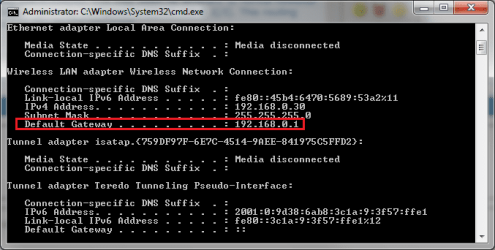
Any traffic destined to 10.1.1.X will be sent out the interface configured with the IP address of 192.168.0.30 to a destination gateway of 192.168.0.110. This may seem no different to normal however when put into perspective it can be seen that the default gateway configured is 192.168.0.1. This routing table overrides this use and allows traffic to be routed to any device you want.
ipconfig.png
______________________________________________________________________________

How do static routes come into this?

By default a routing table will only contain routes relevant to the default gateway and therefore does little to change the routing process. Static routes are manual entries made into the table to override the default gateway for allowing traffic to be exchanged between networks. The previous examples provided were examples of static routes made. They will typically have a gateway different to the default one configured as well as a low value for the metric.


   Warning
You need to be an Administrator to complete this.


   Tip
This also works for Windows 8 and 8.1. The same concepts apply to IPv6 as well should you have an environment to support it


   Note
Any route of '0.0.0.0' with a mask of '0.0.0.0' is a default route and is used for traffic going to your default gateway. DO NOT DELETE it otherwise all network traffic will be dropped.

Also, remember to configure a similar static route to go back to the source network otherwise reply packets will be dropped or sent to the default gateway and routed to the internet when not desired.


Add

Add a Static Route into the Routing Table


1. Open an Elevated Command Prompt.
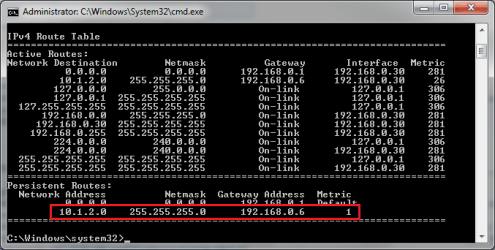
a). Calculate the route you are going to add. You need to know the network, subnet mask and gateway that will be used. For example, I want to add a route for any traffic destined to 10.1.2.0 with a mask of 255.255.255.0 to go to a gateway of 192.168.0.6.
2. Entering the following command changing the variables as needed:
route add -p {network} mask {subnet mask} {gateway}
NOTE: If you do not receive an 'OK!' message then a parameter was wrong or missing
Route add.png
3. To verify enter in the following command to view the IPv4 routing table.
route print -4

verify route.png
______________________________________________________________________


Delete

Delete a Static Route from the Routing Table


1. Open an Elevated Command Prompt.
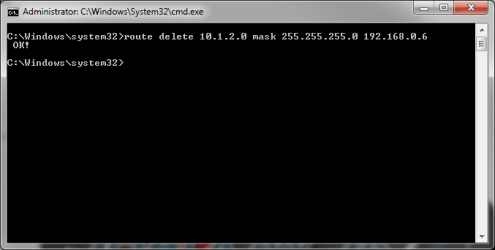
2. Entering the following command changing the variables as needed:
route delete {network} mask {subnet mask} {gateway}
NOTE: If you do not receive an 'OK!' message then a parameter was wrong or missing
route delete.png
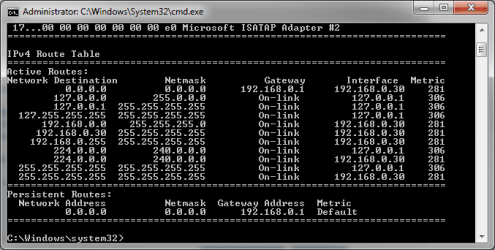
3. To verify enter in the following command to view the IPv4 routing table.
route print -4
route removed.png
Now you're done! Your computer should now be routing traffic to the relevant gateway based on the IP address that you wish to access.

Hope This Helps,
Josh :)
 
Last edited:
Josh this looks well thought out. I personally don't know what it means, but it's well done. :D
 

My Computer

Computer type
PC/Desktop
Computer Manufacturer/Model Number
Home Built Desktop By DataTech
OS
Windows 7 Ultimate X64 SP1
CPU
Intel i5-2550K, Differing ~4.4-4.8GHz No built in GPU
Motherboard
ASUS P8Z68-V PRO/GEN3
Memory
16GB G.Skill Sniper 1866MHz @ 2133MHz 2x8GB
Graphics Card(s)
ASUS GTX650TIB-DC2OC-2GD5, (650TI Boost)
Sound Card
Onboard Realtek 5-1
Monitor(s) Displays
Samsung P2570HD
Screen Resolution
1920x1080
Hard Drives
Samsung 840 Pro 256GB SSD for OS, 500GB Seagate Constellation (Enterprise drive) for Data
PSU
Corsair HX650W
Case
Inwin Dragon Rider
Cooling
Hyper 212 EVO w/two Noctua fans, push-pull, @1300 RPM
Keyboard
E-Z Eyes, bright yellow keys with large characters
Mouse
steelseries SENSEI Laser Pro Gaming
Internet Speed
48-51Mbs Mbs down, 11 Mbs up Xfinity Cable
Antivirus
Norton Internet Security 2013
Browser
IE 10, Opera, Pale Moon if needed
Other Info
4 case fans, LG BluRay-RE, ASUS DVD-RW, Mr. Fusion power supply, 1.21 gigawatts.
Josh this looks well thought out. I personally don't know what it means, but it's well done. :D

Cheers Gary! It's for networks where there are two routers that you can use to access other networks. Since you can't configure multiple default gateways you would use static routes to dictate what router to use given the destination network that you wish to reach. For example, I may setup a static route that says, for any traffic going Google it should use my 2nd router but everything else just use the default gateway. Funky scenario but the concept applies ;)

There was a couple of people that was doing some static routing on the network and sharing forum so I thought to make a tutorial to make it easier to explain and not have to use the post template which doesn't allow images.

Thanks!,
Josh :)
 

My Computer

Computer type
PC/Desktop
Computer Manufacturer/Model Number
Custom Built
OS
Windows 7 Professional x64 SP1 ; Windows Server 2012 R2 Standard
CPU
Intel Core i5 2400 @ 3.10GHz
Motherboard
Foxconn H67MP-S/-V/H67MP
Memory
8.0GB DDR3 @ 665MHz (2GBx4)
Graphics Card(s)
AMD Radeon HD 6870
Sound Card
Realtek High Definition Audio
Monitor(s) Displays
AOC 2243W & SMB1930NW
Screen Resolution
1440x900 & 1920x1080
Hard Drives
977GB Seagate ST31000524AS ATA Drive (SATA)
250GB WD iSCSI attached Drive
PSU
750W Gaming PSU
Case
Novatech Night
Cooling
Fan
Keyboard
Dell Standard PS/2 Keyboard
Mouse
R.A.T 07 Gaming Mouse
Internet Speed
Download: 10 Mbps Ping: 30ms Upload: 0.81 Mbps
Browser
Google Chrome
Other Info
Optiarc DVD RW AD-5260S ATA Device
Oh, I see now. You can possibly set multiple static routes to one gateway then?
 

My Computer

Computer type
PC/Desktop
Computer Manufacturer/Model Number
Home Built Desktop By DataTech
OS
Windows 7 Ultimate X64 SP1
CPU
Intel i5-2550K, Differing ~4.4-4.8GHz No built in GPU
Motherboard
ASUS P8Z68-V PRO/GEN3
Memory
16GB G.Skill Sniper 1866MHz @ 2133MHz 2x8GB
Graphics Card(s)
ASUS GTX650TIB-DC2OC-2GD5, (650TI Boost)
Sound Card
Onboard Realtek 5-1
Monitor(s) Displays
Samsung P2570HD
Screen Resolution
1920x1080
Hard Drives
Samsung 840 Pro 256GB SSD for OS, 500GB Seagate Constellation (Enterprise drive) for Data
PSU
Corsair HX650W
Case
Inwin Dragon Rider
Cooling
Hyper 212 EVO w/two Noctua fans, push-pull, @1300 RPM
Keyboard
E-Z Eyes, bright yellow keys with large characters
Mouse
steelseries SENSEI Laser Pro Gaming
Internet Speed
48-51Mbs Mbs down, 11 Mbs up Xfinity Cable
Antivirus
Norton Internet Security 2013
Browser
IE 10, Opera, Pale Moon if needed
Other Info
4 case fans, LG BluRay-RE, ASUS DVD-RW, Mr. Fusion power supply, 1.21 gigawatts.
Yep, you certainly can! I may setup a static route that says to go to sevenforums and eightforums use one router and to go to vistaforums and nineforums use the other router.

Quite literaly, the possibilities are endless :p
 

My Computer

Computer type
PC/Desktop
Computer Manufacturer/Model Number
Custom Built
OS
Windows 7 Professional x64 SP1 ; Windows Server 2012 R2 Standard
CPU
Intel Core i5 2400 @ 3.10GHz
Motherboard
Foxconn H67MP-S/-V/H67MP
Memory
8.0GB DDR3 @ 665MHz (2GBx4)
Graphics Card(s)
AMD Radeon HD 6870
Sound Card
Realtek High Definition Audio
Monitor(s) Displays
AOC 2243W & SMB1930NW
Screen Resolution
1440x900 & 1920x1080
Hard Drives
977GB Seagate ST31000524AS ATA Drive (SATA)
250GB WD iSCSI attached Drive
PSU
750W Gaming PSU
Case
Novatech Night
Cooling
Fan
Keyboard
Dell Standard PS/2 Keyboard
Mouse
R.A.T 07 Gaming Mouse
Internet Speed
Download: 10 Mbps Ping: 30ms Upload: 0.81 Mbps
Browser
Google Chrome
Other Info
Optiarc DVD RW AD-5260S ATA Device
Cool stuff, thanks.
 

My Computer

Computer type
PC/Desktop
Computer Manufacturer/Model Number
Home Built Desktop By DataTech
OS
Windows 7 Ultimate X64 SP1
CPU
Intel i5-2550K, Differing ~4.4-4.8GHz No built in GPU
Motherboard
ASUS P8Z68-V PRO/GEN3
Memory
16GB G.Skill Sniper 1866MHz @ 2133MHz 2x8GB
Graphics Card(s)
ASUS GTX650TIB-DC2OC-2GD5, (650TI Boost)
Sound Card
Onboard Realtek 5-1
Monitor(s) Displays
Samsung P2570HD
Screen Resolution
1920x1080
Hard Drives
Samsung 840 Pro 256GB SSD for OS, 500GB Seagate Constellation (Enterprise drive) for Data
PSU
Corsair HX650W
Case
Inwin Dragon Rider
Cooling
Hyper 212 EVO w/two Noctua fans, push-pull, @1300 RPM
Keyboard
E-Z Eyes, bright yellow keys with large characters
Mouse
steelseries SENSEI Laser Pro Gaming
Internet Speed
48-51Mbs Mbs down, 11 Mbs up Xfinity Cable
Antivirus
Norton Internet Security 2013
Browser
IE 10, Opera, Pale Moon if needed
Other Info
4 case fans, LG BluRay-RE, ASUS DVD-RW, Mr. Fusion power supply, 1.21 gigawatts.
route -p add 10.10.10.0 mask 255.255.255.0 192.168.1.1

So add -p .... this will make it permanent (what you want in most cases, otherwise the setting will be gone after reboot). In will be stored in registry key HKEY_LOCAL_MACHINE\SYSTEM\CurrentControlSet\Services\Tcpip\Parameters\PersistentRoutes
 

My Computer

Computer type
Laptop
Computer Manufacturer/Model Number
ACER ASPIRE 5742G
OS
Microsoft Windows 7 Home Premium 64-bits 7601 Multiprocessor Free Service Pack 1
CPU
Intel(R) Core(TM) i3 CPU M 370 @ 2.40GHz
Motherboard
Acer Aspire 5742G
Memory
4,00 GB
Graphics Card(s)
ATI Mobility Radeon HD 5400 Series
Sound Card
(1) AMD High Definition Audio Device (2) Realtek High Defi
Screen Resolution
1366 x 768 x 32 bits (4294967296 colors) @ 60 Hz
Hard Drives
WDC WD5000BEVT-22ZAT0
route -p add 10.10.10.0 mask 255.255.255.0 192.168.1.1

So add -p .... this will make it permanent (what you want in most cases, otherwise the setting will be gone after reboot). In will be stored in registry key HKEY_LOCAL_MACHINE\SYSTEM\CurrentControlSet\Services\Tcpip\Parameters\PersistentRoutes

Thanks! Tutorial updated.

I never had an issue after reboot though personally :confused: Though it might have something to do with me using a static IP address on my interface I do not know. Normally I do static routing or use a routing protocol at the router itself rather than client devices. Either way cheers for the heads up :)

Josh
 

My Computer

Computer type
PC/Desktop
Computer Manufacturer/Model Number
Custom Built
OS
Windows 7 Professional x64 SP1 ; Windows Server 2012 R2 Standard
CPU
Intel Core i5 2400 @ 3.10GHz
Motherboard
Foxconn H67MP-S/-V/H67MP
Memory
8.0GB DDR3 @ 665MHz (2GBx4)
Graphics Card(s)
AMD Radeon HD 6870
Sound Card
Realtek High Definition Audio
Monitor(s) Displays
AOC 2243W & SMB1930NW
Screen Resolution
1440x900 & 1920x1080
Hard Drives
977GB Seagate ST31000524AS ATA Drive (SATA)
250GB WD iSCSI attached Drive
PSU
750W Gaming PSU
Case
Novatech Night
Cooling
Fan
Keyboard
Dell Standard PS/2 Keyboard
Mouse
R.A.T 07 Gaming Mouse
Internet Speed
Download: 10 Mbps Ping: 30ms Upload: 0.81 Mbps
Browser
Google Chrome
Other Info
Optiarc DVD RW AD-5260S ATA Device
Normally you configure routing in the router! Normaly static routes are defined to connect 2 subnets, let's call it subnetA and subnetB.

All computers on subnetA have to know where subnetB is..... so configure route to subenetB on subnetA's defaultgateway.

All computers on subnetB have to know where subnetA is..... so configure route to subenetA on subnetB's defaultgateway.
 

My Computer

Computer type
Laptop
Computer Manufacturer/Model Number
ACER ASPIRE 5742G
OS
Microsoft Windows 7 Home Premium 64-bits 7601 Multiprocessor Free Service Pack 1
CPU
Intel(R) Core(TM) i3 CPU M 370 @ 2.40GHz
Motherboard
Acer Aspire 5742G
Memory
4,00 GB
Graphics Card(s)
ATI Mobility Radeon HD 5400 Series
Sound Card
(1) AMD High Definition Audio Device (2) Realtek High Defi
Screen Resolution
1366 x 768 x 32 bits (4294967296 colors) @ 60 Hz
Hard Drives
WDC WD5000BEVT-22ZAT0
Normally you configure routing in the router! Normaly static routes are defined to connect 2 subnets, let's call it subnetA and subnetB.

All computers on subnetA have to know where subnetB is..... so configure route to subenetB on subnetA's defaultgateway.

All computers on subnetB have to know where subnetA is..... so configure route to subenetA on subnetB's defaultgateway.

I would completely agree with you! :) Though my reason for this is that most home routers do not support the use of routing protocols (RIP, OSPF, ISIS you name it) or even static routing. They just have a default route to the internet...

Still, being able to do it on the client end can be useful for the average techy home user who has multiple subnets. Plus, scalability is typically not an issue for home users so manual configuration shouldn't be an issue.

Josh :)
 

My Computer

Computer type
PC/Desktop
Computer Manufacturer/Model Number
Custom Built
OS
Windows 7 Professional x64 SP1 ; Windows Server 2012 R2 Standard
CPU
Intel Core i5 2400 @ 3.10GHz
Motherboard
Foxconn H67MP-S/-V/H67MP
Memory
8.0GB DDR3 @ 665MHz (2GBx4)
Graphics Card(s)
AMD Radeon HD 6870
Sound Card
Realtek High Definition Audio
Monitor(s) Displays
AOC 2243W & SMB1930NW
Screen Resolution
1440x900 & 1920x1080
Hard Drives
977GB Seagate ST31000524AS ATA Drive (SATA)
250GB WD iSCSI attached Drive
PSU
750W Gaming PSU
Case
Novatech Night
Cooling
Fan
Keyboard
Dell Standard PS/2 Keyboard
Mouse
R.A.T 07 Gaming Mouse
Internet Speed
Download: 10 Mbps Ping: 30ms Upload: 0.81 Mbps
Browser
Google Chrome
Other Info
Optiarc DVD RW AD-5260S ATA Device
ask Route

Please i Have question and long time no answer

my laptop
IP = 192.168.1.89
mask = 255.255.255.0
gateway = 192.168.1.1
(manual setting or not DHCP)

and I have a openvpn client connect with my laptop and have address 10.0.0.10 (its fine).
and i have a computer with
IP = 192.168.1.95
mask = 255.255.255.0
gateway = 192.168.1.1

now i need access 10.0.0.1 from 192.168.1.95 computer, cause i dont want too much openvpn client on same network.
many time i route add -p it cannot be done.
please help me, i will be appreciate it. thanks a lot
 

My Computer

Computer type
PC/Desktop
Computer Manufacturer/Model Number
Toshiba
OS
Windows 7 64 bit
CPU
amd Phenom II x4 P920
Motherboard
Unknown
Memory
4 GB
Graphics Card(s)
Ati Radeon
Hard Drives
1 TB
Antivirus
Samadav Fress
Browser
Chrome
What is the exact command you are trying to enter? In order to reach the 10.0.0.1 address you would need to setup a default gateway and routing would happen on the default gateway. For a VPN solution you would typically have two separate networks joined by an intermediate one. For example:

192.168.1.0/24 -----------------------------10.0.0.0/24------------------------------------192.168.2.0/24

Where is the other end of the VPN connection going to?

Many Thanks,
Josh :)
 

My Computer

Computer type
PC/Desktop
Computer Manufacturer/Model Number
Custom Built
OS
Windows 7 Professional x64 SP1 ; Windows Server 2012 R2 Standard
CPU
Intel Core i5 2400 @ 3.10GHz
Motherboard
Foxconn H67MP-S/-V/H67MP
Memory
8.0GB DDR3 @ 665MHz (2GBx4)
Graphics Card(s)
AMD Radeon HD 6870
Sound Card
Realtek High Definition Audio
Monitor(s) Displays
AOC 2243W & SMB1930NW
Screen Resolution
1440x900 & 1920x1080
Hard Drives
977GB Seagate ST31000524AS ATA Drive (SATA)
250GB WD iSCSI attached Drive
PSU
750W Gaming PSU
Case
Novatech Night
Cooling
Fan
Keyboard
Dell Standard PS/2 Keyboard
Mouse
R.A.T 07 Gaming Mouse
Internet Speed
Download: 10 Mbps Ping: 30ms Upload: 0.81 Mbps
Browser
Google Chrome
Other Info
Optiarc DVD RW AD-5260S ATA Device
Thnks for answer Josh

how can i setup a default gateway?

i have vpn server on VPS ip is 10.0.0.1
and my laptop is connect with server on vps and ip is 10.0.0.10

so,
mylaptop My computer
IP 192.168.1.89 - - - - - - - - - - 192.168.1.95
VPN 10.0.0.10
Mask 255.255.255.0 - - - - - - - - - 255.255.255.0
gw 192.168.1.1 -- - - - - - - - - 192.168.1.1

i'd set my laptop as a default gateway so like this,
mylaptop My computer
IP 192.168.1.89 - - - - - - - - - - 192.168.1.95
VPN 10.0.0.10
Mask 255.255.255.0 - - - - - - - - - 255.255.255.0
gw 192.168.1.1 -- - - - - - - - - 192.168.1.89

i'd enable ip router, now i can access the internet its fine.
but i still cannot access 10.0.0.1-10.0.0.254
i need to access all vpn ip through that gw (192.168.1.89),
can you help me please?
 

My Computer

Computer type
PC/Desktop
Computer Manufacturer/Model Number
Toshiba
OS
Windows 7 64 bit
CPU
amd Phenom II x4 P920
Motherboard
Unknown
Memory
4 GB
Graphics Card(s)
Ati Radeon
Hard Drives
1 TB
Antivirus
Samadav Fress
Browser
Chrome
so i need mylaptop act as router.
on ubuntu im use ip masquerade with webmin. and im done with that i can access all vpn ip and internet of course.
on ubuntu is very easy to become default gateway, but in windows???
 

My Computer

Computer type
PC/Desktop
Computer Manufacturer/Model Number
Toshiba
OS
Windows 7 64 bit
CPU
amd Phenom II x4 P920
Motherboard
Unknown
Memory
4 GB
Graphics Card(s)
Ati Radeon
Hard Drives
1 TB
Antivirus
Samadav Fress
Browser
Chrome
how can i setup a default gateway?

i have vpn server on VPS ip is 10.0.0.1
and my laptop is connect with server on vps and ip is 10.0.0.10

so,
mylaptop My computer
IP 192.168.1.89 - - - - - - - - - - 192.168.1.95
VPN 10.0.0.10
Mask 255.255.255.0 - - - - - - - - - 255.255.255.0
gw 192.168.1.1 -- - - - - - - - - 192.168.1.1

i'd set my laptop as a default gateway so like this,
mylaptop My computer
IP 192.168.1.89 - - - - - - - - - - 192.168.1.95
VPN 10.0.0.10
Mask 255.255.255.0 - - - - - - - - - 255.255.255.0
gw 192.168.1.1 -- - - - - - - - - 192.168.1.89

i'd enable ip router, now i can access the internet its fine.
but i still cannot access 10.0.0.1-10.0.0.254
i need to access all vpn ip through that gw (192.168.1.89),
can you help me please?
How can 10.0.0.1-10.0.0.254 know the route back?
 

My Computer

Computer type
Laptop
Computer Manufacturer/Model Number
ACER ASPIRE 5742G
OS
Microsoft Windows 7 Home Premium 64-bits 7601 Multiprocessor Free Service Pack 1
CPU
Intel(R) Core(TM) i3 CPU M 370 @ 2.40GHz
Motherboard
Acer Aspire 5742G
Memory
4,00 GB
Graphics Card(s)
ATI Mobility Radeon HD 5400 Series
Sound Card
(1) AMD High Definition Audio Device (2) Realtek High Defi
Screen Resolution
1366 x 768 x 32 bits (4294967296 colors) @ 60 Hz
Hard Drives
WDC WD5000BEVT-22ZAT0
route back? im sorry what dou you mean?
 

My Computer

Computer type
PC/Desktop
Computer Manufacturer/Model Number
Toshiba
OS
Windows 7 64 bit
CPU
amd Phenom II x4 P920
Motherboard
Unknown
Memory
4 GB
Graphics Card(s)
Ati Radeon
Hard Drives
1 TB
Antivirus
Samadav Fress
Browser
Chrome
how can i setup a default gateway?

i have vpn server on VPS ip is 10.0.0.1
and my laptop is connect with server on vps and ip is 10.0.0.10

so,
mylaptop ------------------------ My computer
IP 192.168.1.89 - - - - - - - - - - 192.168.1.95
VPN 10.0.0.10
Mask 255.255.255.0 - - - - - - - - - 255.255.255.0
gw 192.168.1.1 -- - - - - - - - - 192.168.1.1

i'd set my laptop as a default gateway so like this,
mylaptop ------------------------ My computer
IP 192.168.1.89 - - - - - - - - - - 192.168.1.95
VPN 10.0.0.10
Mask 255.255.255.0 - - - - - - - - - 255.255.255.0
gw 192.168.1.1 -- - - - - - - - - 192.168.1.89

i'd enable ip router, now i can access the internet its fine.
but i still cannot access 10.0.0.1-10.0.0.254
i need to access all vpn ip through that gw (192.168.1.89) from my computer (192.168.1.95) ,
can you help me please?
 

My Computer

Computer type
PC/Desktop
Computer Manufacturer/Model Number
Toshiba
OS
Windows 7 64 bit
CPU
amd Phenom II x4 P920
Motherboard
Unknown
Memory
4 GB
Graphics Card(s)
Ati Radeon
Hard Drives
1 TB
Antivirus
Samadav Fress
Browser
Chrome
route back? im sorry what dou you mean?
"How can 10.0.0.1-10.0.0.254 know the route back?"

I mean if you send something to 10.0.0.x .... then 10.0.0.x should send a message back like "packet receied successfully". But how does he know the route to the original sender?
 

My Computer

Computer type
Laptop
Computer Manufacturer/Model Number
ACER ASPIRE 5742G
OS
Microsoft Windows 7 Home Premium 64-bits 7601 Multiprocessor Free Service Pack 1
CPU
Intel(R) Core(TM) i3 CPU M 370 @ 2.40GHz
Motherboard
Acer Aspire 5742G
Memory
4,00 GB
Graphics Card(s)
ATI Mobility Radeon HD 5400 Series
Sound Card
(1) AMD High Definition Audio Device (2) Realtek High Defi
Screen Resolution
1366 x 768 x 32 bits (4294967296 colors) @ 60 Hz
Hard Drives
WDC WD5000BEVT-22ZAT0
ok ok i know now. the server is not know he came original packet or not. cause im use openvpn.
so, i make this very simple.
i have 2 different network on my laptop, so i need another computer connect to my computer to access internet and vpn.
 

My Computer

Computer type
PC/Desktop
Computer Manufacturer/Model Number
Toshiba
OS
Windows 7 64 bit
CPU
amd Phenom II x4 P920
Motherboard
Unknown
Memory
4 GB
Graphics Card(s)
Ati Radeon
Hard Drives
1 TB
Antivirus
Samadav Fress
Browser
Chrome
I think I just about understand what is going on....

On your laptop that you wish to act as the router you would need to set the following commands to enable routing as well as enable NAT so that the route back can be made. If you don't want to use NAT then simply make sure a valid route from 10.0.0.1 knows how to reach your computer on 192.168.1.95.

Code:
echo 1 > /proc/sys/net/ipv4/ip_forward

The above will allow your linux laptop (192.168.1.89) to be able to route traffic between interfaces.

Code:
iptables -t nat -A POSTROUTING -o [COLOR="Red"]{[I]OUTBOUND INTERFACE[/I]}[/COLOR] -j MASQUERADE

The above sets the outbound interface used to reach the VPN connection. Please replace the OUTBOUND interface section with the interface used to reach the VPN connection (10.0.0.10)... eth0, wlan0 .... etc.

Code:
iptables -A FORWARD --in-interface [COLOR="red"]{[I]INBOUND INTERFACE[/I]}[/COLOR] -j ACCEPT

The next command sets the inbound interface that connects to the same network as your computer. So the interface with an IP address of 192.168.1.89. Please replace the reference INBOUND interface with the relevant interface such as eth0, wlan0 ... etc.

Then simply set the route of the destination network from your computer side. For example, if you wish to access the the network of 192.168.2.0/24 using the VPN tunnel then you would input the following command onto your main computer:

Code:
route add -p 192.168.2.0 mask 255.255.255.0 192.168.1.89

If you want to access the internet using the VPN connection then you would simply change the default gateway of your main computer to the laptops IP address. For example, you would change the default gateway from 192.168.1.1 to 192.168.1.89. Also, on your main laptop you should change the default gateway to the VPN of 10.0.0.1. This will cause a default route to be added and allow the internet traffic to flow to the VPN server.

   Note
The VPN server at the other end should have a default route in place in order to appropriately route the traffic otherwise your internet traffic would be dropped there.


Hopefully this makes sense and helps somewhat

Josh :)
 
Last edited:

My Computer

Computer type
PC/Desktop
Computer Manufacturer/Model Number
Custom Built
OS
Windows 7 Professional x64 SP1 ; Windows Server 2012 R2 Standard
CPU
Intel Core i5 2400 @ 3.10GHz
Motherboard
Foxconn H67MP-S/-V/H67MP
Memory
8.0GB DDR3 @ 665MHz (2GBx4)
Graphics Card(s)
AMD Radeon HD 6870
Sound Card
Realtek High Definition Audio
Monitor(s) Displays
AOC 2243W & SMB1930NW
Screen Resolution
1440x900 & 1920x1080
Hard Drives
977GB Seagate ST31000524AS ATA Drive (SATA)
250GB WD iSCSI attached Drive
PSU
750W Gaming PSU
Case
Novatech Night
Cooling
Fan
Keyboard
Dell Standard PS/2 Keyboard
Mouse
R.A.T 07 Gaming Mouse
Internet Speed
Download: 10 Mbps Ping: 30ms Upload: 0.81 Mbps
Browser
Google Chrome
Other Info
Optiarc DVD RW AD-5260S ATA Device
Back
Top