Static Routes - Create or Remove

How to Create or Remove Static Routes in Windows 7 and 8


   Information
This tutorial will show you how to create or remove static routes used to override the default gateway configured for certain networks. In this section I will be describing what a routing table is and how static routes play a role in this configuration.

What is a Routing Table?

A routing table is table that contains dictates who and what interface traffic should be sent to depending on the destination IP address. It is the primary component in the configuration of routers to ensure internetwork connectivity as packets are routed to their destination. For a Windows machine it is used to override the default gateway configured so you can introduce multiple networks and have the two networks be able to communicate with each other.

For example, consider this small routing table configured on a router:
Router Table.png
When the router receives a packet with a destination IP address of 172.16.1.X ('X' being a value between 1 and 254) it will first look at it's routing table to find a corresponding route. With the scenario there is route that matches telling the router to route the packet to 10.1.1.2. From there 10.1.1.2 will look at its routing table and look for a similar route telling it where to forward the packet destined to the 172.16.1.0 network. This will continue until the packet reaches its destination. This is the main concept of how routers work. For Windows machines the same logic applies with the routing table being used to determine what interface and destination gateway/router to send the traffic to.

For example:
client routing table.png
Any traffic destined to 10.1.1.X will be sent out the interface configured with the IP address of 192.168.0.30 to a destination gateway of 192.168.0.110. This may seem no different to normal however when put into perspective it can be seen that the default gateway configured is 192.168.0.1. This routing table overrides this use and allows traffic to be routed to any device you want.
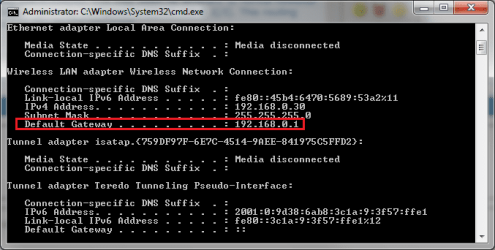
ipconfig.png
______________________________________________________________________________

How do static routes come into this?

By default a routing table will only contain routes relevant to the default gateway and therefore does little to change the routing process. Static routes are manual entries made into the table to override the default gateway for allowing traffic to be exchanged between networks. The previous examples provided were examples of static routes made. They will typically have a gateway different to the default one configured as well as a low value for the metric.


   Warning
You need to be an Administrator to complete this.


   Tip
This also works for Windows 8 and 8.1. The same concepts apply to IPv6 as well should you have an environment to support it


   Note
Any route of '0.0.0.0' with a mask of '0.0.0.0' is a default route and is used for traffic going to your default gateway. DO NOT DELETE it otherwise all network traffic will be dropped.

Also, remember to configure a similar static route to go back to the source network otherwise reply packets will be dropped or sent to the default gateway and routed to the internet when not desired.


Add

Add a Static Route into the Routing Table


1. Open an Elevated Command Prompt.
a). Calculate the route you are going to add. You need to know the network, subnet mask and gateway that will be used. For example, I want to add a route for any traffic destined to 10.1.2.0 with a mask of 255.255.255.0 to go to a gateway of 192.168.0.6.
2. Entering the following command changing the variables as needed:
route add -p {network} mask {subnet mask} {gateway}
NOTE: If you do not receive an 'OK!' message then a parameter was wrong or missing
Route add.png
3. To verify enter in the following command to view the IPv4 routing table.
route print -4
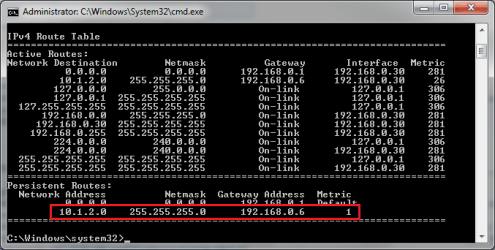

verify route.png
______________________________________________________________________


Delete

Delete a Static Route from the Routing Table


1. Open an Elevated Command Prompt.
2. Entering the following command changing the variables as needed:
route delete {network} mask {subnet mask} {gateway}
NOTE: If you do not receive an 'OK!' message then a parameter was wrong or missing
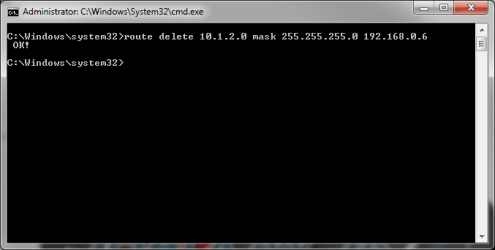
route delete.png
3. To verify enter in the following command to view the IPv4 routing table.
route print -4
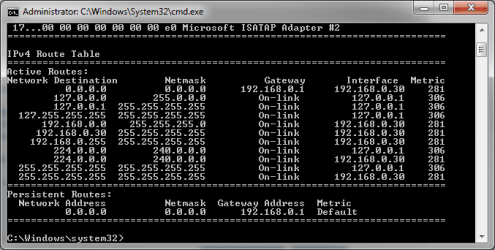
route removed.png
Now you're done! Your computer should now be routing traffic to the relevant gateway based on the IP address that you wish to access.

Hope This Helps,
Josh :)
 
Last edited:
thank you josh, i apreciate it.

but on my laptop im use windows 7 64 bit not a ubuntu.

i can find tutorial (google) ip forward and masquerade on ubuntu, but on windows?
can i fix it?

many thanks josh
 

My Computer

Computer type
PC/Desktop
Computer Manufacturer/Model Number
Toshiba
OS
Windows 7 64 bit
CPU
amd Phenom II x4 P920
Motherboard
Unknown
Memory
4 GB
Graphics Card(s)
Ati Radeon
Hard Drives
1 TB
Antivirus
Samadav Fress
Browser
Chrome
Hmmm... Routing for Windows is normally a server side role installed. As for client side routing the only native application I can think of is ICS. When picking the interface to share, make sure you pick the one that is connecting to the VPN server (10.0.0.10)

http://www.sevenforums.com/tutorials/76617-internet-connection-sharing-enable.html

If you do this on your LAN you may have some conflicts. See how it goes and if it doesn't work I'll try and see if a third party solution could be used to complete your desired task

Hope This Helps,
Josh :)
 

My Computer

Computer type
PC/Desktop
Computer Manufacturer/Model Number
Custom Built
OS
Windows 7 Professional x64 SP1 ; Windows Server 2012 R2 Standard
CPU
Intel Core i5 2400 @ 3.10GHz
Motherboard
Foxconn H67MP-S/-V/H67MP
Memory
8.0GB DDR3 @ 665MHz (2GBx4)
Graphics Card(s)
AMD Radeon HD 6870
Sound Card
Realtek High Definition Audio
Monitor(s) Displays
AOC 2243W & SMB1930NW
Screen Resolution
1440x900 & 1920x1080
Hard Drives
977GB Seagate ST31000524AS ATA Drive (SATA)
250GB WD iSCSI attached Drive
PSU
750W Gaming PSU
Case
Novatech Night
Cooling
Fan
Keyboard
Dell Standard PS/2 Keyboard
Mouse
R.A.T 07 Gaming Mouse
Internet Speed
Download: 10 Mbps Ping: 30ms Upload: 0.81 Mbps
Browser
Google Chrome
Other Info
Optiarc DVD RW AD-5260S ATA Device
okey Josh, i have tried it and i can access all vpn ip from my computer.

but a is there any different better than using ICS? software gateway or something.:)

oh, i ever try squid for windows and i can access all ip vpn through proxy. but the messenger cannot through proxy :o.

Many thank you Josh.
 

My Computer

Computer type
PC/Desktop
Computer Manufacturer/Model Number
Toshiba
OS
Windows 7 64 bit
CPU
amd Phenom II x4 P920
Motherboard
Unknown
Memory
4 GB
Graphics Card(s)
Ati Radeon
Hard Drives
1 TB
Antivirus
Samadav Fress
Browser
Chrome
3 adapters for a LAN and a WAN

Hi guys,
I am not sure anyone is still looking at this post but I need some help and I am writing here hoping someone is out there. :)

I have a network of 3 computers that I need connected to each other on two separate networks (adapters) so two programs can exclusively use one adapter each in a closed LAN of the 3 computers only and they need to be with set IP addresses.

I also want the 3 computers to connect to the internet on a 3rd adapter (built-in NIC adapter) that is connected to my home network in-turn connected to the internet.

On each PC (Win7 x64) I plan on installing a dual port PCI-e Ethernet card so I can get the 2nd and 3rd adapters to be used for the closed LAN, if this will work!

If my home network is configured with a router 192.168.1.1 for internet use, and I need two more closed networks for the 3 PCs to have 10.0.0.x/y/z(3) and 10.0.1.x/y/z(3), I would like to know the following:

1. Is such a setup possible and will the PCs with Win7 see and accept 3 adapters?
2. How do I program these adapters?

Kindly note I am a newbie when it comes to networking!

I would appreciate any help anyone can provide.

Thanks in advance.:D
Ammar387
 

My Computer

Computer Manufacturer/Model Number
Apple MacBook Pro 15"
OS
Windows 7 Ultimate x86 in VMware Fusion 3 virtual machine on MACBook Pro
CPU
Intel
Memory
4GB (2GB dedicated for Win7)
Hi guys,
I am not sure anyone is still looking at this post but I need some help and I am writing here hoping someone is out there. :)

I have a network of 3 computers that I need connected to each other on two separate networks (adapters) so two programs can exclusively use one adapter each in a closed LAN of the 3 computers only and they need to be with set IP addresses.

I also want the 3 computers to connect to the internet on a 3rd adapter (built-in NIC adapter) that is connected to my home network in-turn connected to the internet.

On each PC (Win7 x64) I plan on installing a dual port PCI-e Ethernet card so I can get the 2nd and 3rd adapters to be used for the closed LAN, if this will work!

If my home network is configured with a router 192.168.1.1 for internet use, and I need two more closed networks for the 3 PCs to have 10.0.0.x/y/z(3) and 10.0.1.x/y/z(3), I would like to know the following:

1. Is such a setup possible and will the PCs with Win7 see and accept 3 adapters?
2. How do I program these adapters?

Kindly note I am a newbie when it comes to networking!

I would appreciate any help anyone can provide.

Thanks in advance.:D
Ammar387

Hi ammoun,

What you are asking for is completely possible :)

You wouldn't need static routes to create it though. Static routes has a niche application for environments that have either multiple routers or is used on Multicast networks for content delivery servers (such as ones for netflix etc...).

In networking we have something called a subnet mask that is used to determine whether or not a PC needs to go through a router in order to reach the destination. Since you are plugging these PCs up directly to each other with multiple NICs (Network Interface Cards) then this won't be an issue.

For example, my current laptop has multiple NICs and all the routing is done based on local subnets and one NIC setup with a gateway for internet access.

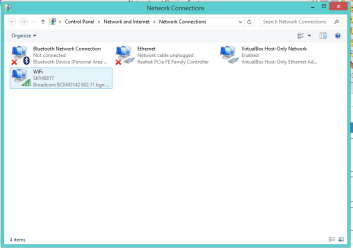
Capture.PNG

What you are asking for is exactly how virtual environments work where you want to logically separate your virtual machines from each other while still allowing internet connectivity for them.

If you can draw up and show how you are connecting your computers up (Maybe through a screenshot?) then I can walk you through the steps needed to setup addressing accordingly.

Best Regards,

Josh :)
 

My Computer

Computer type
PC/Desktop
Computer Manufacturer/Model Number
Custom Built
OS
Windows 7 Professional x64 SP1 ; Windows Server 2012 R2 Standard
CPU
Intel Core i5 2400 @ 3.10GHz
Motherboard
Foxconn H67MP-S/-V/H67MP
Memory
8.0GB DDR3 @ 665MHz (2GBx4)
Graphics Card(s)
AMD Radeon HD 6870
Sound Card
Realtek High Definition Audio
Monitor(s) Displays
AOC 2243W & SMB1930NW
Screen Resolution
1440x900 & 1920x1080
Hard Drives
977GB Seagate ST31000524AS ATA Drive (SATA)
250GB WD iSCSI attached Drive
PSU
750W Gaming PSU
Case
Novatech Night
Cooling
Fan
Keyboard
Dell Standard PS/2 Keyboard
Mouse
R.A.T 07 Gaming Mouse
Internet Speed
Download: 10 Mbps Ping: 30ms Upload: 0.81 Mbps
Browser
Google Chrome
Other Info
Optiarc DVD RW AD-5260S ATA Device
Thank u dear Josh.
I will draw what I want to do and attach it here in a few hours.
I appreciate your help offer :-)
Bless u.
 

My Computer

Computer Manufacturer/Model Number
Apple MacBook Pro 15"
OS
Windows 7 Ultimate x86 in VMware Fusion 3 virtual machine on MACBook Pro
CPU
Intel
Memory
4GB (2GB dedicated for Win7)
Three networks sketch

Dear Josh,
I just did a hand sketch as shown below. :confused: Excuse me but I cannot draw better :o

I am not sure with fixed IP addresses on each PC if I need to connect the PCs to routers, but I can do that.

The router #1 network will be my home network connected to the internet.

Routers #2 and #3 are the two extra networks I want to set up with fixed IP addresses for each PC.

I want to run WidevieW and WideTraffic (for flight simulator) on all three PCs and each program on a separate network (10.0.0.2/3/4 and 10.0.1.2/3/4).

I have not yet set this up, I am waiting to know if it is doable and how to do it so I can buy the PCI-e dual port (or even with four ports) cards for the PCs.

Thanks.
Ammar33353842
 

Attachments

  • Three Networks.jpeg
    Three Networks.jpeg
    57.6 KB · Views: 1,317

My Computer

Computer Manufacturer/Model Number
Apple MacBook Pro 15"
OS
Windows 7 Ultimate x86 in VMware Fusion 3 virtual machine on MACBook Pro
CPU
Intel
Memory
4GB (2GB dedicated for Win7)
Re: Block Microsoft spying and Windows 10 upgrade updates.

I have removed all Windows 10 upgrade updates from Windows 7 and in particular these are of concern:

Telemetry and Data Collection are coming to Windows 7 and Windows 8 too

Now Static Routes isn't something that I am familiar with but I see that someone has written a script here:

Stop Windows Spying - BlockWindows.bat

   Note
It is not recommended for users to run this script.


Do you have any comments on the following lines contained in the script?

Code:
70	route -p add 23.218.212.69 MASK 255.255.255.255 0.0.0.0
71	route -p add 65.55.108.23 MASK 255.255.255.255 0.0.0.0
72	route -p add 65.39.117.230 MASK 255.255.255.255 0.0.0.0
73	route -p add 134.170.30.202 MASK 255.255.255.255 0.0.0.0
74	route -p add 137.116.81.24 MASK 255.255.255.255 0.0.0.0
75	route -p add 204.79.197.200 MASK 255.255.255.255 0.0.0.0
76	route -p add 23.218.212.69 MASK 255.255.255.255 0.0.0.0

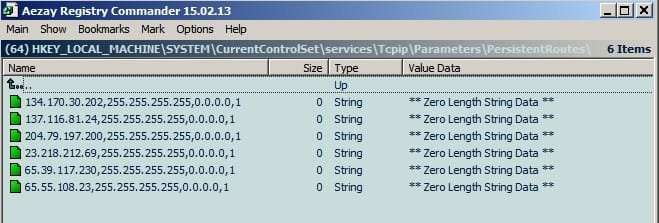
What does that do? I have added the entries to:

HKEY_LOCAL_MACHINE\SYSTEM\CurrentControlSet\services\Tcpip\Parameters\PersistentRoutes\

Persistent_Routes.jpg
 
Last edited:

My Computer

Computer type
Laptop
Computer Manufacturer/Model Number
ASUS
OS
Microsoft Windows 7 Home Premium 64-bit 7601 Multiprocessor Free Service Pack 1
CPU
AMD C-60 APU with Radeon(tm) HD Graphics
Motherboard
ASUSTeK COMPUTER INC. X501U
Memory
4.00 GB
Graphics Card(s)
AMD Radeon HD 6290 Graphics
Sound Card
(1) AMD High Definition Audio Device (2) Realtek High Defi
Screen Resolution
1366 x 768 x 32 bits (4294967296 colors) @ 60 Hz
Hard Drives
Hitachi HTS545050A7E380 SATA Disk Device
Antivirus
Comodo CIS & FW, SecureAplus App Whitelisting, Threatfire
Browser
Cyberfox 64bit, Opera 64bit, Airfox
Other Info
Spy-The-Spy, HitmanPro.Alert, Norton Connect Safe, MJRegWatcher, BitDefender TrafficLight, Voodoo Shield, Zemana AntiMalware
Okay so now I've added the following using Powershell:

Code:
route -p add 8.254.209.254 MASK 255.255.255.255 0.0.0.0
route -p add 68.232.34.200 MASK 255.255.255.255 0.0.0.0
route -p add 66.119.144.190 MASK 255.255.255.255 0.0.0.0
route -p add 65.55.39.10 MASK 255.255.255.255 0.0.0.0
route -p add 65.55.252.93 MASK 255.255.255.255 0.0.0.0
route -p add 65.55.252.92 MASK 255.255.255.255 0.0.0.0
route -p add 65.55.252.71 MASK 255.255.255.255 0.0.0.0
route -p add 65.55.252.63 MASK 255.255.255.255 0.0.0.0
route -p add 65.55.252.43 MASK 255.255.255.255 0.0.0.0
route -p add 65.55.108.23 MASK 255.255.255.255 0.0.0.0
route -p add 65.52.108.29 MASK 255.255.255.255 0.0.0.0
route -p add 65.52.100.94 MASK 255.255.255.255 0.0.0.0
route -p add 65.52.100.93 MASK 255.255.255.255 0.0.0.0
route -p add 65.52.100.92 MASK 255.255.255.255 0.0.0.0
route -p add 65.52.100.91 MASK 255.255.255.255 0.0.0.0
route -p add 65.52.100.9 MASK 255.255.255.255 0.0.0.0
route -p add 65.52.100.7 MASK 255.255.255.255 0.0.0.0
route -p add 65.52.100.11 MASK 255.255.255.255 0.0.0.0
route -p add 64.4.6.100 MASK 255.255.255.255 0.0.0.0
route -p add 64.4.54.32 MASK 255.255.255.255 0.0.0.0
route -p add 64.4.54.22 MASK 255.255.255.255 0.0.0.0
route -p add 23.99.10.11 MASK 255.255.255.255 0.0.0.0
route -p add 23.218.212.69 MASK 255.255.255.255 0.0.0.0
route -p add 23.102.21.4 MASK 255.255.255.255 0.0.0.0
route -p add 216.58.209.166 MASK 255.255.255.255 0.0.0.0
route -p add 207.68.166.254 MASK 255.255.255.255 0.0.0.0
route -p add 207.46.223.94 MASK 255.255.255.255 0.0.0.0
route -p add 207.46.194.25 MASK 255.255.255.255 0.0.0.0
route -p add 207.46.101.29 MASK 255.255.255.255 0.0.0.0
route -p add 207.123.56.252 MASK 255.255.255.255 0.0.0.0
route -p add 204.79.197.200 MASK 255.255.255.255 0.0.0.0
route -p add 198.78.208.254 MASK 255.255.255.255 0.0.0.0
route -p add 194.44.4.208 MASK 255.255.255.255 0.0.0.0
route -p add 194.44.4.200 MASK 255.255.255.255 0.0.0.0
route -p add 185.13.160.61 MASK 255.255.255.255 0.0.0.0
route -p add 173.194.113.220 MASK 255.255.255.255 0.0.0.0
route -p add 173.194.113.219 MASK 255.255.255.255 0.0.0.0
route -p add 168.63.108.233 MASK 255.255.255.255 0.0.0.0
route -p add 157.56.91.82 MASK 255.255.255.255 0.0.0.0
route -p add 157.56.91.77 MASK 255.255.255.255 0.0.0.0
route -p add 157.56.77.139 MASK 255.255.255.255 0.0.0.0
route -p add 157.56.74.250 MASK 255.255.255.255 0.0.0.0
route -p add 157.56.23.91 MASK 255.255.255.255 0.0.0.0
route -p add 157.56.121.89 MASK 255.255.255.255 0.0.0.0
route -p add 157.55.129.21 MASK 255.255.255.255 0.0.0.0
route -p add 134.170.58.189 MASK 255.255.255.255 0.0.0.0
route -p add 134.170.58.123 MASK 255.255.255.255 0.0.0.0
route -p add 134.170.58.121 MASK 255.255.255.255 0.0.0.0
route -p add 134.170.58.118 MASK 255.255.255.255 0.0.0.0
route -p add 134.170.53.30 MASK 255.255.255.255 0.0.0.0
route -p add 134.170.53.29 MASK 255.255.255.255 0.0.0.0
route -p add 134.170.51.190 MASK 255.255.255.255 0.0.0.0
route -p add 134.170.185.70 MASK 255.255.255.255 0.0.0.0
route -p add 134.170.115.60 MASK 255.255.255.255 0.0.0.0
route -p add 131.107.113.238 MASK 255.255.255.255 0.0.0.0
route -p add 111.221.29.177 MASK 255.255.255.255 0.0.0.0
route -p add 104.82.22.249 MASK 255.255.255.255 0.0.0.0
route -p add 104.82.14.146 MASK 255.255.255.255 0.0.0.0

I would really appreciate it if someone could clarify what this does. My understanding of it is that any packets sent to the above ip addresses will be re-routed.
 

My Computer

Computer type
Laptop
Computer Manufacturer/Model Number
ASUS
OS
Microsoft Windows 7 Home Premium 64-bit 7601 Multiprocessor Free Service Pack 1
CPU
AMD C-60 APU with Radeon(tm) HD Graphics
Motherboard
ASUSTeK COMPUTER INC. X501U
Memory
4.00 GB
Graphics Card(s)
AMD Radeon HD 6290 Graphics
Sound Card
(1) AMD High Definition Audio Device (2) Realtek High Defi
Screen Resolution
1366 x 768 x 32 bits (4294967296 colors) @ 60 Hz
Hard Drives
Hitachi HTS545050A7E380 SATA Disk Device
Antivirus
Comodo CIS & FW, SecureAplus App Whitelisting, Threatfire
Browser
Cyberfox 64bit, Opera 64bit, Airfox
Other Info
Spy-The-Spy, HitmanPro.Alert, Norton Connect Safe, MJRegWatcher, BitDefender TrafficLight, Voodoo Shield, Zemana AntiMalware
That is how it looks to me also, however the default subnet mask is 255.255.255.0 ?
Within HOSTS I know you either redirect the IP to 127.0.0.1 or use 0.0.0.0 so that part looks right, but I am curious about the 255.255.255.255 mask, unless one of the MS virtual adapters uses that one ?

I ran a little utility yesterday that appears to do what you are here, very effective one problem though after it added all of the entries (into HOSTS and Windows Firewall) almost everything MS related was blocked even their Bing search engine.

Sorry I can not shed more light on this, but it is doing what you said redirecting the listed IP's to Localhost
 

My Computer

Computer type
Laptop
Computer Manufacturer/Model Number
Sony
OS
Windows 7 x64 SP1
CPU
Intel
Motherboard
Sony
Memory
4gb
Graphics Card(s)
Nvidia
Hard Drives
WD
Internet Speed
Dial up wasn't as bad as this !
Antivirus
Avast
Browser
Firefox
That is how it looks to me also, however the default subnet mask is 255.255.255.0 ?
Within HOSTS I know you either redirect the IP to 127.0.0.1 or use 0.0.0.0 so that part looks right, but I am curious about the 255.255.255.255 mask, unless one of the MS virtual adapters uses that one ?

I ran a little utility yesterday that appears to do what you are here, very effective one problem though after it added all of the entries (into HOSTS and Windows Firewall) almost everything MS related was blocked even their Bing search engine.

Sorry I can not shed more light on this, but it is doing what you said redirecting the listed IP's to Localhost

Thanks for your tests. I can confirm that Bing is blocked. Although I have HOSTS file entries I was thinking that the routing table modification meant that the packets get re-routed regardless of any hard coded MS attempts to bypass the HOSTS file.

I am curious about the 255.255.255.255 mask, unless one of the MS virtual adapters uses that one ?

I know nothing about that at all. :)
 

My Computer

Computer type
Laptop
Computer Manufacturer/Model Number
ASUS
OS
Microsoft Windows 7 Home Premium 64-bit 7601 Multiprocessor Free Service Pack 1
CPU
AMD C-60 APU with Radeon(tm) HD Graphics
Motherboard
ASUSTeK COMPUTER INC. X501U
Memory
4.00 GB
Graphics Card(s)
AMD Radeon HD 6290 Graphics
Sound Card
(1) AMD High Definition Audio Device (2) Realtek High Defi
Screen Resolution
1366 x 768 x 32 bits (4294967296 colors) @ 60 Hz
Hard Drives
Hitachi HTS545050A7E380 SATA Disk Device
Antivirus
Comodo CIS & FW, SecureAplus App Whitelisting, Threatfire
Browser
Cyberfox 64bit, Opera 64bit, Airfox
Other Info
Spy-The-Spy, HitmanPro.Alert, Norton Connect Safe, MJRegWatcher, BitDefender TrafficLight, Voodoo Shield, Zemana AntiMalware
Prior to XP the default subnet mask was different to what it is now (I forget exactly what it was) a subnet basically breaks up IP address and "route's" them to the correct place within the "network" if you think of your postal code being your IP and then the subnet mask would be your street and house number, put very basically...

I am no expert on this subject but the 0 is assigned to a local network address and the 255 is used to broadcast (I looked through some old notes from when I used to set up LAN gaming networks) so this would explain why 255.255.255.255 is being used it is kind of additional precaution to prevent broadcasting to them.

After that it gets seriously complex here is a good article on the subject https://www.iplocation.net/subnet-mask

Personally I think it is sort of overkill as I am sure a good few things you may well need to work will not after applying these rules... that is just my opinion though... I shall be interested to read your findings though once you finish testing this :-)
 

My Computer

Computer type
Laptop
Computer Manufacturer/Model Number
Sony
OS
Windows 7 x64 SP1
CPU
Intel
Motherboard
Sony
Memory
4gb
Graphics Card(s)
Nvidia
Hard Drives
WD
Internet Speed
Dial up wasn't as bad as this !
Antivirus
Avast
Browser
Firefox
Routing for Windows is normally a server side role installed. As for client side routing the only native application I can think of is ICS.

A somewhat similar problem arises when one needs to listen on a Windows PC to a Netconsole output from a booting Linux plug computer on LAN. Lets say the device outputs different info to 2 IPs: bootloader start info to 10.10.10.5, kernel start info to 10.10.10.4. How to view both outputs and send commands back to the device in Netcat on a Windows PC with one physical network adapter without using virtual machines?

I was trying to add Microsoft Loopback Adapter, and setup ICS on the physical adapter to share network with the Loopback, assigned it IP, enabled router function in Registry for physical adapter, set route on a LAN Router with the physical adapter as gateway to loopback, but I still can't ping the PC loopback adapter from the Linux device and send traffic to it. Any ideas, or a different working approach?
 
Last edited:

My Computer

OS
Win 7
why you don't manage this with vbscript? by the record I made one, I don't know if is allow to put the link here!! let me know!!! you know General Rule number 3! I`m afraid to brake this rule! not to promote other link!! but show my job!! that's is my concern!

Thanks!
 

My Computer

Computer type
Laptop
Computer Manufacturer/Model Number
Its all Virtualized
OS
Win 10 Enterprise 64 Bits
Back
Top