
Steam Games on Win 7.

XGUNTHERC

I Click Home Too Much
Power User
VIP
Local time
9:35 AM
Messages
440
Location
Viva Las Vegas
So.. if I install Steam on Win 7. and sign in. How do I play all the games that were installed on my old Vista HD.. as Win 7 is installed on a new HD.

will steam just install them all?
 

My Computer

OS
Windows 7 Ultimate Edition x64
CPU
Q9650 E0 @ 4.0 GHz 1.304v
Motherboard
eVGA 750i FTW!
Memory
2x2GB Corsair Dominator PC2-8500C5D 1100 Mhz 5-5-5-15
Graphics Card(s)
eVGA/Gigabyte GTX 480's SLI
Sound Card
X-Fi XtremeGamer
Monitor(s) Displays
Dell U2410 24" IPS Panel (Beautiful)
Screen Resolution
1900 x 1200 & 1680 x 1050
Hard Drives
WD Caviar Black 640GB AALS x2 (Raid0) + Seagate Pro 500GB External x2
PSU
Enermax Revolution 85+ 1050w PSU
Case
Cooler Master HAF 932 H20
Cooling
Apogee GTZ, Feser 360, D5 Vario, Scythe GT 1850's
Keyboard
Logitech G11
Mouse
Logitech MX-518 / G9
Internet Speed
Fast!
Other Info
Nikon D40 DSLR 18-105mm VR - Nikon 35mm f/1.8 & 55-200mm VR
Bose Companion 3 - 16GB Patriot Xporter USB - ATH AD900's & UR Triple.Fi 10 Custom Phones w/ 32GB iPod Touch 3rd Gen -
Google Nexus One (Phone Rocks!) w/ Kingston 16GB MicroSDHC Class 10 running Amon RA1.7 and Cyan 5.06.1
You would have to download then reinstall the games through steam or if you have the cds you could install them that way.
 

My Computer

OS
Windows 7 7100
yup... it's going to take a while. steam already started reinstalling and downloading. I copied the Appdata file inside of steam. from my old HD, to the new. and most of the games are 100% ready now.. just a few need to be downloaded and stuff.. so hopefully that worked.
 

My Computer

OS
Windows 7 Ultimate Edition x64
CPU
Q9650 E0 @ 4.0 GHz 1.304v
Motherboard
eVGA 750i FTW!
Memory
2x2GB Corsair Dominator PC2-8500C5D 1100 Mhz 5-5-5-15
Graphics Card(s)
eVGA/Gigabyte GTX 480's SLI
Sound Card
X-Fi XtremeGamer
Monitor(s) Displays
Dell U2410 24" IPS Panel (Beautiful)
Screen Resolution
1900 x 1200 & 1680 x 1050
Hard Drives
WD Caviar Black 640GB AALS x2 (Raid0) + Seagate Pro 500GB External x2
PSU
Enermax Revolution 85+ 1050w PSU
Case
Cooler Master HAF 932 H20
Cooling
Apogee GTZ, Feser 360, D5 Vario, Scythe GT 1850's
Keyboard
Logitech G11
Mouse
Logitech MX-518 / G9
Internet Speed
Fast!
Other Info
Nikon D40 DSLR 18-105mm VR - Nikon 35mm f/1.8 & 55-200mm VR
Bose Companion 3 - 16GB Patriot Xporter USB - ATH AD900's & UR Triple.Fi 10 Custom Phones w/ 32GB iPod Touch 3rd Gen -
Google Nexus One (Phone Rocks!) w/ Kingston 16GB MicroSDHC Class 10 running Amon RA1.7 and Cyan 5.06.1
Fixed.. for anyone updating and does need to save everything over from steam and doesn't want to have to re wait for steam on the new system to redownload, and install ALL the games in your steam folder. there is an easier, and faster way.

I went to Computer/c drive/program files(x86)/Steam/Steamapps

the steam app's folder had about 5 or so GFC files for each game that I had, COD4, Source, CS, HL, Bioshock, TF2 and others.. I just copied ALL those into my new Steam apps folder on the new system. and then when I started steam. all of them just needed a refresh in the Games list and they worked.. some needed updates though. other than that they are all working.

That is what worked for me.
 

My Computer

OS
Windows 7 Ultimate Edition x64
CPU
Q9650 E0 @ 4.0 GHz 1.304v
Motherboard
eVGA 750i FTW!
Memory
2x2GB Corsair Dominator PC2-8500C5D 1100 Mhz 5-5-5-15
Graphics Card(s)
eVGA/Gigabyte GTX 480's SLI
Sound Card
X-Fi XtremeGamer
Monitor(s) Displays
Dell U2410 24" IPS Panel (Beautiful)
Screen Resolution
1900 x 1200 & 1680 x 1050
Hard Drives
WD Caviar Black 640GB AALS x2 (Raid0) + Seagate Pro 500GB External x2
PSU
Enermax Revolution 85+ 1050w PSU
Case
Cooler Master HAF 932 H20
Cooling
Apogee GTZ, Feser 360, D5 Vario, Scythe GT 1850's
Keyboard
Logitech G11
Mouse
Logitech MX-518 / G9
Internet Speed
Fast!
Other Info
Nikon D40 DSLR 18-105mm VR - Nikon 35mm f/1.8 & 55-200mm VR
Bose Companion 3 - 16GB Patriot Xporter USB - ATH AD900's & UR Triple.Fi 10 Custom Phones w/ 32GB iPod Touch 3rd Gen -
Google Nexus One (Phone Rocks!) w/ Kingston 16GB MicroSDHC Class 10 running Amon RA1.7 and Cyan 5.06.1
you guys do know steam has a backup option

file> backup games

just be sure to do it in its default location or it doesnt create the exe that restores them.
 

My Computer

Computer Manufacturer/Model Number
Custom Built
OS
windows 7
Motherboard
Abit IP35
Memory
4GB OCZ @ 810Mhz
Graphics Card(s)
EVGA Gtx 280 @610/900
Sound Card
creative X_FI
Monitor(s) Displays
LG 24 inch lcd
Screen Resolution
1650x1080
Hard Drives
150 GB -WD velociraptor
640 GB -WD
PSU
Thermaltake truepower 700w
Case
Coolermaster CM 690 modded
Cooling
Thermaltake Big water
Keyboard
Logitech media elite
Mouse
Logitech G9
If you install windows 7 on a new partition or drive so you maintain your vista files all you have to do is start steam and it will install the service for windows 7.
 

My Computer

OS
Win 7
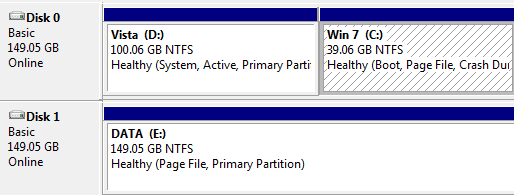
Where are you games installed atm?
 

My Computer

Computer Manufacturer/Model Number
self built
OS
Windows 7 Professional 64-bit
CPU
Intel E8400 3GHz
Motherboard
Intel DX48BT2
Memory
Kingston PC3-10700H 4Gb
Graphics Card(s)
XFX Radeon HD 5850 BlackEd.
Sound Card
Asus Xonar DG
Monitor(s) Displays
2x Samsung SM-T220HD 22"
Screen Resolution
1680x1050 on two monitors
Hard Drives
OCZ Vertex 2 120gb 3.5" (OS)
Seagate Momentus XT 500gb
Samsung F3 1Tb (games)
2x Samsung F1 1Tb
PSU
Thermaltake ToughPower 850w
Case
Thermaltake Armor
Cooling
Scythe Mugen II
Keyboard
Microsoft Comfort Curve USB
Mouse
Razer Diamondback 3G
Internet Speed
8128/443
YupYup has it right, i did not bother with a backup of files via the steam method, had my steam install on a different hard drive anyways so i just left it there. Installed windows, launched steam installed service and was gaming.
 

My Computer

OS
Windows 7 RC 7100
Install steam again within windows 7 (E: in your case) but point to the directory youve already installed steam on your other hard drive, let it install and sign in.

When you sign into your Vista partation to play steam you will have to input your password and the same if you went to play in Vista then back to Win 7!

You wont have to reinstall your games but you might have to set screen resoulotion, sound settings etc.
 

My Computer

Computer Manufacturer/Model Number
MSi GX740 Gaming Laptop
OS
Genuine Windows 7 SP1 Home Premium 64Bit
CPU
Intel Core i5-450m 2.40Ghz (4 Threads)
Motherboard
MSI MegaBook GT740 (MS-1727)
Memory
4GB ASint DDR3 1333Mhz (2X2GB Sticks)
Graphics Card(s)
ATI Mobility Radeon HD 5870 (1GB Dedicated DDR5)
Sound Card
Realtek HD Audio 7.1 SRS Premium Sourround With Sub Woofer
Monitor(s) Displays
Samsung 170MT02-M01 17" Widescreen
Screen Resolution
1680 X 1050
Hard Drives
Western Digital 640GB 7200Rpm SATA2
PSU
Battery and Mains Powered
Case
Generic Laptop Casing
Cooling
Air Cooling + Targus Laptop Cooler
Keyboard
Standard
Mouse
JSCO Quite Click Mouse USB
Internet Speed
Virgin Media 30MB Broadband
Install steam again within windows 7 (E: in your case) but point to the directory youve already installed steam on your other hard drive, let it install and sign in.

When you sign into your Vista partation to play steam you will have to input your password and the same if you went to play in Vista then back to Win 7!

You wont have to reinstall your games but you might have to set screen resoulotion, sound settings etc.

Thanks for the reply but i was not the one asking how. I was pointing out that if you still have the partition steam is on you do not need to reinstall steam or backup or download your games again, all you have to do is start steam and it will install the service for windows 7.
 

My Computer

OS
Win 7
Yes you can do that aswell but i prefer to install it! :)
 

My Computer

Computer Manufacturer/Model Number
MSi GX740 Gaming Laptop
OS
Genuine Windows 7 SP1 Home Premium 64Bit
CPU
Intel Core i5-450m 2.40Ghz (4 Threads)
Motherboard
MSI MegaBook GT740 (MS-1727)
Memory
4GB ASint DDR3 1333Mhz (2X2GB Sticks)
Graphics Card(s)
ATI Mobility Radeon HD 5870 (1GB Dedicated DDR5)
Sound Card
Realtek HD Audio 7.1 SRS Premium Sourround With Sub Woofer
Monitor(s) Displays
Samsung 170MT02-M01 17" Widescreen
Screen Resolution
1680 X 1050
Hard Drives
Western Digital 640GB 7200Rpm SATA2
PSU
Battery and Mains Powered
Case
Generic Laptop Casing
Cooling
Air Cooling + Targus Laptop Cooler
Keyboard
Standard
Mouse
JSCO Quite Click Mouse USB
Internet Speed
Virgin Media 30MB Broadband
Back
Top