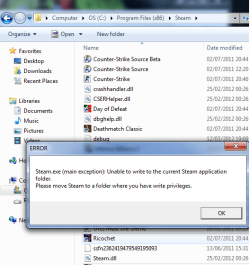
Steam needs perms to write?

silverstormz

Apples
Member
VIP
Local time
5:36 AM
Messages
177
Well I moved all my folders to my program files x86 they were recently on my desktop and now steam refuses to run what should I do?
 

Attachments

  • wsf.png
    wsf.png
    31.5 KB · Views: 24

My Computer

Computer type
PC/Desktop
OS
windows 7 home premium
CPU
INTEL [email protected]
Motherboard
MSI Z77A-GD55
Memory
5gb Corsair/kingston mix
Graphics Card(s)
Asus gtx 660 DCUII
Monitor(s) Displays
LG 23EA63V 23" IPS
Screen Resolution
1980x1080
Hard Drives
Seagate 500gb
PSU
Corsair TX850M PSU
Case
Corsair carbide 200R
Cooling
Noctua NH-U12P SE2
Keyboard
Logitech g510
Mouse
Corsair m60
Internet Speed
1mbs
Antivirus
Malwarebytes,Avg
Browser
Firefox
Sounds like Windows is looking for directories that no longer exist.
Right click one of your shortcuts and see what it says in the "Target" box. Same for Steam.exe.


You will most likely need to re-install all your games, to correct registry errors.
You can not just move everything and expect it to work. Windows thinks its at the old location still, and the registry entries point to the old location as well.


Make a folder where you want Steam to be. Inside it,copy the Steam.exe and the folder "steamapps" to the new location. (this folder holds all your games)
Then, uninstall Steam .It will remove all your games as well.
Once the un-0install is complete, return to the new location where the steamapps folder and steam.exe is. Double click the steam.exe and it will re-install itself.

Although many have no issues, I wouldn't put Steam in the Program Files Folder. Rather, make a Steam folder on a Secondary drive, or the main C Drive.
(( For example: C:/Steam ))
This should fix the issue and have Steam running from the new location. You will not need to redownload any of your games, only Steams files which will not take long.
However, you will need to re-install all of your games so that the registry entries match.
 

My Computer

Computer Manufacturer/Model Number
Custom (Self Build)
OS
Windows 7 Home Premium 64bit
CPU
Intel Core i7 2700k
Motherboard
eVGA P67 SLI
Memory
8GB Mushkin Redline Ridgebacks @1866
Graphics Card(s)
EVGA GTX570 SC
Sound Card
XiFi Titanium HD
Monitor(s) Displays
LG W2453V
Screen Resolution
1920x1080
Hard Drives
Intel 320 80GB -- Intel X25-V 40GB --WD Black 1TB x2 -- WD Blue 640GB
PSU
Seasonic x750
Case
Corsair 600T SE White
Cooling
eVGA Superclocked CPU Cooler
Keyboard
Saitek Cyborg
Antivirus
Kaspersky
Browser
IE
Other Info
LG BD/DVD
Thanks for the advice its a shame I have to download all my games again but I did save like 40 gbs of space :)
 

My Computer

Computer type
PC/Desktop
OS
windows 7 home premium
CPU
INTEL [email protected]
Motherboard
MSI Z77A-GD55
Memory
5gb Corsair/kingston mix
Graphics Card(s)
Asus gtx 660 DCUII
Monitor(s) Displays
LG 23EA63V 23" IPS
Screen Resolution
1980x1080
Hard Drives
Seagate 500gb
PSU
Corsair TX850M PSU
Case
Corsair carbide 200R
Cooling
Noctua NH-U12P SE2
Keyboard
Logitech g510
Mouse
Corsair m60
Internet Speed
1mbs
Antivirus
Malwarebytes,Avg
Browser
Firefox
No, you shouldn't need to download all your games again. In fact, in your current steam folder just copy the steamapps folder somewhere safe. Then uninstall everything.

You can use the trick I mentioned previously at this point, or just redownload Steam and re-install fresh. How you re-install Steam to the new loaction makes no difference.

After, just move the old steam folder to the new location.
This way, you still have to install and set up your games, but you do not need to download them again.

But yes, I agree. It does stink this has to be done, but to my knowledge theres really no other way around it unless you manually edit every registry entry to update the changes.
Sadly, that can get extremely complicated unless you know its workings inside and out. Getting it all all correct would be to much for 99.99% of most users, including myself.


Also, my previous statement "You can not just move it and expect it to work......" will apply to anything that adds registry entries or needs to be installed. Applications that run from a folder as a standalone, media files etc can be moved anywhere without issue. Just a FYI.

Quite simply, for future refrence, if it needs to go through a install process you have 2 choices to move it.

1) Un-Install completely and re-install to new location
2) Create a Junction link (best used when moving to a second partition or physical drive IMHO)

 

My Computer

Computer Manufacturer/Model Number
Custom (Self Build)
OS
Windows 7 Home Premium 64bit
CPU
Intel Core i7 2700k
Motherboard
eVGA P67 SLI
Memory
8GB Mushkin Redline Ridgebacks @1866
Graphics Card(s)
EVGA GTX570 SC
Sound Card
XiFi Titanium HD
Monitor(s) Displays
LG W2453V
Screen Resolution
1920x1080
Hard Drives
Intel 320 80GB -- Intel X25-V 40GB --WD Black 1TB x2 -- WD Blue 640GB
PSU
Seasonic x750
Case
Corsair 600T SE White
Cooling
eVGA Superclocked CPU Cooler
Keyboard
Saitek Cyborg
Antivirus
Kaspersky
Browser
IE
Other Info
LG BD/DVD
See step 14 of my guide here - http://www.sevenforums.com/gaming/77293-tips-troubleshooting-game-issues.html

14Permissions – For various reasons Windows security features may limit permissions to folders or drives. If you’re having issues starting or saving games, check to make sure your user name is included in the "Security" tab and has full read/write permission for the game’s folder(s). Requires Admin rights! See Tutorial on Sharing and Permissions – If you don’t want/need to share the folder just do steps 1-7


Hmmm... on the other hand I see you have your steam folder on "C" drive so it should have permissions by default.... unless you don't have Admin rights?
 

My Computer

Computer type
PC/Desktop
Computer Manufacturer/Model Number
Custom built by me.
OS
Windows 10 Pro
CPU
Intel Core i7-4770K (3.5Ghz)
Motherboard
Gigabyte G1 Sniper 5 (F10 Bios)
Memory
32 gig Corsair Dominator Platinum (4x8Gig)
Graphics Card(s)
Sapphire Tri-X R9 Fury
Sound Card
Soundblaster ZXR
Monitor(s) Displays
NEC PA242W 24" LCD Monitor
Screen Resolution
1920 x 1200
Hard Drives
Primary - Samsung 850 Pro (512gig), Samsung 840 Pro (256gig), 2TB WD Caviar Black.
PSU
EVGA Supernova 1000 G2
Case
Cooler Master HAF X
Cooling
Corsair H100i with Corsair Air Series SP120 Quiet Fans
Keyboard
Logitech Wireless Wave
Mouse
Logitech Performance MX
Internet Speed
High Speed Cable
Antivirus
Norton Security
Browser
IE11
Other Info
Memory Timings - 1866MHz @ 9-9-9-27-1T @ 1.5 volts
Hello,

Go to the steam.exe location right click and run as administrator. You can now create a new steam library folder. :D
 

My Computer

Computer type
PC/Desktop
Computer Manufacturer/Model Number
Custom
OS
8
CPU
i-5 4790K
Motherboard
Gigabyte
Memory
16GB
Graphics Card(s)
GTX 760
Hard Drives
Samsung SSD
Antivirus
Cloud
Browser
Firefox
Back
Top