Stereo Mix not recording any sound

kaJuk

New member
Local time
4:57 PM
Messages
3
Location
Finland
Hello there,

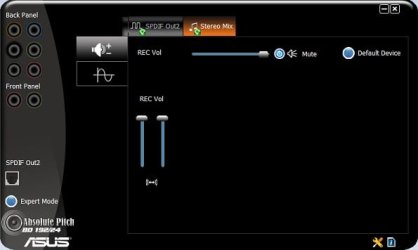
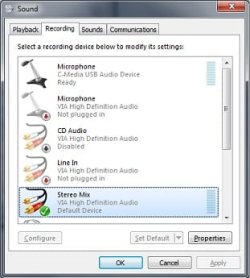
I have been banging my head against the wall for a couple days here. I've been trying to enable recording and streaming audio through the Stereo Mix device but it doesn't seem to be picking up any sound. I have tried reinstalling drivers, enabling and disabling different audio devices but nothing seems to have any effect.

I have read a lot of posts on different forums but most of them are about stereo mix device missing. Thats not the case here since it definitely is showing up and is enabled.

Also pics of Recording tab and VIA control panel.
 

Attachments
  • soundpanel.jpg
    soundpanel.jpg
    18.4 KB · Views: 108
  • audiodeck.jpg
    audiodeck.jpg
    15.2 KB · Views: 211

My Computer My Computer

At a glance

Windows 7 64-bit ProfessionalIntel Core i7 8608192MBATI Radeon HD 5850
OS
Windows 7 64-bit Professional
CPU
Intel Core i7 860
Motherboard
Asus P7P55D-E
Memory
8192MB
Graphics Card(s)
ATI Radeon HD 5850
Sound Card
VIA Vinyl HD Audio VT1828S
Monitor(s) Displays
BenQ G2412HD
Hard Drives
1TB
Case
Fractal Desing Define R2
Could you upload a pic of the Playback Devices tab?


Ap
 

My Computer My Computer

At a glance

Windows 7 Home PremiumIntel Core 2 Duo @ 3.00gHz4 GBATI Radeon HD 2600 XT
Computer Manufacturer/Model Number
Assembled in my workshop
OS
Windows 7 Home Premium
CPU
Intel Core 2 Duo @ 3.00gHz
Motherboard
Gigabyte GA-P35-S3G
Memory
4 GB
Graphics Card(s)
ATI Radeon HD 2600 XT
Sound Card
RME 24/96 Card, Realtek Internal Audio PreSonus FireStudio
Monitor(s) Displays
Acer 1917 (x2)
Screen Resolution
1280 x 1024 on both monitors
Hard Drives
Three 250GB Seagate SATA Barracuda 7200rpm
PSU
Rosewill 500-watt
Case
Rosewill mid-tower
Cooling
Noctua NH-U9B (CPU), PwrSupply fan + single large case Fan
Keyboard
Macally w/2/USB ports.
Mouse
Trackman Wheel
Other Info
Event 20/20 bas studio monitors, Yamaha sub.
Rackmount Korg/Roland/Yamaha synthesizers,
Cubase MIDI/audio recording. Sony Soundforge audio/mastering software. CD Architect Mastering. RME & Presonus audio interfaces.
Moro KaJuk,

It looks like your rec vol is muted, but you've probably checked that already :D
 

My Computer My Computer

At a glance

XP
OS
XP
Moro KaJuk,

It looks like your rec vol is muted, but you've probably checked that already :D


If that's it..... Nice One!

Ap
 

My Computer My Computer

At a glance

Windows 7 Home PremiumIntel Core 2 Duo @ 3.00gHz4 GBATI Radeon HD 2600 XT
Computer Manufacturer/Model Number
Assembled in my workshop
OS
Windows 7 Home Premium
CPU
Intel Core 2 Duo @ 3.00gHz
Motherboard
Gigabyte GA-P35-S3G
Memory
4 GB
Graphics Card(s)
ATI Radeon HD 2600 XT
Sound Card
RME 24/96 Card, Realtek Internal Audio PreSonus FireStudio
Monitor(s) Displays
Acer 1917 (x2)
Screen Resolution
1280 x 1024 on both monitors
Hard Drives
Three 250GB Seagate SATA Barracuda 7200rpm
PSU
Rosewill 500-watt
Case
Rosewill mid-tower
Cooling
Noctua NH-U9B (CPU), PwrSupply fan + single large case Fan
Keyboard
Macally w/2/USB ports.
Mouse
Trackman Wheel
Other Info
Event 20/20 bas studio monitors, Yamaha sub.
Rackmount Korg/Roland/Yamaha synthesizers,
Cubase MIDI/audio recording. Sony Soundforge audio/mastering software. CD Architect Mastering. RME & Presonus audio interfaces.
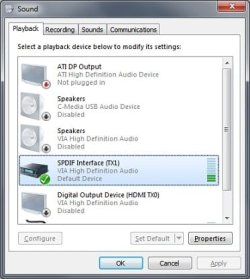
Here is a pic of the playback tab, the last one not showing is line 1 from virtual audio cable.

And the rec vol is not muted :D , unless it can be muted from somewhere else than windows sound settings and VIA control panel :confused:.

When I enable to listen Stereo Mix through my headphones I can hear a faint hissing sound.
 

Attachments

  • playback.jpg
    playback.jpg
    25.8 KB · Views: 59

My Computer My Computer

At a glance

Windows 7 64-bit ProfessionalIntel Core i7 8608192MBATI Radeon HD 5850
OS
Windows 7 64-bit Professional
CPU
Intel Core i7 860
Motherboard
Asus P7P55D-E
Memory
8192MB
Graphics Card(s)
ATI Radeon HD 5850
Sound Card
VIA Vinyl HD Audio VT1828S
Monitor(s) Displays
BenQ G2412HD
Hard Drives
1TB
Case
Fractal Desing Define R2
Ahhh... Ok, there's a problem. You have the digital output set as playback, I haven't tested but I'm almost 100% sure that Stereo Mix recording is only for Analog output.

Try plugging in speakers and enabling the selection right above the one (digital out) you now have as your default.

Ap
 

My Computer My Computer

At a glance

Windows 7 Home PremiumIntel Core 2 Duo @ 3.00gHz4 GBATI Radeon HD 2600 XT
Computer Manufacturer/Model Number
Assembled in my workshop
OS
Windows 7 Home Premium
CPU
Intel Core 2 Duo @ 3.00gHz
Motherboard
Gigabyte GA-P35-S3G
Memory
4 GB
Graphics Card(s)
ATI Radeon HD 2600 XT
Sound Card
RME 24/96 Card, Realtek Internal Audio PreSonus FireStudio
Monitor(s) Displays
Acer 1917 (x2)
Screen Resolution
1280 x 1024 on both monitors
Hard Drives
Three 250GB Seagate SATA Barracuda 7200rpm
PSU
Rosewill 500-watt
Case
Rosewill mid-tower
Cooling
Noctua NH-U9B (CPU), PwrSupply fan + single large case Fan
Keyboard
Macally w/2/USB ports.
Mouse
Trackman Wheel
Other Info
Event 20/20 bas studio monitors, Yamaha sub.
Rackmount Korg/Roland/Yamaha synthesizers,
Cubase MIDI/audio recording. Sony Soundforge audio/mastering software. CD Architect Mastering. RME & Presonus audio interfaces.
Yes, It seems you were right. I plugged in some old speakers and set them as the default playback device and Stereo Mix worked perfectly.

Is there no way to get Stereo Mix record digital output or enable digital and analog to work at the same time?
 

My Computer My Computer

At a glance

Windows 7 64-bit ProfessionalIntel Core i7 8608192MBATI Radeon HD 5850
OS
Windows 7 64-bit Professional
CPU
Intel Core i7 860
Motherboard
Asus P7P55D-E
Memory
8192MB
Graphics Card(s)
ATI Radeon HD 5850
Sound Card
VIA Vinyl HD Audio VT1828S
Monitor(s) Displays
BenQ G2412HD
Hard Drives
1TB
Case
Fractal Desing Define R2
Back
Top