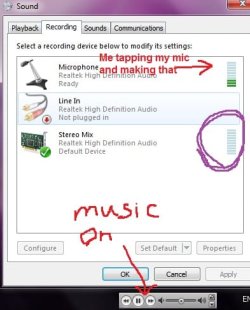
Stereo Mix problem-can't seem to record any sound?

aimpacc

Banned
Local time
11:48 PM
Messages
19
So im using windows 7 and i seem to have a problem recording sound directly from my computer

1-i showed disabled devices
2-Stereo mix is set as default

there is:
MICROPHONE-i tap my microphone and there is the GREEN bars bouncing up and down
LINE IN-N/A
STEREO MIX-i played some music and the green bars are NOT bouncing up and down...:mad:

how do i fix this?:p
 

Attachments

  • Untitled.jpg
    Untitled.jpg
    30.2 KB · Views: 31

My Computer My Computer

At a glance

Windows 7 HPIntel Pentium processor T43003NVIDIA GF G105M
Computer Manufacturer/Model Number
Acer 4736zg
OS
Windows 7 HP
CPU
Intel Pentium processor T4300
Memory
3
Graphics Card(s)
NVIDIA GF G105M
Screen Resolution
1366x768
Hard Drives
320GB HDD
Internet Speed
Slow
What program are you using to record? You will need to set it up to recognize what your inputs and outputs are.

Geeve
 

My Computer My Computer

At a glance

Windows 8, Ubuntu 12.04 64bit, Pear Linux Tri...AMD AthlonTM 64 X2 dual-core3 GBATI Radeon HD 4350 1GB
Computer Manufacturer/Model Number
Dell Dimension E521
OS
Windows 8, Ubuntu 12.04 64bit, Pear Linux Triple Boot
CPU
AMD AthlonTM 64 X2 dual-core
Memory
3 GB
Graphics Card(s)
ATI Radeon HD 4350 1GB
Sound Card
M-Audio Mobile Pre USB External
Monitor(s) Displays
Acer 1916W x2
Screen Resolution
1440X900
Hard Drives
250 GB internal main, 500 GB internal backup, 1TB External
PSU
300 Watt
Keyboard
Dell
So im using windows 7 and i seem to have a problem recording sound directly from my computer

1-i showed disabled devices
2-Stereo mix is set as default

there is:
MICROPHONE-i tap my microphone and there is the GREEN bars bouncing up and down
LINE IN-N/A
STEREO MIX-i played some music and the green bars are NOT bouncing up and down...:mad:

how do i fix this?:p

You have the RECORDING tab pulled up. Even though it may seem Logical it's wrong.

What you want as the default "Stereo Mix" device is under the PLAYBACK tab.

Then set whatever else you want "Line in" or "Mic" as the default recording device.

Ap
 

My Computer My Computer

At a glance

Windows 7 Home PremiumIntel Core 2 Duo @ 3.00gHz4 GBATI Radeon HD 2600 XT
Computer Manufacturer/Model Number
Assembled in my workshop
OS
Windows 7 Home Premium
CPU
Intel Core 2 Duo @ 3.00gHz
Motherboard
Gigabyte GA-P35-S3G
Memory
4 GB
Graphics Card(s)
ATI Radeon HD 2600 XT
Sound Card
RME 24/96 Card, Realtek Internal Audio PreSonus FireStudio
Monitor(s) Displays
Acer 1917 (x2)
Screen Resolution
1280 x 1024 on both monitors
Hard Drives
Three 250GB Seagate SATA Barracuda 7200rpm
PSU
Rosewill 500-watt
Case
Rosewill mid-tower
Cooling
Noctua NH-U9B (CPU), PwrSupply fan + single large case Fan
Keyboard
Macally w/2/USB ports.
Mouse
Trackman Wheel
Other Info
Event 20/20 bas studio monitors, Yamaha sub.
Rackmount Korg/Roland/Yamaha synthesizers,
Cubase MIDI/audio recording. Sony Soundforge audio/mastering software. CD Architect Mastering. RME & Presonus audio interfaces.
@geeve420

i use the 'sound recorder' in windows and i want to record sound directly from my computer...eg.sounds from youtube, sounds from other websites

@Aphelion

'stereo mix' does not exist in the PLAYBACK tab
 

My Computer My Computer

At a glance

Windows 7 HPIntel Pentium processor T43003NVIDIA GF G105M
Computer Manufacturer/Model Number
Acer 4736zg
OS
Windows 7 HP
CPU
Intel Pentium processor T4300
Memory
3
Graphics Card(s)
NVIDIA GF G105M
Screen Resolution
1366x768
Hard Drives
320GB HDD
Internet Speed
Slow
EDIT: it works now but everytime i record the sound is epic soft ??? i have to turn it to nearly loudest to get the volume right :(
 

My Computer My Computer

At a glance

Windows 7 HPIntel Pentium processor T43003NVIDIA GF G105M
Computer Manufacturer/Model Number
Acer 4736zg
OS
Windows 7 HP
CPU
Intel Pentium processor T4300
Memory
3
Graphics Card(s)
NVIDIA GF G105M
Screen Resolution
1366x768
Hard Drives
320GB HDD
Internet Speed
Slow
EDIT: it works now but everytime i record the sound is epic soft ??? i have to turn it to nearly loudest to get the volume right :(

re: Stereo Mix
Sorry, yes... in Recording Devices. duh!

When you select Stereo Mix and then select the "Properties" button at the bottom, then the "Levels" tab, what volume is the record level of Stereo Mix.

Ap
 

My Computer My Computer

At a glance

Windows 7 Home PremiumIntel Core 2 Duo @ 3.00gHz4 GBATI Radeon HD 2600 XT
Computer Manufacturer/Model Number
Assembled in my workshop
OS
Windows 7 Home Premium
CPU
Intel Core 2 Duo @ 3.00gHz
Motherboard
Gigabyte GA-P35-S3G
Memory
4 GB
Graphics Card(s)
ATI Radeon HD 2600 XT
Sound Card
RME 24/96 Card, Realtek Internal Audio PreSonus FireStudio
Monitor(s) Displays
Acer 1917 (x2)
Screen Resolution
1280 x 1024 on both monitors
Hard Drives
Three 250GB Seagate SATA Barracuda 7200rpm
PSU
Rosewill 500-watt
Case
Rosewill mid-tower
Cooling
Noctua NH-U9B (CPU), PwrSupply fan + single large case Fan
Keyboard
Macally w/2/USB ports.
Mouse
Trackman Wheel
Other Info
Event 20/20 bas studio monitors, Yamaha sub.
Rackmount Korg/Roland/Yamaha synthesizers,
Cubase MIDI/audio recording. Sony Soundforge audio/mastering software. CD Architect Mastering. RME & Presonus audio interfaces.
its ninety something when i recorded it and i just made it to 100 and i dun think thats gna make much different :(
 

My Computer My Computer

At a glance

Windows 7 HPIntel Pentium processor T43003NVIDIA GF G105M
Computer Manufacturer/Model Number
Acer 4736zg
OS
Windows 7 HP
CPU
Intel Pentium processor T4300
Memory
3
Graphics Card(s)
NVIDIA GF G105M
Screen Resolution
1366x768
Hard Drives
320GB HDD
Internet Speed
Slow
its ninety something when i recorded it and i just made it to 100 and i dun think thats gna make much different :(


What are you feeding it with, what are you recording?

I only have mine set on 20.


There's also Input level controls for Mic, Line-In...etc.

Ap
 

My Computer My Computer

At a glance

Windows 7 Home PremiumIntel Core 2 Duo @ 3.00gHz4 GBATI Radeon HD 2600 XT
Computer Manufacturer/Model Number
Assembled in my workshop
OS
Windows 7 Home Premium
CPU
Intel Core 2 Duo @ 3.00gHz
Motherboard
Gigabyte GA-P35-S3G
Memory
4 GB
Graphics Card(s)
ATI Radeon HD 2600 XT
Sound Card
RME 24/96 Card, Realtek Internal Audio PreSonus FireStudio
Monitor(s) Displays
Acer 1917 (x2)
Screen Resolution
1280 x 1024 on both monitors
Hard Drives
Three 250GB Seagate SATA Barracuda 7200rpm
PSU
Rosewill 500-watt
Case
Rosewill mid-tower
Cooling
Noctua NH-U9B (CPU), PwrSupply fan + single large case Fan
Keyboard
Macally w/2/USB ports.
Mouse
Trackman Wheel
Other Info
Event 20/20 bas studio monitors, Yamaha sub.
Rackmount Korg/Roland/Yamaha synthesizers,
Cubase MIDI/audio recording. Sony Soundforge audio/mastering software. CD Architect Mastering. RME & Presonus audio interfaces.
its ninety something when i recorded it and i just made it to 100 and i dun think thats gna make much different :(


What are you feeding it with, what are you recording?

I only have mine set on 20.


There's also Input level controls for Mic, Line-In...etc.

Ap

i wanna record some of the things i hear from youtube and some other sites which got music i like but u cant download

and does that mean everytime i wanna record sound from that i have to make it to etreme loud?? :D
 

My Computer My Computer

At a glance

Windows 7 HPIntel Pentium processor T43003NVIDIA GF G105M
Computer Manufacturer/Model Number
Acer 4736zg
OS
Windows 7 HP
CPU
Intel Pentium processor T4300
Memory
3
Graphics Card(s)
NVIDIA GF G105M
Screen Resolution
1366x768
Hard Drives
320GB HDD
Internet Speed
Slow
its ninety something when i recorded it and i just made it to 100 and i dun think thats gna make much different :(


What are you feeding it with, what are you recording?

I only have mine set on 20.


There's also Input level controls for Mic, Line-In...etc.

Ap

i wanna record some of the things i hear from youtube and some other sites which got music i like but u cant download

and does that mean everytime i wanna record sound from that i have to make it to etreme loud?? :D

Basically... yes!

Turn your speakers down and your playback volume up.

Ap

Do you have any of the
 

My Computer My Computer

At a glance

Windows 7 Home PremiumIntel Core 2 Duo @ 3.00gHz4 GBATI Radeon HD 2600 XT
Computer Manufacturer/Model Number
Assembled in my workshop
OS
Windows 7 Home Premium
CPU
Intel Core 2 Duo @ 3.00gHz
Motherboard
Gigabyte GA-P35-S3G
Memory
4 GB
Graphics Card(s)
ATI Radeon HD 2600 XT
Sound Card
RME 24/96 Card, Realtek Internal Audio PreSonus FireStudio
Monitor(s) Displays
Acer 1917 (x2)
Screen Resolution
1280 x 1024 on both monitors
Hard Drives
Three 250GB Seagate SATA Barracuda 7200rpm
PSU
Rosewill 500-watt
Case
Rosewill mid-tower
Cooling
Noctua NH-U9B (CPU), PwrSupply fan + single large case Fan
Keyboard
Macally w/2/USB ports.
Mouse
Trackman Wheel
Other Info
Event 20/20 bas studio monitors, Yamaha sub.
Rackmount Korg/Roland/Yamaha synthesizers,
Cubase MIDI/audio recording. Sony Soundforge audio/mastering software. CD Architect Mastering. RME & Presonus audio interfaces.
What are you feeding it with, what are you recording?

I only have mine set on 20.


There's also Input level controls for Mic, Line-In...etc.

Ap

i wanna record some of the things i hear from youtube and some other sites which got music i like but u cant download

and does that mean everytime i wanna record sound from that i have to make it to etreme loud?? :D

Basically... yes!

Turn your speakers down and your playback volume up.

Ap

Do you have any of the

do you have any of the??? lol...the what?
 

My Computer My Computer

At a glance

Windows 7 HPIntel Pentium processor T43003NVIDIA GF G105M
Computer Manufacturer/Model Number
Acer 4736zg
OS
Windows 7 HP
CPU
Intel Pentium processor T4300
Memory
3
Graphics Card(s)
NVIDIA GF G105M
Screen Resolution
1366x768
Hard Drives
320GB HDD
Internet Speed
Slow
hey tell me wt u got for speaker imma use that level for my speaker too ^_^
 

My Computer My Computer

At a glance

Windows 7 HPIntel Pentium processor T43003NVIDIA GF G105M
Computer Manufacturer/Model Number
Acer 4736zg
OS
Windows 7 HP
CPU
Intel Pentium processor T4300
Memory
3
Graphics Card(s)
NVIDIA GF G105M
Screen Resolution
1366x768
Hard Drives
320GB HDD
Internet Speed
Slow
hey tell me wt u got for speaker imma use that level for my speaker too ^_^

I have my computer output going into a large mixing board, and have headphones and and speakers plugged into the mixing board.

I use this system for professional recording/mixing, Televsion/Radio commercials, soundtracks for PBS/NPR.

If you run you main volume at 75% and the youtube volume at 50 to 75% the you should get a good signal. Just turn the speaker volume down.

good luck, keep experimenting, you'll get it.

Ap
 

My Computer My Computer

At a glance

Windows 7 Home PremiumIntel Core 2 Duo @ 3.00gHz4 GBATI Radeon HD 2600 XT
Computer Manufacturer/Model Number
Assembled in my workshop
OS
Windows 7 Home Premium
CPU
Intel Core 2 Duo @ 3.00gHz
Motherboard
Gigabyte GA-P35-S3G
Memory
4 GB
Graphics Card(s)
ATI Radeon HD 2600 XT
Sound Card
RME 24/96 Card, Realtek Internal Audio PreSonus FireStudio
Monitor(s) Displays
Acer 1917 (x2)
Screen Resolution
1280 x 1024 on both monitors
Hard Drives
Three 250GB Seagate SATA Barracuda 7200rpm
PSU
Rosewill 500-watt
Case
Rosewill mid-tower
Cooling
Noctua NH-U9B (CPU), PwrSupply fan + single large case Fan
Keyboard
Macally w/2/USB ports.
Mouse
Trackman Wheel
Other Info
Event 20/20 bas studio monitors, Yamaha sub.
Rackmount Korg/Roland/Yamaha synthesizers,
Cubase MIDI/audio recording. Sony Soundforge audio/mastering software. CD Architect Mastering. RME & Presonus audio interfaces.
hey tell me wt u got for speaker imma use that level for my speaker too ^_^

I have my computer output going into a large mixing board, and have headphones and and speakers plugged into the mixing board.

I use this system for professional recording/mixing, Televsion/Radio commercials, soundtracks for PBS/NPR.

If you run you main volume at 75% and the youtube volume at 50 to 75% the you should get a good signal. Just turn the speaker volume down.

good luck, keep experimenting, you'll get it.

Ap

lol tyty 'professional' ;)
 

My Computer My Computer

At a glance

Windows 7 HPIntel Pentium processor T43003NVIDIA GF G105M
Computer Manufacturer/Model Number
Acer 4736zg
OS
Windows 7 HP
CPU
Intel Pentium processor T4300
Memory
3
Graphics Card(s)
NVIDIA GF G105M
Screen Resolution
1366x768
Hard Drives
320GB HDD
Internet Speed
Slow

My Computer My Computer

At a glance

Windows 7 Home PremiumIntel Core 2 Duo @ 3.00gHz4 GBATI Radeon HD 2600 XT
Computer Manufacturer/Model Number
Assembled in my workshop
OS
Windows 7 Home Premium
CPU
Intel Core 2 Duo @ 3.00gHz
Motherboard
Gigabyte GA-P35-S3G
Memory
4 GB
Graphics Card(s)
ATI Radeon HD 2600 XT
Sound Card
RME 24/96 Card, Realtek Internal Audio PreSonus FireStudio
Monitor(s) Displays
Acer 1917 (x2)
Screen Resolution
1280 x 1024 on both monitors
Hard Drives
Three 250GB Seagate SATA Barracuda 7200rpm
PSU
Rosewill 500-watt
Case
Rosewill mid-tower
Cooling
Noctua NH-U9B (CPU), PwrSupply fan + single large case Fan
Keyboard
Macally w/2/USB ports.
Mouse
Trackman Wheel
Other Info
Event 20/20 bas studio monitors, Yamaha sub.
Rackmount Korg/Roland/Yamaha synthesizers,
Cubase MIDI/audio recording. Sony Soundforge audio/mastering software. CD Architect Mastering. RME & Presonus audio interfaces.

My Computer My Computer

At a glance

Windows 7 HPIntel Pentium processor T43003NVIDIA GF G105M
Computer Manufacturer/Model Number
Acer 4736zg
OS
Windows 7 HP
CPU
Intel Pentium processor T4300
Memory
3
Graphics Card(s)
NVIDIA GF G105M
Screen Resolution
1366x768
Hard Drives
320GB HDD
Internet Speed
Slow
Back
Top