Stickies will not run

dogperson

New member
Local time
2:45 PM
Messages
1
I have downloaded software for stikies_setup_7.1e (1).exe but am unable to actually install the program from this file Stickies does show up in my program list, and appears on my task list, but nothing happens when I click on the task list icon either.

I feel silly asking this question - it seems so elementary but I'm really stuck.

Can anyone help?

Thank tou,
 

My Computer

Computer type
Laptop
Computer Manufacturer/Model Number
acer
OS
windows 7
Antivirus
norton
Browser
windows explorer
Hi Dogperson, welcome to the Seven Forums.

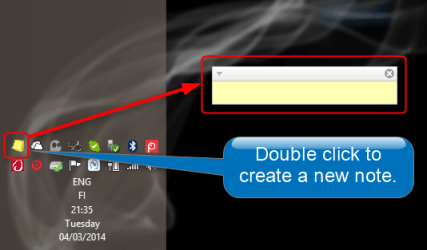
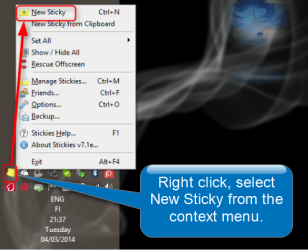
You can add a new note in two ways, by double click or right click. The third way, pressing CTRL + N, does not work at least on the PC I just installed Stickies to test it.

1. Double click the icon in Notification area:

2014-03-04_21h35_17.png

2. Right click the icon in notification area, select New Sticky from context menu:

2014-03-04_21h38_00.png

(Please notice I have the Taskbar located vertically at left, notification area at bottom left. If you are using a normal horizontal Taskbar, your notification area will be at bottom right and not as shown in screenshots above.)

Kari
 

My Computer

Computer type
Laptop
Computer Manufacturer/Model Number
HP ENVY 17-1150eg
OS
Windows 10 Pro x64 EN-GB
CPU
1.6 GHz Intel Core i7-720QM Processor
Memory
6 GB
Graphics Card(s)
ATI Mobility Radeon HD 5850 Graphics
Sound Card
Beats sound system with integrated subwoofer
Monitor(s) Displays
17" laptop display, 22" LED and 32" Full HD TV through HDMI
Screen Resolution
1600*900 (1), 1920*1080 (2&3)
Hard Drives
Internal: 2 x 500 GB SATA Hard Disk Drive 7200 rpm
External: 2TB for backups, 3TB USB3 network drive for media
Cooling
As Envy runs a bit warm, I have it on a Cooler Master pad
Keyboard
Logitech diNovo Media Desktop Laser (bluetooth)
Mouse
Logitech Performance Mouse MX
Internet Speed
50/10 Mbps VDSL
Antivirus
Windows Defender 4.3.9431.0
Browser
Maxthon 3.5.2., IE11
Back
Top