
Sticking Keys

dooffas

New member
Local time
9:12 PM
Messages
2
Location
UK
Hi all

I’m having some problems with keys sticking with windows 7 while playing games .
While in-game I have found that some keys "stick", the keys are NOT physically sticking on the keyboard but the effect is the same.
The effect is most prominent in 1st person shooters. When running around the keys will seem to stick. When letting go of a key (e.g. WASD, arrow keys, Ctrl and other common command keys) it is as though the key is still depressed for another 2ish seconds.

I first noticed this in old games such as Original Unreal Tournament and Quake 3 Arena (yes I am aware how sad it is to still be playing these games) but with further investigation I have similar problems with more modern games such as WarHammer 40,000 Dawn of War (plus expansions) although this seems only to be with command keys such as the Ctrl key.

I originally noticed this with the windows 7 RC version but assumed this was a bug. Since I have now upgraded to the released Windows 7 PRO I still find the same problems....

Anyone else discovered these problems? This seems to be an undisguised topic...

Any help would be amazing

Thanks
Dooffas


P.S
The keys are NOT physically sticking on the keyboard
I have tryed useing another keyboard
and since writing this I have noticed the problem with the Ctrl key is apparent in FireFox aswel but I am unsure if this is a problem with other web browsers.
 

My Computer

OS
Windows 7
CPU
2.00 GHz Intel Core 2 Duo
Motherboard
Asus P5K SE/EPU
Memory
OCZ 2GB 1066 MHz/PC2-8500 Dual Channel SLI Ready Edition
Graphics Card(s)
GForce XFX 8600GT 512MB
Hard Drives
500GB Seagate 7200 RPM SATA II
750GB Western Digital 7200 RPM SATA II
PSU
650W
Case
Cool Master
Cooling
Scythe SCZP-1000 Zipang Quiet
Internet Speed
100 Mb/s
:o Im still playing UT 2004 lol... I havent noticed any trouble with CTRL or other command keys. I also haev sticky keys disabled and decreased the keyboard repeat delay time.
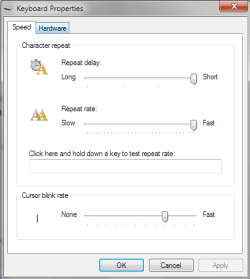
Here are the steps if you havent already tried it...
Control Panel>Ease of Access>Change how your keyboard works
Uncheck: Turn on sticky keys, Turn on toggle keys and Turn on filter keys

Scroll to the bottom of the window and click on Keyboard Settings. Set your repeat rate to 'Short'.

Im not positive that the repeat rate will make a difference. Im just passing along my settings and what seems to work for me. With a little luck this will solve your problem too.
 

Attachments

  • StickyKeys.PNG
    StickyKeys.PNG
    10.1 KB · Views: 116
  • Repeat.PNG
    Repeat.PNG
    8.7 KB · Views: 76

My Computer

Computer Manufacturer/Model Number
Dell Dimension E520
OS
Windows 7 Ultimate (x86)
CPU
Intel 2.20 Dual Core
Memory
4 GB
Graphics Card(s)
nVidia 9400 GT (512 MB)
Sound Card
Sigmatel C Major HD
Monitor(s) Displays
22" Samsung 2232 bw
Screen Resolution
1680x1050
Mouse
Microsoft Arc
Other Info
Wacom Graphire 4 (6x8) Tablet
If Diskmat's advice didn't help:

I have tried using another keyboard

What type of keyboard/s? ie USB, PS/2, Wireless etc

Do you have any other controllers connected? ie Gamepad/Wheel/Joystick

I assume that this wasn't a problem in a prior version of Windows?
 

My Computer

Computer type
PC/Desktop
Computer Manufacturer/Model Number
Systems by SmartEyeball
OS
8 Pro x64
CPU
i7 3770K 4.6GHz
Motherboard
ASUS P8Z77 WS
Memory
16GB G.Skill Trident X 2666mhz
Graphics Card(s)
x2 EVGA 780 Ti Superclocked SLI
Sound Card
SB X-FI Surround 5.1 PRO USB / ATH-AD900 Headphones
Monitor(s) Displays
x3 Dell U2410 / 58" Samsung
Screen Resolution
5760*1200/ 1920*1200
Hard Drives
2x Intel 520 240GB (RAID 0) * 2x WD Caviar Blacks 2TB (RAID 0) * 2TB WD Caviar Black * Sony Optirac DVD
PSU
Silverstone Strider Evolution 1200W
Case
Thermaltake Level 10 GT Snow Edition
Cooling
Noctua NH-D14
Keyboard
Topre Realforce // Ducky Shine MX Black // Filco Ninja TKL
Mouse
Thermaltake Theron (Highly Recommended) + Razer Imperator
Antivirus
MSE
Browser
IE, FF, WaterFox
Other Info
GT Extreme V2 Sim Racing Cockpit + 40" LCD and K/B Mouse stand ▼
Fanatec CSR Elite Wheel + Clubsport V1 Pedals + CSR shifter/7G-H ▼Saitek X52 Pro ▼ TrackIR 5 Pro
Buttkicker v2 Seat Rumbler with Dedicated 5.1 and Sub Woofer attached to frame ▼
=
Bloody Big Grin
Hi Disk4mat

Thanks for the sugestion. I tryed the things you sugested but with no joy... Doing this seemed to have almost no affect at all. :(

smarteyeball
Currently im using a wireless PS/2 Keyboard but I have tryed....
PS/2 Wired/Wireless
USB Wired/Wireless

Any other sugestions anyone?

Thanks
dooffas
 

My Computer

OS
Windows 7
CPU
2.00 GHz Intel Core 2 Duo
Motherboard
Asus P5K SE/EPU
Memory
OCZ 2GB 1066 MHz/PC2-8500 Dual Channel SLI Ready Edition
Graphics Card(s)
GForce XFX 8600GT 512MB
Hard Drives
500GB Seagate 7200 RPM SATA II
750GB Western Digital 7200 RPM SATA II
PSU
650W
Case
Cool Master
Cooling
Scythe SCZP-1000 Zipang Quiet
Internet Speed
100 Mb/s
smarteyeball
Currently im using a wireless PS/2 Keyboard but I have tryed....
PS/2 Wired/Wireless
USB Wired/Wireless

I'd say that rules out any h/ware issue with your mobo ports. Ditto for the keyboards themselves.

Do any of those keyboards have any proprietary software?(extra functions for buttons / macros etc)

If not, then unfortunately I am currently out of ideas -

Yours is the first I've heard of it in Seven, so it's not a common problem:confused:
 

My Computer

Computer type
PC/Desktop
Computer Manufacturer/Model Number
Systems by SmartEyeball
OS
8 Pro x64
CPU
i7 3770K 4.6GHz
Motherboard
ASUS P8Z77 WS
Memory
16GB G.Skill Trident X 2666mhz
Graphics Card(s)
x2 EVGA 780 Ti Superclocked SLI
Sound Card
SB X-FI Surround 5.1 PRO USB / ATH-AD900 Headphones
Monitor(s) Displays
x3 Dell U2410 / 58" Samsung
Screen Resolution
5760*1200/ 1920*1200
Hard Drives
2x Intel 520 240GB (RAID 0) * 2x WD Caviar Blacks 2TB (RAID 0) * 2TB WD Caviar Black * Sony Optirac DVD
PSU
Silverstone Strider Evolution 1200W
Case
Thermaltake Level 10 GT Snow Edition
Cooling
Noctua NH-D14
Keyboard
Topre Realforce // Ducky Shine MX Black // Filco Ninja TKL
Mouse
Thermaltake Theron (Highly Recommended) + Razer Imperator
Antivirus
MSE
Browser
IE, FF, WaterFox
Other Info
GT Extreme V2 Sim Racing Cockpit + 40" LCD and K/B Mouse stand ▼
Fanatec CSR Elite Wheel + Clubsport V1 Pedals + CSR shifter/7G-H ▼Saitek X52 Pro ▼ TrackIR 5 Pro
Buttkicker v2 Seat Rumbler with Dedicated 5.1 and Sub Woofer attached to frame ▼
=
Bloody Big Grin
Smarteyeball may have hit on something. The only other thought I had was to remap the keys. I know its possible in most games but not all.
 

My Computer

Computer Manufacturer/Model Number
Dell Dimension E520
OS
Windows 7 Ultimate (x86)
CPU
Intel 2.20 Dual Core
Memory
4 GB
Graphics Card(s)
nVidia 9400 GT (512 MB)
Sound Card
Sigmatel C Major HD
Monitor(s) Displays
22" Samsung 2232 bw
Screen Resolution
1680x1050
Mouse
Microsoft Arc
Other Info
Wacom Graphire 4 (6x8) Tablet
I am having the same problems.. Only on Windows 7, doesn't happen on XP at all.. I have been looking all over and still haven't found a solution.. Doesn't matter what game I play, it messes up.. Gets stuck in one direction..

Using g15
 

My Computer

OS
windows 7
Hi all

I’m having some problems with keys sticking with windows 7 while playing games .
While in-game I have found that some keys "stick", the keys are NOT physically sticking on the keyboard but the effect is the same.
The effect is most prominent in 1st person shooters. When running around the keys will seem to stick. When letting go of a key (e.g. WASD, arrow keys, Ctrl and other common command keys) it is as though the key is still depressed for another 2ish seconds.

I first noticed this in old games such as Original Unreal Tournament and Quake 3 Arena (yes I am aware how sad it is to still be playing these games) but with further investigation I have similar problems with more modern games such as WarHammer 40,000 Dawn of War (plus expansions) although this seems only to be with command keys such as the Ctrl key.

I originally noticed this with the windows 7 RC version but assumed this was a bug. Since I have now upgraded to the released Windows 7 PRO I still find the same problems....

Anyone else discovered these problems? This seems to be an undisguised topic...

Any help would be amazing

Thanks
Dooffas


P.S
The keys are NOT physically sticking on the keyboard
I have tryed useing another keyboard
and since writing this I have noticed the problem with the Ctrl key is apparent in FireFox aswel but I am unsure if this is a problem with other web browsers.


I am having this exact same problem. I only notice when play team fortress. The Ctrl keys show the are pressed when I view the on-screen keyboard. I need to restart or log out to get the it back to normal. I am using a G15 keyboard and have tried all the above suggestions already. Anyone have an luck?
 

My Computer

OS
Windows 7 Home
I was having the exact same problem as well. I experienced it in various Steam games. I think I have fixed it. At first I was using the same PS2 keyboard that I had on my previous computer. I like the feel of it. However, I switched to the USB keyboard that came with the computer to see if it would help, and so far I have had no key sticking issues. So, unless you hear further from me, the problem appears to have been with the PS2 keyboard. Try a USB keyboard and see if the problem goes away.
 

My Computer

OS
Windows 7 Home Premium
Back
Top