Sticky Notes - Change Text Format

How to Format Text in a Sticky Note in Windows 7 and Windows 8

   Information
This will show you how to format text, add bullets to make a list, or change the text size of Sticky Notes by using keyboard shortcuts in Windows 7 and Windows 8.

Sticky Notes is not available in the Windows 7 Starter and Home Basic editions.

   Tip
Sticky Notes uses the Segoe Print font by default. While you cannot change the font in Sticky Notes, you could copy and paste text with a different font from other programs (ex: WordPad) into a Sticky Note to have that text and font in a Sticky Note.


Here's How:
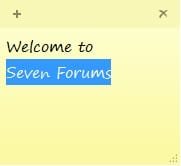
1. While modifying or creating a Sticky Note, highlight the text that you want to change the format of. (See screenshot below)
Format.jpg
2. Use one of the keyboard shortcuts below to change the format of the highlighted text for how you want it to be.
Keyboard Shortcut | Description
Ctrl+B | Bold text
Ctrl+I | Italic text
Ctrl+T | Strikethrough
Ctrl+U | Underlined text
Ctrl+Shift+L | Bulleted ( press once ) or Numbered ( press twice ) list
Ctrl+Shift+> | Increased text size
Ctrl+Shift+< | Decreased text size
Ctrl+A | Select all
Ctrl+Shift+A | Toggles all caps
Ctrl+L | Left aligns text
Ctrl+R | Right aligns text
Ctrl+E | Centers text
Ctrl+Shift+L | Small Alpha list (3rd), Capital Alpha list (4th), small roman (5th), Capital roman (6th)
Ctrl+Scroll Wheel | Increase/Decrease text size
Ctrl+1 | Single-space lines
Ctrl+2 | Double-space lines
Ctrl+5 | Set 1.5-line spacing
Ctrl+= | Subscript
Ctrl+Shift++ | Superscript
Ctrl+Z | Undo
Ctrl+Y | Redo
Ctrl+X | Cut
Ctrl+C | Copy
Ctrl+V | Paste
Ctrl+N | New sticky note


That's it,
Shawn


Last edited:
Use Ctrl+Shift+L more than two times for more options, and eventually to disable it.
 

My Computer

OS
windows 7 64 bit RC 7100 (dual boot with Vista SP1 64 bit)
nice...didn't know that, i was really interested on how to make the text smaller
thanks for this tip Brink :thumbsup:

it would be great if the colour (of text) could also be changed
 

My Computer

Computer type
PC/Desktop
Computer Manufacturer/Model Number
2015 Home Made with Great Performance
OS
Windows 8.1 x64 Enterprise
CPU
i5 4690K
Motherboard
Gigabyte GA-Z87X-UD5H
Memory
Corsair 16 GB DDR3 2000Mhz
Graphics Card(s)
Asus GTX760 2GB 256bit
Sound Card
Realtek OnBoard
Monitor(s) Displays
Samsung SyncMaster SA350 + LG 42LA660S
Screen Resolution
1920x1080 Full HD
Hard Drives
1x 640GB Western Digital SATA
1x 4TB Western Digital Green SATA
3x 2TB Western Digital Caviar Green RS SATA
1x 3TB Western Digital Caviar Green SATA
1x 128GB Corsair Force Red SSD
PSU
Corsair CX 600W
Case
Nexus Prominent 5
Cooling
CPU: Artic Cooler Freezer 13 + 5x120mm Case Fans @ 700RPM
Keyboard
Microsoft Wired Keyboard 600
Mouse
Microsoft Wireless Mobile Mouse 1000
Internet Speed
FO 1 Gbit/s
Antivirus
ESET / Malwarebytes
Browser
Opera / Chrome
Other Info
- Fan Controller Aerocool X-Vision 5
- 1x 1TB Hitachi DeskPlus External USB
- 1x 1TB Western Digital Passport External USB3
You're welcome Maranello.

The font color can't be changed. You might see if the free program Stickies may work better for this though.
 

My Computer

Computer type
PC/Desktop
Computer Manufacturer/Model Number
Self built custom
OS
64-bit Windows 11 Pro for Workstations
CPU
Intel i7-8700K OC'd to 5 GHz
Motherboard
ASUS ROG Maximus XI Formula Z390
Memory
64 GB (4x16GB) G.SKILL TridentZ RGB DDR4 3600 MHz
Graphics Card(s)
ASUS ROG-STRIX-GTX1080TI-O11G-GAMING
Sound Card
Integrated
Monitor(s) Displays
2 x Samsung Odyssey G7 27"
Screen Resolution
2560x1440
Hard Drives
1TB Samsung 990 PRO M.2,
4TB Samsung 990 PRO PRO M.2,
TerraMaster F8 SSD Plus NAS
PSU
Seasonic Prime Titanium 850W
Case
Thermaltake Core P3
Cooling
Corsair Hydro H115i
Keyboard
Logitech wireless K800
Mouse
Logitech MX Master 4
Internet Speed
2 Gb/s Download and 100 Mb/s Upload
Antivirus
Malwarebyte Anti-Malware Premium
Browser
Google Chrome
Other Info
Logitech Z625 speaker system,
Logitech BRIO 4K Pro webcam,
HP Color LaserJet Pro MFP M477fdn,
APC SMART-UPS RT 1000 XL - SURT1000XLI,
Galaxy S23 Plus phone
Sticky notes use many of the standard word processing keyboard shortcuts:

Ctrl+A - Select all
Ctrl+Shift+A - Toggles all caps
Ctrl+L - Left aligns text
Ctrl+R - Right aligns text
Ctrl+E - Centers text
Ctrl+Shift+L - Small Alpha list (3rd), Capital Alpha list (4th), small roman (5th), Capital roman (6th)
Ctrl+Scroll Wheel - Increase/Decrease text size
Ctrl+1 - Single-space lines
Ctrl+2 - Double-space lines
Ctrl+5 - Set 1.5-line spacing
Ctrl+= - Subscript
Ctrl+Shift++ - Superscript
Ctrl+z - Undo
Ctrl+y - Redo
Ctrl+x - Cut
Ctrl+c - Copy
Ctrl+v - Paste
Ctrl+n - New sticky note
 

My Computer

Computer Manufacturer/Model Number
NA
OS
Windows 7 Professional 64bit
CPU
i7 920
Motherboard
Asus P6T
Memory
6 GB
Graphics Card(s)
Geforce 260
Sound Card
None
Monitor(s) Displays
Dell 2408WFP
Screen Resolution
1920x1200
Hard Drives
System - 640GB WD Caviar Black
Data - 1.5TB WD Caviar Green
PSU
Corsair 800W
Case
Antec Sonata Elite
Cooling
Stock
Mouse
Deathadder
Formatting Windows 7 Sticky Notes

That's adorable! Would you happen to know what font this is? I know some people hate it but I love it!

Thanks.
 

My Computer

OS
Windows 7
That's adorable! Would you happen to know what font this is? I know some people hate it but I love it!

Thanks.

The font is "Segoe Print".
 

My Computer

Computer Manufacturer/Model Number
NA
OS
Windows 7 Professional 64bit
CPU
i7 920
Motherboard
Asus P6T
Memory
6 GB
Graphics Card(s)
Geforce 260
Sound Card
None
Monitor(s) Displays
Dell 2408WFP
Screen Resolution
1920x1200
Hard Drives
System - 640GB WD Caviar Black
Data - 1.5TB WD Caviar Green
PSU
Corsair 800W
Case
Antec Sonata Elite
Cooling
Stock
Mouse
Deathadder
Stegoe Print Font

Thanks, Shroom. Is it used in any programs besides Sticky Notes?

Again, many thanks.
 

My Computer

OS
Windows 7
You're welcome Maranello.

The font color can't be changed. You might see if the free program Stickies may work better for this though.

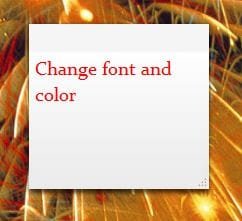
It actually can. Use Word (or similiar) to create the text ie:font style, colour, size, and paste it into a new note. Easy! :)
 

Attachments

  • sticky.JPG
    sticky.JPG
    16.5 KB · Views: 270,542

My Computer

Computer Manufacturer/Model Number
tw33k
OS
Windows 7 Ultimate (x64) SP1
CPU
Intel 3770k 4.6GHz
Motherboard
ASUS Maximus V Formula
Memory
8GB (2x 4GB) Crucial Ballistix
Graphics Card(s)
Sapphire 7950 (1060/1600)
Sound Card
On Board Realtek HD Audio
Monitor(s) Displays
27" Acer B273HU (via HDMI)
Screen Resolution
2048 x 1152
Hard Drives
Crucial M4 128GB
2TB WD Black
1TB Samsung F3 SATA
1TB WD Elite External
2TB WD USB 3.0
PSU
Corsair AX750 Gold
Case
Corsair Obsidian 800DW
Cooling
Corsair H100 (2x AP-121/2x UK-3000 push/pull)
Keyboard
Microsoft Wireless 5000
Mouse
Microsoft Wireless 5000
Internet Speed
5mb/s
Other Info
Logitech z-2300 2.1 speakers
Lamptron FC-5 v2
LOL, now there's a good workaround.

Thank you Tw33k. :)
 

My Computer

Computer type
PC/Desktop
Computer Manufacturer/Model Number
Self built custom
OS
64-bit Windows 11 Pro for Workstations
CPU
Intel i7-8700K OC'd to 5 GHz
Motherboard
ASUS ROG Maximus XI Formula Z390
Memory
64 GB (4x16GB) G.SKILL TridentZ RGB DDR4 3600 MHz
Graphics Card(s)
ASUS ROG-STRIX-GTX1080TI-O11G-GAMING
Sound Card
Integrated
Monitor(s) Displays
2 x Samsung Odyssey G7 27"
Screen Resolution
2560x1440
Hard Drives
1TB Samsung 990 PRO M.2,
4TB Samsung 990 PRO PRO M.2,
TerraMaster F8 SSD Plus NAS
PSU
Seasonic Prime Titanium 850W
Case
Thermaltake Core P3
Cooling
Corsair Hydro H115i
Keyboard
Logitech wireless K800
Mouse
Logitech MX Master 4
Internet Speed
2 Gb/s Download and 100 Mb/s Upload
Antivirus
Malwarebyte Anti-Malware Premium
Browser
Google Chrome
Other Info
Logitech Z625 speaker system,
Logitech BRIO 4K Pro webcam,
HP Color LaserJet Pro MFP M477fdn,
APC SMART-UPS RT 1000 XL - SURT1000XLI,
Galaxy S23 Plus phone

My Computer

Computer Manufacturer/Model Number
tw33k
OS
Windows 7 Ultimate (x64) SP1
CPU
Intel 3770k 4.6GHz
Motherboard
ASUS Maximus V Formula
Memory
8GB (2x 4GB) Crucial Ballistix
Graphics Card(s)
Sapphire 7950 (1060/1600)
Sound Card
On Board Realtek HD Audio
Monitor(s) Displays
27" Acer B273HU (via HDMI)
Screen Resolution
2048 x 1152
Hard Drives
Crucial M4 128GB
2TB WD Black
1TB Samsung F3 SATA
1TB WD Elite External
2TB WD USB 3.0
PSU
Corsair AX750 Gold
Case
Corsair Obsidian 800DW
Cooling
Corsair H100 (2x AP-121/2x UK-3000 push/pull)
Keyboard
Microsoft Wireless 5000
Mouse
Microsoft Wireless 5000
Internet Speed
5mb/s
Other Info
Logitech z-2300 2.1 speakers
Lamptron FC-5 v2
follow up question

Is there any way to add indentation to list items? Like so...

1. Book A
i chapter 3
ii chapter 7
2. Book B
i chapter 12
ii chapter assessment

I tried highlighting a sub item and pressing tab, also tried to select just the sub items and use Ctrl+Shift+L. Although it kind of worked the next un-indented list item starts a new list order (ie 1. instead of 2.) Also, tried the word shortcuts (Ctrl+M/ Ctrl+Shift+M) any ideas?
 
Last edited:

My Computer

Computer Manufacturer/Model Number
Acer Aspire 5738-6444
OS
Windows 7 Professional x64
CPU
Intel Core2 Duo T6600 @2.20GHz
Memory
4.00 GB
Monitor(s) Displays
2x HNC TW191D
Hard Drives
285 GB
Hello XiMiX, and welcome to Seven Forums.

If you mean inside Sticky Notes, then you could press the Tab key to indent.

Hope this helps,
Shawn
 

My Computer

Computer type
PC/Desktop
Computer Manufacturer/Model Number
Self built custom
OS
64-bit Windows 11 Pro for Workstations
CPU
Intel i7-8700K OC'd to 5 GHz
Motherboard
ASUS ROG Maximus XI Formula Z390
Memory
64 GB (4x16GB) G.SKILL TridentZ RGB DDR4 3600 MHz
Graphics Card(s)
ASUS ROG-STRIX-GTX1080TI-O11G-GAMING
Sound Card
Integrated
Monitor(s) Displays
2 x Samsung Odyssey G7 27"
Screen Resolution
2560x1440
Hard Drives
1TB Samsung 990 PRO M.2,
4TB Samsung 990 PRO PRO M.2,
TerraMaster F8 SSD Plus NAS
PSU
Seasonic Prime Titanium 850W
Case
Thermaltake Core P3
Cooling
Corsair Hydro H115i
Keyboard
Logitech wireless K800
Mouse
Logitech MX Master 4
Internet Speed
2 Gb/s Download and 100 Mb/s Upload
Antivirus
Malwarebyte Anti-Malware Premium
Browser
Google Chrome
Other Info
Logitech Z625 speaker system,
Logitech BRIO 4K Pro webcam,
HP Color LaserJet Pro MFP M477fdn,
APC SMART-UPS RT 1000 XL - SURT1000XLI,
Galaxy S23 Plus phone
Thanks for the info and welcoming Brink!
I understand that I am able to indent with the tab key but this is regarding indenting lists within a list. For now I am just creating them by hand but was wondering if there is an easier way.
 
Last edited:

My Computer

Computer Manufacturer/Model Number
Acer Aspire 5738-6444
OS
Windows 7 Professional x64
CPU
Intel Core2 Duo T6600 @2.20GHz
Memory
4.00 GB
Monitor(s) Displays
2x HNC TW191D
Hard Drives
285 GB
I'm afraid not. You might see if the free program Stickies may work better for this though.
 

My Computer

Computer type
PC/Desktop
Computer Manufacturer/Model Number
Self built custom
OS
64-bit Windows 11 Pro for Workstations
CPU
Intel i7-8700K OC'd to 5 GHz
Motherboard
ASUS ROG Maximus XI Formula Z390
Memory
64 GB (4x16GB) G.SKILL TridentZ RGB DDR4 3600 MHz
Graphics Card(s)
ASUS ROG-STRIX-GTX1080TI-O11G-GAMING
Sound Card
Integrated
Monitor(s) Displays
2 x Samsung Odyssey G7 27"
Screen Resolution
2560x1440
Hard Drives
1TB Samsung 990 PRO M.2,
4TB Samsung 990 PRO PRO M.2,
TerraMaster F8 SSD Plus NAS
PSU
Seasonic Prime Titanium 850W
Case
Thermaltake Core P3
Cooling
Corsair Hydro H115i
Keyboard
Logitech wireless K800
Mouse
Logitech MX Master 4
Internet Speed
2 Gb/s Download and 100 Mb/s Upload
Antivirus
Malwarebyte Anti-Malware Premium
Browser
Google Chrome
Other Info
Logitech Z625 speaker system,
Logitech BRIO 4K Pro webcam,
HP Color LaserJet Pro MFP M477fdn,
APC SMART-UPS RT 1000 XL - SURT1000XLI,
Galaxy S23 Plus phone
In response to the question about changing the default font used by Sticky Notes, I use a program called Bitstream Font Navigator (came with Corel Draw Graphics Suite) to unregister the font Segoe Print. This causes Windows to fall back to the default font, MS Sans Serif. This is acceptable to me, since I can't ever distinguish the different numbers and letters in the Segoe Print font. :p

Edit:
I've confirmed that you will have to unregister the Segoe Print font to keep from having problems. There is a free font manager that can do that for you called AMP Font Viewer. You can find it here: AMP Font Viewer - Complete font manager: view, organize, install, delete and print fonts lists (TrueType, OpenType and Type 1) - AMPsoft
 
Last edited:

My Computer

OS
Yes, I'm running that OS too.
Get rid of that nasty font!

Thanks for the tip, comcc! Works wonderfully! I removed the font, but without installing anything. You can do this from Control Panel -> Fonts (if by Categories, it's under the "Appearance and Personalization" category). Before deleting the font, you will get an error message if you don't exit completely from any application that is using the "Segoe Print [...]" font, including browsers, Word, Sticky Notes, etc.

-Joe

In response to the question about changing the default font used by Sticky Notes, I use a program called Bitstream Font Navigator (came with Corel Draw Graphics Suite) to unregister the font Segoe Print. This causes Windows to fall back to the default font, MS Sans Serif. This is acceptable to me, since I can't ever distinguish the different numbers and letters in the Segoe Print font. :p

Edit:
I've confirmed that you will have to unregister the Segoe Print font to keep from having problems. There is a free font manager that can do that for you called AMP Font Viewer. You can find it here: AMP Font Viewer - Complete font manager: view, organize, install, delete and print fonts lists (TrueType, OpenType and Type 1) - AMPsoft
 

My Computer

Computer type
Laptop
Computer Manufacturer/Model Number
Lenovo Thinkpad
OS
Windows 7 Enterprise 64-bit SP1
Browser
Chrome, IE10, FireFox
Back
Top