Still having bad DPC latency, have tried disabling LAN, USB, etc.

LtDrebin

New member
Local time
5:25 AM
Messages
11
I submitted a thread here a long time ago regarding DPC latency issues, as well as to tomshardware.com. Nobody has replied.

I've been having DPC latency problems and the main symptom is system stuttering, with sound crackling and mouse skipping. A DPC latency checker program shows huge red spikes. This problem seems to start happening when I'm in a game (possibly fullscreen-only, I haven't tested a game in windowed mode). However, once it starts, it usually doesn't stop until I reboot, even if I close the game. If I keep playing, eventually it leads to a BSOD. If I close the game, the latency drops, but it never goes back to normal.

When it happens, I've tried disabling devices one-at-a-time in device manager. LAN, USB, mice, etc. Nothing works so far. I haven't been able to test the sound card as it requires a full reboot for it to be disabled and rebooting usually gets rid of the problem for a while. Same thing with disabling my graphics card.

I have no idea what's causing the problem and there seems to be very little information about diagnosing DPC latency problems on the web, or at least I'm not very good at finding that info.

My system:
CPU: Core i7 920
Motherboard: ASUS P6T
Video: EVGA GTX285OC
Memory: 6GB OCZ
Power: 850W
OS: Windows 7 64bit
 

My Computer My Computer

At a glance

Windows 7 Professional 64bitIntel Core i7 9206GBeVGA GeForce 285 OC
Computer Manufacturer/Model Number
Home built
OS
Windows 7 Professional 64bit
CPU
Intel Core i7 920
Motherboard
Asus P6T
Memory
6GB
Graphics Card(s)
eVGA GeForce 285 OC
Sound Card
Integrated RealTek on motherboard
The DPC latency checker usually gives you more info about the source of the spikes. In most cases it is driver problems. What did your latency checker say?
 

My Computer My Computer

At a glance

Vista, Windows7, Mint Mate, Zorin, Windows 8from 1.6GHz Duo to i7
Computer Manufacturer/Model Number
HP, Dell, Gateway, Toshiba - 4 laptops and 2 desktops
OS
Vista, Windows7, Mint Mate, Zorin, Windows 8
CPU
from 1.6GHz Duo to i7
Monitor(s) Displays
2x HP w2207
Hard Drives
5x HDD, 7x SSD, 12x Externals
Keyboard
with trackball - no mices
Mouse
Trackball mice
Internet Speed
DSL 6000
You're referring to this checker? DPC Latency Checker

It doesn't tell me what is causing the problem, it just tells me the latency every second.

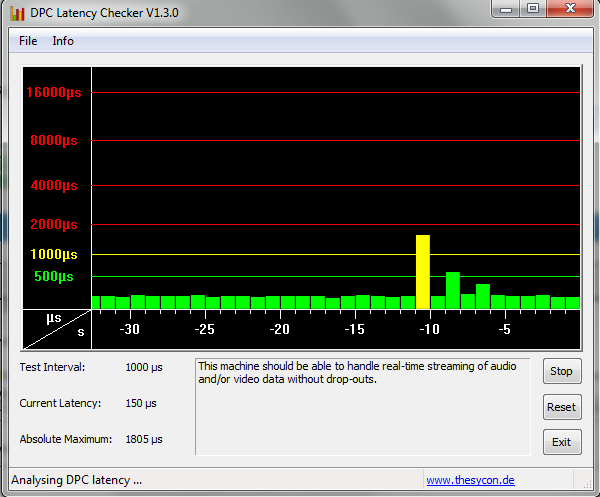
My average latency is around 150 us, which is fine, though it does seem a bit higher than other averages. When I get bad spikes, it'll be in the 3 millisecond range for extended periods of time.

I've noticed something when fooling around with it a bit more. If I disable my onboard ethernet port and then enable it, my latency spikes to over 1 millisecond, and then goes back to normal after a few seconds, as seen below.


My Computer My Computer

At a glance

Windows 7 Professional 64bitIntel Core i7 9206GBeVGA GeForce 285 OC
Computer Manufacturer/Model Number
Home built
OS
Windows 7 Professional 64bit
CPU
Intel Core i7 920
Motherboard
Asus P6T
Memory
6GB
Graphics Card(s)
eVGA GeForce 285 OC
Sound Card
Integrated RealTek on motherboard
Well, you look good. There is no unusual events.
 

My Computer My Computer

At a glance

Vista, Windows7, Mint Mate, Zorin, Windows 8from 1.6GHz Duo to i7
Computer Manufacturer/Model Number
HP, Dell, Gateway, Toshiba - 4 laptops and 2 desktops
OS
Vista, Windows7, Mint Mate, Zorin, Windows 8
CPU
from 1.6GHz Duo to i7
Monitor(s) Displays
2x HP w2207
Hard Drives
5x HDD, 7x SSD, 12x Externals
Keyboard
with trackball - no mices
Mouse
Trackball mice
Internet Speed
DSL 6000
http://www.sevenforums.com/967811-post25.html

Here's an old discussion that points fingers at MS Security Essentials, NIC drivers and power settings. I pointed to post #25 in the link since it's where positive results were starting to occur. I'm not sure un-installing MSE would be wise but it might be worth checking some of the realtime and exclusion settings.
 

My Computer My Computer

At a glance

Windows 7 Pro-x64i7-2600 3.4GHz - 3.8GHz Turbo8Gb - 2x4GB, Muskin 991770 PC3-1333Integrated Intel HD 2000
Computer type
PC/Desktop
Computer Manufacturer/Model Number
Built 2/11/2011
OS
Windows 7 Pro-x64
CPU
i7-2600 3.4GHz - 3.8GHz Turbo
Motherboard
Intel DH67BL-B3
Memory
8Gb - 2x4GB, Muskin 991770 PC3-1333
Graphics Card(s)
Integrated Intel HD 2000
Sound Card
Integrated Intel 10.1 HD, RealTek ALC892
Monitor(s) Displays
Asus LCD VH222H, Haier HL24XSL2a
Screen Resolution
1920x1080, 1920x1080
Hard Drives
Crucial SSD C300-128Gb,
Western Digital WD5002AALX - 500Gb,
Western Digital WD7501AALS - 750Gb
PSU
Seasonic 650W 80+ Gold Modular
Case
Rosewill Defender
Cooling
Stock CPU, Four 120mm case fans, PCH fan added
Keyboard
Logitech EX100 Y-RBH94 Wireless
Mouse
Logitech EX100 M-RCE95 Wireless
Internet Speed
3.0/1.5 Mbs
Antivirus
Microsoft Security Essentials
Browser
Microsoft Internet Explorer 11
Other Info
Antec Veris Premier-Multimedia IR Station,
Cyber Accoustics-3602 Speakers,
AFT XM-5U Card Reader,
Hauppauge TV-HVR-2250,
Sony LX300 USB Turntable
Well, you look good. There is no unusual events.

I'll be sure to grab a screenshot when I get bad lag. It's quite dramatic. Latencies over 2ms constantly.

http://www.sevenforums.com/967811-post25.html
DPC Latency

Here's an old discussion that points fingers at MS Security Essentials, NIC drivers and power settings. I pointed to post #25 in the link since it's where positive results were starting to occur. I'm not sure un-installing MSE would be wise but it might be worth checking some of the realtime and exclusion settings.

Thanks. Reading now. I should note that I'm not getting errant DPC spikes. Rather, when it happens, DPC latency goes high and stays high, pretty much constantly, unless I close the system drain (even an "easy" game like Dungeon Fighter can cause it) and wait a few minutes. Doing so, however, will mean that the DPC problems will pop up again if I stress the system. The only "permanent" solution is to reboot.

I got a reply on my post at tomshardware.com. The poster says his older desktop had issues and was caused by his eSATA port emitting sparks. He removed the port and all problems went away. I haven't seen anything as dramatic as that, but hardware problems might be a cause, but I don't know how I would test that.
 

My Computer My Computer

At a glance

Windows 7 Professional 64bitIntel Core i7 9206GBeVGA GeForce 285 OC
Computer Manufacturer/Model Number
Home built
OS
Windows 7 Professional 64bit
CPU
Intel Core i7 920
Motherboard
Asus P6T
Memory
6GB
Graphics Card(s)
eVGA GeForce 285 OC
Sound Card
Integrated RealTek on motherboard
What's your disk drive configuration? Have a SSD?
 

My Computer My Computer

At a glance

Windows 7 Pro-x64i7-2600 3.4GHz - 3.8GHz Turbo8Gb - 2x4GB, Muskin 991770 PC3-1333Integrated Intel HD 2000
Computer type
PC/Desktop
Computer Manufacturer/Model Number
Built 2/11/2011
OS
Windows 7 Pro-x64
CPU
i7-2600 3.4GHz - 3.8GHz Turbo
Motherboard
Intel DH67BL-B3
Memory
8Gb - 2x4GB, Muskin 991770 PC3-1333
Graphics Card(s)
Integrated Intel HD 2000
Sound Card
Integrated Intel 10.1 HD, RealTek ALC892
Monitor(s) Displays
Asus LCD VH222H, Haier HL24XSL2a
Screen Resolution
1920x1080, 1920x1080
Hard Drives
Crucial SSD C300-128Gb,
Western Digital WD5002AALX - 500Gb,
Western Digital WD7501AALS - 750Gb
PSU
Seasonic 650W 80+ Gold Modular
Case
Rosewill Defender
Cooling
Stock CPU, Four 120mm case fans, PCH fan added
Keyboard
Logitech EX100 Y-RBH94 Wireless
Mouse
Logitech EX100 M-RCE95 Wireless
Internet Speed
3.0/1.5 Mbs
Antivirus
Microsoft Security Essentials
Browser
Microsoft Internet Explorer 11
Other Info
Antec Veris Premier-Multimedia IR Station,
Cyber Accoustics-3602 Speakers,
AFT XM-5U Card Reader,
Hauppauge TV-HVR-2250,
Sony LX300 USB Turntable
You might be on to something.

Quick answer: I had a HDD that failed back in May of this year. I replaced it with an SSD which has Windows 7 and common applications and a 1.5TB drive for everything else. No special configuration.

My system originally had just one HDD. Around May of this year, it started to fail. I was also having DPC latency issues. However, I was having them even before the HDD failed, so the drive itself is not the problem, but I suppose a controller might be responsible.

Here's my post to here regarding my failing HDD (it also mentions DPC latency issues identical to what I have now): http://www.sevenforums.com/crashes-debugging/163063-random-bsod-ntoskrnl-exe-blame.html

I posted this question here in July. I did some xperf tests as well. Here's that thread: http://www.sevenforums.com/performance-maintenance/172951-major-dpc-latency-issues.html
 

My Computer My Computer

At a glance

Windows 7 Professional 64bitIntel Core i7 9206GBeVGA GeForce 285 OC
Computer Manufacturer/Model Number
Home built
OS
Windows 7 Professional 64bit
CPU
Intel Core i7 920
Motherboard
Asus P6T
Memory
6GB
Graphics Card(s)
eVGA GeForce 285 OC
Sound Card
Integrated RealTek on motherboard
Back
Top