Required Updates
If you turn on the Update Services, in order for them to properly function some software components on your system that make up or are directly related to the Update Services will need to be updated from time to time. These updates must be performed before the service can check for, download, or install other updates. These required updates fix errors, provide ongoing improvements, and maintain compatibility with the Microsoft servers that support the service. If the Update Services are turned off, you will not receive these updates.
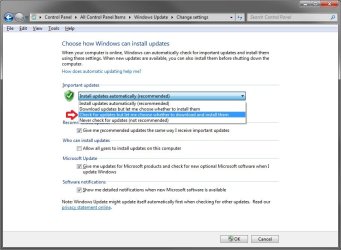
Update Services are "turned on" if you choose one of the following settings: (i) install updates automatically, (ii) download updates automatically and choose whether to install them, or (iii) receive notifications about updates and choose whether to download and install them. Windows Update service is "turned on" and set to "install updates automatically" when you choose the recommended option during Windows Out Of Box Experience (OOBE) setup.
If you turn on the Update Services, regardless of which "turned on" setting you have chosen, required updates to some components of the service will be downloaded and installed automatically without further notice to you. If you would prefer not to receive required updates, turn off the Update Services.