Stop AutoPlay Popup

Hipster Doofus

New member
Guru
Local time
10:26 PM
Messages
475
Location
Melbourne Australia
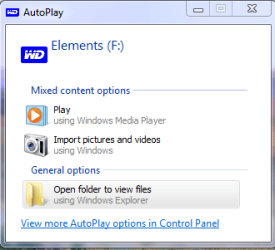
I've got an external drive hooked up through USB. Everytime I boot up I get this auto play popup all the time.

Is there a way to stop this happening at bootup as I know it is there & it is only for storage?
 

Attachments

  • WD.png
    WD.png
    10.5 KB · Views: 11

My Computer

Computer Manufacturer/Model Number
Custom
OS
Windows 7 Pro x64 -- PCLinuxOS KDE4 FullMonty 2011
CPU
i7-875k @ Turbo - 7,6,5,5 - 3.6ghz
Motherboard
Asus P7P55D-E Deluxe
Memory
Corsair CMD8GX3M4A1600C8 8gb
Graphics Card(s)
Asus EAH5850 DirectCU/2DIS/1GD5
Sound Card
On Board
Monitor(s) Displays
Samsung SyncMaster T220 - Panasonic VT30a 50"
Screen Resolution
1680x1050 -
Hard Drives
Corsair Force 3 SSD 120GB x 2 ::
WD VelociRaptor 150GB WD1500HLFS x 2
PSU
Corsair HX-850 Power Supply
Case
Coolmaster HAF 932
Cooling
Corsair H50
Keyboard
Logitech Wireless MK700
Mouse
Logitech Wireless MX620
Internet Speed
Good enough for now
Other Info
Voip. Insanely cheap phone calls.
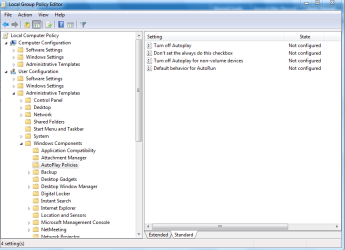
Type gpedit.msc in run and hit enter

In the group policy windows navigate to,

user configuration>Administrative templates>Windows components>Auto play policies

Capture5.PNG

In the right pane double click on turn off autoplay and make it as enabled...

You are done...
 

My Computer

Computer Manufacturer/Model Number
wipro
OS
windows 7
CPU
wipro
Motherboard
intel
Memory
8 gb
Hard Drives
580 gb
Thanks Delphin. I'll see how that goes. :)
 

My Computer

Computer Manufacturer/Model Number
Custom
OS
Windows 7 Pro x64 -- PCLinuxOS KDE4 FullMonty 2011
CPU
i7-875k @ Turbo - 7,6,5,5 - 3.6ghz
Motherboard
Asus P7P55D-E Deluxe
Memory
Corsair CMD8GX3M4A1600C8 8gb
Graphics Card(s)
Asus EAH5850 DirectCU/2DIS/1GD5
Sound Card
On Board
Monitor(s) Displays
Samsung SyncMaster T220 - Panasonic VT30a 50"
Screen Resolution
1680x1050 -
Hard Drives
Corsair Force 3 SSD 120GB x 2 ::
WD VelociRaptor 150GB WD1500HLFS x 2
PSU
Corsair HX-850 Power Supply
Case
Coolmaster HAF 932
Cooling
Corsair H50
Keyboard
Logitech Wireless MK700
Mouse
Logitech Wireless MX620
Internet Speed
Good enough for now
Other Info
Voip. Insanely cheap phone calls.
You are welcome.. :D
 

My Computer

Computer Manufacturer/Model Number
wipro
OS
windows 7
CPU
wipro
Motherboard
intel
Memory
8 gb
Hard Drives
580 gb
For USB (external) drives, one needs to choose "All Drives"

Just tried this fix, and it works.
Note (even if obvious in retrospect):
for a USB (external) drive, one needs to choose "All Drives" and not "CD-ROM and removable media drive" (see Capture.JPG attachment).
 

Attachments

  • Capture.JPG
    Capture.JPG
    56.9 KB · Views: 5

My Computer

OS
Windows 7
Back
Top