Stop Boot Manager appearing

Malcolm Alberry

New member
Local time
1:22 AM
Messages
6
Hi

There have been variations on this problem, but I have not seen one with these conditions.

I have a new installation of Win7 Ultimate, installed over WinXP, without reformmatting the drive.

I get Windows Boot Manager at startup giving me the options of Win7 or Microsoft Windows Recovery Consol.

Disc Management Boot Tab only shows Win7 - no Microsoft Windows Recovery Consol.

I want to clean start without Boot Manager - how can I do this please

Regards

Malcolm in Linslade UK
 

My Computer

Computer Manufacturer/Model Number
HP Pavilion 741.uk
OS
Windows 7 Ultimate
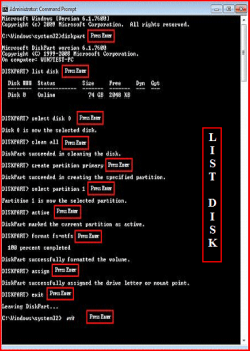
Try a full clean & full format in command prompt.
http://www.sevenforums.com/tutorials/52129-disk-clean-clean-all-diskpart-command.html
http://www.sevenforums.com/tutorials/2668-partition-volume-delete.html?ltr=P
http://www.sevenforums.com/tutorials/2674-partition-volume-create-new.html?ltr=P
http://www.sevenforums.com/tutorials/71432-partition-mark-active.html?ltr=P
1) Boot DVD, & Press Shift+F10 (for command prompt)
2) Boot DVD, & http://www.sevenforums.com/tutorials/682-command-prompt-startup.html(for command prompt)

Type in command line
DISKPART
LIST DISK OR List Volume (If you have partitions)
SELECT DISK # (win HD)
CLEAN ALL
CREATE PARTITION PRIMARY
SELECT PARTITION 1
ACTIVE
FORMAT fs=NTFS
ASSIGN
EXIT
EXIT

List Disk.PNG List Volume.PNG

http://www.sevenforums.com/tutorials/91339-ssd-optimize-windows-re-installation.html
 

My Computer

OS
ME/XP/Vista/Win7
Thanks for the prompt clear reply - some clarification before I start please - have not worked at this level before

Try a full clean & full format in command prompt.
Disk - Clean and Clean All with Diskpart Command
Partition or Volume - Delete
Partition or Volume - Create New
Partition - Mark as Active

I assume that I can do above entering Command Prompt from my running Win7

Or use one of the 2 options below

DVD below is my Win7 installation disc - correct?

1) Boot DVD, & Press Shift+F10 (for command prompt)
2) Boot DVD, & Command Prompt at Startup command prompt)

Why are there 2 ways to get into Command Prompt - can I use either way?

Best

Malcolm
 
Last edited:

My Computer

Computer Manufacturer/Model Number
HP Pavilion 741.uk
OS
Windows 7 Ultimate
Just found I can printout the pages as attachments - I am new to forum capabilities

Malcolm
 

My Computer

Computer Manufacturer/Model Number
HP Pavilion 741.uk
OS
Windows 7 Ultimate
You're going to reformat your drive?
Wipe the drive?
Are you sure that's what you want to do?

Ap
 

My Computer

Computer Manufacturer/Model Number
Assembled in my workshop
OS
Windows 7 Home Premium
CPU
Intel Core 2 Duo @ 3.00gHz
Motherboard
Gigabyte GA-P35-S3G
Memory
4 GB
Graphics Card(s)
ATI Radeon HD 2600 XT
Sound Card
RME 24/96 Card, Realtek Internal Audio PreSonus FireStudio
Monitor(s) Displays
Acer 1917 (x2)
Screen Resolution
1280 x 1024 on both monitors
Hard Drives
Three 250GB Seagate SATA Barracuda 7200rpm
PSU
Rosewill 500-watt
Case
Rosewill mid-tower
Cooling
Noctua NH-U9B (CPU), PwrSupply fan + single large case Fan
Keyboard
Macally w/2/USB ports.
Mouse
Trackman Wheel
Other Info
Event 20/20 bas studio monitors, Yamaha sub.
Rackmount Korg/Roland/Yamaha synthesizers,
Cubase MIDI/audio recording. Sony Soundforge audio/mastering software. CD Architect Mastering. RME & Presonus audio interfaces.
Yup - I have no data on that drive
All on another HD (which will be powered off for safety) and also backed up elsewhare
Thanks for the warning

Malcolm
 

My Computer

Computer Manufacturer/Model Number
HP Pavilion 741.uk
OS
Windows 7 Ultimate
Just found I can printout the pages as attachments - I am new to forum capabilities

Malcolm

If go to the tutorials in my post, you will find step by step screen shots.

I assume that I can do above entering Command Prompt from my running Windows 7
you can remove the HD from PC & install as slave in aother PC.

Please remove your email address.
 

My Computer

OS
ME/XP/Vista/Win7
Yup - I have no data on that drive
All on another HD (which will be powered off for safety) and also backed up elsewhare
Thanks for the warning

Malcolm


No problem, I thought you just wanted to remove the Bootmanager prompt so you boot directly into Win-7. (which is easy enough to do).

Ap
 

My Computer

Computer Manufacturer/Model Number
Assembled in my workshop
OS
Windows 7 Home Premium
CPU
Intel Core 2 Duo @ 3.00gHz
Motherboard
Gigabyte GA-P35-S3G
Memory
4 GB
Graphics Card(s)
ATI Radeon HD 2600 XT
Sound Card
RME 24/96 Card, Realtek Internal Audio PreSonus FireStudio
Monitor(s) Displays
Acer 1917 (x2)
Screen Resolution
1280 x 1024 on both monitors
Hard Drives
Three 250GB Seagate SATA Barracuda 7200rpm
PSU
Rosewill 500-watt
Case
Rosewill mid-tower
Cooling
Noctua NH-U9B (CPU), PwrSupply fan + single large case Fan
Keyboard
Macally w/2/USB ports.
Mouse
Trackman Wheel
Other Info
Event 20/20 bas studio monitors, Yamaha sub.
Rackmount Korg/Roland/Yamaha synthesizers,
Cubase MIDI/audio recording. Sony Soundforge audio/mastering software. CD Architect Mastering. RME & Presonus audio interfaces.
Hi

I have been following the recommendation from THEOG , but I get the following error with DISK CLEAN

Virtual disc error
Clean is not allowed on the disc containing the current boot, system,page dump crash dump or hibination volume

Is there s/w that I can download that will clean the file please

Please advise name and source as I do want to completely clean the disc as recommended to get rid of the Boot Manager

Best

Malcolm
 

My Computer

Computer Manufacturer/Model Number
HP Pavilion 741.uk
OS
Windows 7 Ultimate
Hi Malcolm,

Are you wanting to completely start afresh? Your problem seems to stem from having XP on the drive originally and then installing Windows 7 on top. In order to completely remove XP, you will need to format the drive during the installation of the OS.

Follow the instructions here: http://www.sevenforums.com/tutorials/1649-clean-install-windows-7-a.html and remember to format at Step 8.
 

My Computer

Computer type
PC/Desktop
Computer Manufacturer/Model Number
Dwarf Dwf/11/2012 r09/2013
OS
Windows 8.1 Pro RTM x64
CPU
Intel Core-i5-3570K 4-core @ 3.4GHz (Ivy Bridge) (OC 4.4GHz)
Motherboard
ASRock Z77 Extreme4-M
Memory
4 x 4GB DDR3-1600 Corsair Vengeance CMZ8GX3M2A1600C9B (16GB)
Graphics Card(s)
MSI GeForce GTX770 Gaming OC 2GB
Sound Card
Realtek High Definition on board solution (ALC 898)
Monitor(s) Displays
ViewSonic VA1912w Widescreen (VGA)
Screen Resolution
1440x900
Hard Drives
OCZ Agility 3 SSD 120GB SATA III x2 (RAID 0)
Samsung HD501LJ 500GB SATA II x2
Hitachi HDS721010CLA332 1TB SATA II
Iomega 1.5TB Ext USB 2.0
WD 2.0TB Ext USB 3.0
PSU
XFX Pro Series 850W Semi-Modular
Case
Gigabyte IF233
Cooling
1 x 120mm Front Inlet 1 x 120mm Rear Exhaust
Keyboard
Microsoft Comfort Curve Keyboard 3000 (USB)
Mouse
Microsoft Comfort Mouse 3000 for Business (USB)
Internet Speed
NetGear DG834Gv3 ADSL Modem/Router (Ethernet) ~4.0 Mb/s (O2)
Antivirus
Avast! 8.0.1497
Browser
IE 11
Other Info
Optical Drive: HL-DT-ST BD-RE BH10LS30 SATA Bluray
Lexmark S305 Printer/Scanner/Copier (USB)
WEI Score: 8.1/8.1/8.5/8.5/8.25
Asus Eee PC 1011PX Netbook (Windows 7 x86 Starter)
Hi Dwarf

Thanks, but I have currently 3 partions on disk 0 from the original install

P1. Backup 4 GB P
P2. current Win7 system 107 GB P
P3. Unallocated 10 GB

I have to select a partition

I can only select P2 as the other 2 state Win7 cannot be installed there

When I tell it to format selecting P2 -> NEXT in Step 8 - it says

'This partition might contain recovery / system files or importent manufacturers information. Any data stored will be lost.

And if I say OK - it revert to screen with the choice to Format again - round and round

Do I need to 'Delete' all partitions first to get a large 'Unallocated space'

Any other ideas please

Best

Malcolm
 

My Computer

Computer Manufacturer/Model Number
HP Pavilion 741.uk
OS
Windows 7 Ultimate
Back
Top