Stop IP address changes on PCs

TanyaC

New member
Guru
Local time
2:48 AM
Messages
782
Location
Melbourne, Australia
I'm trying to stop my kids changing IP addresses on their computers.

I have set DHCP reservations in my DIR-655 router. I set each machine to DHCP and the reservation assigns the correct address.

Problem is, anyone can change the adapter properties any time they want. So I if block internet access from 3am - 6am on my sons PC using an access control rule, he simply changes his IP address to something else and he's back online.

I considered changing the subnet mask to 255.255.255.224, but that gives me 32(30) addresses, but I only have 13 devices, so that would still leave some vacant addresses for them to choose from.

There are a couple of settings in the group policy editor, but they don't work. Apparently this is a known issue. In any case, all users are administrators.

Is there anyway to stop them changing IP address, or locking out changes to the LAN connection properties, Control Panel applet or any other ideas?

Thanks
Tanya
 

My Computer

Computer type
PC/Desktop
Computer Manufacturer/Model Number
Home Made
OS
Linux Mint 17 Cinnamon | Win 7 Ult x64
CPU
Intel I7-3770K @ 4.2ghz
Motherboard
ASRock Extreme 4
Memory
32GB G-Skill C10Q
Graphics Card(s)
EVGA GTX 670 2GB SC
Sound Card
Creative Fatality ExtremeGamer
Monitor(s) Displays
LG E2742V x 2
Screen Resolution
1920x1080
Hard Drives
256GB Vertex 4 SSD
2TB Seagate ST2000DM001
1TB Seagate ST1000DM003
PSU
Corsair HX 650
Case
HAF 932 advanced
Cooling
Corsair H100i liquid cooler
Keyboard
Logitech Wireless
Mouse
Logitech Wireless
Internet Speed
OptusNet NBN 100/40
Antivirus
Malwarebytes
Browser
Firefox 30
Other Info
Router: Sagemcom F@st 3846 Crippled by Optus.
In any case, all users are administrators.
Make them standard users.

Either that or start "gpedit.msc" and browse to where I found the setting to prohibit access:

gpoe_network.JPG


However unless they are standard users, they will probably still have access to gpedit and can turn it back on.
 

My Computer

OS
Windows 7 Ultimate 64-bit
CPU
AMD Phenom II X6 1090T 3.2GHZ
Motherboard
MSI 890FXA-GD70
Memory
G.SKILL RipJaw 3x2GB DDR3-1066
Graphics Card(s)
2x HIS Radeon HD 6850 1 GB
Sound Card
VIA 8-channel
Monitor(s) Displays
2x 20 inch Acer LCDs, 1x 32" Sony LCD TV
Screen Resolution
4480x900
Hard Drives
1x Crucial 64GB SSD
3x 1TB HDDs (WD, Seagate, Hitatchi)
1x 500GB Seagate External
PSU
Kingwin 1000W Modular
Case
Coolermaster HAF 932
Cooling
1x 120mm, 3x 200mm, CoolerMaster Hyper 212+
Keyboard
Microsoft Wireless Keyboard 1000
Mouse
Microsoft Wiresless Mouse 5000
Internet Speed
20mbps
Other Info
Samsung BD-ROM/DVD-RW
In any case, all users are administrators.
Make them standard users.

Either that or start "gpedit.msc" and browse to where I found the setting to prohibit access:

However unless they are standard users, they will probably still have access to gpedit and can turn it back on.

These settings do not work. I have tried it on a test PC with a standard user and my PC.

And you're right about policy editor - though at this stage I don't think they've heard of it yet. But when challenged with restrictions teenagers can be remarkable learning machines when they want to be ;)

Setting them to standard users is also not an option, unless I want to be spending an extra 10 hours a week on the machines

What I was really hoping for was a router based solution.

I posted on dlink and the consensus seems to be that the DIR655 is too "low end" to support any real form of security settings.
 

My Computer

Computer type
PC/Desktop
Computer Manufacturer/Model Number
Home Made
OS
Linux Mint 17 Cinnamon | Win 7 Ult x64
CPU
Intel I7-3770K @ 4.2ghz
Motherboard
ASRock Extreme 4
Memory
32GB G-Skill C10Q
Graphics Card(s)
EVGA GTX 670 2GB SC
Sound Card
Creative Fatality ExtremeGamer
Monitor(s) Displays
LG E2742V x 2
Screen Resolution
1920x1080
Hard Drives
256GB Vertex 4 SSD
2TB Seagate ST2000DM001
1TB Seagate ST1000DM003
PSU
Corsair HX 650
Case
HAF 932 advanced
Cooling
Corsair H100i liquid cooler
Keyboard
Logitech Wireless
Mouse
Logitech Wireless
Internet Speed
OptusNet NBN 100/40
Antivirus
Malwarebytes
Browser
Firefox 30
Other Info
Router: Sagemcom F@st 3846 Crippled by Optus.
I used to be one of those teenagers you are describing now and I can promise you we are very hard to beat. I made my way around every content monitoring/blocking software/hardware put in my way. I would get a fancier router or maybe put software on the machines to limit use (if they can't figure out how to crash it by killing the processes/services and prevent it from starting in msconfig).
 

My Computer

OS
Windows 7 Ultimate 64-bit
CPU
AMD Phenom II X6 1090T 3.2GHZ
Motherboard
MSI 890FXA-GD70
Memory
G.SKILL RipJaw 3x2GB DDR3-1066
Graphics Card(s)
2x HIS Radeon HD 6850 1 GB
Sound Card
VIA 8-channel
Monitor(s) Displays
2x 20 inch Acer LCDs, 1x 32" Sony LCD TV
Screen Resolution
4480x900
Hard Drives
1x Crucial 64GB SSD
3x 1TB HDDs (WD, Seagate, Hitatchi)
1x 500GB Seagate External
PSU
Kingwin 1000W Modular
Case
Coolermaster HAF 932
Cooling
1x 120mm, 3x 200mm, CoolerMaster Hyper 212+
Keyboard
Microsoft Wireless Keyboard 1000
Mouse
Microsoft Wiresless Mouse 5000
Internet Speed
20mbps
Other Info
Samsung BD-ROM/DVD-RW
Well if he's getting around restrictions you're trying to put in, shouldn't you have a word with him?

When I was a teenager, my Mum put a timer thing on the power socket the router was plugged in to and it'd turn the power off to the router at like midnight until whatever time. Only way I could get back on was to unplug the timer. If I was found to have unplugged it, I'd get no computer use for a week.

There's also the parental controls within Windows 7 too that can limit computer usage.
 

My Computer

Computer type
PC/Desktop
Computer Manufacturer/Model Number
Custom Built
OS
Windows 8.1 Pro x64
CPU
Intel Core i7 4790k
Motherboard
MSI Z97S Krait Edition
Memory
8GB Corsair Dominator 1600MHz
Graphics Card(s)
MSI TwinFrozr GeForce GTX770
Sound Card
ASUS Xonar DX/XD 7.1
Monitor(s) Displays
Dell 24" S2409W + Dell 20" E207WFP
Screen Resolution
1920x1080 + 1680x1050
Hard Drives
1x 120GB OCZ Agility 3, 1x 750GB Western Digital Caviar Black, 1x 1TB Western Digital Caviar Blue
PSU
Corsair HX850 modular
Case
Fractal Design Define R4
Cooling
Corsair H60 w/ twin Corsair SP120 fans
Keyboard
Logitech G510S Keyboard
Mouse
Logitech G500S Laser Mouse
Internet Speed
40Mbps
Antivirus
Microsoft Security Essentials
Browser
Google Chrome
Other Info
LG Blu-Ray player
Since DHCP reservations don't seem to work on your router, I would suggest unplugging it at night or putting it on a timer.

I have a DIR-655 also, but the reservation feature does work for me. If the IP I set on the PC does not match the reservation, the PC might be able to access (in limited capacity) the network, but not the Internet. Was is the hardware revision for your DIR-655? It says on the bottom of the unit. Upgrading with firmware from the US D-Link website might help.

Also, consider a /28 mask. That should give you about 14 addresses. (255.255.255.240)
 

My Computer

Computer Manufacturer/Model Number
ATX Custom Build 2012
OS
Windows 7 Enterprise x64 SP1
CPU
Intel Core i3-2100 @ 3.10GHz
Motherboard
Intel DH67CL desktop ATX
Memory
10 GB DDR3
Graphics Card(s)
Asus EAH5450 series (Radeon)
Monitor(s) Displays
Samsung SyncMaster 226BW, Samsung Syncmaster P2450H
Screen Resolution
226BW: 1680 x 1050 & P2450H: 1920 x 1080
Hard Drives
Western Digital 320 GB sata (boot), Samsung 640 GB sata, Seagate 2 TB sata (data)
PSU
Cooler Master Extreme Power Plus 500W
Case
Thermaltake V3 Black Edition
Cooling
stock cooling with added intake fan
Keyboard
HP Wireless Elite Keyboard Wireless Keyboard
Mouse
Microsoft Touch
Internet Speed
Comcast Cable business class <=18Mb {averages 12Mb}
Other Info
Optical drives: LG SuperMulti Blue, HP DVD 1260T
Other: Kensington Bluetooth Receiver
Network: Buffalo Wireless N USB, DLink N router/DLink Ethernet Switch/DLink Xtreme N wireless bridge
Printer: HP Photosmart Plus, HP Officejet Pro 8600 Plus
PCs: HP dv6-3040us (7 x64 SP1), HP DM4-2165dx (7 x64 SP1), HP Pavilion zv6130us (7 x86), Apple Macbook Air (Lion)
************
  • Like
Reactions: JMH
You should be using MAC addresses to identify computers not IPs.
Windows 7 does not currently support changing MAC addresses.
 

My Computer

Computer type
PC/Desktop
Computer Manufacturer/Model Number
Alienware Aurora ALX R4
OS
Windows 10 Pro (x64)
CPU
Intel Core i7-3930K (3.2GHz - 4.5GHz)
Motherboard
Alienware Aurora-R4 x79
Memory
4x Samsung 4GB PC3-12800 DDR3 (16GB 1600MHz)
Graphics Card(s)
Nvidia Geforce GTX 690
Sound Card
SteelSeries Siberia Elite
Monitor(s) Displays
Dell UltraSharp U3011
Screen Resolution
2560x1600
Hard Drives
Samsung 850 Pro 256 GB, Seagate 1TB Desktop Hybrid HDD, 2x Western Digital 4TB Green HDD
PSU
875W Some Dell PSU <.<
Case
Alienware Aurora ALX
Cooling
Custom Liquid Cooling (EK CPU & GPU blocks) dual EK 480RAD
Keyboard
Logitech G710+ Mechanical
Mouse
Logitech G700s
Internet Speed
Verizon Fios (50 mbps average)
Other Info
Server: Intel NUC D54250WYK: i5-4250U, 16GB, 256 GB mSATA, Windows Server 2012 R2
  • Like
Reactions: JMH
Put the router in your bedroom....unplug when you go to bed....
 

My Computer

Computer type
PC/Desktop
Computer Manufacturer/Model Number
Custom
OS
windows 10 pro 64 bit
CPU
i5 4690K@4500 COOLER MASTER Seidon 120M water cooler
Motherboard
ASUS SABERTOOTH Z87 LGA 1150 Intel
Memory
16gb Kingston HyperX DDR3 1600
Graphics Card(s)
EVGA GTX 1070 sc
Monitor(s) Displays
BenQ GL2760H Black 27" 2ms HDMI Widescreen LED 1920X1080
Screen Resolution
DSR 2103X1183
Hard Drives
ADATA 256 gig SSD + 4 junk
PSU
EVGA supernova 750
Case
coolermaster
Cooling
many...
Keyboard
z merc
Mouse
Logitech wireless G602
Internet Speed
2.5mbs cable
Speaking as someone who went so far as to change the time in BIOS to allow myself more time on the computer, I can second the remark that we're hard to stop.

I see three viable solutions.* Firstly, and perhaps best, is to talk to your kids about it, and make sure they understand the rules. Also, don't just tell them the rules, make them repeat them back to you, and tell you the consequences you've instated will be. It helps ensure that they truly listen, and don't just glaze over during the conversation. Secondly, is to use mac-based filtration and limitation, rather than IP based. Also, change the defauly password on the router (if you haven't already) and find a way to tape/cover over the reset button that doesn't permanently disable it. Lastly, if all else fails, would be take the power brick to bed with you, and leave it on your night stand, with the policy that when you go to bed, the internet goes off. If they truly want it back at that point, make them earn it by demonstrating an ability to be responsible.


*please note: I'm not, in any of the following, suggesting you raise your kid differently than you choose to. I'm just giving my input, and hoping it helps with your situation.
 

My Computer

Computer Manufacturer/Model Number
HP 6000 Pro Micro Tower
OS
W7 Professional x64
CPU
Core 2 Duo 2.93
Memory
2 GB
Graphics Card(s)
ATI Radeon 4695
Monitor(s) Displays
Two HP 17's
Hard Drives
150GB Sata Drive
Case
Tiny. Kinda cute.
Keyboard
HP Supplied. Surprisingly nice.
Mouse
Gateway Mouse from an E2610D
Internet Speed
45 mbps
  • Like
Reactions: JMH
You should be using MAC addresses to identify computers not IPs.
Windows 7 does not currently support changing MAC addresses.

Solved :)
 

My Computer

Computer type
Laptop
Computer Manufacturer/Model Number
HP ENVY 17-1150eg
OS
Windows 10 Pro x64 EN-GB
CPU
1.6 GHz Intel Core i7-720QM Processor
Memory
6 GB
Graphics Card(s)
ATI Mobility Radeon HD 5850 Graphics
Sound Card
Beats sound system with integrated subwoofer
Monitor(s) Displays
17" laptop display, 22" LED and 32" Full HD TV through HDMI
Screen Resolution
1600*900 (1), 1920*1080 (2&3)
Hard Drives
Internal: 2 x 500 GB SATA Hard Disk Drive 7200 rpm
External: 2TB for backups, 3TB USB3 network drive for media
Cooling
As Envy runs a bit warm, I have it on a Cooler Master pad
Keyboard
Logitech diNovo Media Desktop Laser (bluetooth)
Mouse
Logitech Performance Mouse MX
Internet Speed
50/10 Mbps VDSL
Antivirus
Windows Defender 4.3.9431.0
Browser
Maxthon 3.5.2., IE11
Since DHCP reservations don't seem to work on your router, I would suggest unplugging it at night or putting it on a timer.

I have a DIR-655 also, but the reservation feature does work for me. If the IP I set on the PC does not match the reservation, the PC might be able to access (in limited capacity) the network, but not the Internet. Was is the hardware revision for your DIR-655? It says on the bottom of the unit. Upgrading with firmware from the US D-Link website might help.

Also, consider a /28 mask. That should give you about 14 addresses. (255.255.255.240)

The DIR655 is brand new (old one replaced under warranty). The hardware revision is A4 and it's on firmware 1.30WW (As shipped). I installed 1.34WW on the old one when I was trouble shooting it, but that didn't solve this problem.

I suspect the router is working as it is supposed to, assuming I've configured it correctly.

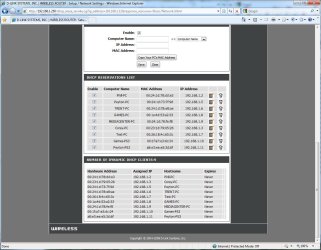
I have set up the DHCP reservations for each machine in the router.

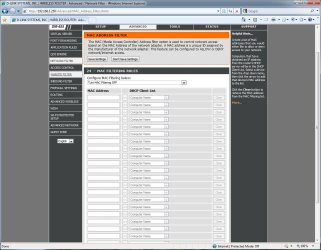
I have not configured any network filters because everytime I do it kills internet access for everyone and I have to reset router to factory defaults to get back into it. (see attached screen shots).

When a PC is set to use DHCP it will pick up the reserved address.

When a PC is configured with an IP address it will connect to the internet, regardless of the DHCP reservation.

There are five IPs not listed in the pics. 192.168.1.1 is the file/web server, 192.168.1.4 is currently turned off for repairs. The printer is 192.168.1.31

There are also two IPhones that are occasionally used. So /28 won't be enough addresses. But thanks for the suggestion.
 

Attachments

  • sf1.jpg
    sf1.jpg
    270.3 KB · Views: 24
  • sf2.jpg
    sf2.jpg
    289.4 KB · Views: 18

My Computer

Computer type
PC/Desktop
Computer Manufacturer/Model Number
Home Made
OS
Linux Mint 17 Cinnamon | Win 7 Ult x64
CPU
Intel I7-3770K @ 4.2ghz
Motherboard
ASRock Extreme 4
Memory
32GB G-Skill C10Q
Graphics Card(s)
EVGA GTX 670 2GB SC
Sound Card
Creative Fatality ExtremeGamer
Monitor(s) Displays
LG E2742V x 2
Screen Resolution
1920x1080
Hard Drives
256GB Vertex 4 SSD
2TB Seagate ST2000DM001
1TB Seagate ST1000DM003
PSU
Corsair HX 650
Case
HAF 932 advanced
Cooling
Corsair H100i liquid cooler
Keyboard
Logitech Wireless
Mouse
Logitech Wireless
Internet Speed
OptusNet NBN 100/40
Antivirus
Malwarebytes
Browser
Firefox 30
Other Info
Router: Sagemcom F@st 3846 Crippled by Optus.

My Computer

Computer type
PC/Desktop
Computer Manufacturer/Model Number
Home Made
OS
Linux Mint 17 Cinnamon | Win 7 Ult x64
CPU
Intel I7-3770K @ 4.2ghz
Motherboard
ASRock Extreme 4
Memory
32GB G-Skill C10Q
Graphics Card(s)
EVGA GTX 670 2GB SC
Sound Card
Creative Fatality ExtremeGamer
Monitor(s) Displays
LG E2742V x 2
Screen Resolution
1920x1080
Hard Drives
256GB Vertex 4 SSD
2TB Seagate ST2000DM001
1TB Seagate ST1000DM003
PSU
Corsair HX 650
Case
HAF 932 advanced
Cooling
Corsair H100i liquid cooler
Keyboard
Logitech Wireless
Mouse
Logitech Wireless
Internet Speed
OptusNet NBN 100/40
Antivirus
Malwarebytes
Browser
Firefox 30
Other Info
Router: Sagemcom F@st 3846 Crippled by Optus.
I would still go with the router in a slightly different approach:

Simply allow certain IP addresses to connect with the restrictions you want to enforce and only those IPs
Kind of like a white list which means if they want to be smart a**es and change the IP they're automatically locked out.
(you might want to change and keep to yourself the router-PW ;) That's how it works for my brats :D
PLUS as a bit of "positive reinforcement" I told 'em "If I catch you even trying to circumvent my restrictions you're grounded from Facebook for AS LONG AS I SEE FIT"
If nothing else works scares them...that does it :D :D

-DG
 
Last edited:

My Computer

Computer Manufacturer/Model Number
HP m8000n
OS
Windows 7 Ultimate x86
CPU
DualCore AMD Athlon 64 X2, 2600 MHz 5200+
Motherboard
Asus M2N68-LA (Narra)
Memory
Samsung 2GB DDR2
Graphics Card(s)
Onboard NVIDIA GeForce 6150SE nForce 430
Sound Card
Onboard nVIDIA nForce 6100-430 (MCP61P)
Monitor(s) Displays
Westinghouse 19" LED
Screen Resolution
1280x1024
Hard Drives
SATA II Seagate Barracuda 500GB
USB II WD Elements 500GB
USB II WD My Book 1TB
USB II WD My Book 2TB
PSU
Stock (HP)
Case
Stock (HP)
Cooling
Stock
Keyboard
Logitech Classic KB 200
Mouse
Standard HP opticle USB mouse
  • Like
Reactions: JMH
Seriously - What!?
He's saying that, rather than using the DHCP functionality of the device, apply a mac filter (when you click the mac filter on, add your machine you're using before you click "apply" or you'll be locked out), and then individually add each machine explicitly, and use that as a limiter. Also, have you tried the securespot 2.0 that is an optional add-on software for the DIR-655? If that doesn't do it, I'd say investigate Sledge's solution, of creating a restricted white list.

Oh, and what about using a /27 subnet mask? It'd limit you to 30 useable IP addresses.

I maintain my previous solution is the best way to go, but it's your call.
 

My Computer

Computer Manufacturer/Model Number
HP 6000 Pro Micro Tower
OS
W7 Professional x64
CPU
Core 2 Duo 2.93
Memory
2 GB
Graphics Card(s)
ATI Radeon 4695
Monitor(s) Displays
Two HP 17's
Hard Drives
150GB Sata Drive
Case
Tiny. Kinda cute.
Keyboard
HP Supplied. Surprisingly nice.
Mouse
Gateway Mouse from an E2610D
Internet Speed
45 mbps
You should be using MAC addresses to identify computers not IPs.
Windows 7 does not currently support changing MAC addresses.

Solved :)

Seriously - What!?

Using MAC addresses your kids can change the IP as often as they want to. If they can not change your router settings i.e. they don't have credentials to router, they can not change MAC filtering rules.

Kari
 

My Computer

Computer type
Laptop
Computer Manufacturer/Model Number
HP ENVY 17-1150eg
OS
Windows 10 Pro x64 EN-GB
CPU
1.6 GHz Intel Core i7-720QM Processor
Memory
6 GB
Graphics Card(s)
ATI Mobility Radeon HD 5850 Graphics
Sound Card
Beats sound system with integrated subwoofer
Monitor(s) Displays
17" laptop display, 22" LED and 32" Full HD TV through HDMI
Screen Resolution
1600*900 (1), 1920*1080 (2&3)
Hard Drives
Internal: 2 x 500 GB SATA Hard Disk Drive 7200 rpm
External: 2TB for backups, 3TB USB3 network drive for media
Cooling
As Envy runs a bit warm, I have it on a Cooler Master pad
Keyboard
Logitech diNovo Media Desktop Laser (bluetooth)
Mouse
Logitech Performance Mouse MX
Internet Speed
50/10 Mbps VDSL
Antivirus
Windows Defender 4.3.9431.0
Browser
Maxthon 3.5.2., IE11

Using MAC addresses your kids can change the IP as often as they want to. If they can not change your router settings i.e. they don't have credentials to router, they can not change MAC filtering rules.

Kari

Then it just comes down to if the kids are smart enough to spoof their MAC addresses or borrow USB wireless adapters from friends or get their own.
 

My Computer

OS
Windows 7 Ultimate 64-bit
CPU
AMD Phenom II X6 1090T 3.2GHZ
Motherboard
MSI 890FXA-GD70
Memory
G.SKILL RipJaw 3x2GB DDR3-1066
Graphics Card(s)
2x HIS Radeon HD 6850 1 GB
Sound Card
VIA 8-channel
Monitor(s) Displays
2x 20 inch Acer LCDs, 1x 32" Sony LCD TV
Screen Resolution
4480x900
Hard Drives
1x Crucial 64GB SSD
3x 1TB HDDs (WD, Seagate, Hitatchi)
1x 500GB Seagate External
PSU
Kingwin 1000W Modular
Case
Coolermaster HAF 932
Cooling
1x 120mm, 3x 200mm, CoolerMaster Hyper 212+
Keyboard
Microsoft Wireless Keyboard 1000
Mouse
Microsoft Wiresless Mouse 5000
Internet Speed
20mbps
Other Info
Samsung BD-ROM/DVD-RW
Then it just comes down to if the kids are smart enough to spoof their MAC addresses or borrow USB wireless adapters from friends or get their own.
1) Every NIC, wireless or wired, has its own MAC address. If MAC address filtering is enabled, only NIC's listed can access the net.

2) Windows does not allow changing of MAC address.

Kari
 

My Computer

Computer type
Laptop
Computer Manufacturer/Model Number
HP ENVY 17-1150eg
OS
Windows 10 Pro x64 EN-GB
CPU
1.6 GHz Intel Core i7-720QM Processor
Memory
6 GB
Graphics Card(s)
ATI Mobility Radeon HD 5850 Graphics
Sound Card
Beats sound system with integrated subwoofer
Monitor(s) Displays
17" laptop display, 22" LED and 32" Full HD TV through HDMI
Screen Resolution
1600*900 (1), 1920*1080 (2&3)
Hard Drives
Internal: 2 x 500 GB SATA Hard Disk Drive 7200 rpm
External: 2TB for backups, 3TB USB3 network drive for media
Cooling
As Envy runs a bit warm, I have it on a Cooler Master pad
Keyboard
Logitech diNovo Media Desktop Laser (bluetooth)
Mouse
Logitech Performance Mouse MX
Internet Speed
50/10 Mbps VDSL
Antivirus
Windows Defender 4.3.9431.0
Browser
Maxthon 3.5.2., IE11
Then it just comes down to if the kids are smart enough to spoof their MAC addresses or borrow USB wireless adapters from friends or get their own.
1) Every NIC, wireless or wired, has its own MAC address. If MAC address filtering is enabled, only NIC's listed can access the net.

2) Windows does not allow changing of MAC address.

Kari

Thanks to all who have replied.

DOH!!!! The problem is in the ACL... The DIR-655 allows me to specify an IP address or a MAC address... the penny has dropped now :o

I have set up the network filters, and left the DHCP reservations intact.

Let's see how that goes..

thanks
tanya
 

My Computer

Computer type
PC/Desktop
Computer Manufacturer/Model Number
Home Made
OS
Linux Mint 17 Cinnamon | Win 7 Ult x64
CPU
Intel I7-3770K @ 4.2ghz
Motherboard
ASRock Extreme 4
Memory
32GB G-Skill C10Q
Graphics Card(s)
EVGA GTX 670 2GB SC
Sound Card
Creative Fatality ExtremeGamer
Monitor(s) Displays
LG E2742V x 2
Screen Resolution
1920x1080
Hard Drives
256GB Vertex 4 SSD
2TB Seagate ST2000DM001
1TB Seagate ST1000DM003
PSU
Corsair HX 650
Case
HAF 932 advanced
Cooling
Corsair H100i liquid cooler
Keyboard
Logitech Wireless
Mouse
Logitech Wireless
Internet Speed
OptusNet NBN 100/40
Antivirus
Malwarebytes
Browser
Firefox 30
Other Info
Router: Sagemcom F@st 3846 Crippled by Optus.
Then it just comes down to if the kids are smart enough to spoof their MAC addresses or borrow USB wireless adapters from friends or get their own.
1) Every NIC, wireless or wired, has its own MAC address. If MAC address filtering is enabled, only NIC's listed can access the net.

2) Windows does not allow changing of MAC address.

Kari

How to spoof a MAC address | TechRepublic

All they'd need to do is mimic the mac address of say an adult's computer that may not have restrictions on the router.
 

My Computer

OS
Windows 7 Ultimate 64-bit
CPU
AMD Phenom II X6 1090T 3.2GHZ
Motherboard
MSI 890FXA-GD70
Memory
G.SKILL RipJaw 3x2GB DDR3-1066
Graphics Card(s)
2x HIS Radeon HD 6850 1 GB
Sound Card
VIA 8-channel
Monitor(s) Displays
2x 20 inch Acer LCDs, 1x 32" Sony LCD TV
Screen Resolution
4480x900
Hard Drives
1x Crucial 64GB SSD
3x 1TB HDDs (WD, Seagate, Hitatchi)
1x 500GB Seagate External
PSU
Kingwin 1000W Modular
Case
Coolermaster HAF 932
Cooling
1x 120mm, 3x 200mm, CoolerMaster Hyper 212+
Keyboard
Microsoft Wireless Keyboard 1000
Mouse
Microsoft Wiresless Mouse 5000
Internet Speed
20mbps
Other Info
Samsung BD-ROM/DVD-RW
How to spoof a MAC address | TechRepublic

All they'd need to do is mimic the mac address of say an adult's computer that may not have restrictions on the router.

Obviously I don't understand this stuff.. but it seems pointless sticking a MAC address in the registry so it can be easily spoofed. At what point is the physical NIC MAC address queried? Never?

What would happen if two computers shared the same MAC address and tried to access the internet at the same time? Would you get a MAC address conflict like you do with IP addresses?

All computer share the same web and port filters, including mine, so it would be pointless using any other computer. All I am talking about is completely blocking access when they misbehave. So he could simply use someone elses computer when the rest of are not home.
 

My Computer

Computer type
PC/Desktop
Computer Manufacturer/Model Number
Home Made
OS
Linux Mint 17 Cinnamon | Win 7 Ult x64
CPU
Intel I7-3770K @ 4.2ghz
Motherboard
ASRock Extreme 4
Memory
32GB G-Skill C10Q
Graphics Card(s)
EVGA GTX 670 2GB SC
Sound Card
Creative Fatality ExtremeGamer
Monitor(s) Displays
LG E2742V x 2
Screen Resolution
1920x1080
Hard Drives
256GB Vertex 4 SSD
2TB Seagate ST2000DM001
1TB Seagate ST1000DM003
PSU
Corsair HX 650
Case
HAF 932 advanced
Cooling
Corsair H100i liquid cooler
Keyboard
Logitech Wireless
Mouse
Logitech Wireless
Internet Speed
OptusNet NBN 100/40
Antivirus
Malwarebytes
Browser
Firefox 30
Other Info
Router: Sagemcom F@st 3846 Crippled by Optus.
Back
Top