Stop WiFi adapter using internet, but retain networking capabilities.

shnabz2

New member
Local time
4:59 AM
Messages
10
I have a wired Ethernet connection directly into my modem, I also have a WiFi dongle connected to a router so that i have network access to other machines. The WiFi network is also providing me with internet, i dont want the internet because i think it my confuse certain applications, how will they know which internet to use? How can i stop internet coming in through the WiFi but still be connected so i can retain the networking capabilities with other machines. I have tried unticking IPv4&6 in the network adapter properties but that just ruined the network. Im out of ideas. Any help would be appreciated.

Thanks, Mike
 

My Computer My Computer

At a glance

Windows 7 Ultimate x32AMD Phenom II X4 965 Black EditionG.SKILL 2X2GBMatrox TH2G
Computer type
PC/Desktop
Computer Manufacturer/Model Number
Custom Build
OS
Windows 7 Ultimate x32
CPU
AMD Phenom II X4 965 Black Edition
Motherboard
Gigabyte GA-880GMA-UD2H
Memory
G.SKILL 2X2GB
Graphics Card(s)
Matrox TH2G
Hard Drives
Corsair 64GB SSD
Antivirus
Common Sense
Browser
FireFox
Hi Mike and Welcome to Seven Forums,

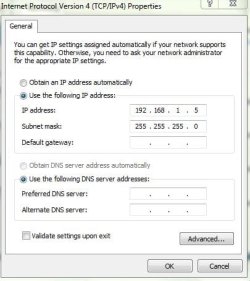
Perhaps, do an experiment from one wireless computers and see if this would work or not, assign a Static Addressing, remove the DNS servers and default gateway. See an image attached. Make sure that you would use the same IP Scope in your network for ex. 192.168.1.X or 192.168.0.X.
 

Attachments

  • TCPIP - remove DNS and Gateway.JPG
    TCPIP - remove DNS and Gateway.JPG
    34.6 KB · Views: 2

My Computer My Computer

At a glance

Win7 & Win8 64bitIntel i5
Computer Manufacturer/Model Number
Lenovo Desktop/Samsung Laptop
OS
Win7 & Win8 64bit
CPU
Intel i5
Internet Speed
Charter-20 Mbps
Antivirus
Avast
Browser
FF, IE9 and Chrome
Change your router settings to block internet access for your ip. What roueter do you have
 

My Computer My Computer

At a glance

Windows 7 32 and 64 bit
Computer type
PC/Desktop
OS
Windows 7 32 and 64 bit
Yes some router's will have this option. If not you could just go to blocking all ports which would take a while. On the other hand you could just disable NAT on your router this will allow communication to the computers within the network but will not pass the router.
 

My Computer My Computer

At a glance

Windows 7 Ultimate 64-bitIntel Core 2 Duo E6550 @2.33GHz4GB DDR"NVIDIA GeForce 8600 GS
Computer type
PC/Desktop
Computer Manufacturer/Model Number
Dell / Lenovo g550
OS
Windows 7 Ultimate 64-bit
CPU
Intel Core 2 Duo E6550 @2.33GHz
Motherboard
foxconn g33m02
Memory
4GB DDR"
Graphics Card(s)
NVIDIA GeForce 8600 GS
Hard Drives
HDD 1 = 150GB
HDD 2 = 1.5TB
PSU
450W
Cooling
Stock fan
Internet Speed
12Mb
Antivirus
AVG Internet Security
Back
Top