
stopping windows 10 upgrade install

JAIPALIG

New member
Local time
4:19 PM
Messages
5
Hello Everyone:

I'm a new member so bear with me.

I was trying to help a friend with his windows updates, Window 7 Home Premium 64 bit, now he had reserved the windows 10 upgrade and it had already downloaded. Some how, and I don't know how :confused:, I inadvertly started the installation. I stopped it right then shut down the PC and rebooted. But now everytime he opens windows update it starts installing windows 10 upgrade. I can't seem to stop it.

So, now after I've messed this whole thing (I thought would be easy) up and not wanting to screw it up worst, I'm coming to you guys or gals for help on how I might be able to remedy this screw up.

My friend is not very happy with me and to be truthful I'm not very happy with me either. :(

SOS ... Please help
.

JAIPALIG
 

My Computer

Computer type
PC/Desktop
Computer Manufacturer/Model Number
Gateway FX 6860
OS
Windows 7 Home Premium 64 bit
CPU
i7
Memory
12 gigs
Antivirus
Trend Micro
Browser
Firefox
Hello Everyone:

I'm a new member so bear with me.

I was trying to help a friend with his windows updates, Window 7 Home Premium 64 bit, now he had reserved the windows 10 upgrade and it had already downloaded. Some how, and I don't know how :confused:, I inadvertly started the installation. I stopped it right then shut down the PC and rebooted. But now everytime he opens windows update it starts installing windows 10 upgrade. I can't seem to stop it.

So, now after I've messed this whole thing (I thought would be easy) up and not wanting to screw it up worst, I'm coming to you guys or gals for help on how I might be able to remedy this screw up.

My friend is not very happy with me and to be truthful I'm not very happy with me either. :(

SOS ... Please help.

JAIPALIG

Hi there, if he has already downloaded it on his PC then in Windows Update you can choose to hide this update. It won't harm any of the system and will let others Windows 7 updates go through.

Windows Update - Hide or Restore Hidden Updates

You did the right thing too.

Its trigerring two times when you start installing Windows 10, first its downloading about 2,65GB then a windows popping up telling is preparing the PC and ask also that Media Center will be remove and you'll have to click "OK i understand". Then the pop up windows close down and in the background its downloading the Drivers and Updates, about 1,4 GB depends of the machine.

A new window popping up and ask you to agree, if you continue you'll have the choice to Launch at later date or Launch now.

Sure if you're not ready to see all those Windows Popping up it can be a little unexpected and surprise you, to be close to hard reset the PC.

If you decide to hide the update then there will be an error at every reboot but this one is normal, search for updates and it will go away.

Don't Panic, unless you have directly in Windows Update click on the Tab "Restart", this will launch the install.

That's why you better hide it.
 

My Computer

Computer type
PC/Desktop
Computer Manufacturer/Model Number
Custom Build
OS
Windows 7 Professional SP1 - x64 [Non-UEFI Boot]
CPU
Ivy Bridge Core i5 3570K (Delidded)
Motherboard
Asus P8Z77-V LE PLUS
Memory
G.Skill "Ares" DDR3 PC3-12800 - 1600MHz (16Gb)
Graphics Card(s)
Asus Dual-RX480-O4G
Sound Card
Creative Sound Blaster Z w/5.1 sound system
Monitor(s) Displays
Asus IPS 23"
Screen Resolution
16/9
Hard Drives
Internal:
500Go Sata 6Gb/s (x2)
500Go Sata 3Gb/s (x2)
SSD 60Go Sata 6Gb/s
PSU
In Win C 900W Series 80+ Platinum
Case
Thermaltake Chaser A71
Cooling
Custom Water Cooling Loop
Keyboard
Cooler Master QuickFire XTi
Mouse
Razer Imperator 2012 (4G)
Antivirus
MSE
Browser
IE 11.0.xxx Rtm
Other Info
"Raid0" with Intel Smart Response Technology (HDD/SSD)
According to the update page at Microsoft you can install 10 and then revert back to windows 7 before one month. How you do that I don't know - maybe someone else can be helpfull there.
 

My Computer

Computer type
Laptop
Computer Manufacturer/Model Number
Lenovo T61
OS
Windows 7 Enterprise 32 bit
Probably is on the boot menu as default entry.

Couple of possible fixes:

1) boot up your favourite winpe, load bcd and set win7 as default entry. That is what I would do.

Or

2) Let it continue with the upgrade, when it has extracted the files, it will reboot and you should see an entry offering to rollback.If you do it then, it won't have messed with anything and will simply delete the temporary folder it has extracted the 10 installation files into, and reset the bcd store.
 

My Computers

System One System Two

  • Computer type
    PC/Desktop
    OS
    7 X64
    CPU
    i5 8400
    Motherboard
    gigabyte b365m ds3h
    Memory
    2x8gb 3200mhz
    Hard Drives
    various
    PSU
    pure power 11 400w cm
    Case
    Coolermaster
    Cooling
    cryorig m9i
  • Computer type
    PC/Desktop
    OS
    7x64
    CPU
    g5400
    Motherboard
    ga b365m ds3h
    Memory
    8gb ddr4 2400
    PSU
    xfx pro 450w
You better have not do a Disk Clean up after the upgrade...You won't have access to Rollback. I do use the Recovery Console at reboot to Rollback function.
 

My Computer

Computer type
PC/Desktop
Computer Manufacturer/Model Number
Custom Build
OS
Windows 7 Professional SP1 - x64 [Non-UEFI Boot]
CPU
Ivy Bridge Core i5 3570K (Delidded)
Motherboard
Asus P8Z77-V LE PLUS
Memory
G.Skill "Ares" DDR3 PC3-12800 - 1600MHz (16Gb)
Graphics Card(s)
Asus Dual-RX480-O4G
Sound Card
Creative Sound Blaster Z w/5.1 sound system
Monitor(s) Displays
Asus IPS 23"
Screen Resolution
16/9
Hard Drives
Internal:
500Go Sata 6Gb/s (x2)
500Go Sata 3Gb/s (x2)
SSD 60Go Sata 6Gb/s
PSU
In Win C 900W Series 80+ Platinum
Case
Thermaltake Chaser A71
Cooling
Custom Water Cooling Loop
Keyboard
Cooler Master QuickFire XTi
Mouse
Razer Imperator 2012 (4G)
Antivirus
MSE
Browser
IE 11.0.xxx Rtm
Other Info
"Raid0" with Intel Smart Response Technology (HDD/SSD)
thanks everyone who replied ... Sorry I forgot to say that I had been there earlier and had hid the windows 10 update ... thats why I thought I had taken care of it. I think he might have click on it by accident and then turned off the PC after I left (he says he didn't:rolleyes:). If this was the case, is there a way to stop the installation process anyway. I just keep getting the installing windows 10 blue moving bar everytime I try to open windows update. I'm perplexed.
 

My Computer

Computer type
PC/Desktop
Computer Manufacturer/Model Number
Gateway FX 6860
OS
Windows 7 Home Premium 64 bit
CPU
i7
Memory
12 gigs
Antivirus
Trend Micro
Browser
Firefox
thanks everyone who replied ... Sorry I forgot to say that I had been there earlier and had hid the windows 10 update ... thats why I thought I had taken care of it. I think he might have click on it by accident and then turned off the PC after I left (he says he didn't:rolleyes:). If this was the case, is there a way to stop the installation process anyway. I just keep getting the installing windows 10 blue moving bar everytime I try to open windows update. I'm perplexed.

You're getting the windows 10 blue moving bar because it does download in the background the remaining files it needs.

There's no way to stop the installation process once it start downloading and is reserved, unless you uninstall the articles ID:

3035583,
2952664,
3075851,
3068708...

hide them in windows update and then delete the entire folder "C:Windows. BT" and forget about having Windows 10 until you're ready.

You'll have to bear with some normal errors in Windows Update even if its set to hidden because its pre-loaded on the system.
 

My Computer

Computer type
PC/Desktop
Computer Manufacturer/Model Number
Custom Build
OS
Windows 7 Professional SP1 - x64 [Non-UEFI Boot]
CPU
Ivy Bridge Core i5 3570K (Delidded)
Motherboard
Asus P8Z77-V LE PLUS
Memory
G.Skill "Ares" DDR3 PC3-12800 - 1600MHz (16Gb)
Graphics Card(s)
Asus Dual-RX480-O4G
Sound Card
Creative Sound Blaster Z w/5.1 sound system
Monitor(s) Displays
Asus IPS 23"
Screen Resolution
16/9
Hard Drives
Internal:
500Go Sata 6Gb/s (x2)
500Go Sata 3Gb/s (x2)
SSD 60Go Sata 6Gb/s
PSU
In Win C 900W Series 80+ Platinum
Case
Thermaltake Chaser A71
Cooling
Custom Water Cooling Loop
Keyboard
Cooler Master QuickFire XTi
Mouse
Razer Imperator 2012 (4G)
Antivirus
MSE
Browser
IE 11.0.xxx Rtm
Other Info
"Raid0" with Intel Smart Response Technology (HDD/SSD)
According to the update page at Microsoft you can install 10 and then revert back to windows 7 before one month. How you do that I don't know - maybe someone else can be helpfull there.

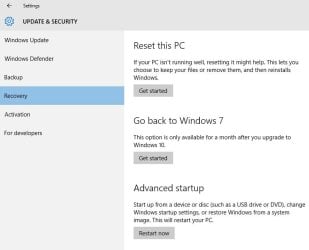
if you have just done a W10 upgrade (not clean install) and Windows.old folder is on C:\ , in theory you go -

W10 start button > settings > update & security > recovery > go back to Windows 7

see pic (from VM)

goback.jpg

I say in theory because some have had W7 activation probs after doing this
 

My Computer

Computer type
PC/Desktop
Computer Manufacturer/Model Number
self build
OS
W10 Pro x64, W7 Pro x64 in VMware
CPU
i7 2600K @ 4.4GHz
Motherboard
MSI Z68A-GD80
Memory
8GB Mushkin @ 1600MHz
Graphics Card(s)
Nvidia GTX 750 Ti
Monitor(s) Displays
27" Benq + 27" LG
Screen Resolution
1080p
Hard Drives
500GB 850 Evo SSD + 3 * 2TB Seagate
PSU
EVGA 650 GS modular
Case
Antec 300
Cooling
Seidon 120V v2
Internet Speed
62/18 Mbps
Antivirus
Defender (W10) + MSE (W7)
Browser
Firefox
thanks NoN, WasNotWas, and everyone who has replied and tried to help. Been mulling over my options and just might let him suffer for a few days before I return. I'm thinking that he might have started this whole thing himself after I left the first time. Now he's asking me what I did .... and I know everything was working fine the first time I left. Hmm, Trying to pin it on the guy that tried to help (for free) is not sitting well with me. Just going to wait a bit, but a big thanks to all of you for helping me & who knows might be back on here come Monday. THANKS AGAIN EVERYONE! Have a great weekend!! :cool:
 

My Computer

Computer type
PC/Desktop
Computer Manufacturer/Model Number
Gateway FX 6860
OS
Windows 7 Home Premium 64 bit
CPU
i7
Memory
12 gigs
Antivirus
Trend Micro
Browser
Firefox
I have a Windows 10 install I would like to cancel as well. I did ask for the reservation, but somehow I went and turned my PC on one morning, got a BLACK SCREEN, and it actually installed Windows 10. I didn't know what was going on at first, but I finally discerned what had happened and after some research I found the Microsoft feature to backup to a previous Windows system. In my case, it's Windows 7 Pro 64 bit. I hated many things I found in Windows 10 and I did use the option to backup to Windows 7 a day later. I found an innocuous little message warning me that I might have to reinstall "some" programs after the backup. I did run into one. There may have been more. The backup to Windows 7 seemed to go okay outside of the program reinstall it caused. It happened to be Winpatrol. I worried that Microsoft about what Microsoft may have left behind from the Windows 10 install so I did a complete system reload from a current Macrium Reflect image backup. That went well. I followed but I kept getting Windows 10 nag messages. I uninstalled KB3035583 and that got rid of the nag messages. This morning I happened into Windows Update and found it is ready to install Windows 10 if I click "Restart". See attachment. Now, I don't know what to do. I don't want to go through all of that again. I read that I should hide the update in Control Panel, but I can't find how to do that. Windows won't let me check for updates because it's in the middle of the Windows 10 install. Hiding it would be short term in any case because I don't want to leave the Windows 10 files lying around. Any help would be appreciated

IronYooper.

I originally added my attachment as a .mht file type not knowing that type was not supported. I have now attached iot as a .pdf file to make it viewable.

IronYooper
 

Attachments

Last edited:

My Computer

Computer type
PC/Desktop
Computer Manufacturer/Model Number
Dell Optiplex 9020
OS
Windows 7 Professional X64
Memory
32 GB
Hard Drives
1 TB
Antivirus
Avast
Browser
Firefox
In windows update I uncheck the windows 10 upgrade then right click on it and chose hide update ... that's what I did. Hope this helped. :geek:
 

My Computer

Computer type
PC/Desktop
Computer Manufacturer/Model Number
Gateway FX 6860
OS
Windows 7 Home Premium 64 bit
CPU
i7
Memory
12 gigs
Antivirus
Trend Micro
Browser
Firefox
In windows update I uncheck the windows 10 upgrade then right click on it and chose hide update ... that's what I did. Hope this helped. :geek:

Unfortunately, I can't get a list to uncheck "Window 10 Upgrade". Your post made me realize I had attempted to add an attachment as a .mht file. I have corrected that and made it a .pdf file and it is now viewable. What you see in the attachment is the only thing I have in "Windows Update". I've included it here as well.

IronYooper
 

Attachments

My Computer

Computer type
PC/Desktop
Computer Manufacturer/Model Number
Dell Optiplex 9020
OS
Windows 7 Professional X64
Memory
32 GB
Hard Drives
1 TB
Antivirus
Avast
Browser
Firefox
Sorry that didn't help ... how about taking your PC back a couple of restore points? Usually your computer makes a restore point before it installs important updates. You could at least check it out. :cool:
 

My Computer

Computer type
PC/Desktop
Computer Manufacturer/Model Number
Gateway FX 6860
OS
Windows 7 Home Premium 64 bit
CPU
i7
Memory
12 gigs
Antivirus
Trend Micro
Browser
Firefox
Back
Top