Storage devices not showing under Computer in Network explorer

LilBro

New member
Local time
2:19 PM
Messages
19
I have three computers running over a combo wired / wireless network. The basement unit is connected via a home wiring adapter and the main unit and laptop are connected via 802.11n wireless. The basement and laptop are running Win7 Pro and main is running Win7 Home Premium.
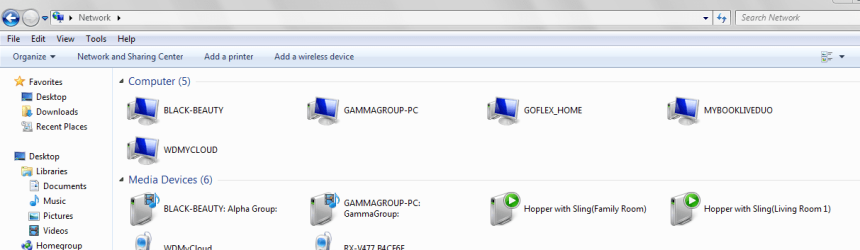
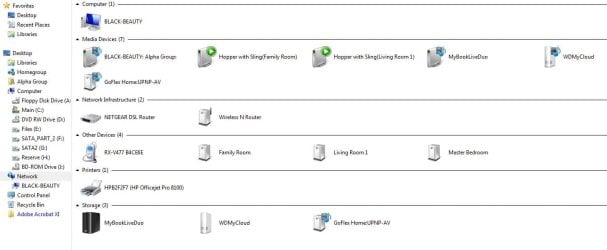
On the laptop and basement units I can see all my NAS devices under Computer (see screen shots)

On the main unit, it is the only one that shows (Black Beauty). All units are set to the same workgroup and network settings. What caused this? I use the NAS units for backup and media servers but can't save to them now because Windows doesn't see them, especially the GoFlex. MS Technet is a big goose egg on solving this.
Thank you.
 

Attachments
  • Capture.JPG
    Capture.JPG
    83.7 KB · Views: 0
  • GammaGrpMyComp.PNG
    GammaGrpMyComp.PNG
    67.9 KB · Views: 0
Last edited:

My Computer

Computer Manufacturer/Model Number
Home built
OS
Windows 7 Home Premium 64
CPU
AMD 64 X2 5400+ Black Edition
Motherboard
Gigabyte MA770-UD3
Memory
8 Gb
Graphics Card(s)
ATi Radeon HD 4600
Sound Card
Integrated

My Computer

Computer type
PC/Desktop
Computer Manufacturer/Model Number
Home made Desktop
OS
Windows 10 Pro. 64/ version 1709 Windows 7 Pro/64
CPU
Intel i7-6800K @ 4.3
Motherboard
ASUS X-99 Deluxe II
Memory
Corsair Platinum 16 gig @2400
Graphics Card(s)
EVGA GTX 1070 OC
Monitor(s) Displays
Asus 27" LED LCD/VE278Q
Screen Resolution
1920-1080 or 1280-720 HDMI
Hard Drives
INTEL SSD 730-240 Gb Sata 3.0/
PSU
EVGA Platium 1200W
Case
Phanteks Luxe Tempered Glass 8 fans/ one radiator
Cooling
XSPC/ Water Cooled CPU
Keyboard
Das 4 Professional
Mouse
Logitech M705/MX Anywhere 2-S
Internet Speed
100 mbits
Antivirus
Microsoft Security Essentials/ Malwarebytes Premium 3.0/ SAS
Browser
I.E. 11 default/Firefox/ ISP Time Warner Cable/Spectrum
Other Info
LG BluRay Burner/
Sound system-KLipsch-THX/
Icy Dock ssd Hot Swap bays.
Now I'm really confused. I decided to see if I could restore the GoFlex files from a backup. All of the NAS devices showed in the dialog box up when I went to select the destination for the restoration. After an hour or so I returned to the problem pc and under "Computer" all of the device appeared. Then when I used the back arrow on the window after looking at the GoFlex layout, only the problem child appeared.
 

My Computer

Computer Manufacturer/Model Number
Home built
OS
Windows 7 Home Premium 64
CPU
AMD 64 X2 5400+ Black Edition
Motherboard
Gigabyte MA770-UD3
Memory
8 Gb
Graphics Card(s)
ATi Radeon HD 4600
Sound Card
Integrated

My Computer

Computer type
PC/Desktop
Computer Manufacturer/Model Number
Home made Desktop
OS
Windows 10 Pro. 64/ version 1709 Windows 7 Pro/64
CPU
Intel i7-6800K @ 4.3
Motherboard
ASUS X-99 Deluxe II
Memory
Corsair Platinum 16 gig @2400
Graphics Card(s)
EVGA GTX 1070 OC
Monitor(s) Displays
Asus 27" LED LCD/VE278Q
Screen Resolution
1920-1080 or 1280-720 HDMI
Hard Drives
INTEL SSD 730-240 Gb Sata 3.0/
PSU
EVGA Platium 1200W
Case
Phanteks Luxe Tempered Glass 8 fans/ one radiator
Cooling
XSPC/ Water Cooled CPU
Keyboard
Das 4 Professional
Mouse
Logitech M705/MX Anywhere 2-S
Internet Speed
100 mbits
Antivirus
Microsoft Security Essentials/ Malwarebytes Premium 3.0/ SAS
Browser
I.E. 11 default/Firefox/ ISP Time Warner Cable/Spectrum
Other Info
LG BluRay Burner/
Sound system-KLipsch-THX/
Icy Dock ssd Hot Swap bays.
I have no idea what I did to get the devices to appear under Computers in Explorer but the problem is back. This time the entire category Computers is not showing in Explorer. The storage devices are only showing as media devices. Interestingly, the same problem is occurring under Win10 on my laptop. Gotta love Windows.
 
Last edited:

My Computer

Computer Manufacturer/Model Number
Home built
OS
Windows 7 Home Premium 64
CPU
AMD 64 X2 5400+ Black Edition
Motherboard
Gigabyte MA770-UD3
Memory
8 Gb
Graphics Card(s)
ATi Radeon HD 4600
Sound Card
Integrated
Update. Checked to see if network is set to private. It is. Ran Windows Repair from install disc. No problems found.Rebooted modem. No effect. Rebooted all devices. No effect. Since this problem is on bith a Win7 and Win10 computer, reinstalling does not seem to be a viable option.
 

My Computer

Computer Manufacturer/Model Number
Home built
OS
Windows 7 Home Premium 64
CPU
AMD 64 X2 5400+ Black Edition
Motherboard
Gigabyte MA770-UD3
Memory
8 Gb
Graphics Card(s)
ATi Radeon HD 4600
Sound Card
Integrated
Back
Top